Entwodiksyon
The CHUNGHOP X9 Voice Air Mouse Mini Keyboard Wireless Remote is a versatile 4-in-1 device combining a 2.4G air mouse, wireless mini keyboard, 6-axis gyroscope, and infrared remote learning capabilities. It is designed for use with various operating systems including Android, Windows, Mac, and Linux, provided the device has a standard USB port. This manual provides detailed instructions for setup, operation, and troubleshooting to ensure optimal use of your remote.
Kontni pake
- CHUNGHOP X9 Voice Air Mouse Mini Keyboard Wireless Remote
- Reseptè USB (2.4G)
- USB-C Chaje Kab
- Manyèl itilizatè

The package includes the X9 remote, a small USB receiver for 2.4G wireless connection, and a USB-C cable for charging the remote's internal battery. A user manual is also provided for detailed guidance.
Pwodwi souview
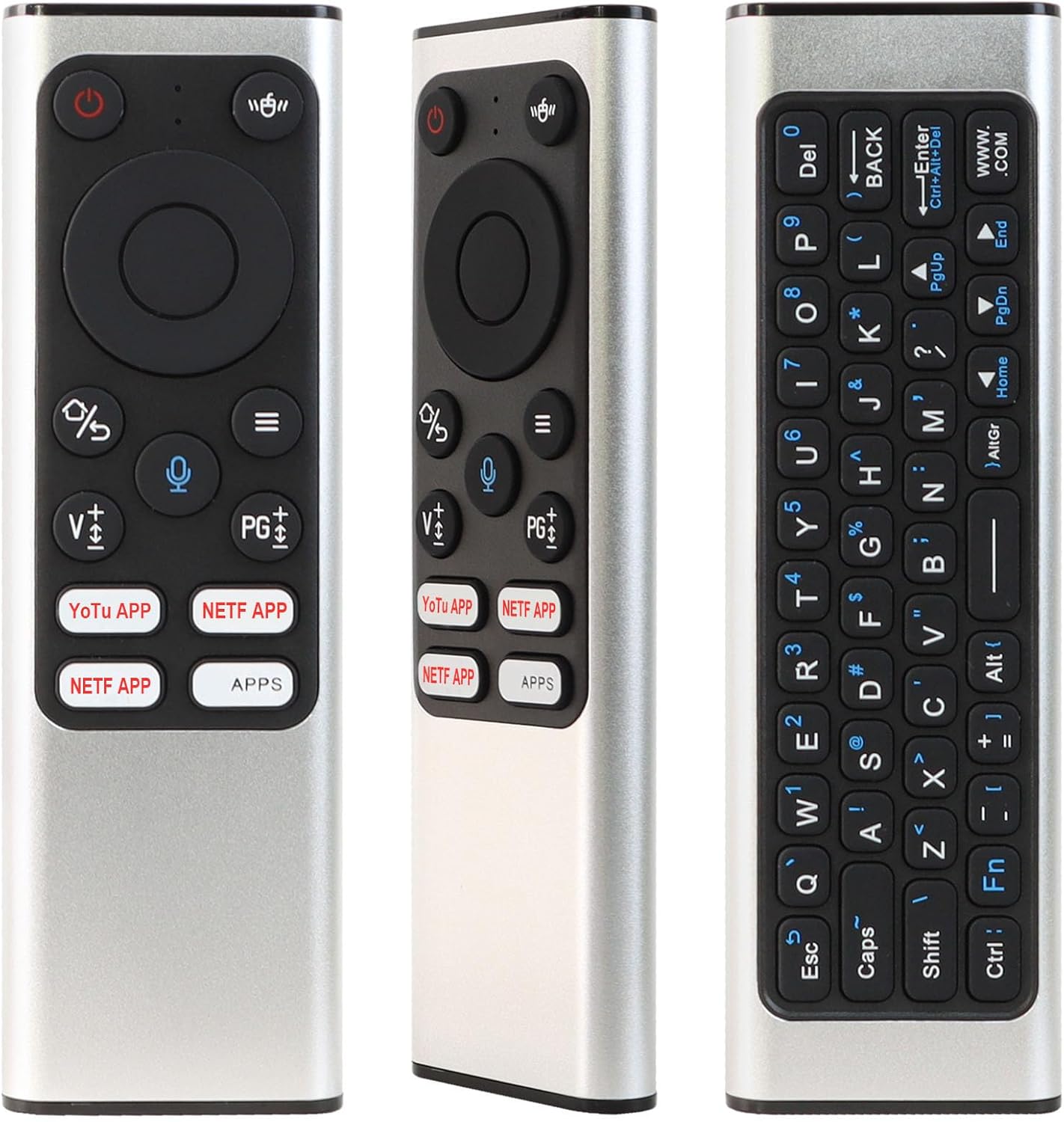
The CHUNGHOP X9 remote features a dual-sided design. The front side includes navigation buttons, media controls, and a microphone for voice input. The reverse side houses a full QWERTY mini keyboard for easy text entry.


Enstalasyon
Konekte Reseptè a USB
- Locate an available standard USB port on your device (e.g., Android TV box, PC, projector).
- Plug the USB receiver into the USB port. The device should automatically detect and install necessary drivers.
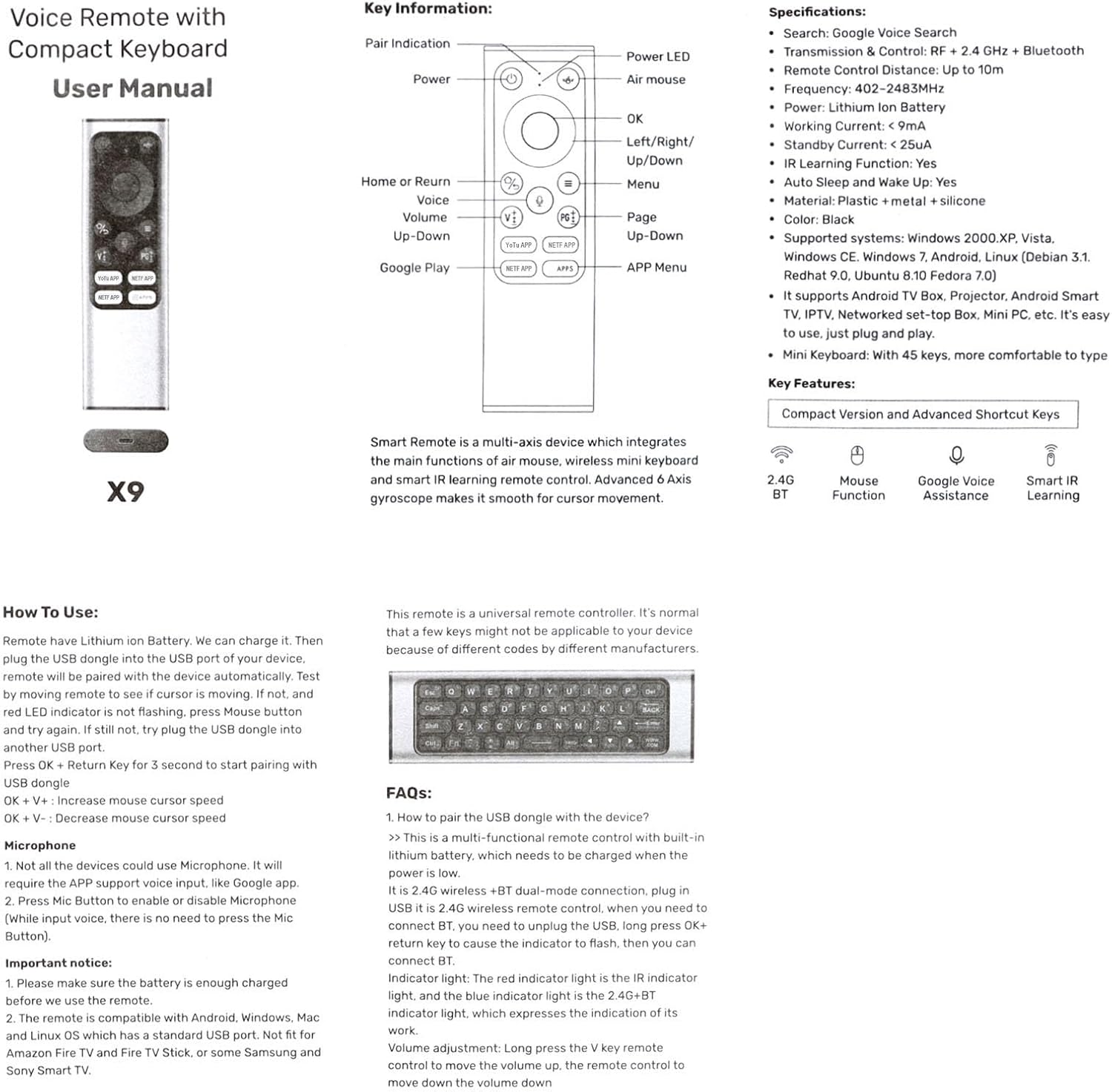
- For initial pairing, press the OK epi Retounen buttons on the air mouse remote simultaneously for 3 seconds. The red LED indicator will flash slowly, indicating pairing mode.
- Once successfully paired, the red LED indicator will stop flashing, and the air mouse cursor will appear on your screen.
Limen / Off
The remote is powered by a rechargeable lithium-ion battery. To turn on the air mouse functionality, simply move the remote. To turn off the air mouse cursor, press the dedicated mouse button (often indicated by a cursor icon). The remote will enter sleep mode automatically after a period of inactivity to conserve power.
Enstriksyon Operasyon
Fonksyonalite Air Mouse
The remote utilizes a 6-axis gyroscope for precise air mouse control. Simply move the remote in the air to control the cursor on your screen. Press the dedicated mouse button to enable or disable the cursor.
Itilizasyon klavye
Flip the remote to access the full QWERTY mini keyboard. The keys are designed for comfortable typing. Use the Chanjman, Ctrl, ak Alt buttons for special characters and functions, indicated in blue on the keys.
Antre vwa
The built-in microphone allows for voice input. Press the Mikwo button to enable or disable the microphone. Note that voice input functionality depends on the application; not all devices or apps support this feature (e.g., Google Assistant compatible apps are required).
Infrared (IR) Learning Function
The remote has IR learning keys that can be programmed to learn basic functions from your TV remote, such as the POWER button. Follow these steps:
- Ensure your TV remote supports NEC protocol.
- Point the head (infrared emitter) of the air mouse remote and your TV remote towards each other, ensuring the distance is less than 0.1 feet.
- Peze a POUVWA button on the air mouse remote for 3-5 seconds. The blue LED indicator will flash very fast, then the red LED indicator will flash slowly, indicating IR learning mode.
- Peze a POUVWA button on your TV remote until the red LED indicator on the air mouse remote keeps lighting on.
- Peze POUVWA on the air mouse remote. The red LED indicator will flash slowly again, meaning learning succeeded.
- Repeat steps 2-5 for other buttons you wish to program.
Ekleraj
The keyboard features a backlight for use in low-light conditions. To activate or deactivate the backlight, press the dedicated backlight button (often indicated by a light bulb icon).
Konpatibilite
The CHUNGHOP X9 remote is compatible with a wide range of operating systems and devices:
- Sistèm operasyon: Android, Windows, Mac, Linux OS (with a standard USB port).
- Aparèy konpatib: PCs, projectors, Android TV boxes, smart TVs (excluding some models).
Nòt enpòtan:
- Not compatible with Amazon Fire TV and Fire TV Stick.
- May not be compatible with some Samsung and Sony Smart TVs.
Chaje Remote a
The X9 remote features a built-in rechargeable battery, eliminating the need for frequent battery replacement. It can be charged via the USB-C port located on the side of the remote.
- Connect the provided USB-C charging cable to the remote's USB-C port.
- Plug the other end of the cable into a standard USB power source (e.g., computer USB port, USB wall adapter).
- The remote will indicate charging status (e.g., LED indicator).
Depanaj ak Kesyon yo poze souvan
Mouse Cursor Movement
- Why is the cursor not moving, or moving slowly? Make sure the USB dongle is correctly plugged into the USB port of your device. The remote will pair with the device automatically. Test by moving the remote to see if the cursor is moving. If not, and the red LED indicator is not flashing, try plugging the USB dongle into another USB port.
- How to adjust cursor speed? Peze OK + V+ to increase mouse cursor speed. Press OK + V- to decrease mouse cursor speed.
Voice Input Issues
- Mikwofòn nan pa mache? Not all devices or applications support microphone voice input. It requires the app to support voice input, like Google apps. Ensure you are pressing the Mikwo button to enable voice input (though some apps may not require holding it).
IR Learning Issues
- IR learning not successful? Make sure the TV remote supports NEC protocol. Ensure batteries are installed correctly and the red LED indicator is flashing while pressing any buttons on the TV remote.
Pwoblèm Pairing
- Remote not pairing? Peze OK + Return buttons for 3 seconds to start pairing with the USB dongle.
Espesifikasyon pwodwi
- Modèl: X9 (981a5c89-5ab8-447e-b957-81fc18d07a18)
- Koneksyon: 2.4GHz RF technology
- Distans transmisyon: Jiska 10m
- Frekans: 402-483MHz
- Pouvwa: Lithium Ion Battery (Rechargeable via USB-C)
- Kouran travay: <9mA
- Kouran sibstiti: <25uA
- Karakteristik espesyal: Ergonomic design, Voice Input, 6-Axis Gyroscope, Backlight
- Materyèl: Plastic + Metal + Silicone
- Dimansyon: 7.6 x 2.52 x 1.61 pous
- Pwa atik: 6.7 ons
- OS konpatib: Android, Windows, Mac, Linux
Enfòmasyon sou Garanti
This product is provided with a warranty. Please refer to the warranty card included in your package for specific terms and conditions regarding coverage, duration, and how to claim support. Keep your purchase receipt for warranty validation.


