Entwodiksyon
Thank you for choosing the Dolphin KaraokeBox 85R Portable Karaoke Machine. This versatile system combines powerful audio with a 14-inch tablet, offering voice modulation, HDMI output, Bluetooth, USB, SD, and FM radio capabilities. Designed for portability, it features a built-in rechargeable battery, trolley handle, and wheels, making it ideal for any event. This manual provides essential information for setup, operation, maintenance, and troubleshooting to ensure optimal performance and enjoyment of your device.
Enfòmasyon sou Sekirite
- Li tout enstriksyon yo anvan ou opere aparèy la.
- Kenbe aparèy la lwen dlo ak imidite.
- Pa bloke ouvèti vantilasyon.
- Sèvi ak sèlman atachman/akseswa manifakti a espesifye.
- Deploge inite a pandan tanpèt zèklè oswa lè li pa itilize pou yon tan long.
- Refere tout sèvis yo bay pèsonèl sèvis kalifye.
- Pa ekspoze pil nan chalè twòp.
Kontni pake
Tanpri tcheke kare a pou atik sa yo:
- Dolphin KaraokeBox 85R Unit
- Mikwofòn san fil
- Adaptè kouran/Kab chaje
- Manyèl Itilizatè (dokiman sa a)
- Kontwòl Remote (si enkli)
Pwodwi souview
Familiarize yourself with the main components of your Dolphin KaraokeBox 85R.
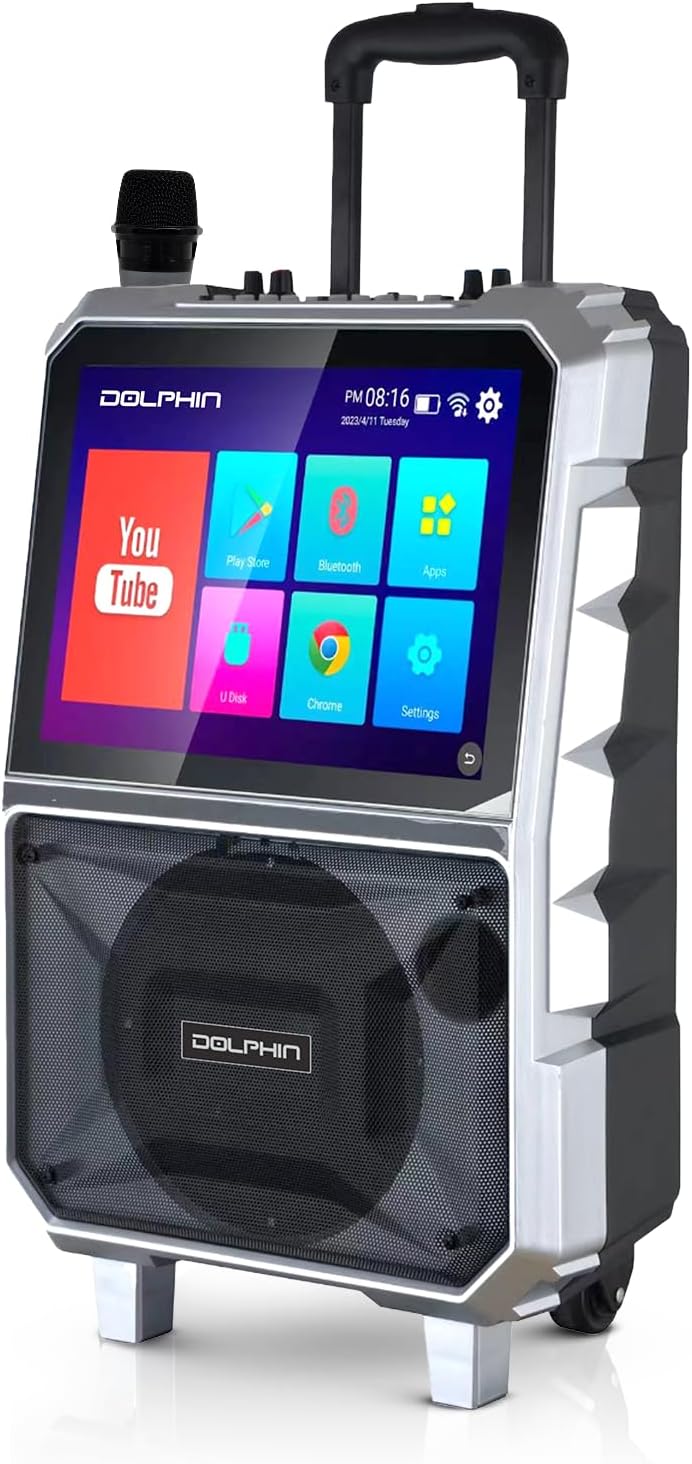
Figi 1: Devan view of the Dolphin KaraokeBox 85R, showing the integrated 14-inch tablet display and the main speaker grille. A wireless microphone is visible on top.

Figi 2: Top control panel of the KaraokeBox 85R, featuring various knobs and ports for microphone inputs, volume control, echo, bass, treble, USB, and HDMI output.
Konpozan kle:
- 14-inch Touchscreen Tablet: Integrated display for accessing apps, media, and settings.
- Woofer 8 pous: Delivers powerful 100W RMS audio output.
- Kontwòl Panel: Located on top, with knobs for volume, echo, bass, treble, and various input ports.
- Mikwofòn san fil: For vocal performances.
- Trolley Handle & Wheels: Pou portabilite fasil.
- Sòti HDMI: Pou konekte ak ekran ekstèn.
- USB & SD Card Slots: Pou lekti medya.
Enstalasyon
1. Premye Chajman
Before first use, fully charge the built-in 5400mAh battery. Connect the provided power adapter to the charging port on the unit and plug it into a power outlet. The charging indicator light will show the charging status.
2. Power On/Off
Locate the power switch on the control panel (refer to Figure 2). Flip the switch to the "ON" position to power on the unit. The tablet screen will light up. To power off, flip the switch to the "OFF" position.
3. Enstalasyon Mikwofòn San Fil
The included wireless microphone is pre-paired with the unit. Ensure the microphone has fresh batteries. Power on the microphone, and it should automatically connect to the KaraokeBox 85R.
Enstriksyon Operasyon
1. Tablet Operation and Connectivity
- Koneksyon Wi-Fi: On the 14-inch touchscreen, navigate to "Settings" and select "Wi-Fi" to connect to your wireless network. A stable Wi-Fi connection is recommended for streaming content.
- Koneksyon kont Google: For uninterrupted video loading and access to personalized content, log into your Google Account via the YouTube app or system settings.
- Bluetooth mak: To connect external devices via Bluetooth, go to "Settings" on the tablet, select "Bluetooth," and pair with your desired device.
- Sòti HDMI: Connect an HDMI cable from the HDMI output port on the KaraokeBox 85R to an external display (TV, projector) for a larger vieweksperyans nan.
- Lektur kat USB/SD: Insert a USB drive or SD card into the respective slots on the control panel. Use the built-in media player app on the tablet to browse and play audio or video files.
- Android/iOS Mirroring: The unit supports mirroring functions for both Android and iOS devices. Refer to the tablet's mirroring app for specific instructions on connecting your smartphone or tablet.
2. Kontwòl Audio
- Mèt Volim: Adjust the main volume knob on the control panel to control the overall sound output.
- Volim Mikwofòn: Use the dedicated microphone volume knob to adjust the level of the wireless microphone.
- Eko: Turn the "Echo" knob to add or reduce reverberation to the microphone sound, enhancing vocal effects.
- Bass & Treble: Adjust the "Bass" and "Treble" knobs to fine-tune the low and high frequencies of the audio output to your preference.
- Voice Modulation: The KB-85R offers various voice modulation functions. Access these effects through the tablet interface or dedicated buttons on the control panel (if available), allowing for personalized vocal styles.
3. Karakteristik Portabilite
- Manch chariot: Extend the retractable trolley handle from the top of the unit for easy pulling.
- Wou: Utilize the built-in wheels at the base of the unit for effortless transportation across flat surfaces.

Figi 3: The Dolphin KaraokeBox 85R showcasing its convenient trolley handle and durable wheels for easy transport.
Antretyen
- Netwayaj: Use a soft, dry cloth to clean the exterior of the unit. For the touchscreen, use a screen-specific cleaner and a microfiber cloth. Do not use abrasive cleaners or solvents.
- Swen batri: Pou pwolonje lavi batri a, evite dechaje batri a nèt souvan. Rechaje aparèy la regilyèman, sitou si w ap sere l pou yon bon bout tan. Sere l nan yon kote ki fre epi sèk.
- Depo: When not in use, store the KaraokeBox 85R in a dry, dust-free environment, away from direct sunlight and extreme temperatures.
Depanaj
| Pwoblèm | Kòz posib | Solisyon |
|---|---|---|
| Aparèy pa limen. | Batri a fini; Entèriptè a etenn. | Charge the unit; Ensure power switch is in the "ON" position. |
| Pa gen pwodiksyon son. | Volume is too low; Input source not selected; Cables not connected properly. | Increase master volume; Select correct input source on tablet; Check all cable connections. |
| Mikwofòn pa mache. | Microphone batteries are low/dead; Microphone not powered on; Microphone volume is low. | Replace microphone batteries; Power on microphone; Increase microphone volume. |
| Tablet screen unresponsive or slow. | Too many apps running in background; System error. | Close unnecessary apps; Restart the unit. |
| Pwoblèm koneksyon Wi-Fi. | Incorrect password; Out of range; Router issues. | Verify Wi-Fi password; Move closer to router; Restart router and unit. |
Espesifikasyon
| Karakteristik | Detay |
|---|---|
| Modèl | KaraokeBox 85R |
| Dimansyon pwodwi | 10 x 20 x 25 pous |
| Pwa atik | 22.3 liv |
| Woofer Size | 8 pous |
| Sorti pouvwa | 100 Watt RMS |
| Gwosè grenn | 14 pous |
| Batri | Built-in 5400mAh (12V) Rechargeable Battery |
| Koneksyon | Bluetooth, Wi-Fi, HDMI Output, USB, SD, FM Radio |
| Karakteristik espesyal | Voice Modulation, Android/iOS Mirroring, Trolley Handle & Wheels |
| Koulè | Nwa |
| Manifakti | General Sound Co |
Garanti ak sipò
For warranty information and technical support, please refer to the warranty card included with your product or visit the official Dolphin website. You may also contact customer service at the details provided on the product packaging or the manufacturer's websit.
Manifakti: General Sound Co
Mak: Dolphin



