1. Entwodiksyon
The Trevi DAB 7F80 R is a portable digital radio offering DAB, DAB+, and FM reception, along with Bluetooth connectivity. It features a high-readability Dot Matrix display, a programmable alarm clock, and a headphone jack. This manual provides instructions for the proper setup, operation, and maintenance of your device.
2. Enfòmasyon sou Sekirite
- Li tout enstriksyon yo ak anpil atansyon anvan ou sèvi ak aparèy la.
- Pa ekspoze aparèy la nan dlo, imidite, oswa tanperati ekstrèm.
- Use only the specified power source (4 x AAA batteries or a compatible 5V DC adapter, not included).
- Pa eseye demonte, repare, oswa modifye aparèy la. Konfye tout antretyen bay pèsonèl kalifye.
- Jete pil yo yon fason responsab dapre règleman lokal yo.
- Kenbe aparèy la lwen gwo chan mayetik.
3. Pake kontni
Tanpri verifye si atik sa yo enkli nan pakè ou a:
- Trevi DAB 7F80 R Main Unit
- Manyèl Itilizatè (dokiman sa a)
- Sètifika Garanti
4. Pwodwi souview
Familiarize yourself with the components and controls of your Trevi DAB 7F80 R radio.
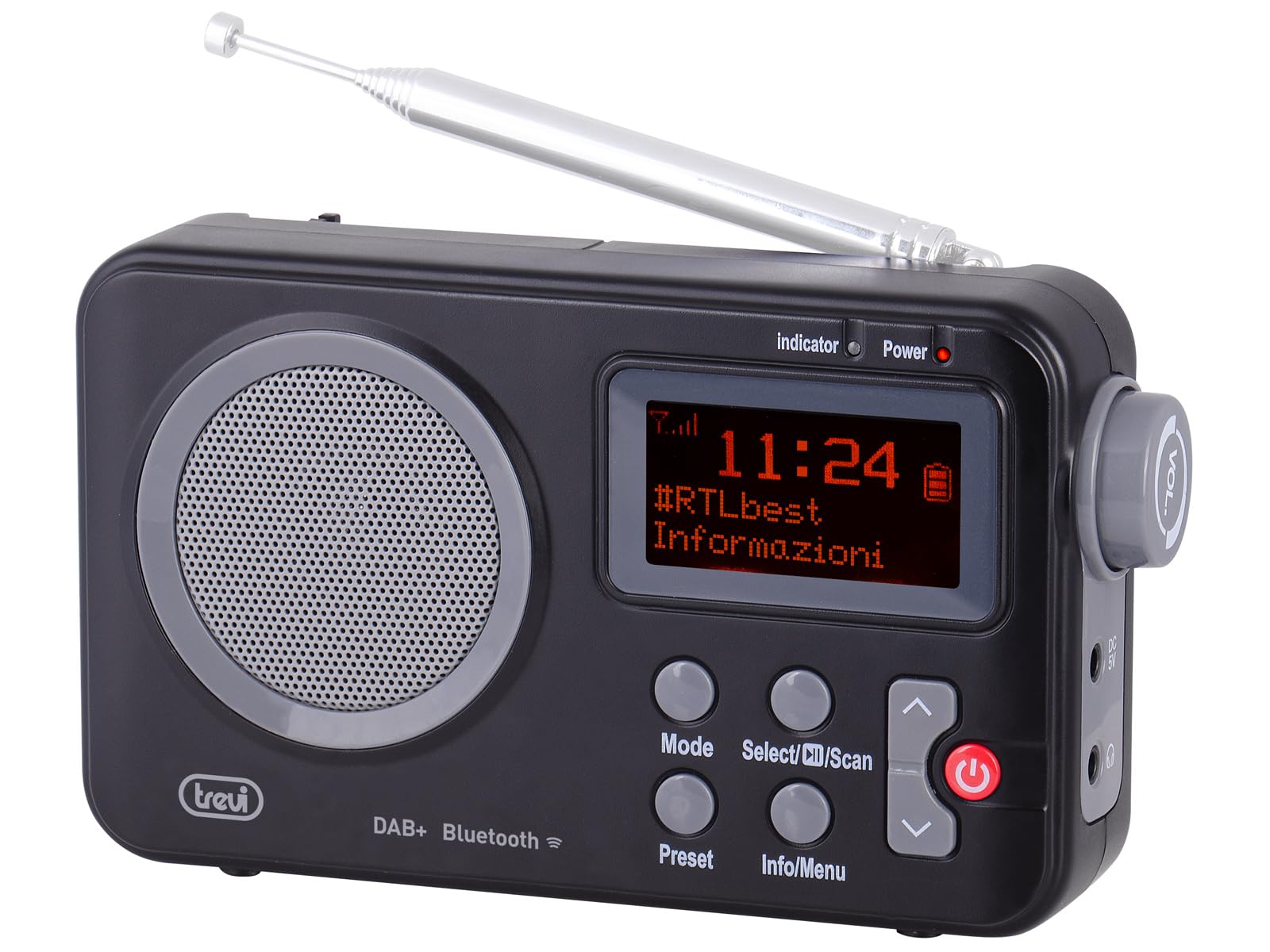
Figi 1: Devan view of the Trevi DAB 7F80 R radio. This image displays the Dot Matrix screen, the main speaker grille, and the primary control buttons including Mode, Select/Scan, Preset, Info/Menu, and Power. The extendable telescopic antenna is visible at the top.
Kontwòl ak Karakteristik:
- Ekspozisyon: High-readability Dot Matrix screen for station information, time, and menu navigation.
- Oratè: Integrated speaker for audio output.
- Bouton pouvwa: Limen / etenn radyo a.
- bouton mòd: Switches between DAB/DAB+, FM, and Bluetooth modes.
- Select/Scan Button: Confirms selections in menus, initiates station scans.
- Bouton Prereglaj: Accesses and stores favorite radio stations.
- Bouton Info/Meni: Displays station information and accesses system settings.
- Bouton flèch monte/desann: Navigates through menus, adjusts volume, changes stations.
- Kas ekoutè Jack: Sòti 3.5mm pou koute an prive.
- Antèn: Antèn teleskopik ki ka pwolonje pou pi bon resepsyon radyo.
5. Enstalasyon
5.1 Alimente Aparèy la
The Trevi DAB 7F80 R can be powered by batteries or an external AC adapter.
- Enstalasyon batri: Open the battery compartment cover on the back of the unit. Insert 4 x AAA batteries (not included), ensuring correct polarity (+/-). Close the cover securely.
- Adaptè AC (Si ou vle): For continuous power, connect a compatible 5V DC, 1A AC adapter (not included) to the DC IN port on the side of the radio.
Avètisman enpòtan: Do not use batteries in the device when it is connected to an AC adapter for extended periods. This may lead to battery leakage or damage to the unit. If using the AC adapter, remove the batteries. If using batteries, disconnect the AC adapter.
5.2 Initial Power On and Station Scan
- Lonje antèn teleskopik la nèt pou yon resepsyon optimal.
- Peze a Pouvwa bouton pou limen radyo a.
- Upon first use, the radio may prompt you to select a language. Use the Up / Down Arrow buttons to navigate and Select/Scan pou konfime.
- The radio will automatically perform a full scan for DAB/DAB+ stations. This process may take a few minutes. Once complete, the first available station will begin playing.
6. Operasyon Enstriksyon
6.1 Radio Mode (DAB/DAB+, FM)
- Chanje mòd: Peze a Mode button repeatedly to cycle between DAB, FM, and Bluetooth modes.
- Ap chèche estasyon:
- In DAB mode, a full scan is usually performed on first use. To perform a new scan, press and hold Select/Scan.
- Nan mòd FM, peze Select/Scan oto-eskane pou pwochen estasyon ki disponib la.
- Chwazi Estasyon yo: Sèvi ak la Up / Down Arrow buttons to browse through available stations.
- Estoke Prereglaj: The radio can store up to 20 DAB/DAB+ and 20 FM stations.
- Branche sou estasyon ou vle a.
- Peze epi kenbe la Prereglaj bouton an jiskaske 'Preset Store' parèt sou ekran an.
- Sèvi ak la Up / Down Arrow bouton yo pou chwazi yon nimewo prereglaj (1-20).
- Peze Select/Scan pou konfime epi sove estasyon an.
- Rapèl Prereglaj: Peze a Prereglaj button briefly. Use the Up / Down Arrow buttons to select the desired preset number, then press Select/Scan.
- RDS/DLS Information: In FM or DAB mode, press the Info/Meni button repeatedly to cycle through available information such as station name, program type, time, and song title (if broadcast).
6.2 Bluetooth mòd
- Peze a Mode button until 'Bluetooth' appears on the display. The radio will enter pairing mode, indicated by a flashing Bluetooth icon.
- Sou telefòn entelijan, tablèt, oswa laptop ou, aktive Bluetooth epi chèche aparèy ki disponib yo.
- Select 'Trevi DAB 7F80 R' from the list of devices to pair. Once connected, the Bluetooth icon will stop flashing.
- You can now play audio from your connected device through the radio. Use your device's controls for playback and the radio's volume controls for audio level.
6.3 Fonksyon revèy ak alam
The radio features an integrated clock and two programmable alarms.
- Mete lè a:
- Peze epi kenbe la Info/Meni bouton pou antre nan meni prensipal la.
- Sèvi ak Up / Down Arrow buttons to navigate to 'Time/Date' and press Select/Scan.
- Select 'Set Time/Date' and adjust the hour, minute, day, month, and year using the Up / Down Arrow buttons and confirming each step with Select/Scan.
- Setting Alarms (Alarm 1 / Alarm 2):
- From the main menu, navigate to 'Alarm' and press Select/Scan.
- Select 'Alarm 1 Setup' or 'Alarm 2 Setup'.
- Configure the alarm settings: 'On Time' (hour/minute), 'Duration', 'Source' (Buzzer or last used radio station), 'Volume', and 'Frequency' (Daily, Weekdays, Weekends, Once). Use Up / Down Arrow bouton pou ajiste valè yo ak Select/Scan konfime chak anviwònman.
- Ensure the alarm is set to 'On' in the alarm setup menu.
- Deactivating a sounding alarm: Peze a Pouvwa bouton pou fèmen alam la.
6.4 Itilizasyon kas ekoutè
To listen privately, insert standard 3.5mm headphones into the headphone jack located on the side of the radio. The internal speaker will automatically mute.
7. Antretyen
- Netwayaj: Siye radyo a avèk yon twal mou, sèk, ki pa gen pousyè. Pa sèvi ak pwodui netwayaj abrazif, sir, oswa solvan.
- Ranplasman batri: When the low battery indicator appears on the display, replace all four AAA batteries with new ones.
- Depo: If the radio will not be used for an extended period, remove the batteries to prevent leakage and potential damage. Store the device in a cool, dry place.
NAN. Depanaj
If you encounter issues with your Trevi DAB 7F80 R, please refer to the following common problems and solutions:
- Radyo a pa limen:
- Tcheke si pil yo byen mete epi yo pa fin itilize. Ranplase yo si sa nesesè.
- Si w ap itilize yon adaptè AC, asire w ke li byen konekte epi priz kouran an fonksyone.
- Pa gen son oswa son an pa bon kalite:
- Ajiste volim nan.
- Ensure headphones are not connected if you want sound from the speaker.
- Check radio reception. Extend and adjust the antenna. Try moving the radio to a different location.
- For Bluetooth, ensure the device is paired and audio is playing from the source.
- Clock resets after power loss or battery change:
- This model does not feature a backup battery for the clock. It is normal for the time to reset when power is completely removed (e.g., batteries removed or AC adapter unplugged). You will need to re-set the time manually as described in section 6.3.
- Kout lavi batri:
- Battery life can vary depending on usage and battery quality. Use high-quality alkaline batteries for best performance.
- For prolonged use, consider using a compatible 5V DC AC adapter (not included).
- Difficulty with setup or navigation (e.g., station search, alarm setup):
- The radio uses a limited number of buttons for various functions. Refer to the specific operating instructions in section 6 for detailed, step-by-step guidance. Some functions may require pressing buttons multiple times or holding them down.
- Radio turns off when switching between battery and AC power:
- This is expected behavior. The radio will power cycle when changing its primary power source. Ensure you have saved any settings or presets before switching.
9. Espesifikasyon
| Mak | Trevi |
| Modèl | DAB 7F80 R |
| Koulè | Nwa |
| Teknoloji Akor | DAB/DAB+, FM |
| Gwoup Radyo Sipòte yo | DAB, DAB+, FM (3 bands) |
| Bluetooth | Wi |
| Ekspozisyon | High-readability Dot Matrix |
| Alam | 2 alam pwogramasyon |
| Prereglaj | 20 DAB/DAB+, 20 FM |
| Sous pouvwa | 4 x AAA batteries (not included) or 5V DC adapter (not included) |
| Aparèy konpatib | Smartphone, tablet, laptop |
| Dimansyon pwodwi (L x W x H) | 14 x 3.5 x 8.5 cm |
| Konpozan ki enkli | Main unit, user manual, warranty certificate |
10. Garanti ak sipò
This product is supplied with a warranty certificate. For detailed information regarding warranty terms and conditions, please refer to the certificate included in your package.
For technical support, troubleshooting beyond this manual, or warranty claims, please contact your retailer or the manufacturer's customer service using the contact information provided with your purchase.


