1. Entwodiksyon
Thank you for choosing the Charmast C05S 5000mAh Portable Power Bank. This device is designed to provide convenient and fast charging for your mobile devices on the go. Its compact size, built-in cable, and digital display make it an essential accessory for daily use and travel.
2. Pake kontni
- Charmast C05S 5000mAh Portable Power Bank with built-in Lightning cable (x1)
- USB-C to USB-C charging cable (x1)
- Manyèl itilizatè (x1)

3. Pwodwi souview
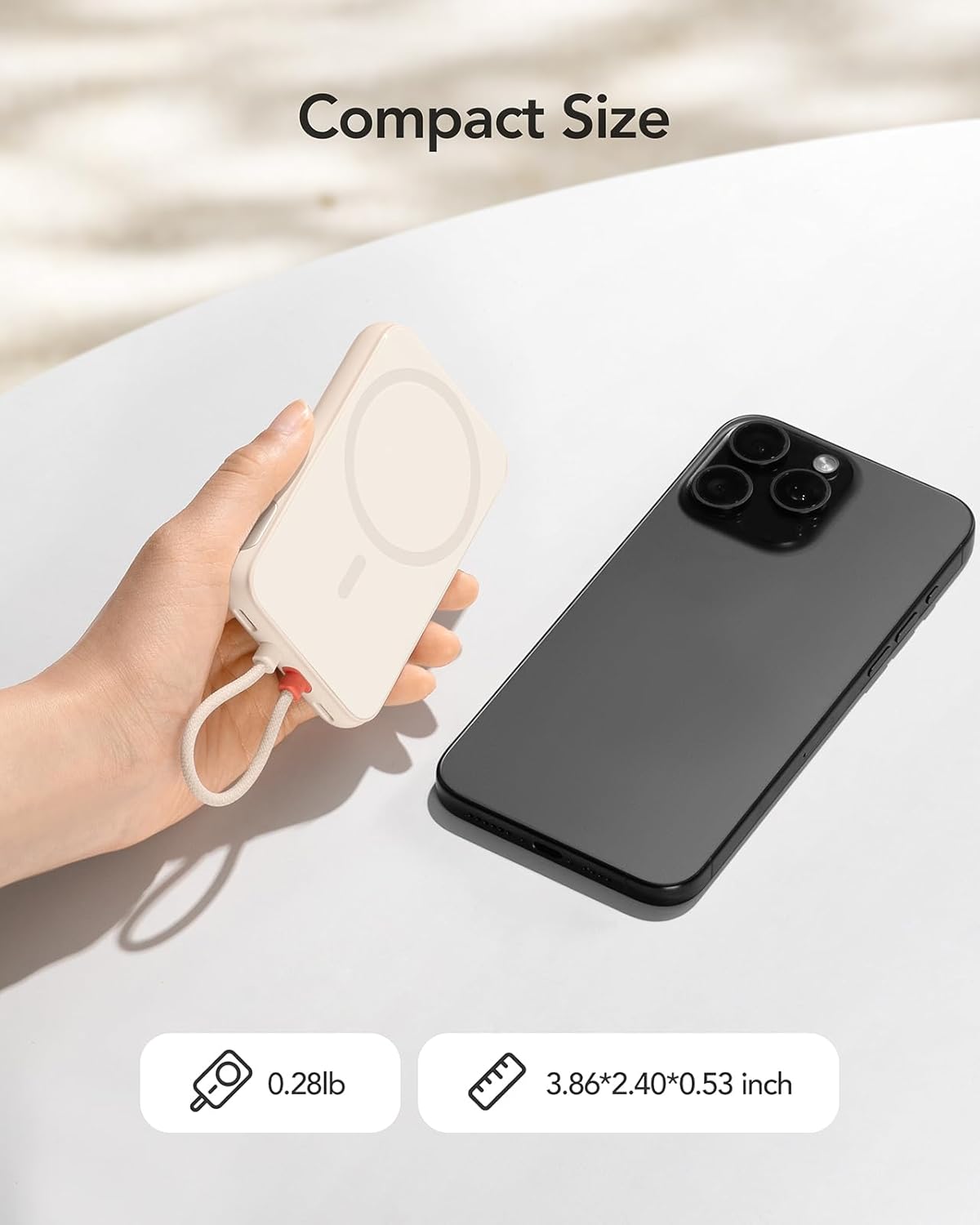
The Charmast C05S is a slim and lightweight power bank designed for portability and efficiency.
- Dimansyon: 3.86 x 2.40 x 0.53 pous
- Pwa: Apeprè 0.28 liv (5.9 ons)
- Kab entegre: Features an integrated Lightning cable for direct connection to compatible Apple devices.
- USB-C pò: A versatile USB-C port for both input (recharging the power bank) and output (charging other devices).
- Ekspozisyon dijital: An LED screen on the side indicates the remaining battery percentage.

4. Enstalasyon epi Rechaje Bank Ekstèn lan
Before first use, fully charge your Charmast C05S Power Bank.
- Sèvi ak pò USB-C a: Connect the provided USB-C to USB-C cable to the power bank's USB-C port and to a compatible USB wall adapter (not included). The power bank will fully recharge in approximately 2.0 hours.
- Using the Built-in Lightning Cable: Connect the built-in Lightning cable to a compatible Lightning input port on a wall adapter. The power bank will fully recharge in approximately 3.5 hours.
Ekran dijital la ap montre pwogrè chaj la, li endike 100% lè li konplètman chaje.

5. Operasyon Enstriksyon
Pou chaje aparèy ou yo:
- For iPhone (Lightning devices): Pull out the built-in Lightning cable and connect it directly to your iPhone or other compatible Lightning device.
- For USB-C devices: Use the provided USB-C to USB-C cable. Connect one end to the power bank's USB-C port and the other end to your USB-C compatible device.
Bank pouvwa a ap kòmanse chaje aparèy ou an otomatikman. Ekran dijital la ap montre pousantaj batri ki rete a.tage nan bank pouvwa a.


6. Digital Display
The integrated digital display provides real-time information about the power bank's battery level. It shows the remaining percentage, allowing you to easily monitor when it's time to recharge the power bank.
- To activate the display, press the on/off button located on the side of the power bank.
- The display will automatically turn off after a short period of inactivity to conserve power.
7. Universal Compatibility and Charging Speed
The Charmast C05S Power Bank offers broad compatibility and fast charging capabilities.
- Kab zeklè entegre: Universally compatible with iPhone 14, 13, 12, 11, 8, 7 series, and other Lightning-enabled devices.
- USB-C pò: Compatible with iPhone 15 series, Samsung S24/S23/S22/S21/S20, Google Pixel series, other Android phones, and various low-current devices such as portable fans, neck fans, Bluetooth headphones, and heated vests.
- 20W PD vit chaje: Supports Power Delivery (PD) 20W fast charging, significantly reducing charging times for both your devices and the power bank itself.


8. Antretyen ak Swen
To ensure the longevity and optimal performance of your power bank:
- Nivo batri: Keep the power bank's battery level above 40% to improve overall battery life and maintain efficient charging speeds.
- Depo: Sere bank pouvwa a nan yon kote ki fre epi sèk, lwen limyè solèy dirèk ak tanperati ekstrèm.
- Netwayaj: Sèvi ak yon twal mou epi sèk pou netwaye deyò power bank lan. Evite itilize pwodui chimik ki agresif oswa materyèl abrazif.
- Evite gout: Pwoteje aparèy la kont tonbe ak enpak, ki ka domaje konpozan entèn yo.
NAN. Depanaj
If you encounter issues with your Charmast C05S Power Bank, please refer to the following common solutions:
- Aparèy pa chaje: Ensure the power bank is sufficiently charged. Check that the charging cable (built-in Lightning or USB-C) is securely connected to both the power bank and your device. Try a different cable or device to isolate the issue.
- Batri pouvwa a pa rechaje: Verify that the charging cable and wall adapter are functioning correctly. Ensure the cable is properly inserted into the power bank's input port.
- Digital display not showing: Press the on/off button on the side of the power bank to reactivate the display. If it remains off, the power bank might be fully depleted and requires recharging.
- Chaje dousman: Ensure you are using a 20W PD compatible wall adapter for optimal fast charging. Charging speed can also be affected by the device being charged and its current battery level.
10. Espesifikasyon
| Karakteristik | Detay |
|---|---|
| Nimewo Modèl | C05S |
| Kapasite batri | 5000 Miliamp Orè (mAh) |
| Dimansyon pwodwi | 3.86 x 2.4 x 0.53 pous |
| Pwa atik | 5.9 ons |
| Antre (USB-C) | 20W PD (Max) |
| Antre (Zeklè) | 10W (Max) |
| Sòti (Kab Zeklè Entegre) | 20W PD (Max) |
| Sòti (Pò USB-C) | 20W PD (Max) |
| Karakteristik espesyal | Built-in Cable, Digital Display, Fast Charging, Pocket Size, Ultra Slim |
11. Garanti ak sipò
Charmast provides Sipò 24 mwa for this product. If you encounter any problems or have questions, please contact us through Amazon. We are committed to resolving any issues within 24 hours.
12. Enfòmasyon sou Sekirite
Tanpri li epi swiv direktiv sekirite sa yo pou evite domaje pwodwi a oswa blese tèt ou:
- Pa ekspoze bank pouvwa a nan dlo, imidite, oswa tanperati ekstrèm.
- Pa demonte, modifye, oswa eseye repare aparèy la.
- Kenbe soti nan atenn timoun yo.
- Evite lage bank pouvwa a oswa soumèt li a gwo chòk.
- Jete bank pouvwa a yon fason responsab dapre règleman lokal yo. Pa jete l nan fatra kay la.


