Entwodiksyon
Welcome to the user manual for your new ECHO RAINBOW PRO Smartwatch. This device is designed to seamlessly integrate into your daily life, offering advanced health monitoring, sports tracking, and smart connectivity features. With its elegant rose metal finish and interchangeable straps, it combines style with functionality. This manual provides essential information on setting up, operating, maintaining, and troubleshooting your smartwatch to ensure optimal performance and a satisfying user experience.
Enfòmasyon sou Sekirite
- Pa eseye demonte, repare, oswa modifye aparèy la. Sa ka lakòz domaj, dife, oswa chòk elektrik.
- Kenbe aparèy la lwen tanperati ekstrèm, limyè solèy dirèk, ak imidite ki wo.
- Evite ekspoze aparèy la a gwo enpak oswa vibrasyon.
- Sèvi sèlman ak kab chaje ki vini ak aparèy la ansanm ak yon adaptè kouran konpatib.
- Consult a medical professional before starting any new exercise regimen or if you have pre-existing health conditions, especially if relying on the health monitoring features. The health data provided by this device is for reference only and should not be used for medical diagnosis or treatment.
- If you experience skin irritation or discomfort while wearing the watch, discontinue use and consult a doctor.
Kontni pake
Tanpri tcheke kare a pou atik sa yo:
- ECHO RAINBOW PRO Smartwatch (with metal strap attached)
- 1 x Silicone Strap (interchangeable)
- Chaje kab
- Manyèl Itilizatè (dokiman sa a)

Image: The ECHO RAINBOW PRO Smartwatch in rose metal, shown with its pre-attached metal strap and a separate light pink silicone strap, highlighting the interchangeable design.

Image: The ECHO RAINBOW PRO Smartwatch body displayed alongside its detached light pink silicone strap and rose metal mesh strap, illustrating the modular design.

Image: The retail packaging for the ECHO RAINBOW PRO Smartwatch, showing the watch and its accessories through a clear window, with product features listed on the box.
Pwodwi souview
Familiarize yourself with the components of your ECHO RAINBOW PRO Smartwatch.
- Ekspozisyon: High-resolution touchscreen for interactive use.
- Bouton/kouwòn bò a: Used for power on/off, screen wake/sleep, and navigating menus.
- Detèktè: Located on the back of the watch for health monitoring (heart rate, SpO2, blood pressure, ECG).
- Strap Attachment Points: Allows for easy changing of straps.
- Kontak chaje: Kontak mayetik sou do a pou chaje.

Imaj: Yon imaj detaye view of the ECHO RAINBOW PRO Smartwatch's display, showcasing a watch face with a mechanical gear design, current time, date, temperature, and health metrics.

Imaj: Yon pwofesyonèl bò kotefile view of the ECHO RAINBOW PRO Smartwatch, highlighting its slim design and the functional side button/crown.
Enstalasyon
1. Chaje mont entelijan an
Anvan premye itilizasyon an, chaje mont entelijan ou nèt.
- Konekte kab chaje mayetik la ak kontak chaje yo sou dèyè mont lan.
- Plug the USB end of the cable into a USB power adapter (not included) or a computer's USB port.
- The watch display will show a charging indicator. A full charge typically takes about 2 hours.
2. Mete/Chanje Espageti yo
Your ECHO RAINBOW PRO Smartwatch comes with interchangeable straps, allowing you to customize its look.
- To remove a strap, locate the quick-release pin on the underside of the strap near the watch body.
- Glise peny lan anndan pou detache braslè a nan mont lan.
- To attach a new strap, insert one end of the pin into the watch lug.
- Slide the quick-release pin inwards and align the other end with the opposite lug hole. Release the pin to secure the strap. Gently pull on the strap to ensure it is properly locked in place.

Image: Two ECHO RAINBOW PRO Smartwatches are shown side-by-side, one fitted with the rose metal mesh strap and the other with the light pink silicone strap, demonstrating the versatility of interchangeable bands.
3. Konekte ak telefòn entelijan ou
To unlock the full potential of your smartwatch, pair it with your smartphone via the dedicated app.
- Telechaje App a: Chèche pou the "ECHO Fit" app (or similar, check packaging for exact name) on your smartphone's app store (Google Play Store for Android, Apple App Store for iOS). Install the app.
- Pèmèt Bluetooth: Asire w ke Bluetooth aktive sou smartphone ou.
- Louvri aplikasyon an: Launch the ECHO Fit app and follow the on-screen instructions to create an account or log in.
- Ajoute Aparèy: In the app, navigate to the "Device" or "Add Device" section. The app will search for nearby smartwatches.
- Chwazi mont ou a: Select "ECHO RAINBOW PRO" from the list of found devices. A pairing request may appear on your watch and phone. Confirm the pairing on both devices.
- Ranpli Enstalasyon: Once paired, the app will guide you through initial settings such as personal information, notification preferences, and health goals.
Itilizasyon Smartwatch ou a
Navigasyon debaz
- Reveye ekran: Press the side button or raise your wrist.
- Jès ekran taktil:
- Swipe Up/Down: Scroll through menus or notifications.
- Swipe Left/Right: Access quick widgets or different functions.
- Tap: Select an item or confirm an action.
- Press and Hold: Customize watch faces (from home screen).
- Side Button Function:
- Short Press: Return to home screen, or go back in a menu.
- Long Press: Power on/off, or access a shortcut menu (e.g., restart).
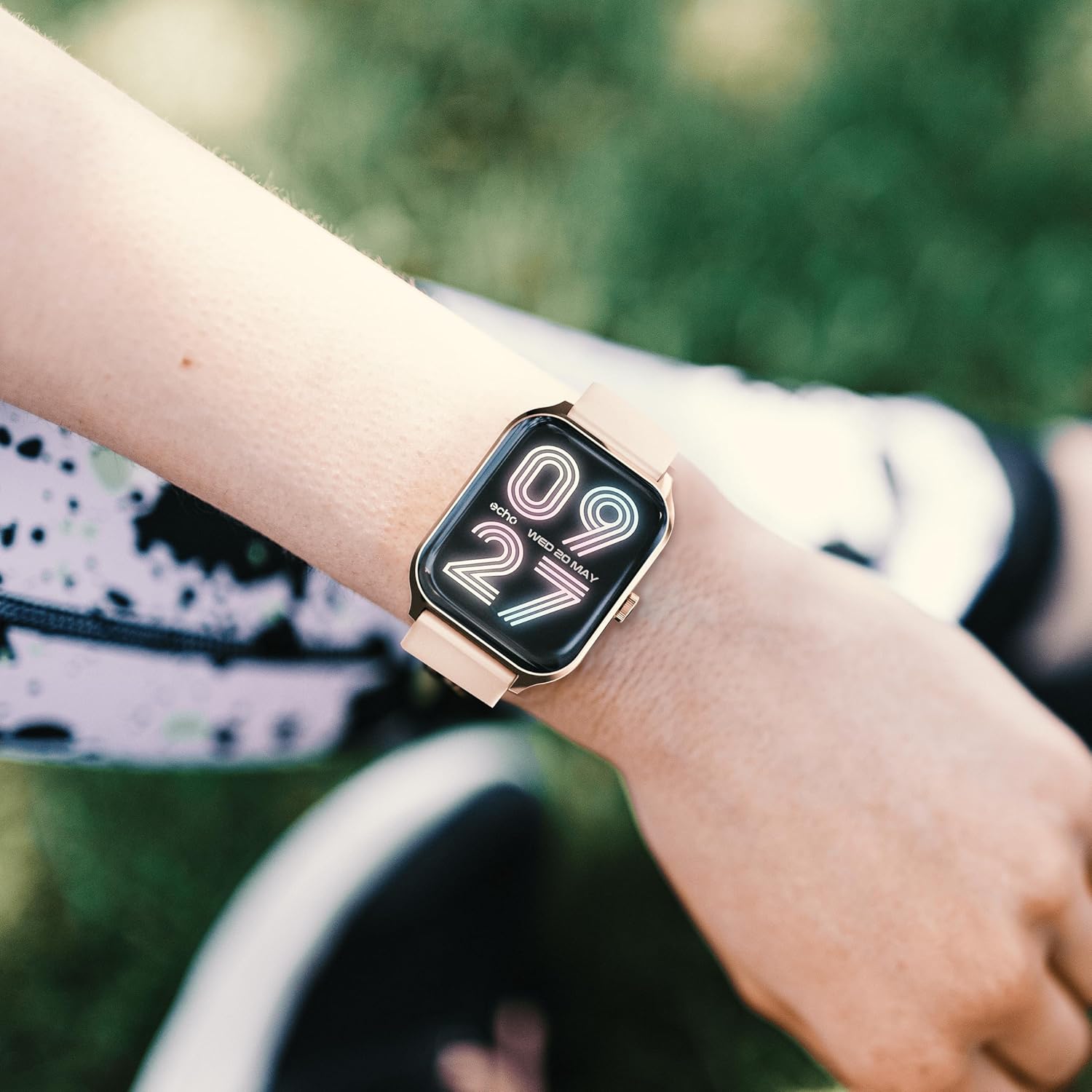
Image: The ECHO RAINBOW PRO Smartwatch worn on a wrist, displaying a digital watch face with the current time and date.

Image: A close-up of the ECHO RAINBOW PRO Smartwatch's screen, showing a clear digital time display along with battery status, step count, and temperature.
Siveyans Sante
Your smartwatch is equipped with advanced sensors to help you monitor your health.
- Batman kè: Access the heart rate function on your watch or through the app. Ensure the watch is snug on your wrist for accurate readings.
- Tansyon: Follow the instructions on the watch screen or app for taking a blood pressure measurement.
- Oksijèn nan san (SpO2): Measure your blood oxygen saturation levels. Remain still during the measurement.
- ECG (elektwokardyogram): Use the ECG function as directed by the app to record your heart's electrical activity.
Enpòtan: The health data provided by this device is for reference only and should not be used for medical diagnosis or treatment. Always consult a qualified medical professional for any health concerns.
Mòd Aktivite ak Espò
Track your daily activity and specific workouts.
- Pedomètr: Mont lan otomatikman swiv pa ou yo, distans ou fè, ak kalori ou boule pandan tout jounen an.
- Mòd espò: Select from various sports modes (e.g., running, cycling, walking) to track specific workout data like duration, heart rate zones, and calories.
- Personalized Goals: Set daily activity goals within the companion app to stay motivated.
Siveyans dòmi
Wear your smartwatch to bed to monitor your sleep patterns. The app will provide detailed analysis of your sleep stages (deep, light, REM) and sleep quality.
Suivi Sik Menstruèl
For female users, the app offers menstrual cycle tracking. Input your cycle data into the app to receive predictions and insights.
Koneksyon entelijan
Stay connected without constantly checking your phone.
- Notifikasyon: Receive call, message, and app notifications directly on your wrist. Customize notification settings in the app.
- Kontwòl Smartphone: Control certain smartphone functions, such as music playback or camera shutter, directly from your watch.
Lavi batri
The ECHO RAINBOW PRO Smartwatch offers an extended battery life, typically requiring a recharge only every 5 days, depending on usage. To maximize battery life:
- Diminye klète ekran an.
- Disable continuous heart rate monitoring (if continuous monitoring is enabled).
- Etenn notifikasyon ki pa nesesè yo.
Antretyen
Netwaye Smartwatch ou a
- Wipe the watch screen and body with a soft, lint-free cloth. If necessary, dampRense twal la yon ti kras avèk dlo.
- For the metal strap, use a soft brush to gently clean between links. For the silicone strap, wash with mild soap and water, then rinse thoroughly.
- Asire w ke mont lan sèk nèt anvan ou chaje l oswa mete l.
- Evite itilize pwodui chimik ki fò, pwodui netwayaj abrazif, oswa solvan, paske sa yo ka domaje fini mont lan.
Rezistans dlo
The ECHO RAINBOW PRO Smartwatch is designed to be resistant to splashes and sweat. It is suitable for daily use and light exercise. However, it is not recommended for swimming, showering, or diving. Prolonged exposure to water or use in high-pressure water environments may cause damage.
Depanaj
| Pwoblèm | Kòz posib / Solisyon |
|---|---|
| Mont lan pa limen. | Battery might be depleted. Charge the watch for at least 30 minutes. If it still doesn't turn on, try a different charging port or adapter. |
| Pa ka konekte ak telefòn entelijan an. |
|
| Lekti sante ki pa egzak. |
|
| Notifikasyon yo pa resevwa. |
|
| Kout lavi batri. |
|
Espesifikasyon
| Karakteristik | Detay |
|---|---|
| Nimewo Modèl | e40c8026-5752-4c6b-9f6c-f5735f7e9eaf |
| Kalite batri | 1 ityòm-ion (enkli) |
| Tipik lavi batri | Up to 5 days (depending on usage) |
| Dimansyon pake | 18.1 x 10.6 x 3.5 cm |
| Pwa atik | 20 grams (watch body only, approximate) |
| Manifakti | Samsung (as per product data) |
| Peyi orijin | Lachin |
| Koneksyon | Bluetooth (compatible with all smartphones) |
| Detèktè Sante | ECG, Blood Pressure, Blood Oxygen (SpO2), Heart Rate, Sleep Tracker, Pedometer |
| Espageti enkli | 1 Metal Strap, 1 Silicone Strap |
Garanti ak sipò
For warranty information and customer support, please refer to the warranty card included in your product packaging or visit the official ECHO websit.
If you encounter any issues not covered in this manual, please contact our customer service team for assistance.
- Sipò sou entènèt: www.echo.com/support (egzanpample link, please refer to actual product documentation)
- Sipò Imèl: support@echo.com (exampimel)


