Manyèl itilizatè
AXIS M5000-G 5 Megapixel Network Camera
Model: M5000-G | Brand: AXIS
1. Entwodiksyon
This manual provides comprehensive instructions for the installation, operation, and maintenance of the AXIS M5000-G 5 Megapixel Network Camera. Please read this manual thoroughly before using the product to ensure proper functionality and safety.
The AXIS M5000-G is a high-performance network camera designed for surveillance applications, offering 5-megapixel resolution and PTZ capabilities for enhanced monitoring.
2. Enfòmasyon sou Sekirite
Obsève prekosyon sekirite sa yo pou evite domaje pwodwi a oswa blese tèt ou:
- Ensure the power source matches the camera's requirements.
- Do not expose the camera to extreme temperatures or humidity.
- Evite ekspozisyon dirèk a sous limyè fò, ki ka domaje detèktè imaj la.
- Se pèsonèl kalifye ki ta dwe fè enstalasyon an, dapre kòd elektrik lokal yo.
- Dekonekte kouran anvan ou netwaye oswa antretyen.
3. Pake kontni
Verifye ke tout atik yo prezan nan pakè a:
- AXIS M5000-G Network Camera Unit
- Twous montaj (vis, lank)
- Installation Guide (Quick Start)
- Adaptè pouvwa (si enkli)
Note: Specific components may vary based on region or package version.
4. Pwodwi souview
The AXIS M5000-G is a dome-style network camera designed for discreet and effective surveillance. It features a robust housing suitable for outdoor use and a PTZ (Pan-Tilt-Zoom) mechanism for flexible viewang ing.

Figi 4.1: Devan view of the AXIS M5000-G Network Camera. This image shows the camera's dome shape, with the lens visible through the dark transparent cover. The main body is white.
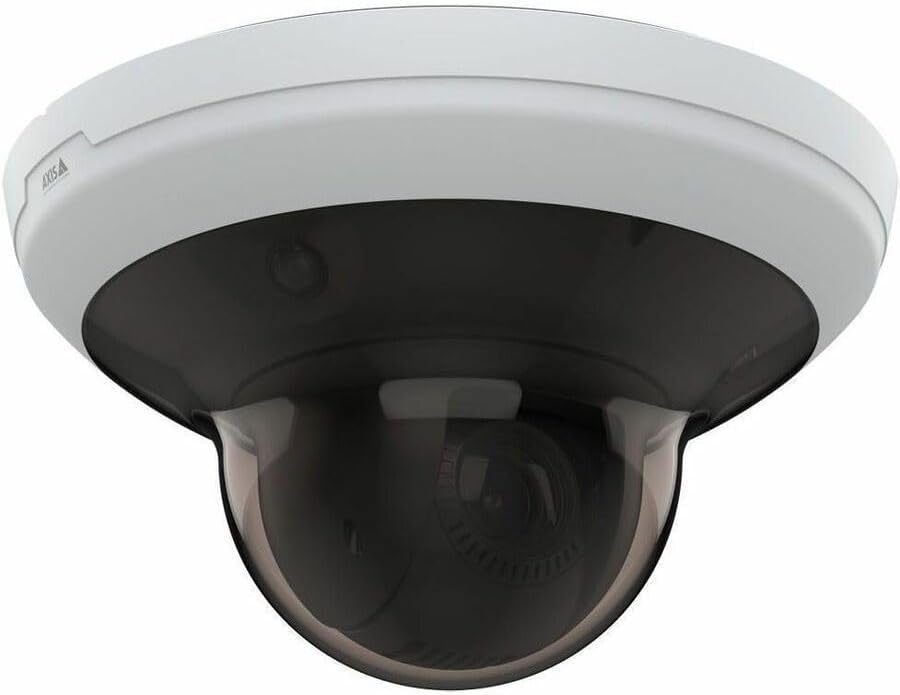
Figi 4.2: Angle view of the AXIS M5000-G Network Camera. This perspective highlights the camera's compact design and the subtle AXIS logo on the side of the white base.

Figi 4.3: Yon lòt angilè view of the AXIS M5000-G Network Camera. Similar to Figure 4.2, this image provides a slightly different angle, emphasizing the smooth contours of the camera's housing.
5. Enstalasyon ak Enstalasyon
The AXIS M5000-G is designed for wall mount installation and requires a wired connection for network and power.
5.1 Monte Kamera a
- Chwazi yon kote: Select an outdoor location that provides the desired field of view and is within reach of a power source and network connection. Ensure the mounting surface is sturdy enough to support the camera's weight (approximately 5.7 pounds).
- Make pwen perçage yo: Use the provided mounting template (if applicable) or the camera base to mark the drilling points on the wall.
- Fè twou: Fè twou gid nan pwen ki make yo. Mete lank miray si sa nesesè.
- Sekirize baz la: Fikse baz kamera a sou miray la avèk vis yo bay yo.
- Attach Camera Unit: Secure the main camera unit to the mounted base, ensuring it clicks into place or is fastened according to the quick start guide.
5.2 Konekte kouran ak rezo a
- Koneksyon pouvwa: Connect the provided power adapter to the camera's power input and then to a suitable electrical outlet. The camera operates on corded electric power.
- Rezo Koneksyon: Connect an Ethernet cable from your network router or switch to the camera's network port. The camera uses wired connectivity technology.
- Premye demaraj: Allow the camera a few minutes to power on and establish a network connection.
6. Itilizasyon Kamera a
The AXIS M5000-G camera is controlled primarily through a dedicated application or network video recorder (NVR) software.
6.1 Inisyal Konfigirasyon
- Dekouvri Kamera: Use the AXIS IP Utility or your network's device discovery tools to find the camera's IP address on your network.
- Aksè Web Entèfas: Louvri a web navigatè a epi antre adrès IP kamera a pou jwenn aksè a li web koòdone.
- Konekte: Enter the default username and password (refer to the quick start guide or manufacturer's documentation for default credentials). Change default credentials immediately for security.
- Anviwònman rezo: Configure network settings (e.g., static IP, DHCP) as required by your network environment.
- Dat ak Lè: Set the correct date and time for accurate video timestamps.
6.2 Viv View ak Kontwòl PTZ
- Viv View: Access the live video feed through the web interface or a compatible surveillance application. The camera provides 1080p video capture resolution and 5 MP effective still resolution.
- Pan, Tilt, Zoom (PTZ): Utilize the PTZ controls within the application to adjust the camera's viewing angle and zoom level. This feature allows for dynamic monitoring of large areas.
- Pozisyon Prereglaj: Configure and save specific PTZ positions for quick navigation to frequently monitored areas.
6.3 Deteksyon Mouvman ak Alèt
- Motion Only Alert Type: Configure motion detection zones and sensitivity settings within the camera's interface.
- Aksyon Alèt: Set up actions to be triggered upon motion detection, such as recording video, sending email notifications, or uploading images to an FTP server.
7. Antretyen
Regular maintenance ensures optimal performance and longevity of your AXIS M5000-G camera.
- Netwaye lantiy la: Gently wipe the camera lens and dome cover with a soft, clean, lint-free cloth. For stubborn dirt, use a mild lens cleaning solution applied to the cloth, not directly to the lens.
- Mizajou mikrolojisyèl: Periodically check the AXIS website for firmware updates. Keeping the firmware updated ensures access to the latest features and security patches.
- Enspeksyon kab: Regularly inspect all cables (power and network) for any signs of wear, damage, or corrosion, especially in outdoor installations.
- Verifikasyon Anviwònman: Ensure the camera's environment remains within its specified operating temperature and humidity ranges.
NAN. Depanaj
This section addresses common issues you might encounter with the AXIS M5000-G camera.
| Pwoblèm | Kòz posib | Solisyon |
|---|---|---|
| Pa gen manje videyo | Kouran koupe, pwoblèm rezo, adrès IP ki pa kòrèk. | Check power connection. Verify network cable is securely connected. Confirm camera's IP address and network settings. Restart camera. |
| Pòv bon jan kalite imaj | Dirty lens, low light, incorrect resolution settings. | Clean the lens. Ensure adequate lighting. Adjust video resolution settings in the camera's web koòdone. |
| Kontwòl PTZ yo pa reponn | Network latency, software issue, camera malfunction. | Check network connection stability. Restart the camera and the control application. If issue persists, contact support. |
| Deteksyon mouvman pa travay | Paramèt sansiblite yo pa kòrèk, zòn deteksyon yo pa konfigire. | Review and adjust motion detection sensitivity. Ensure detection zones are properly defined in the camera's settings. |
9. Espesifikasyon
| Karakteristik | Detay |
|---|---|
| Non modèl | M5000-G Network Camera |
| Mak | AKS |
| Itilizasyon Andedan kay la / Deyò | Deyò |
| Sous pouvwa | Fil elektrik |
| Koneksyon Teknoloji | Branche |
| Rezolisyon Capture Videyo | 1080p |
| Rezolisyon toujou efikas | 5 MP |
| Kalite aliye | Mi mòn |
| Kalite Alèt | Mouvman sèlman |
| Dimansyon atik (L x W x H) | 11.9 x 12 x 8.4 pous |
| Pwa atik | 5.7 liv |
| Manifakti | AXIS COMMUNICATION INC |
10. Garanti ak sipò
For warranty information, please refer to the documentation included with your purchase or visit the official AXIS website. AXIS provides support resources, including FAQs, troubleshooting guides, and contact information for technical assistance.
You can typically find more information and support on the AXIS Store on Amazon oubyen ofisyèl manifakti a websit.