1. Entwodiksyon
Thank you for choosing the Hiwill HW210 Soundbar with Subwoofer. This 2.1 channel surround sound system is designed to enhance your audio experience for televisions, PCs, gaming consoles, and other compatible devices. This manual provides detailed instructions for setup, operation, and maintenance to ensure optimal performance and longevity of your product. Please read this manual thoroughly before use and retain it for future reference.

Image 1.1: The Hiwill HW210 Soundbar and Subwoofer system, shown with a television for illustrative purposes.
2. Enfòmasyon sou Sekirite
Pou diminye risk chòk elektrik, dife, oswa domaj nan aparèy la, tanpri obsève prekosyon sekirite sa yo:
- Pa ekspoze aparèy sa a lapli oswa imidite.
- Pa mete objè ki plen likid, tankou vaz, sou aparèy la.
- Asire bon vantilasyon. Pa bloke okenn ouvèti vantilasyon.
- Pa enstale tou pre okenn sous chalè tankou radyatè, rejis chalè, recho, oswa lòt aparèy (tankou amplifiers) ki pwodui chalè.
- Pwoteje kòd pouvwa a pou yo pa mache sou li oswa pense, patikilyèman nan ploge, resipyan konvenyans, ak pwen kote yo sòti nan aparèy la.
- Itilize sèlman atachman/akseswa manifakti a espesifye.
- Deploge aparèy sa a pandan tanpèt zèklè oswa lè li pa itilize pou yon tan long.
- Refere tout sèvis yo bay pèsonèl sèvis kalifye. Reparasyon nesesè lè aparèy la domaje nenpòt fason, tankou kòd kouran oswa ploge domaje, likid koule oswa objè tonbe nan aparèy la, aparèy la te ekspoze a lapli oswa imidite, li pa fonksyone nòmalman. , oswa li te tonbe.
3. Pake kontni
Tanpri verifye ke tout atik yo prezan epi yo an bon kondisyon:
- Hiwill Soundbar
- Filè Subwoofer
- Kontwòl Remote
- Adaptè pouvwa
- Optical Cable (may vary by region)
- AUX Cable (may vary by region)
- Wall Mounting Kit (screws, anchors)
- Manyèl Itilizatè (dokiman sa a)
4. Pwodwi souview
4.1 Soundbar Features
- Ultra-slim design (3.8 cm height)
- Integrated orbital aluminum diaphragm speakers
- Built-in HiFi and DSP technology for immersive 3D surround sound
- Maximum output power: 120 Watts
- Nivo presyon son: 106 dB
- Bluetooth 5.3 for wireless streaming
- Multiple input options: HDMI ARC, Optical, AUX, USB
- 3 adjustable EQ modes: Game, Movie, Music
- Adjustable bass and treble levels
4.2 Subwoofer Features
- 9-liter capacity for deep, resonant bass
- Wired connection to the soundbar for stable audio transmission
4.3 Kontwòl ak Endikatè
The soundbar features an integrated display and control buttons, typically located on the top or front panel. The remote control provides full functionality.
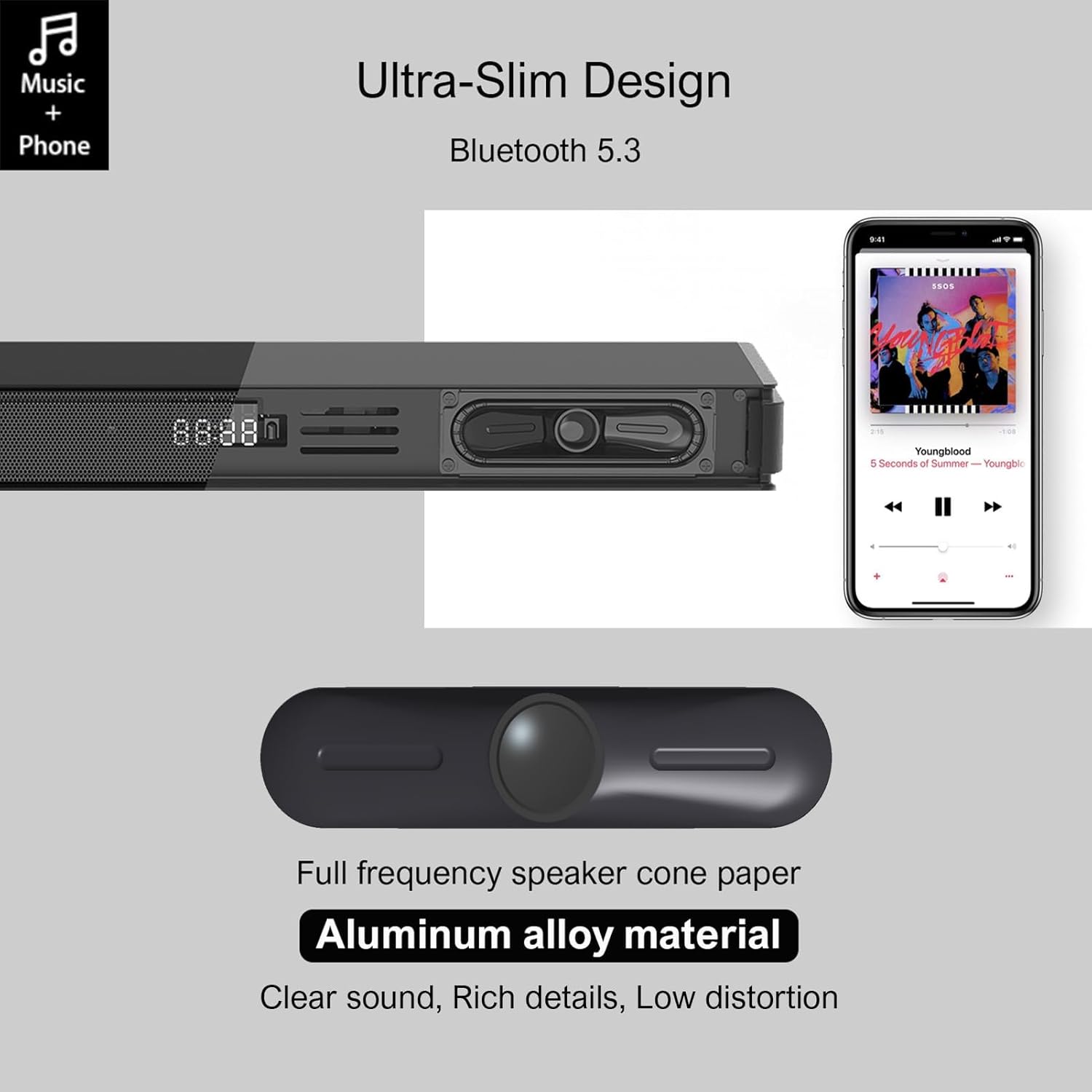
Image 4.1: Detail of the soundbar's ultra-slim design, showing the front display and integrated speakers.
4.4 Koneksyon Panèl Dèyè
The rear panel of the soundbar provides various ports for connecting to your audio sources and power.

Imaj 4.2: Dèyè view of the soundbar showing input ports: AUX, HDMI ARC, USB, Optical, Subwoofer Out, and DC In.
- AUX (3.5mm): Pou konekte aparèy ki gen yon pwodiksyon odyo 3.5mm.
- ARC (HDMI): For connecting to a TV's HDMI ARC port. Supports CEC for unified control.
- USB: Pou jwe odyo files soti nan yon kondwi USB.
- OPTIK: For connecting to a TV or other device with an optical audio output.
- SUB SOTI: For connecting the wired subwoofer.
- DC IN: Pou konekte adaptè pouvwa a.
5. Enstalasyon
5.1 Opsyon Plasman
The Hiwill HW210 soundbar offers flexible placement options to suit your home entertainment setup.

Image 5.1: Illustrates placing the soundbar on a tabletop in front of the TV or mounting it on the wall below the TV.
- Plasman Tabletop: Place the soundbar on a stable, flat surface directly in front of your TV. Ensure it does not obstruct the TV's remote sensor.
- Montaj mi: The soundbar can be mounted on the wall below your TV. Use the provided wall mounting kit and follow these steps:
- Mark the desired mounting positions on the wall, ensuring the soundbar is centered with your TV.
- Fè twou pilòt nan pozisyon ki make yo.
- Insert wall anchors (if necessary for your wall type).
- Secure the mounting brackets (if separate) or the soundbar directly using screws.
- Plasman subwoofer: Place the subwoofer on the floor near the soundbar. Experiment with placement to find the best bass response for your room.
5.2 Konekte sou pouvwa
- Connect the power adapter to the DC IN port on the soundbar's rear panel.
- Ploge lòt bout adaptè pouvwa a nan yon priz miray.
- Connect the wired subwoofer cable to the SUB OUT port on the soundbar.
5.3 Konekte ak sous odyo
Choose one of the following connection methods based on your device:
- HDMI ARC (Recommended for TVs):
- Connect one end of an HDMI cable (not included) to the ARC port on the soundbar.
- Konekte lòt bout la nan pò HDMI ARC ki sou televizyon ou an.
- Ensure HDMI CEC is enabled in your TV's settings for unified control.
- Optik:
- Connect the optical cable (included) to the OPTICAL port on the soundbar.
- Connect the other end to the optical audio output port on your TV or other device.
- Ensure your TV's audio output is set to "PCM" if you experience no sound.
- AUX (3.5mm):
- Connect the 3.5mm AUX cable (included) to the AUX port on the soundbar.
- Connect the other end to the headphone jack or AUX output of your device.
- USB:
- Mete yon kondwi flash USB ki gen odyo files nan pò USB sou ba son an.
6. Operasyon Enstriksyon
6.1 Power On/Off
- Peze a Pouvwa bouton ki sou ba son an oswa sou kontwòl remote la pou limen oswa etenn aparèy la.
6.2 Chwazi Sous Antre
- Peze a Antre button on the remote control or the soundbar to cycle through available input sources (ARC, OPT, AUX, USB, BT). The selected input will be displayed on the soundbar's screen.
6.3 Bluetooth Pairing
- Turn on the soundbar and select the "BT" input source. The soundbar will enter pairing mode, indicated by a flashing "BT" on the display.
- Sou aparèy mobil ou, aktive Bluetooth epi chèche aparèy ki disponib.
- Select "Hiwill HW210" (or similar name) from the list of devices.
- Once paired, the soundbar will emit a confirmation tone, and "BT" will stop flashing.
- To disconnect, turn off Bluetooth on your device or select a different input source on the soundbar.
6.4 Kontwòl Volim
- Sèvi ak la Volim monte (+) epi Volim Dawonn (-) buttons on the soundbar or remote control to adjust the master volume.
- Peze a bèbè button on the remote control to mute or unmute the sound.
6.5 EQ Modes and Tone Adjustment
The soundbar features three preset equalizer modes and adjustable bass/treble settings.

Image 6.1: Visual representation of the three equalizer modes: Game, Movie, and Music, optimized for different audio content.
- Peze a EQ button on the remote control to cycle through the preset modes: Jwèt, Fim, ak Mizik.
- Sèvi ak la Bas +/- buttons on the remote control to adjust the bass level.
- Sèvi ak la Treble +/- buttons on the remote control to adjust the treble level.
7. Antretyen
- Netwayaj: Sèvi ak yon twal mou epi sèk pou netwaye sifas ba son an ak subwoofer la. Pa sèvi ak pwodui netwayaj likid oswa materyèl abrazif.
- Depo: Si w ap sere aparèy la pou yon bon bout tan, debranche l nan priz kouran an epi sere l nan yon kote ki fre epi sèk.
- Evite obstak: Ensure that the speaker grilles and ventilation openings are not blocked by dust or other objects.
NAN. Depanaj
| Pwoblèm | Kòz posib | Solisyon |
|---|---|---|
| Pa gen pouvwa | Kòd kouran an pa konekte; Priz kouran an pa aktif | Asire w kòd kouran an byen konekte; Eseye yon lòt priz kouran. |
| Pa gen son | Incorrect input source selected; Volume too low; Cables not connected properly; TV audio output settings incorrect. | Select the correct input source; Increase volume; Check all audio cables are securely connected; For Optical/ARC, ensure TV audio output is set to PCM. |
| Aparèy Bluetooth echwe | Ba son an pa nan mòd koneksyon; Aparèy la twò lwen; Entèferans. | Ensure soundbar is in BT mode and flashing; Move device closer; Turn off other Bluetooth devices. |
| Remote kontwòl pa travay | Pil yo fin itilize; Gen yon obstak ant telekòmand lan ak ba son an. | Replace remote control batteries; Ensure clear line of sight to the soundbar's sensor. |
| Move son kalite | Incorrect EQ mode; Source audio quality; Cable issues. | Adjust EQ modes and bass/treble settings; Try a different audio source; Check/replace audio cables. |
9. Espesifikasyon
| Non modèl | Hiwill HW210 Soundbar |
| Kalite Oratè | Ba son ak filè subwoofer |
| Konfigirasyon son antoure | 2.1 Chèn |
| Maksimòm puisans sòti oratè | 120 Watts |
| Koneksyon Teknoloji | Bluetooth 5.3, HDMI ARC, AUX (3.5mm), USB, Optical |
| Audio Sòti Mode | Antoure |
| Karakteristik espesyal | High-resolution audio support, 3 EQ modes, Adjustable Bass/Treble, Wall-mountable |
| Itilizasyon Rekòmande | TV, Gaming Consoles, Computers, Smartphones, Tablets, Music Players, DVD Players, Home Theater |
10. Garanti ak sipò
Hiwill products are designed and manufactured to the highest quality standards. For detailed warranty information, please refer to the warranty card included in your package or visit the official Hiwill website. If you encounter any issues or require technical assistance, please contact Hiwill customer support through the contact information provided on the product packaging or websit.
Please have your model number (HW210) and purchase date ready when contacting support.


