Entwodiksyon
The VOCOlinc Air Tracker Tag is a smart Bluetooth item locator designed to help you find your belongings quickly and efficiently. It integrates seamlessly with the Apple Find My app on iOS devices, allowing you to track items both nearby and far away. This device is ideal for keeping track of keys, luggage, wallets, bags, and other personal items.
Note: This product is compatible only with iOS devices and does not support Android devices. It does not feature Ultra-Wideband (UWB) functionality.

Image: VOCOlinc Air Tracker Tag highlighting its key features: compatibility with Apple Find My, privacy protection, a replaceable battery lasting over a year, and integration with Siri.
Enstalasyon
Follow these steps to set up your VOCOlinc Air Tracker Tag with your Apple Find My app:
- Reyajiste aparèy la: In the power-on state, long press the button on the tracker for 10 seconds. You will hear a short 'beep' after 3 seconds, and a long 'beep' after 10 seconds. Release the button, and two short beeps will confirm a successful reset.
- Aktive Jwenn Mwen ak Bluetooth: On your iOS device, ensure both the 'Find My' app and Bluetooth are turned on.
- Ajoute yon nouvo atik: Open the 'Find My' app. Navigate to the 'Items' tab at the bottom of the screen. Tap the '+' icon, then select 'Add Other Supported Item'.
- Konekte: The app will search for nearby items. When 'VOCOlinc Tag' appears, tap 'Connect'.
- Bay non atik ou a: Swiv enstriksyon ki sou ekran an pou bay non ou a tag (e.g., 'Keys', 'Luggage') and choose an emoji to represent it.
- Konfime koneksyon an: Review the privacy notice and tap 'Agree' or 'Continue' to link the tag nan ID Apple ou a.
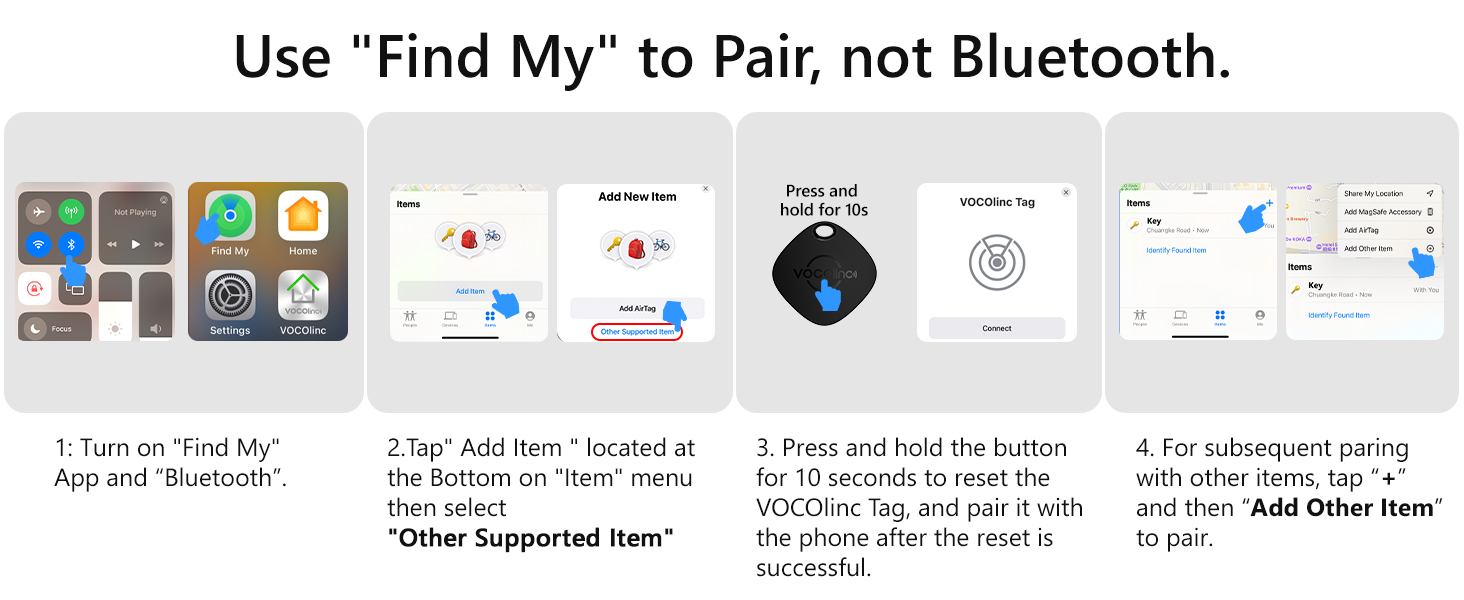
Image: Visual guide demonstrating the pairing process of the VOCOlinc Air Tracker Tag with the Apple Find My app, showing screenshots of the app interface.
Video: Official tutorial demonstrating how to pair the VOCOlinc Air Tracker Tag with the Apple Find My app.
Enstriksyon Operasyon
Finding Nearby Items
When your VOCOlinc Air Tracker Tag is within Bluetooth range (up to 200 feet without obstacles), you can use the 'Find My' app to make it play a loud sound (80-100 decibels). This helps you locate misplaced items like keys under a couch cushion.
- Open the 'Find My' app on your iOS device.
- Select the 'Items' tab and choose your VOCOlinc Tag.
- Tap 'Play Sound' to activate the tag's speaker.

Image: A VOCOlinc Air Tracker Tag attached to keys, emitting sound to be found under a couch cushion, as controlled by the Find My app on a phone.
Finding Far Away Items
If your item is outside Bluetooth range, the Apple Find My network, composed of millions of Apple devices, can help locate it. The app will show you the tag's last known location on a map and can provide navigation to its vicinity.
- In the 'Find My' app, select your VOCOlinc Tag.
- View kote li sou kat la.
- Tape 'Direksyon' pou jwenn navigasyon gide pou ale nan tagkote a.

Image: A user interacting with the Find My app on an iPhone, showing the location of a VOCOlinc Air Tracker Tag on a map and options for navigation to find it.
Left Behind Remind and Lost Mode
To prevent losing your items, enable 'Left Behind Remind' for instant alerts if you leave your tag behind. If an item is lost, activate 'Lost Mode' in the 'Find My' app. You will be notified when any Apple device in the network detects your tag.
- To enable 'Left Behind Remind': In the 'Find My' app, select your tag, then tap 'Notify When Left Behind' and configure your preferences.
- To activate 'Lost Mode': In the 'Find My' app, select your tag, scroll down to 'Lost Mode', and tap 'Enable'. You can leave a contact number or message.
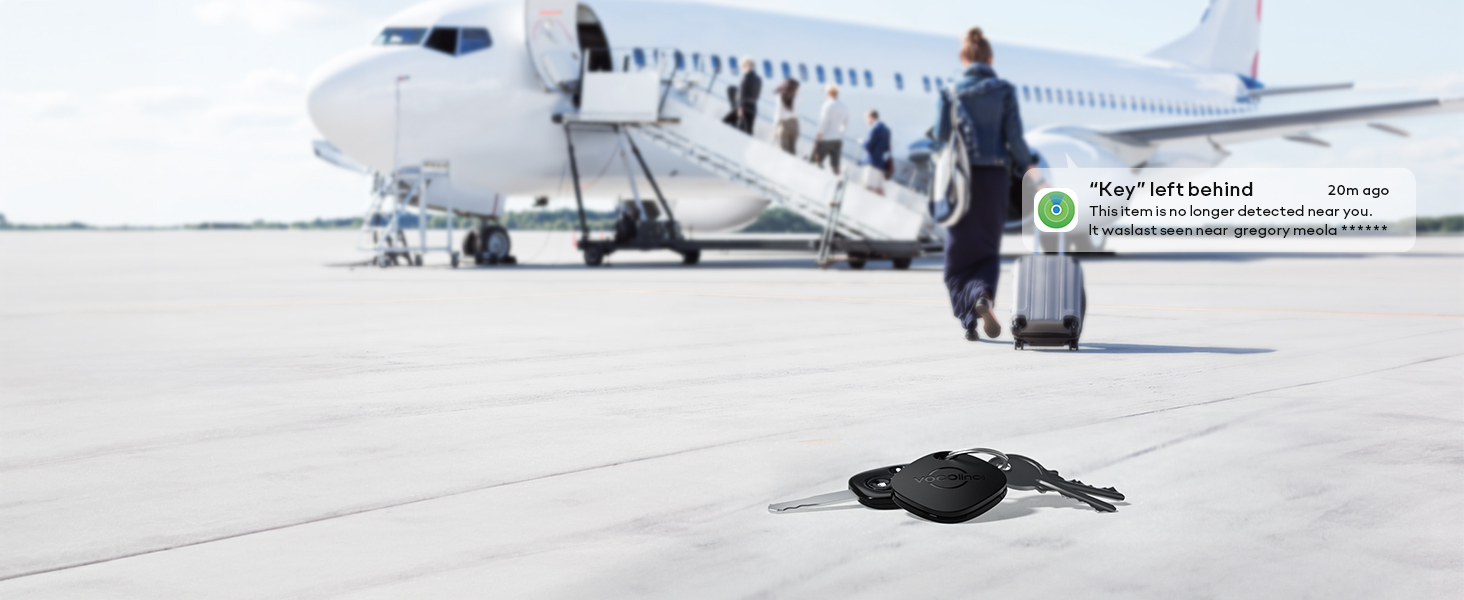
Image: A VOCOlinc Air Tracker Tag attached to keys lying on an airport tarmac, with a phone displaying a 'Key left behind' notification, illustrating the alert feature.
Pwoteksyon Konfidansyalite
The Apple Find My network ensures your privacy. Location data and history are encrypted and anonymous, meaning neither Apple nor VOCOlinc can view ou tagkote a.
Video: An official video highlighting the key finder and luggage tracker features of the VOCOlinc Air Tracker Tag, including its integration with the Apple Find My network.
Antretyen
Ranplasman batri
The VOCOlinc Air Tracker Tag is powered by a replaceable CR2032 coin cell battery, which typically lasts over 1 year. The 'Find My' app will notify you when the battery is low.
- To replace the battery, locate the small gap on the side of the tracker.
- Use a fingernail or a small tool to gently pry open the two halves of the tracker.
- Retire ansyen pil CR2032 la epi mete yon nouvo, asire w ke bò pozitif la (+) fè fas anlè.
- Align the top holes of the two covers and press them firmly together until they click into place.
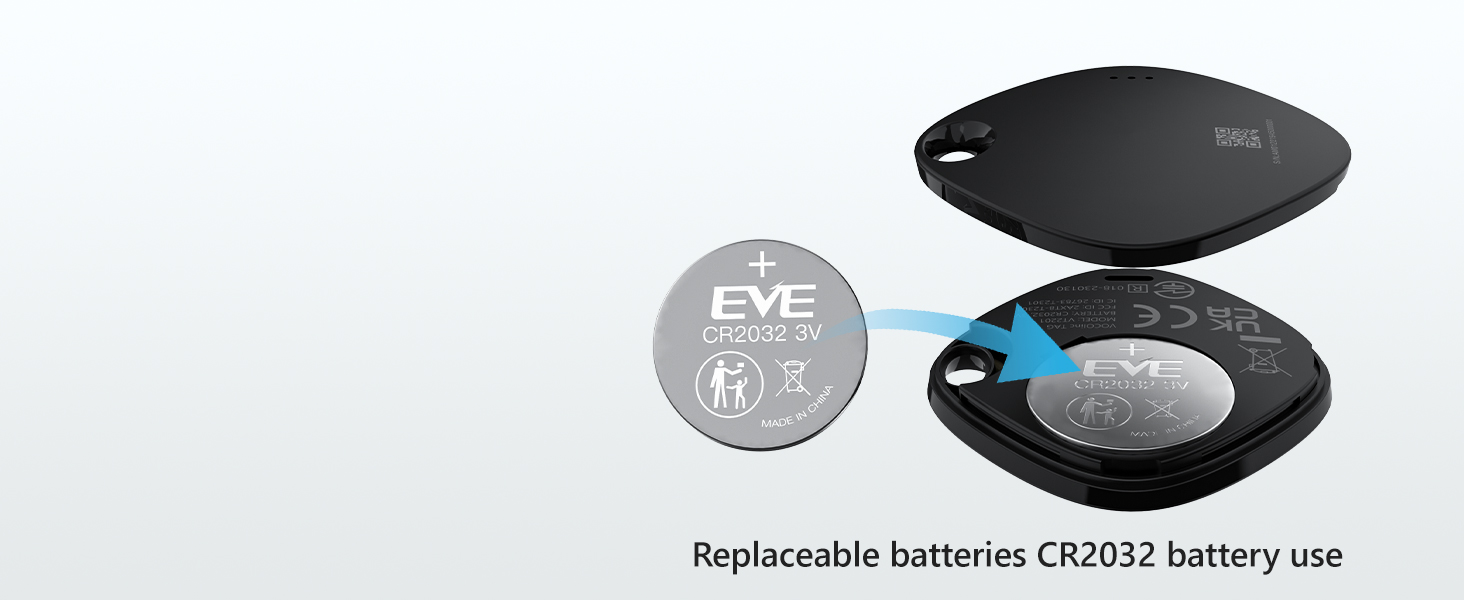
Image: A detailed diagram illustrating the process of replacing the CR2032 battery in the VOCOlinc Air Tracker Tag, showing the battery compartment and insertion method.
Video: Official instructions on how to replace the battery in the VOCOlinc Air Tracker Tag.
Rezistans dlo
The VOCOlinc Air Tracker Tag has an IP67 water-resistant rating, meaning it can withstand splashes, rain, and brief immersion in water. However, it is not recommended for prolonged submersion.
Depanaj
- Tag not found in Find My app: Ensure Bluetooth is enabled on your iOS device and the tag is powered on. Try resetting the tag as described in the Setup section.
- Sound not playing: Tcheke si la tag's battery is low and replace it if necessary. Ensure your iOS device is within Bluetooth range of the tag.
- Kote ki pa egzak: The accuracy of location tracking depends on the density of the Apple Find My network. In areas with fewer Apple devices, location updates might be less frequent or precise.
- Left Behind alerts not working: Verify that 'Notify When Left Behind' is enabled for your tag in the Find My app settings. Ensure your iOS device has a stable internet connection.
Espesifikasyon
| Karakteristik | Detay |
|---|---|
| Nimewo Modèl | VT2201 |
| Koneksyon | Bluetooth 5.2 |
| Konpatibilite | iOS devices (iPhone, iPad) only |
| Gamme Bluetooth | Jiska 200 pye (60 mèt) san obstak |
| Nivo son | 80-100 decibels |
| Kalite batri | CR2032 coin cell (included) |
| Lavi batri | Plis pase 1 ane |
| Rezistans dlo | IP67 rated |
| Dimansyon | 1.37 x 1.37 x 0.29 pous (36 x 36 x 7.5 mm) |
| Pwa atik | 1.44 ons |
| Materyèl | Metal |

Image: A visual representation of the VOCOlinc Air Tracker Tag, detailing its physical dimensions and highlighting key specifications such as sound level, Bluetooth range, water resistance, and battery type.
Garanti ak sipò
VOCOlinc provides customer service for its products. For any questions regarding the use, setup, or troubleshooting of your VOCOlinc Air Tracker Tag, please refer to the contact information provided with your product packaging or visit the official VOCOlinc websit pou resous sipò.
Warranty information is typically included with your purchase. Please retain your proof of purchase for any warranty claims.