Entwodiksyon
Mèsi pou acha aasing the Lenco CR-650 DAB+ Alarm Clock Radio. This device combines a modern DAB+ and FM radio with an alarm clock, Bluetooth connectivity, USB/Micro SD playback, and a convenient wireless charging pad. This manual provides detailed instructions for setup, operation, maintenance, and troubleshooting to ensure optimal performance and longevity of your device.
Enfòmasyon sou Sekirite
Please read these safety instructions carefully before using the device and keep them for future reference. Improper use may result in electric shock, fire, or other hazards.
- Do not expose the device to rain, moisture, or direct sunlight.
- Asire w ke gen bon vantilasyon toutotou aparèy la. Pa bloke okenn ouvèti vantilasyon.
- Pa mete aparèy la tou pre sous chalè tankou radyatè, rejis chalè, recho, oswa lòt aparèy (tankou amplifiers) ki pwodui chalè.
- Itilize sèlman atachman/akseswa manifakti a espesifye.
- Deploge aparèy la pandan tanpèt zèklè oswa lè li pa itilize pou yon tan long.
- Refere tout sèvis yo bay pèsonèl sèvis ki kalifye yo. Antretyen obligatwa lè aparèy la te domaje nan okenn fason.
Kontni pake
Verifye ke tout atik yo prezan nan pakè a:
- Lenco CR-650 DAB+ Alarm Clock Radio
- Adaptè pouvwa
- Manyèl Itilizatè (dokiman sa a)
Pwodwi souview
Devan View

Figi 1: Devan view of the Lenco CR-650, highlighting the LCD display and speaker grilles.
The front of the CR-650 features a clear LCD display that shows time, radio station information, and various settings. The large speaker grilles on either side of the display provide audio output.
Top View (Controls and Wireless Charging)
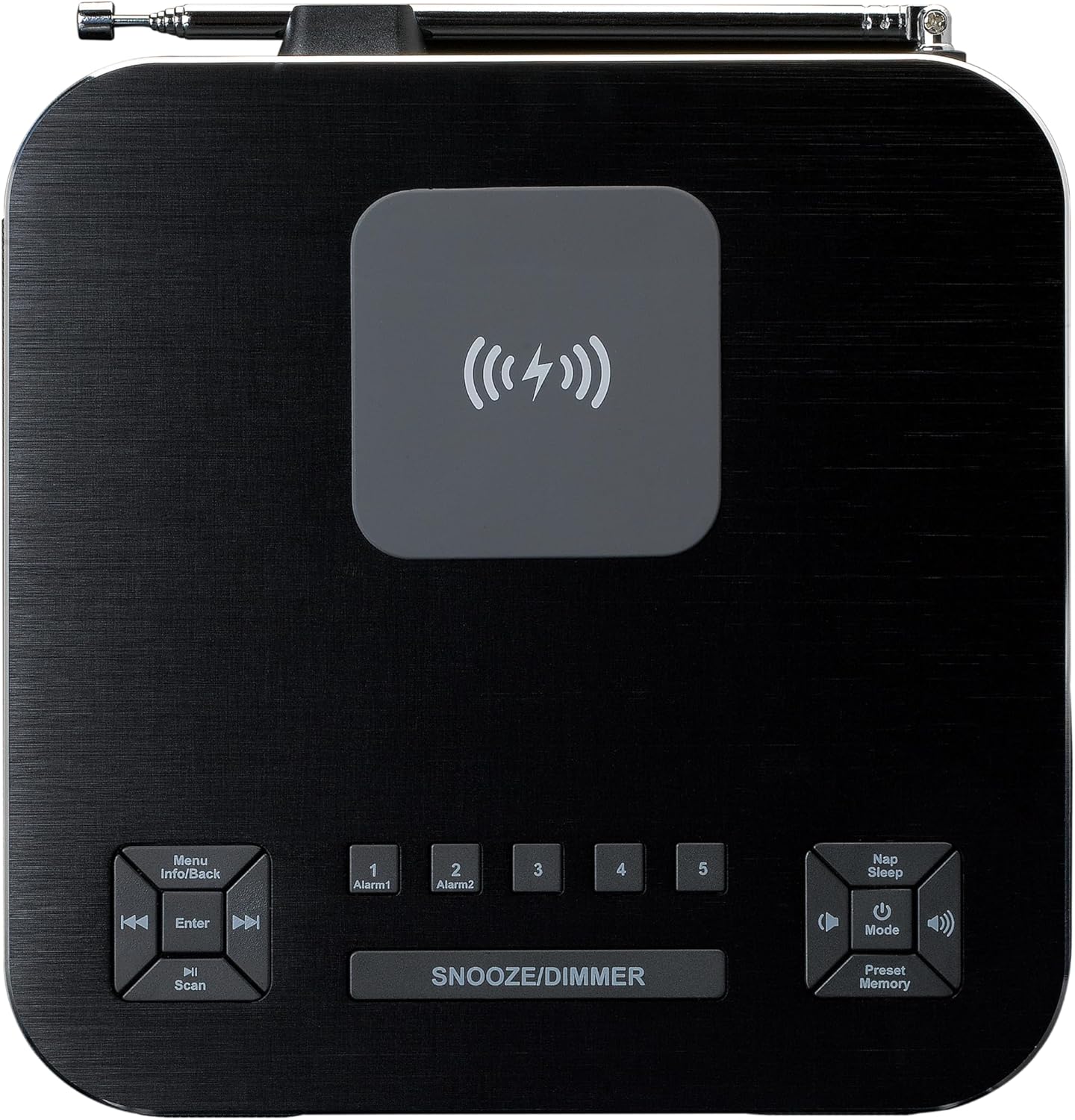
Figi 2: Top view of the Lenco CR-650, illustrating the control buttons and the central wireless charging area.
The top panel houses all the control buttons and the integrated wireless charging pad. Key controls include:
- Menu/Info/Back: Navigates menus, displays information, or goes back.
- Enter/Scan: Konfime seleksyon yo oswa lanse eskanè estasyon yo.
- Alarm 1 / Alarm 2: Buttons for setting and activating the two independent alarms.
- Snooze/Dimmer: Aktive fonksyon repetisyon an pandan yon alam oswa ajiste klète ekran an.
- Nap/Sleep: Sets a short nap timer or sleep timer.
- Power/Mode/Volume: Power on/off, switches between modes (DAB+, FM, Bluetooth, USB, Micro SD, AUX), and adjusts volume.
- Preset/Memory: Accesses and saves radio presets.
- Pad chaje san fil: Central area for Qi-compatible device charging.
Dèyè View (Koneksyon)

Figi 3: Dèyè view of the Lenco CR-650, detailing the various input ports and the telescopic antenna.
The rear panel provides essential connection ports:
- Mikwo SD kat plas: Pou jwe odyo files from a Micro SD card.
- Pò USB: Pou jwe odyo files soti nan yon kondwi USB.
- Antre AUX (3.5mm): Pou konekte aparèy odyo ekstèn.
- DC 5V Antre pouvwa: Konekte ak adaptè kouran ki founi an.
- Antèn teleskopik: For optimal DAB+ and FM radio reception.
Enstalasyon
- Koneksyon pouvwa: Insert the DC plug of the provided power adapter into the DC 5V input port on the rear of the CR-650. Plug the other end of the adapter into a standard wall outlet.
- Enstalasyon antèn: Fully extend the telescopic antenna located on the rear of the unit for best radio reception. Adjust its position as needed to improve signal quality.
- Premye pouvwa sou: Peze a Pouvwa/Mòd button on the top panel to turn on the device. The display will light up.
- Tan ak Dat Anviwònman: The device should automatically set the time and date via DAB+ signal. If not, refer to the "Operating Instructions - System Settings" section to set it manually.
Enstriksyon Operasyon
Radio Functions (DAB+/FM)
The CR-650 supports both DAB+ digital radio and traditional FM radio.
- Chanje mòd: Peze a Mode button repeatedly to cycle between DAB+ and FM radio modes.
- Ap chèche estasyon:
- Nan mòd DAB +, peze la Eskane button to perform a full scan for available DAB+ stations. The display will show "Station scan".
- Nan mòd FM, peze epi kenbe la Eskane button to auto-scan and stop at the next strong station.
- Manyèl akor: Sèvi ak la Previous/Next buttons to manually tune frequencies in FM mode or navigate through DAB+ stations.
- Ekonomize Prereglaj:
- Branche sou estasyon ou vle.
- Peze epi kenbe la Prereglaj/Memwa bouton.
- Sèvi ak la Previous/Next bouton yo pou chwazi yon nimewo prereglaj (1-20).
- Peze Antre pou konfime epi sove estasyon an.
- Rapèl Prereglaj: Yon ti tan peze la Prereglaj/Memwa bouton, Lè sa a, sèvi ak la Previous/Next buttons to select the desired preset and press Antre.

Figure 4: Display during DAB+ station scanning.
Operasyon Bluetooth
Koute odyo san fil depi aparèy ou ki gen Bluetooth.
- Antre nan mòd Bluetooth: Peze a Mode button until "Bluetooth" appears on the display. The device will enter pairing mode, indicated by a blinking Bluetooth icon.
- Peyaj: On your smartphone or other Bluetooth device, enable Bluetooth and search for "Lenco CR-650". Select it to pair. Once connected, the Bluetooth icon will stop blinking.
- Lektur: Start playing audio on your connected device. The sound will be streamed to the CR-650. Use the volume controls on the CR-650 or your device to adjust the sound level.

Figure 5: Display showing Bluetooth pairing name.
Lektur USB/Micro SD
Jwe odyo files directly from a USB flash drive or Micro SD card.
- Mete medya: Insert a USB flash drive into the USB port or a Micro SD card into the Micro SD slot on the rear of the unit.
- Chwazi mòd: Peze a Mode button until "USB" or "Micro SD" appears on the display. The device will automatically start playing compatible audio files.
- Kontwòl: Sèvi ak la Previous/Next buttons to skip tracks. Use the Jwe/Poz button (often integrated with Power/Mode or Enter) to pause/resume playback.
Fonksyon alam
The CR-650 features dual alarms and various wake-up options.
- Mete Alam:
- Peze swa la Alam 1 or Alam 2 bouton.
- Sèvi ak la Previous/Next bouton ak Antre to set the alarm time, alarm source (DAB+, FM, Buzzer, Nature Sounds), and alarm volume.
- Confirm settings to activate the alarm. An alarm icon will appear on the display.
- Fonksyon Snooze: Lè yon alam sonnen, peze bouton an Snooze/Dimmer bouton pou fèmen alam lan tanporèman pou yon peryòd defini (pa egzanp, 9 minit). Alam lan ap sonnen ankò apre peryòd repetisyon an.
- Kijan pou kanpe yon alam: Pou etenn yon alam k ap sonnen, peze bouton an Pouvwa bouton an. Alam lan ap re-mete pou jou kap vini an.
- Disabling Alarms: To completely disable an alarm, press the corresponding Alam 1 or Alam 2 bouton an jiskaske ikòn alam lan disparèt sou ekran an.
Anviwònman ekspozisyon
Ajiste klète ekran LCD a pou yon santiman konfòtab viewing.
- Ajisteman klète: Yon ti tan peze la Snooze/Dimmer button to cycle through different brightness levels (e.g., High, Medium, Low, Off).
Chaje san fil (Qi)
The Lenco CR-650 features a built-in Qi wireless charging pad on its top surface.

Figure 6: Smartphone wirelessly charging on the Lenco CR-650.
- Plasman: Place your Qi-compatible smartphone or device directly onto the wireless charging pad located in the center of the top panel.
- Endikatè chaje: Your device's screen should indicate that it is charging. Ensure the phone is centered on the pad for optimal charging.
- Troubleshooting Charging: If your device does not charge, try repositioning it. Remove any thick cases that might interfere with wireless charging.
Antretyen
- Netwayaj: Sèvi ak yon twal mou epi sèk pou netwaye sifas aparèy la. Pa sèvi ak pwodui netwayaj abrazif, sir, oswa solvan.
- Depo: Si w ap sere aparèy la pou yon bon bout tan, dekonekte l nan priz kouran an epi sere l nan yon kote ki fre epi sèk.
- Swen antèn: Handle the telescopic antenna carefully to prevent bending or breaking.
Depanaj
| Pwoblèm | Kòz posib | Solisyon |
|---|---|---|
| Pa gen pouvwa | Adaptè kouran an pa konekte oubyen priz la pa kouran. | Asire w adaptè kouran an byen branche nan aparèy la ak nan yon priz miray ki fonksyone. |
| Resepsyon radyo pòv | Antèn nan pa lonje oswa siyal la pa bon. | Fully extend the telescopic antenna and try repositioning the unit. Perform a full station scan. |
| Aparèy Bluetooth la pa vle konekte | CR-650 not in pairing mode or device too far. | Ensure CR-650 is in Bluetooth mode and blinking. Move devices closer. Forget "Lenco CR-650" on your device and try pairing again. |
| Chaj san fil pa travay | Phone not aligned or case is too thick. | Reposition the phone on the charging pad. Remove thick phone cases. Ensure phone is Qi-compatible. |
| Alam pa sonnen | Alam lan pa aktive oubyen volim nan twò ba. | Check if the alarm icon is displayed. Verify alarm time and source. Increase alarm volume. |
Espesifikasyon
| Karakteristik | Detay |
|---|---|
| Nimewo Modèl | CR-650 (A004976) |
| Mak | Lenco |
| Radio Tuner | DAB +, FM |
| Prereglaj | 20 (5 quick dial) |
| Bluetooth vèsyon | 5.0 |
| Gamme Bluetooth | Jiska 10 mèt |
| Sortie pouvwa | 2 x 2W RMS |
| Ekspozisyon | 2-inch LCD with adjustable brightness |
| Koneksyon | USB, Micro SD, AUX (3.5mm), Bluetooth |
| Chaje san fil | Qi-konpatib |
| Dimansyon (H x W x P) | 75 x 170 x 180 mm (apeprè 2.95 x 6.69 x 7.09 pous) |
| Pwa | 1.34 kg (apeprè 2.95 lbs) |
| Materyèl | Aliminyòm |
Garanti ak sipò
Lenco products are designed and manufactured to the highest quality standards. In the unlikely event of a problem with your product, please refer to the warranty terms provided with your purchase documentation or visit the official Lenco websit pou sipò ak enfòmasyon kontak.
For technical assistance or service inquiries, please contact Lenco customer support. Keep your proof of purchase for warranty claims.


