LAUNCH CR3008 Plus Professional OBD2 Scanner Diagnostic Tool Instruction Manual
Model: CR3008 Plus
Mak: LAUNCH
Entwodiksyon
The LAUNCH CR3008 Plus is a professional OBD2 scanner and diagnostic tool designed to help vehicle owners and technicians quickly and accurately diagnose car problems. This manual provides detailed instructions for setting up, operating, maintaining, and troubleshooting your device, ensuring you can effectively utilize its full range of features.
Enstalasyon
1. Debale ak Konpozan
Lè w ap ouvri pake a, asire w ke tout konpozan yo la:
1x LAUNCH Creader 3008 Plus Unit
1x manyèl itilizatè
Image: The LAUNCH CR3008 Plus unit with its included components.
2. Aparèy souview
Familiarize yourself with the physical features of the CR3008 Plus:
Ekspozisyon: 2.8-inch TFT true color LCD screen for clear readability.
Klavye: Silicone buttons for easy navigation and operation.
OBD2 Cable: Integrated 32-inch data cable for vehicle connection.
USB-C pò: Located at the bottom for software updates and data printing.
Imaj: Devan view of the LAUNCH CR3008 Plus, highlighting its display and silicone keypad.
Image: The LAUNCH CR3008 Plus showing its integrated OBD2 cable for vehicle connection.
Image: The USB-C port located at the bottom of the LAUNCH CR3008 Plus, used for updates and data transfer.
Videyo: Yon detay souview of the LAUNCH CR3008 Plus, demonstrating its physical features and user interface.
3. Initial Setup (Plug & Play)
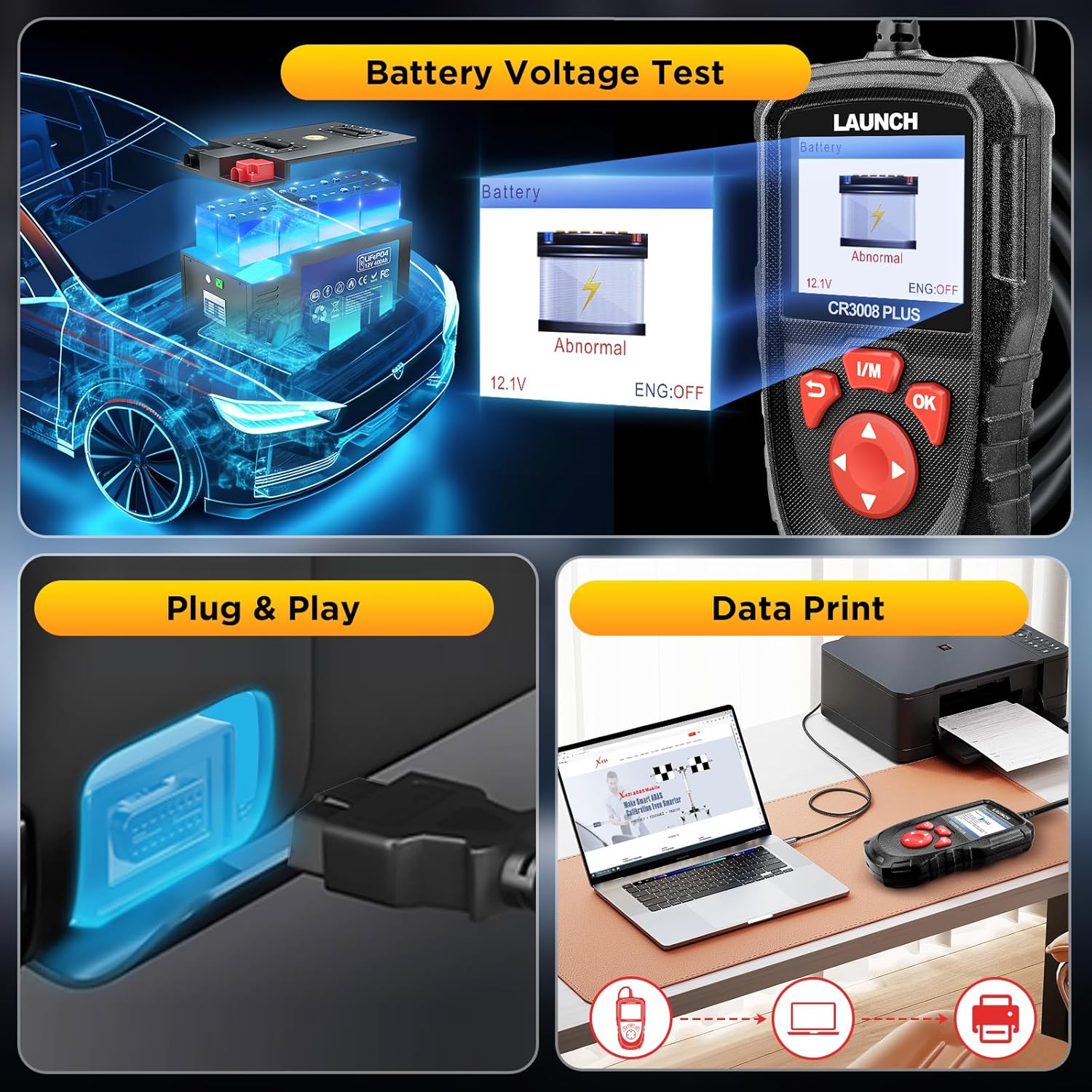
The LAUNCH CR3008 Plus is designed for immediate use without the need for batteries or chargers, as it is powered directly from your vehicle's OBD2 port.
Locate your vehicle's 16-pin OBD2 Data Link Connector (DLC). This is typically found under the dashboard on the driver's side.
Plug the CR3008 Plus's integrated OBD2 cable into the vehicle's DLC.
Turn the vehicle's ignition to the 'ON' position (engine can be off or running, depending on the function). The device will power on automatically.
Video: Demonstration of the simple plug-and-play setup for the LAUNCH CR3008 Plus, showing how to connect it to a vehicle's OBD2 port.
Opere Aparèy la
1. Navigasyon nan meni prensipal la
The main menu provides access to all diagnostic and utility functions. Use the directional buttons (up, down, left, right) to navigate and the 'OK' button to select an option.
Image: The main menu of the LAUNCH CR3008 Plus, displaying icons for Diagnose, Battery, Review, Lookup, Print, Help, Setup, and Info.
2. Fonksyon Dyagnostik
Select 'Diagnose' from the main menu to access the core diagnostic features:
Li Kòd: Montre deskripsyon detaye sou Kòd Pwoblèm Dyagnostik (DTC).
Efase kòd: Efase DTC yo epi etenn Endikatè Defo L la.amp (MIL) after repairs.
Kouran Done An Dirèk: Reads and displays real-time ECU/PCM data, often with graphical plotting.
View Friz done ankadreman: Shows vehicle conditions recorded by the on-board computer at the time an emission-related fault occurred.
Tès Monitè Abò: Rekipere epi montre rezilta tès pou konpozan ak sistèm motè ki gen rapò ak emisyon.
Tès Sistèm EVAP: Kòmanse yon tès flit pou sistèm EVAP machin nan.
Enfòmasyon sou machin: Displays information such as VIN, CID, and CVN.
Image: The diagnostic menu of the LAUNCH CR3008 Plus, listing various test modes and functions.
Image: The scanner displaying the status of the Check Engine Light (MIL) and its ability to clear fault codes.
Video: A demonstration of how to use the LAUNCH CR3008 Plus to diagnose car issues, including reading and clearing codes.
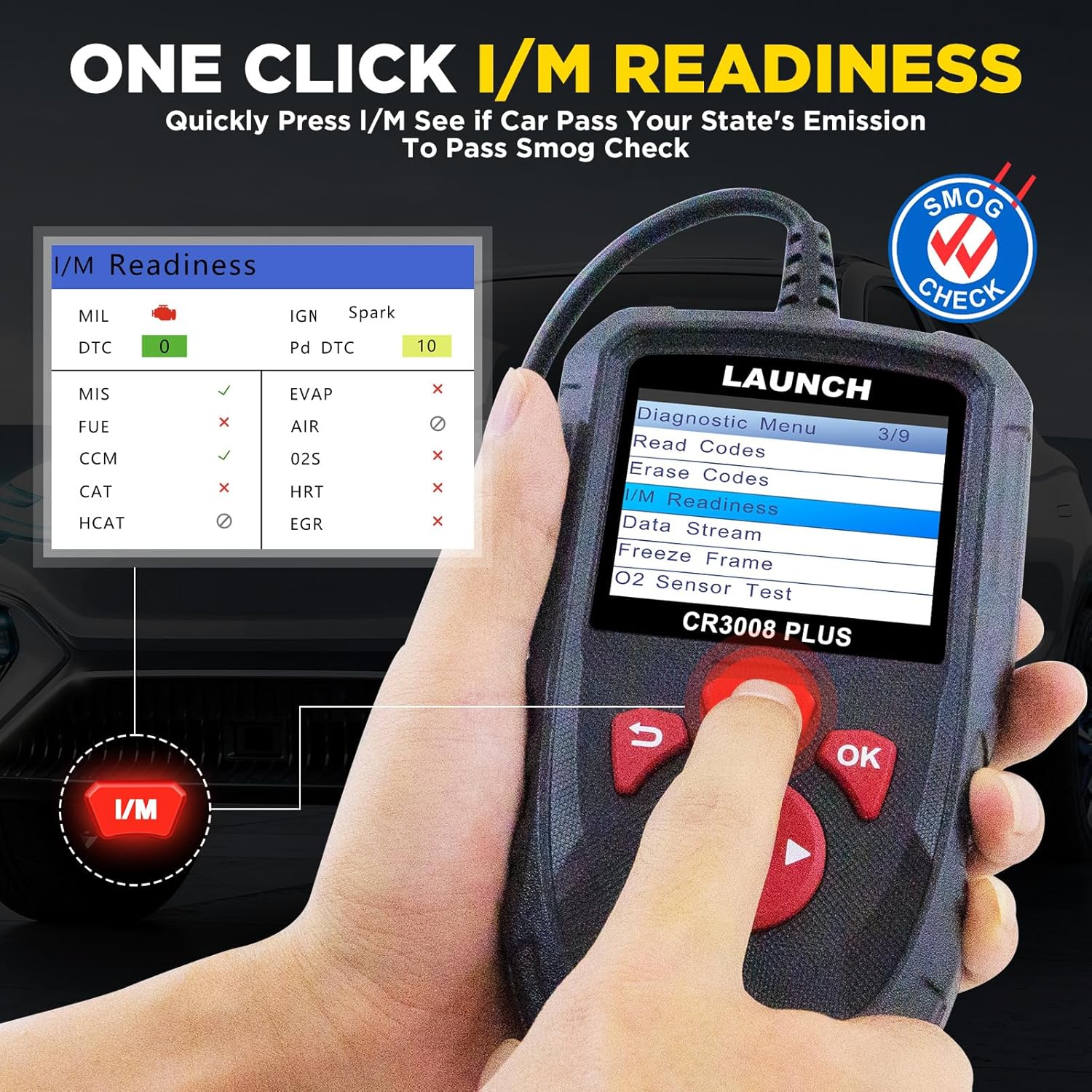
3. One-Click I/M Readiness
This convenient feature allows for a quick check of your vehicle's emission readiness status, which is crucial for smog tests.
From the main menu, press the dedicated 'I/M' button.
The scanner will quickly process and display the readiness status of various emission-related systems.
Image: The One-Click I/M Readiness screen, showing the status of various emission monitors for a quick smog check.
4. Battery Voltage Tès
Quickly check your car's battery voltage and health:
Chwazi 'Batri' nan meni prensipal la.
Aparèy la ap montre volim batri aktyèl latage and indicate its status (Normal/Abnormal).
Image: The Battery Voltage Test screen, showing the current voltage and battery health status.
5. DTC Recherche
The built-in DTC library allows you to quickly find definitions and possible causes of Diagnostic Trouble Codes without needing to search online.
Select 'Lookup' from the main menu.
Input the DTC code using the directional buttons.
The scanner will display the definition and relevant information for the entered code.
Image: The DTC Lookup feature, allowing users to input a code and receive its definition and potential causes.
Antretyen
1. Mizajou lojisyèl
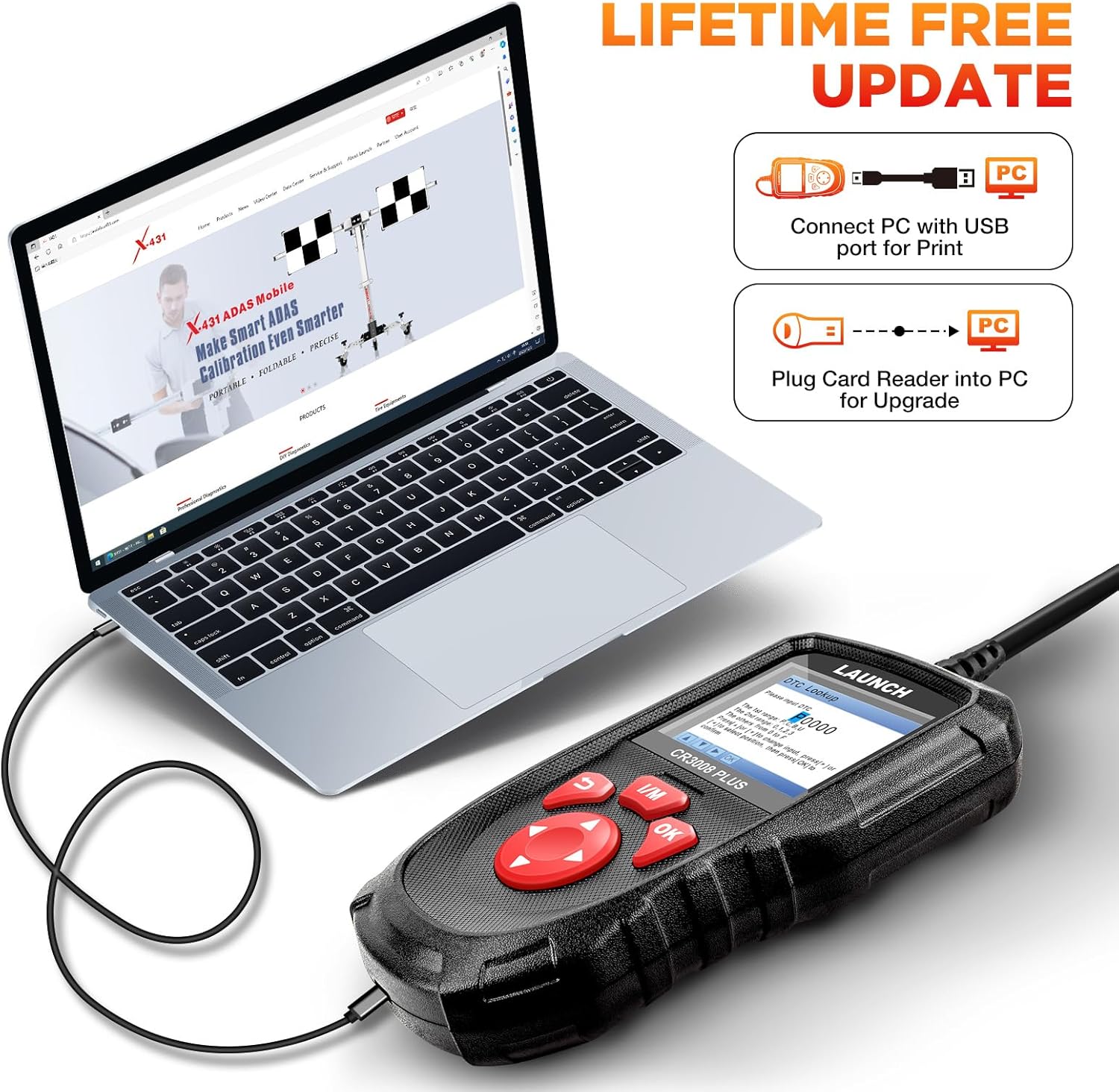
The LAUNCH CR3008 Plus offers free lifetime software updates to ensure compatibility with new vehicle models and diagnostic protocols.
Vizite LANSMAN ofisyèl la website to download the update tool (compatible with Windows XP, 7, 8, & 10).
Connect the CR3008 Plus to your computer via a USB cable using the USB-C port at the bottom of the device.
Register the scanner using its serial number through the update tool.
Follow the on-screen instructions to download and install the latest software updates. Ensure a stable internet connection during the process.
Image: Close-up of the USB-C port on the LAUNCH CR3008 Plus, used for connecting to a computer for software updates.
Image: The LAUNCH CR3008 Plus connected to a laptop, illustrating the process for software updates or printing diagnostic reports.
2. Data Record and Print
The device allows you to record diagnostic data for later review and print reports for your records or to share with a mechanic.
Mode Dosye: Enable 'Record Mode' in the 'Setup' menu to save live data streams and DTCs during diagnosis.
Review Done: Access 'Review' from the main menu to view recorded DTCs, data streams, and freeze frame data.
Rapò enprime: Connect the scanner to a computer via USB. Use the LAUNCH update tool's 'Print Manager' function to print saved diagnostic reports.
Image: The LAUNCH CR3008 Plus connected to a laptop, illustrating the process for software updates or printing diagnostic reports.
Depanaj
If you encounter issues with your LAUNCH CR3008 Plus, consider the following common troubleshooting steps:
No Power/Communication Error:
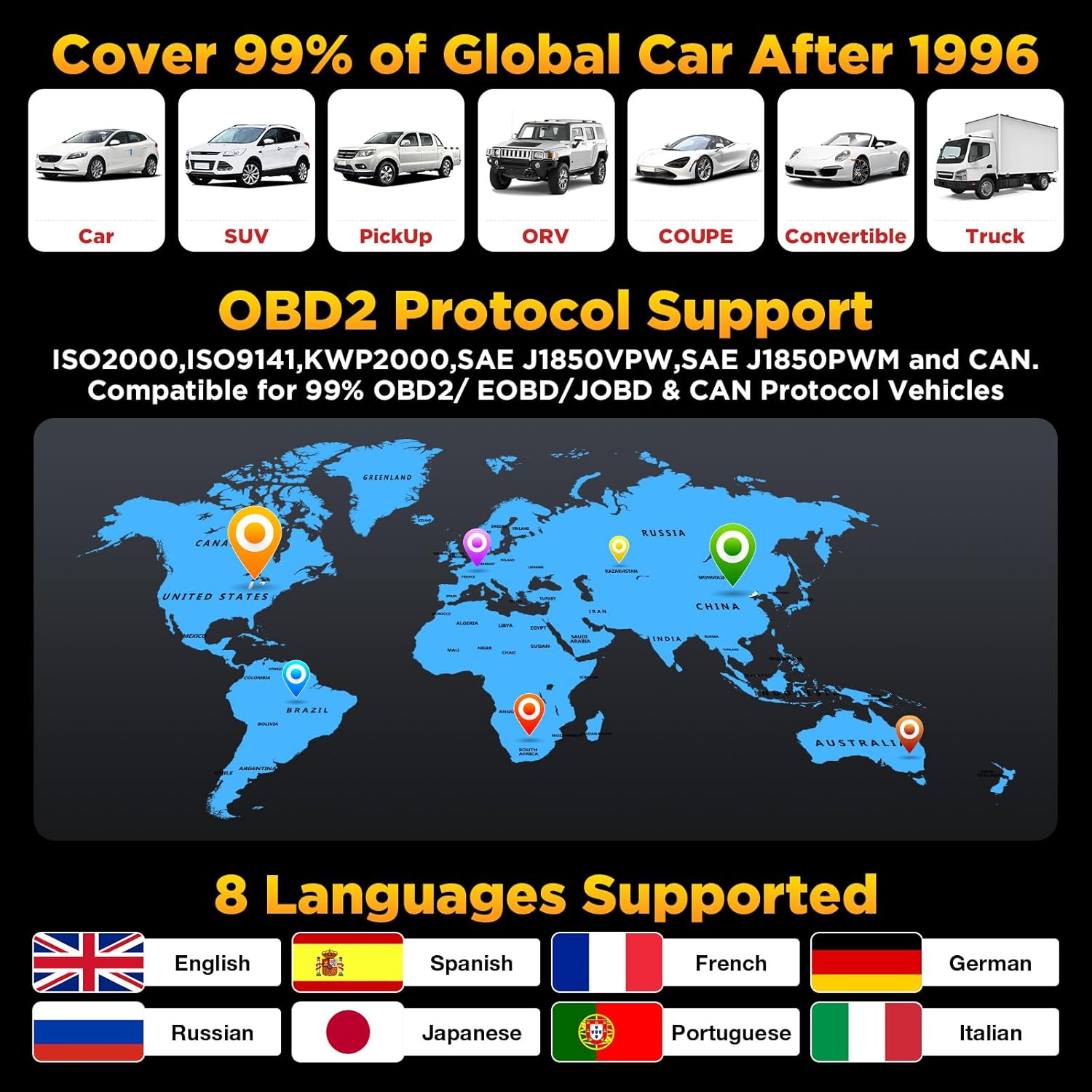
Ensure your vehicle supports OBD2 protocols and has a standard 16-pin data connector. Check the compliance label under the hood for OBD certification.
Verify the vehicle's wiring and fuses for any short circuits.
Try connecting the scanner to another OBD2-compliant vehicle to determine if the communication error persists.
Check Engine Light (MIL) Issues:
If the MIL is on, use the 'Read Codes' function to identify the specific DTCs. The scanner will help pinpoint the area to investigate.
If the engine is running erratically (stalling, poor acceleration, decreased fuel efficiency) even without the MIL, use 'Live Data Stream' to monitor parameters and identify values outside the normal range.
Remember, clearing codes only turns off the MIL; the underlying fault must be repaired to prevent the code from reappearing.
Software Update Problems:
Ensure your computer's operating system is compatible (Windows XP, 7, 8, or 10).
Verify your internet connection is strong and stable during the update process.
Double-check that the serial number entered for registration is correct.
Espesifikasyon
Modèl: LAUNCH Creader 3008 Plus
Ekspozisyon: 2.8-inch TFT True Color LCD
Sistèm operasyon: Linux
Koneksyon: OBD2 (integrated cable), USB-C (for PC connection)
Konpatibilite machin: US vehicles (1996 & newer), EU vehicles (2000 & newer), Asian vehicles (2008 & newer)
Lang ki sipòte: English, Spanish, French, German, Russian, Japanese, Portuguese, Italian
Pwa atik: 12.7 ons
Dimansyon pwodwi: 4.65 x 2.68 x 0.88 pous
Peyi orijin: Lachin
Garanti ak sipò
Garanti
The LAUNCH CR3008 Plus comes with a 5-year warranty, ensuring long-term reliability and peace of mind for your investment.
Sipò
For any technical assistance or inquiries, LAUNCH offers 24/7/365 technical support. Please refer to the contact information provided in your product packaging or on the official LAUNCH websit pou asistans dirèk.
Dokiman ki gen rapò - CR3008 Plus
LAUNCH CR3008 Plus Quick Start Guide A quick start guide for the LAUNCH CR3008 Plus OBD2 scanner, detailing components, controls, and basic diagnostic procedures for OBD II compliant vehicles.
LAUNCH CRP123E FAQ: Depanaj ak Sipò Kesyon yo poze souvan pou zouti dyagnostik otomobil LAUNCH CRP123E a, ki kouvri mizajou, anrejistreman, sipò lang, karakteristik, kontni pake a, depanaj, ak plis ankò.
Manyèl Itilizatè LAUNCH Creader Professional 123i - Gid Konplè Eksplore karakteristik ak fonksyònman zouti dyagnostik otomobil LAUNCH Creader Professional 123i a. Manyèl itilizatè sa a bay enstriksyon detaye sou dyagnostik machin, verifikasyon sistèm, mizajou ak paramèt.
LANSMAN CRP123X OBD2 Scanner: Enfòmasyon kle anvan acha Gid esansyèl ki kouvri 10 pwen enpòtan pou itilizatè eskanè LAUNCH CRP123X OBD2, tankou konpatibilite, mizajou, garanti, konsèy itilizasyon, ak akseswa ki enkli yo. Aprann sou karakteristik pwodwi a, sipò, ak règleman pou retounen machin.
Gid Pwosesis Mizajou LAUNCH CReader VII+ Yon gid etap pa etap sou kijan pou mete ajou zouti dyagnostik otomobil LAUNCH CReader VII+ la lè l sèvi avèk yon kat TF oswa yon kab USB. Gen ladan l enstriksyon pou telechaje lojisyèl, enstalasyon ak anrejistreman.