Entwodiksyon
This manual provides essential information for the proper setup, operation, and maintenance of your AODSK AD-X1 Digital Piano and ALP-22 Adjustable Piano Bench. Please read these instructions carefully before use to ensure optimal performance and longevity of your instruments.

Figure 1: Assembled AODSK AD-X1 Digital Piano and ALP-22 Adjustable Piano Bench.
Enstalasyon ak Asanble
Carefully unpack all components and ensure all parts are present before beginning assembly. Refer to the included hardware package for specific fasteners.
1. Digital Piano Assembly (AD-X1)
- Attach the four legs to the underside of the digital piano body using the provided screws. Ensure they are securely fastened.
- Insert the music rest into the designated slot on the top panel of the digital piano.
- Connect the sustain pedal or triple pedal unit to the appropriate port on the rear panel of the piano.

Figure 2: Digital Piano dimensions. Length: 53.15 inches, Depth: 12.2 inches, Height: 24.8 inches (without music rest).
2. Piano Bench Assembly (ALP-22)
- Attach the four legs to the base of the piano bench using the provided hardware.
- Ensure the height adjustment mechanism is properly aligned and functional.
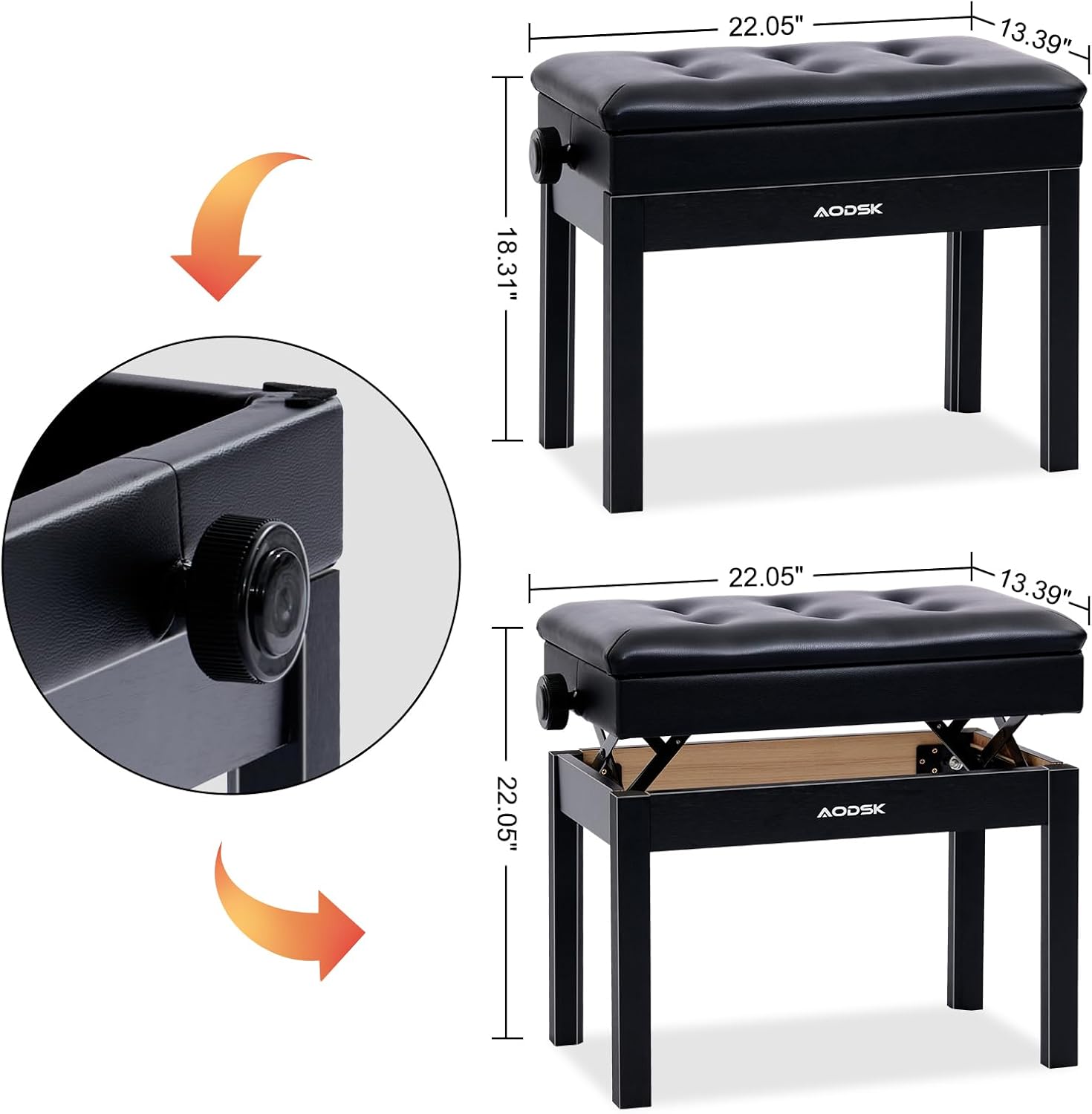
Figure 3: Piano Bench dimensions. Length: 22.05 inches, Width: 13.39 inches. Adjustable height range: 18.31 to 22.05 inches.
Operating the Digital Piano (AD-X1)
1. Power On/Off
- Connect the power adapter to the DC IN port (3) on the rear panel and plug it into a standard electrical outlet.
- Peze a POUVWA button on the control panel to turn the piano on or off.
2. Fonksyon Panel Kontwòl
The control panel provides access to various features and settings:

Figure 4: Digital Piano control panel with buttons for DEMO, RHYTHM, VOLUME, TONE, RECORD, SPLIT, TOUCH, RE-PLAY, CHORD, SYNC, METRONOME, START/STOP, POWER, and DATA WHEEL.
- DEMO: Plays built-in demonstration songs (80 available).
- RITM: Selects from 128 available rhythms.
- VOLIM: Adjusts the overall sound output level.
- TON: Selects from 128 available instrument timbres.
- DOSYE: Initiates recording of your performance.
- DIVIZYON: Divides the keyboard into two sections for different voices.
- MANYEN: Adjusts touch sensitivity of the keys.
- RE-PLAY: Plays back recorded performances.
- KORD: Activates chord recognition mode.
- SYNC: Synchronizes rhythm playback.
- METRONOME: Activates the metronome function for practice.
- K STARTMANSE / SISPANN: Starts or stops rhythm/demo playback.
- DATA WHEEL: Used to navigate menus and adjust values.
3. Headphone Mode
To practice privately, connect headphones to the Headphone Jack (1) on the rear panel. The internal speakers will automatically mute.

Figure 5: Headphone jack for private practice.
4. Koneksyon
The rear panel offers various connection options:
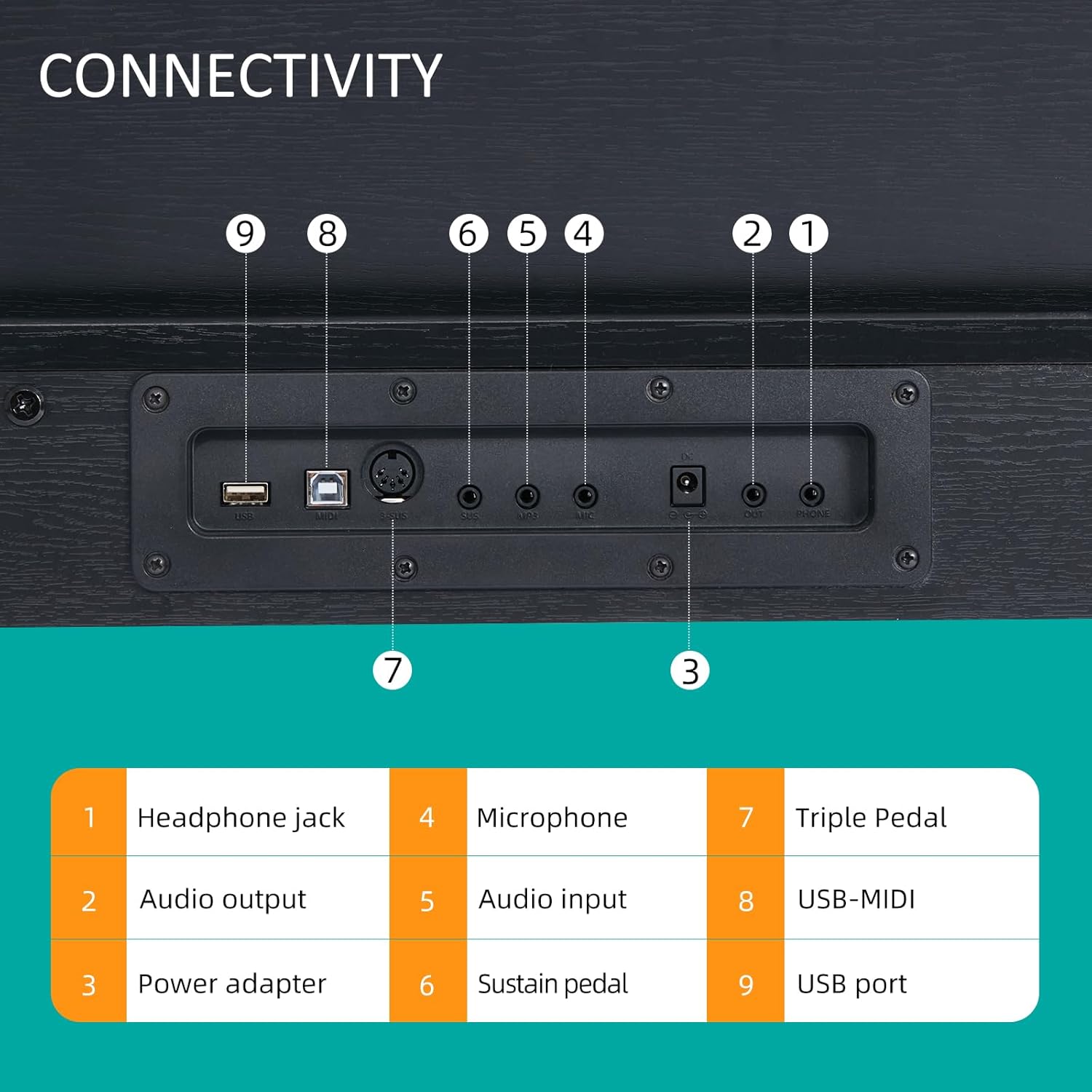
Figure 6: Connectivity panel with labeled ports.
- 1. Pak pou kas ekoutè: Pou konekte kas ekoutè (3.5mm).
- 2. Sòti odyo: Pou konekte ak ekstèn amplification systems or recording devices.
- 3. Power Adapter: DC IN port for the power supply.
- 4. Mikwofòn: Input for a microphone.
- 5. Antre odyo: Pou konekte sous odyo ekstèn yo.
- 6. Sustain Pedal: Input for a single sustain pedal.
- 7. Triple Pedal: Input for the included triple pedal unit.
- 8. USB-MIDI: For connecting to a computer or MIDI devices.
- 9. Port USB: Pou konekte aparèy depo USB oswa lòt periferik.
Operating the Piano Bench (ALP-22)
1. Ajisteman Wotè
The ALP-22 piano bench features an adjustable height mechanism. Locate the knob on the side of the bench. Rotate the knob to raise or lower the seat to your desired height. The adjustable range is from 18.31 inches to 22.05 inches.

Figure 7: Adjusting the piano bench height using the side knob.
2. Lòj Depo
The padded seat of the ALP-22 bench can be lifted to reveal a storage compartment. This space is suitable for storing sheet music, books, and small accessories.

Figure 8: Storage compartment beneath the piano bench seat.
Antretyen
1. Netwayaj
- Wipe the surfaces of the digital piano and bench with a soft, dry cloth.
- Pou pousyè tè ki difisil pou retire, yon ti kras dampen the cloth with water and a mild, non-abrasive cleaner. Avoid harsh chemicals or solvents.
- Do not allow liquids to enter the piano's internal components.
2. Depo
- Store the instruments in a dry environment, away from direct sunlight and extreme temperature fluctuations.
- Avoid placing heavy objects on the piano or bench.
Depanaj
- Pa gen son:
- Asire w adaptè kouran an byen konekte epi pyano a limen.
- Tcheke nivo volim.
- Si kas ekoutè yo branche, debranche yo pou aktive pwodiksyon oratè a.
- Verify external audio connections if using an amplifier.
- Kle yo pa reponn:
- Restart the piano.
- Ensure no foreign objects are lodged between the keys.
- Pedal Not Functioning:
- Check that the pedal cable is securely connected to the correct port on the piano's rear panel.
Espesifikasyon
AODSK AD-X1 Digital Piano
| Karakteristik | Spesifikasyon |
|---|---|
| Non modèl | AD-X1 |
| Kantite kle | 88 Standard Keys (A2-C5 range) |
| Max Polyphony | 128 |
| Timbres | 128 |
| Ritm | 128 |
| Chante Demo | 80 |
| Koneksyon | 3.5mm Headphone Jack, Audio Output, Microphone Input, Audio Input, Sustain Pedal Input, Triple Pedal Input, USB-MIDI, USB Port |
| Sous pouvwa | Fil elektrik |
| Fini Kalite | Mat |
| Nivo konpetans | debutan |
AODSK ALP-22 Adjustable Piano Bench
| Karakteristik | Spesifikasyon |
|---|---|
| Non modèl | ALP-22 |
| Ranje Wotè reglabl | 18.31'' - 22.05'' |
| Materyèl chèz | Padded, High-elastic sponge |
| Depo | Integrated compartment under seat |
Garanti ak sipò
For warranty information or technical support, please refer to the documentation included with your purchase or contact AODSK customer service directly. Keep your purchase receipt as proof of purchase.


