1. Entwodiksyon
This manual provides detailed instructions for the operation and maintenance of the LAUNCH CRP129E Plus OBD2 Scanner. Please read this manual thoroughly before using the device to ensure proper and safe operation. The CRP129E Plus is a comprehensive diagnostic tool designed for automotive professionals and enthusiasts, offering full system diagnostics and various service reset functions.
2. Pwodwi souview
2.1. Konpozan aparèy
The LAUNCH CRP129E Plus features a user-friendly interface with a 5-inch touchscreen and physical buttons for navigation.

Imaj 2.1: The LAUNCH CRP129E Plus OBD2 Scanner and its protective carrying case.
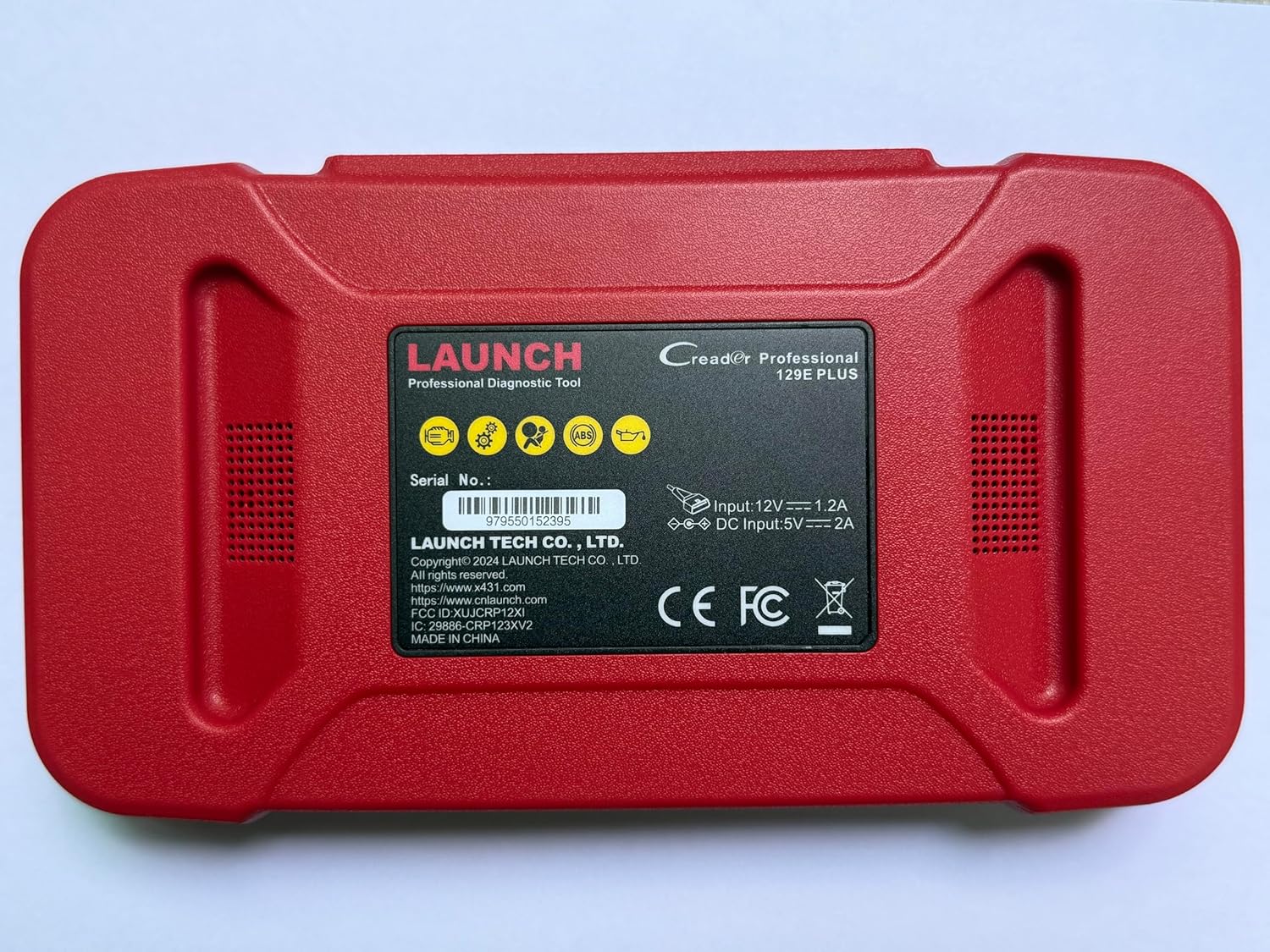
Imaj 2.2: Dèyè view of the CRP129E Plus, displaying input voltage, current specifications, and serial number (e.g., 979550152395).
2.2. Pake kontni
Upon unboxing, verify that all items listed below are present:
- CRP129E PLUS OBD2 Scanner (x1)
- OBDII Cable (x1)
- 5V DC Charging Cable (x1)
- Manyèl itilizatè (x1)
- Gid Quick Start (x1)
- Sak pou pote (x1)

Imaj 2.3: Visual representation of the CRP129E Plus package contents.
3. Enstalasyon ak Premye Itilizasyon
3.1. Chaje Aparèy la
Before first use, ensure the device is fully charged using the provided 5V DC charging cable. Connect the cable to the device and a suitable power source.
3.2. Powering On / Off
- Pouvwa sou: Peze epi kenbe bouton pouvwa a jiskaske ekran an limen.
- Pouvwa Off: Press and hold the power button, then select "Power Off" from the options.
3.3. Konekte ak Veyikil la
Locate the vehicle's OBDII port, typically under the dashboard on the driver's side. Connect the provided OBDII cable from the CRP129E Plus to the vehicle's OBDII port. Ensure the vehicle's ignition is in the ON position (engine off or running, depending on the diagnostic task).
3.4. Wi-Fi Connection and Updates
The CRP129E Plus supports one-click Wi-Fi updates. Connect the device to a stable Wi-Fi network to download the latest software and vehicle data. Regular updates ensure compatibility with new vehicle models and improved diagnostic functions.
- From the main menu, tap "Settings".
- Select "WLAN" and connect to an available network.
- Return to the main menu and tap "Upgrade".
- Select the desired software updates and tap "Update".

Imaj 3.1: The device interface showing options for updates, DTC lookup, live data stream, and battery test.
4. Operasyon Enstriksyon
4.1. Auto VIN Scan
The device can automatically identify vehicle information. After connecting to the vehicle, select "Diagnose" and the device will attempt an Auto VIN scan to quickly identify the vehicle's make, model, and year.

Imaj 4.1: Visual representation of the Auto VIN scan process and systems covered by diagnosis.
4.2. Dyagnostik Sistèm Konplè
The CRP129E Plus can access and diagnose all available vehicle systems. This includes, but is not limited to, Engine, ABS, SRS, SAS, TCM, TPMS, Body, Chassis, Powertrain, Fuel System, and Lighting System.
- Nan meni prensipal la, chwazi "Dyagnostik".
- Choose "Health Report" or select specific systems for diagnosis.
- The device will scan for Diagnostic Trouble Codes (DTCs) and display results.
- You can read fault codes, clear fault codes, and view live data streams.

Imaj 4.2: Plis paseview of the comprehensive system diagnostic capabilities.
4.3. OBD2 Functions
The device supports all 10 modes of OBDII testing for emissions-related issues.
- Li/Efase DTC yo: Retrieve and erase diagnostic trouble codes.
- Kouran Done An Dirèk: View real-time data from the vehicle's sensors.
- Preparasyon I/M: Check the status of emission-related monitors.
- Friz done ankadreman: View a snapshot of vehicle conditions when a fault code was set.
- Tès Capteur O2: Rekipere rezilta tès monitè detèktè O2 a.
- Tès Monitè Abò: Retrieve results for emission-related powertrain components.
- Tès Sistèm EVAP: Initiate a test of the evaporative emission system.
- Enfòmasyon sou machin: Retrieve vehicle identification number (VIN), calibration ID, and calibration verification number (CVN).
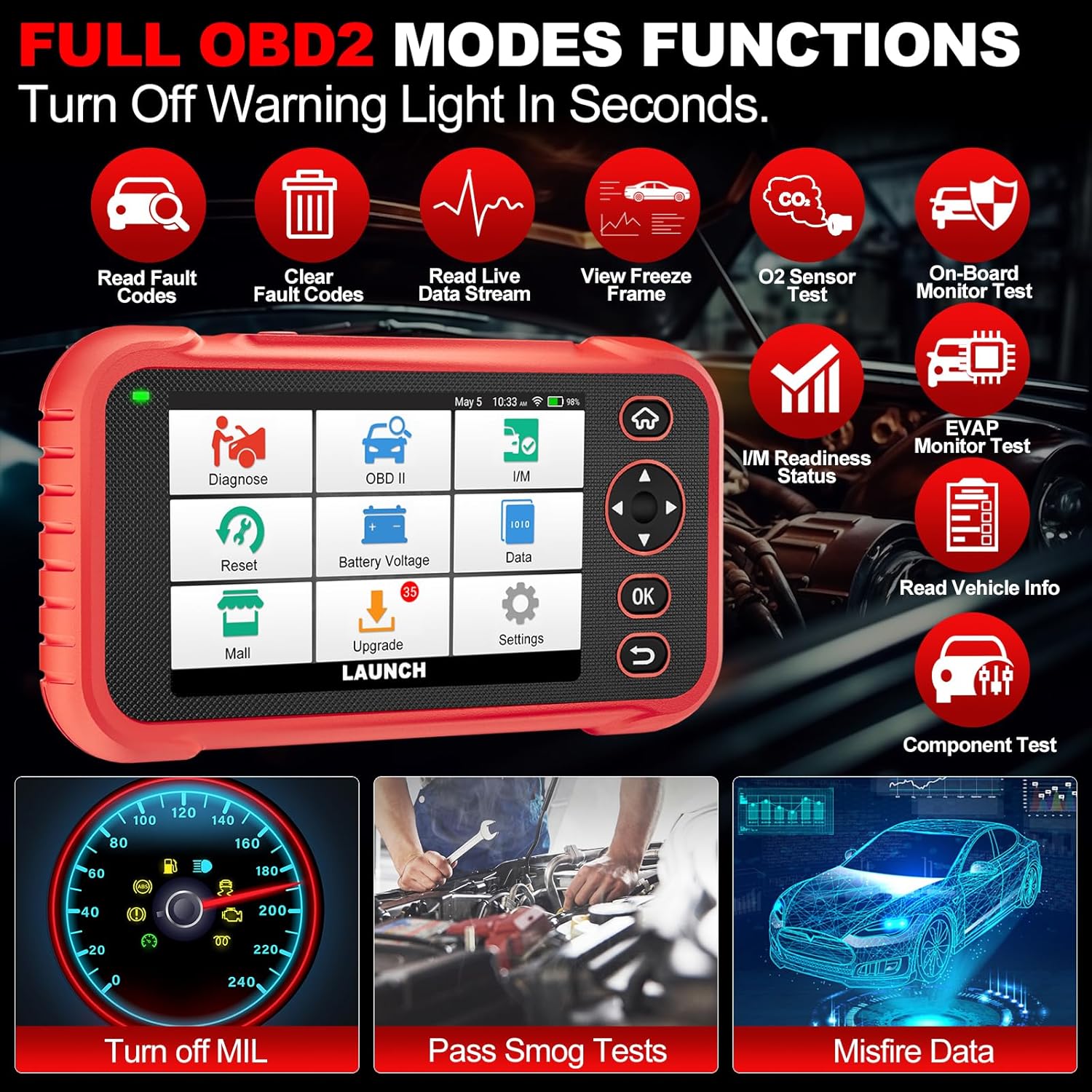
Imaj 4.3: Main menu options for OBD2 functions.
4.4. Service Reset Functions
The CRP129E Plus offers 12+ essential service reset functions for common maintenance tasks.
- Reset lwil oliv: Reyajiste sistèm lavi lwil la apre yon chanjman lwil.
- Adaptasyon akseleratè: Inisyalize aktuateur akseleratè yo nan eta defo a.
- Reyajiste Adblue: Resets the urea after the diesel exhaust fluid (AdBlue) is replaced or refilled.
- Headlamp Matching: Calibrates the adaptive front lighting system.
- TPMS Reyajiste: Resets tire pressure monitoring system sensors.
- Reyajisteman SAS: Kalibre detèktè ang volan an.
- Matche batri (BMS Reyajiste): Anrejistre ranplasman nouvo batri.
- Reyajisteman A/F: Ajiste paramèt rapò lè/gaz.
- D-P-F Regeneration: Clears particulate matter from the DPF filter.
- Kodaj enjektè: Kode nouvo nimewo enjektè yo nan ECU a.
- Reyajisteman EPB: Reyajiste plaket fren pakin elektwonik yo apre ranplasman.
- Senyen nan ABS: Fè senyen sistèm fren an.

Imaj 4.4: Plis paseview of available service reset functions.
4.5. Live Data Graphing and Recording
The device can display live data streams in merged quadrant graphs, allowing for comprehensive analysis of up to four parameters simultaneously. Data can also be recorded and played back for further review.

Imaj 4.5: Example of 4-in-1 live data graphing and diagnostic report generation.
4.6. Battery Voltage Tès
Monitor the vehicle's battery voltage in real-time to assess its status and identify potential issues.

Imaj 4.6: Batri voltage test interface and other diagnostic support features.
5. Antretyen
- Netwayaj: Sèvi ak yon twal mou epi sèk pou netwaye aparèy la. Evite pwodui netwayaj abrazif oswa solvan.
- Depo: Sere aparèy la nan bwat transpò li nan yon kote ki fre epi sèk lè w pa ap itilize li.
- Mizajou lojisyèl: Regularly check for and install software updates via Wi-Fi to ensure optimal performance and vehicle compatibility.
- Swen batri: Avoid fully discharging the battery frequently. Charge the device regularly, even if not in active use, to maintain battery health.
NAN. Depanaj
| Pwoblèm | Kòz posib | Solisyon |
|---|---|---|
| Aparèy pa limen. | Pil ki fèb; bouton pouvwa a gen pwoblèm. | Charge the device for at least 30 minutes. If issue persists, contact support. |
| Erè kominikasyon ak machin nan. | Loose OBDII connection; vehicle ignition off; incompatible vehicle protocol. | Ensure cable is securely connected. Turn ignition to ON. Verify vehicle compatibility. |
| Unable to update software. | No Wi-Fi connection; unstable internet; insufficient storage. | Check Wi-Fi connection. Ensure stable internet. Free up storage if necessary. |
| Ekran an pa reponn. | Pwoblèm lojisyèl; domaj fizik. | Restart the device. If issue persists, contact support. |
7. Espesifikasyon
- Modèl: CRP129E PLUS
- Sistèm operasyon: Android 7.0
- Ekspozisyon: 5-pous tactile
- memwa: 16GB
- Batri: 6100mAh
- Koneksyon: Wi-Fi
- Dimansyon: 7.09 x 6.3 x 2.36 pous
- Pwa atik: 2.27 liv
- Pwotokòl Sipò pou: OBDII/EOBD
- Kouvèti machin: Over 85 brands (1996-2025)
- UPC: 884508007774

Imaj 7.1: Summary of key hardware and software specifications.

Imaj 7.2: Extensive vehicle brand coverage and multi-language support.
8. Garanti ak sipò
The LAUNCH CRP129E Plus comes with a manufacturer's warranty. Please refer to the official LAUNCH websit la oswa dokiman acha ou a pou tèm ak kondisyon garanti espesifik yo.
- Garanti: 5 Years (as per product information)
- Return/Replace Policy: 90 Days (as per product information)
- Sipò teknik: 24/7 technical support is available. For assistance, please contact LAUNCH customer service.
- Kòmantè sou entènèt: The device supports online feedback for quick resolution of diagnostic issues.
For further assistance or to provide feedback, please visit the official LAUNCH support channels.


