Entwodiksyon
This manual provides detailed instructions for the setup, operation, and maintenance of your CZEview ZY-D4 5Ghz WiFi Security Camera. Please read this document thoroughly before using the product to ensure proper functionality and safety. This indoor camera is designed for monitoring pets, babies, or general home security, featuring advanced capabilities such as 4K resolution, pan/tilt control, AI motion detection, auto-tracking, two-way audio, and night vision.

CZE aview ZY-D4 5Ghz WiFi Security Camera, shown in white, features a spherical camera head on a cylindrical base. A smartphone screen next to it displays a live feed of a kitchen scene with a person and a dog, highlighting 3K 5MP resolution and 5G connectivity.
Kontni pake
Verifye ke tout atik yo prezan nan pakè ou a:
- CZEview ZY-D4 Security Camera
- Adaptè kouran (elektrik ak fil)
- Mounting Accessories (for Ceiling Mount)
- Manyèl Itilizatè (dokiman sa a)
Gid Enstalasyon
1. Limen Kamera a
- Konekte adaptè kouran ki vini ak li a nan pò antre kouran kamera a.
- Plug the power adapter into a standard electrical outlet. The camera will power on and initiate its self-test sequence.

An illustration of the CZEview ZY-D4 camera highlighting its dual-band 2.4 GHz and 5 GHz Wi-Fi connectivity, ensuring stable network performance.
2. Enstalasyon Aplikasyon an ak Kreyasyon Kont
- Download the "Elemage Cam" app from your device's app store (compatible with Android and iOS).
- Louvri aplikasyon an epi swiv enstriksyon ki sou ekran an pou kreye yon nouvo kont oubyen konekte si ou deja genyen youn.
3. Konekte ak Wi-Fi
- In the Elemage Cam app, tap the "+" icon to add a new device.
- Chwazi modèl kamera ou nan lis la.
- Ensure your smartphone is connected to the 2.4GHz or 5GHz Wi-Fi network you intend to use for the camera. The camera supports both bands.
- Enter your Wi-Fi password accurately. Incorrect passwords are a common setup issue.
- Follow the app's instructions to scan the QR code displayed on your phone with the camera lens, or listen for an audible pairing prompt.
- Wait for the camera to connect to the Wi-Fi network. A voice prompt or indicator light change will confirm successful connection.
4. Enstalasyon kat mikwo SD (si ou vle)
To install a Micro SD card for local storage:
- Gently tilt the camera lens upwards to reveal the Micro SD card slot and reset button.
- Insert the Micro SD card into the slot with the contacts facing down until it clicks into place.
- The camera will automatically detect and format the card.
5. Enstalasyon Kamera a (Si ou vle)
The camera can be placed on a flat surface or ceiling-mounted. For ceiling mounting:
- Use the provided mounting bracket as a template to mark drill holes on the ceiling.
- Drill pilot holes if mounting into wood, or use appropriate anchors for other materials.
- Secure the mounting bracket, then attach the camera to the bracket.
Enstriksyon Operasyon
Viv View ak Kontwòl Pan/Tilt
- Open the Elemage Cam app and select your camera to view manje a ap viv.
- Glise sou live la view screen to control the camera's 355° pan and 100° tilt rotation.

Yon te eksploze view diagram of the CZEview ZY-D4 camera, illustrating its internal components including the lens, circuit board, and motor mechanisms for pan and tilt functionality.
De-fason odyo
- Tape ikòn mikwofòn nan nan an dirèk aplikasyon an view to speak through the camera.
- Tape ikòn oratè a pou koute odyo ki soti nan anviwònman kamera a.

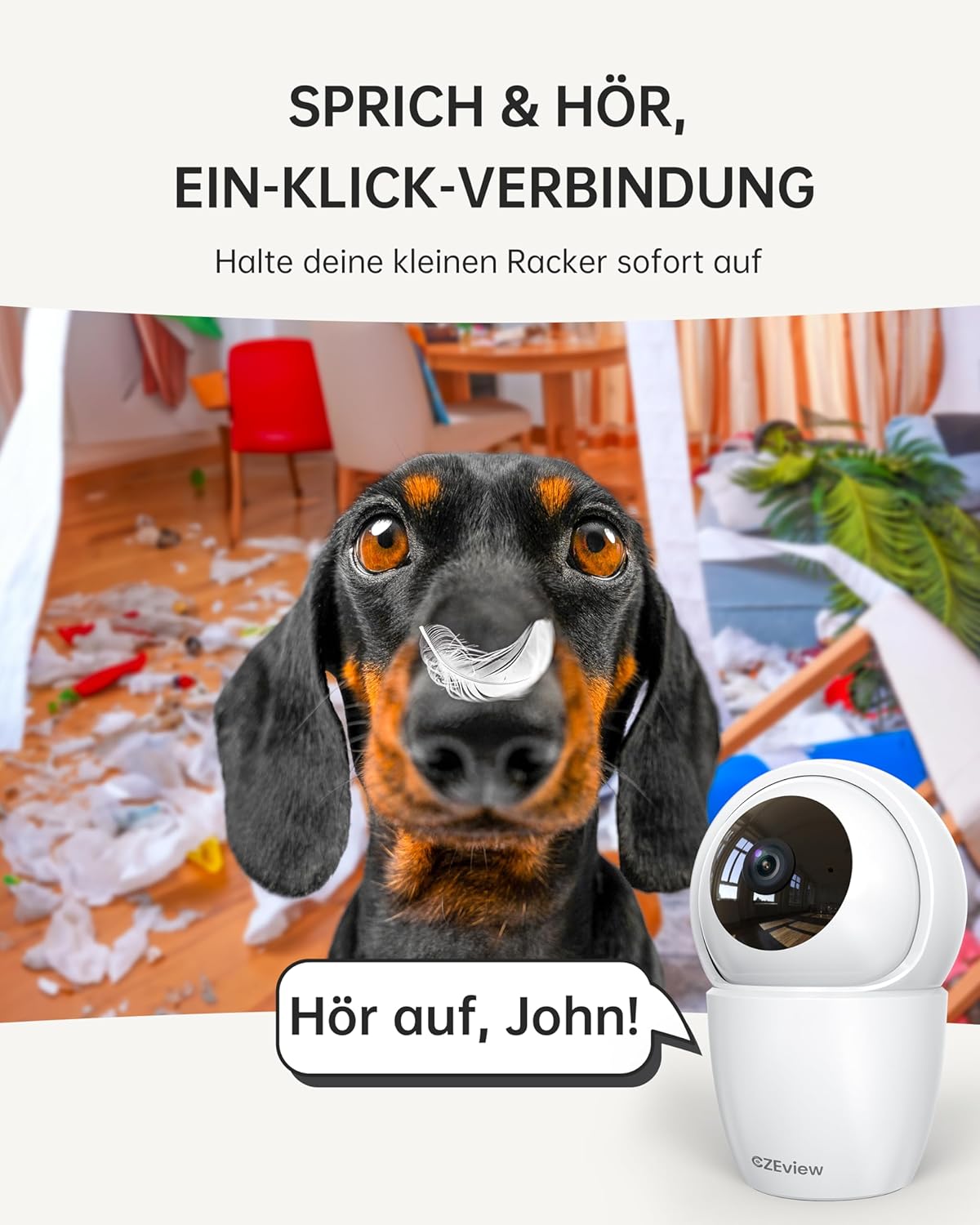
A CZEview ZY-D4 camera positioned in a room with a mischievous dog, illustrating the two-way talk feature with a speech bubble saying 'Hör auf, John!' (Stop, John!), indicating remote communication.
Motion Detection and Auto Tracking
- Enable motion detection in the app settings to receive alerts on your phone.
- When motion is detected, the camera will automatically track the moving object and begin recording.
Two children interacting in a kitchen, with the CZEview ZY-D4 camera in the foreground. Overlays show 'Alert Message motion [Kitchen]' and 'Alert Message decibel [Kitchen]', demonstrating AI motion and sound detection with auto-tracking.
Vizyon lannwit
- The camera automatically switches to night vision mode in low-light conditions, providing clear black and white video.

A smartphone displaying a black and white night vision feed from the CZEview ZY-D4 camera, showing a dog sleeping on a blanket, with '3K 5MP ULTRASCHARF' (ultra-sharp) and '4x ZOOM VERBESSERUNG' (zoom enhancement) labels.
Mode konfidansyalite
- Activate privacy mode via the app to deactivate the camera lens and stop recording, ensuring your privacy when needed.

A family in a living room with the CZEview ZY-D4 camera. A smartphone screen shows a message 'The lens is disabled, unable to view stream and record.', illustrating the camera's privacy mode.
Antretyen
- Netwayaj: Use a soft, dry cloth to clean the camera lens and body. Avoid abrasive cleaners or solvents, which can damage the device.
- Mizajou mikrolojisyèl: Regularly check the Elemage Cam app for available firmware updates. Installing updates ensures optimal performance, security enhancements, and access to new features.
- Jesyon Depo: If using a Micro SD card, periodically review ak jere ki estoke footage. The app provides options for formatting the card or managing cloud storage subscriptions as needed.
Depanaj
- Kamera a pa konekte ak Wi-Fi a:
- Asire w ke modpas Wi-Fi ou a kòrèk.
- Verify your router is broadcasting a 2.4GHz or 5GHz network.
- Move the camera closer to the router during initial setup to ensure a strong signal.
- Reset the camera using the reset button (located near the SD card slot) and attempt the setup process again.
- Move kalite videyo:
- Check your Wi-Fi signal strength. A weak signal can significantly affect video streaming quality.
- Ensure the camera lens is clean and free from any obstructions.
- Motion alerts are unreliable:
- Adjust motion detection sensitivity in the app settings to suit your environment.
- Ensure the camera has a stable Wi-Fi connection.
- Check app notification settings on your smartphone to ensure they are enabled.
- Odyo bidireksyonèl la pa fonksyone:
- Check microphone and speaker permissions for the Elemage Cam app on your phone.
- Asire w ke mikwofòn ak oratè kamera a pa bloke.
Espesifikasyon
| Karakteristik | Detay |
|---|---|
| Non modèl | ZY-D4 |
| Mak | CZEview |
| Itilizasyon Andedan kay la / Deyò | Andedan kay la |
| Koneksyon Teknoloji | Wi-Fi (2.4GHz & 5GHz Dual Band) |
| Rezolisyon Capture Videyo | 1920p (4K) |
| Rezolisyon toujou efikas | 5 MP |
| Pan / Panche Range | 355° Pan, 100° Panche |
| Karakteristik espesyal | Night Vision, Motion Sensor, Dual Band, Two-Way Talk, Auto Tracking, AI Detection |
| Sous pouvwa | Fil elektrik |
| Aparèy konpatib | Android, iOS |
| Kalite kontwolè | Elemage Cam App |
| Kalite aliye | Mòn plafon |
| Dimansyon pwodwi | 2.36 x 1.97 x 5.12 pous |
| Pwa atik | 11.3 ons |
| Rating Pwoteksyon Entènasyonal | IP65 (Note: This rating is typically for outdoor use, but the product is specified for Indoor use.) |
Enfòmasyon sou Garanti
CZEview products typically come with a limited manufacturer's warranty. For specific warranty terms and conditions, including duration and coverage, please refer to the warranty card included with your product or visit the official CZEview websit la. Li rekòmande pou konsève resi acha ou kòm prèv acha pou nenpòt reklamasyon garanti.
Sipò pou Kliyan
If you encounter any issues, have questions not covered in this manual, or require technical assistance, please contact CZEview customer support. You can typically find support options within the Elemage Cam app or by visiting the official CZEview websit pou enfòmasyon kontak.
Resous sou entènèt: CZEview Magazen Amazon