Entwodiksyon
This manual provides detailed instructions for the safe and efficient operation of your boAt Partypal 390 Bluetooth Speaker. Please read this manual thoroughly before using the product and retain it for future reference. The Partypal 390 is a powerful portable speaker designed for various audio needs, featuring 160W boAt Signature Sound, multiple connectivity options, and integrated LED lighting.
Enfòmasyon sou Sekirite
- Pa ekspoze oratè a nan tanperati ekstrèm, limyè solèy dirèk, oswa imidite ki wo.
- Evite jete oswa soumèt oratè a nan gwo enpak.
- Pa eseye demonte, repare, oswa modifye oratè a tèt ou. Kontakte pèsonèl sèvis kalifye pou asistans.
- Keep the speaker away from water and other liquids. Although it is waterproof, prolonged submersion or exposure to high-pressure water jets should be avoided.
- Sèvi sèlman ak kab chaje ki vini ak li a oswa yon kab ekivalan sètifye.
- Asire w ke gen bon vantilasyon lè w ap itilize oratè a.
- Netwaye oratè a avèk yon twal mou epi sèk. Pa sèvi ak pwodui netwayaj abrazif oswa solvan.
Kontni pake
Verifye ke tout atik ki nan lis anba a yo prezan nan pakè ou a:
- boAt Partypal 390 Speaker
- Chaje kab
- Manyèl itilizatè
- Kat Garanti
Pwodwi souview
The boAt Partypal 390 is a versatile Bluetooth speaker featuring powerful audio output and dynamic LED lighting. Below are key visual references and descriptions of its components.
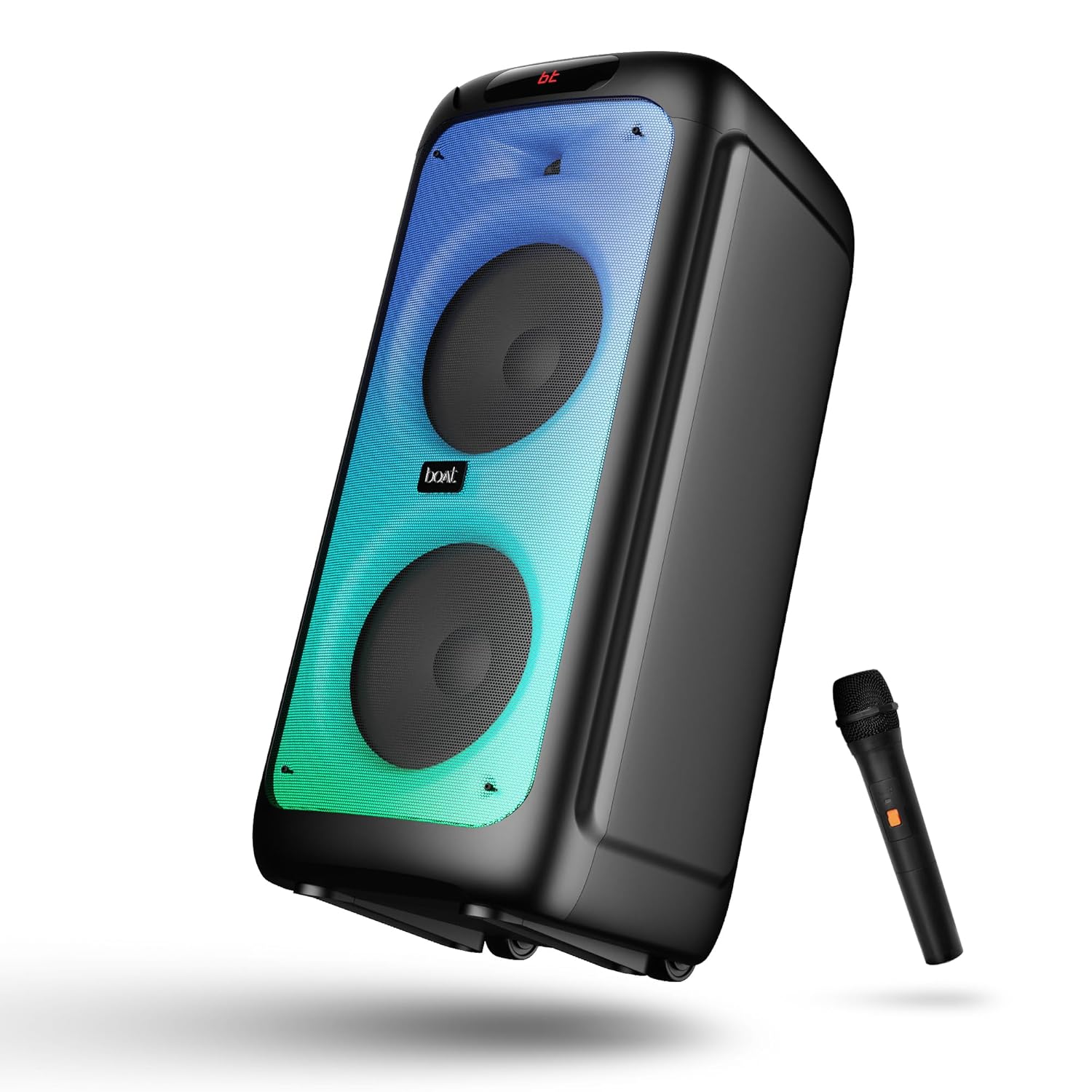
Figi 1: Devan view of the boAt Partypal 390 speaker, showcasing its dual speaker design, integrated flame LEDs, and the included wired microphone.

Figi 2: Top panel of the speaker displaying the control buttons and various input ports including USB, AUX, Guitar In, Mic 1, Mic 2, and the USB Type-C charging port. Also shown are dedicated controls for Bass/Treble, LED modes, and volume.
Karakteristik kle:
- Son siyati bato 160W: Bay yon odyo pwisan ak klè.
- Flame LEDs: Dynamic lighting effects to enhance the listening experience.
- Koneksyon miltip: Bluetooth v5.3, AUX, USB, and TF card support.
- Fonksyonalite Karaoke: Two microphone input ports for vocal performances.
- Antre gita: Dedicated port for connecting a guitar.
- Mòd EQ: Pre-set sound modes (Normal, Party, Pop, Rock, Jazz) for different audio preferences.
- Mòd TWS: Allows wireless connection of two Partypal speakers for stereo sound.
- Kontwòl Bass ak Treble: Adjustable audio settings for personalized sound.
- Long Playback: Jiska 6 èdtan nan lavi batri.
Enstalasyon
1. Chaje Oratè a
Before first use, fully charge the speaker. Connect the provided USB Type-C charging cable to the speaker's charging port and the other end to a compatible USB power adapter (not included). The charging indicator will show the charging status. A full charge provides up to 6 hours of playback.

Figi 3: The speaker in an outdoor setting, illustrating its portability and battery life.
2. Power On/Off
- To power on, press and hold the Power button located on the control panel until the display illuminates.
- Pou etenn li, peze epi kenbe bouton Power la ankò jiskaske ekran an etenn.
3. Premye koneksyon Bluetooth
- Ensure the speaker is powered on and in Bluetooth mode. The display will show "bt" and the Bluetooth indicator will flash, indicating it's ready for pairing.
- Sou aparèy mobil ou, aktive Bluetooth epi chèche aparèy ki disponib.
- Select "boAt Partypal 390" from the list of devices.
- Once paired, the speaker will emit a confirmation sound, and the Bluetooth indicator will stop flashing.
Enstriksyon Operasyon
1. Seleksyon mòd
Press the "Mode" button on the control panel to cycle through available input modes: Bluetooth, AUX, USB, and TF Card.
2. Bluetooth mòd
- Apre koneksyon an reyisi, odyo ki soti nan aparèy ki konekte a ap jwe nan oratè a.
- Use the volume knob on the speaker or your connected device to adjust the volume.
- Use the Previous/Next buttons to skip tracks.
- Peze bouton Jwe/Pòz la pou kontwole lekti a.
3. AUX Mode
- Connect an audio device to the AUX input port using a 3.5mm audio cable.
- Switch the speaker to AUX mode using the "Mode" button.
- Kontwole lekti ak volim nan depi aparèy konekte ou an.
4. USB/TF Card Mode
- Mete yon kle USB nan pò USB a oubyen yon kat TF nan fant kat TF la.
- Oratè a pral otomatikman chanje an mòd USB oswa kat TF epi li pral kòmanse jwe odyo. files. If not, switch manually using the "Mode" button.
- Use the Previous/Next buttons to navigate tracks and Play/Pause for playback control.
5. Karaoke Function (Microphone Input)
- Connect up to two wired microphones to the "MIC 1" and "MIC 2" input ports.
- Adjust microphone volume using the dedicated MIC VOL knob.
- Adjust microphone echo effect using the ECHO knob.
6. Antre gita
- Connect a guitar to the "GUITAR IN" port.
- Adjust guitar volume using the dedicated GUITAR VOL knob.
7. Mòd EQ yo
The speaker offers several pre-set equalizer modes to optimize audio for different content types. Press the "EQ" button to cycle through:
- Nòmal
- Pati
- Pop
- Wòch
- Jazz

Figi 4: Visual representation of the available EQ modes for sound customization.
8. Mòd TWS (Vrè Stereo san fil)
To connect two Partypal 390 speakers for a stereo audio experience:
- Ensure both speakers are powered on and in Bluetooth mode, but not yet paired to any device.
- On one speaker (this will be the primary speaker), press and hold the TWS button. The speaker will emit a sound indicating it's searching for another speaker.
- De oratè yo ap konekte otomatikman youn ak lòt. Yon son konfimasyon ap endike koneksyon TWS la reyisi.
- Now, pair your mobile device to the primary speaker via Bluetooth as described in the "Initial Bluetooth Pairing" section. Audio will play in stereo through both speakers.

Figi 5: Two Partypal 390 speakers wirelessly connected, demonstrating the TWS feature.
9. dirije kontwòl
Press the "LED Mode" button to cycle through different flame LED lighting effects or to turn them off.
10. Bass and Treble Controls
Use the dedicated Bass and Treble knobs on the control panel to adjust the low and high frequencies of the audio output according to your preference.
Antretyen
- Netwayaj: Sèvi ak yon twal mou, sèk, ki pa gen pousyè pou netwaye deyò oratè a. Pa sèvi ak pwodui netwayaj likid, ayewosòl, oswa solvan.
- Depo: Lè w pa itilize oratè a pou yon bon bout tan, sere l nan yon kote ki fre epi sèk, lwen limyè solèy dirèk ak tanperati ekstrèm.
- Swen batri: Pou pwolonje lavi batri a, evite dechaje nèt oratè a souvan. Chaje l regilyèman, menm si w pa ap itilize l.
Depanaj
| Pwoblèm | Kòz posib | Solisyon |
|---|---|---|
| Oratè a pa limen. | Pil fèb; Bouton pouvwa a pa byen peze. | Chaje oratè a nèt. Peze epi kenbe bouton Pouvwa a pandan kèk segonn. |
| Pa gen son. | Volim twò ba; Mòd antre ki pa kòrèk; Aparèy la pa konekte. | Increase speaker and device volume. Ensure correct mode is selected (Bluetooth, AUX, USB, TF). Re-pair Bluetooth device or check cable connections. |
| Bluetooth appariement echwe. | Oratè a pa an mòd koneksyon; Aparèy la twò lwen; Entèferans. | Ensure speaker is in Bluetooth pairing mode (flashing "bt"). Move device closer to speaker. Turn off other Bluetooth devices. Forget "boAt Partypal 390" on your device and try pairing again. |
| Mikwofòn pa mache. | Microphone not connected properly; MIC VOL too low. | Ensure microphone is securely plugged into MIC 1 or MIC 2 port. Increase the MIC VOL knob. |
| Koneksyon TWS la echwe. | Speakers already paired to a device; Speakers too far apart. | Ensure both speakers are not connected to any Bluetooth device. Place speakers within close proximity. Repeat TWS pairing steps. |
Espesifikasyon
Below are the technical specifications for the boAt Partypal 390 speaker:
| Non modèl | Partypal 390 |
| Kalite Oratè | Miltimedya, Kanpe atè |
| Pouvwa Sòti Audio | 160 Watts |
| Koneksyon Teknoloji | Bluetooth v5.3, AUX, USB, Kat TF |
| Gamme Bluetooth | Jiska 10 mèt |
| Lavi batri | Jiska 6 èdtan |
| Kapasite batri | 7500 mAh (Lead Acid) |
| Dimansyon pwodwi (D x W x H) | 70P x 32W x 32H santimèt |
| Pwa atik | 10.8 kg |
| Nivo rezistans dlo | Ki enpèmeyab |
| Konpozan ki enkli | Speaker, Charging Cable, User Manual, Warranty Card |

Figi 6: Diagram illustrating the physical dimensions of the Partypal 390 speaker.
Garanti ak sipò
Your boAt Partypal 390 speaker comes with a limited warranty. Please refer to the included Warranty Card for specific terms and conditions, including the warranty period and coverage details. For technical support, service, or warranty claims, please contact boAt customer service through their official websit la oswa enfòmasyon kontak ki sou kat garanti ou a.
For more information, visit the official boAt store: Magazen boAt sou Amazon


