Entwodiksyon
The DECATHLON W500M Running Stopwatch is designed for everyday use and to assist in improving interval training performance. This manual provides detailed instructions on how to set up, operate, and maintain your stopwatch, ensuring optimal use and longevity.
Pwodwi souview
The W500M stopwatch offers a range of features to enhance your training experience:
- Parameter Measurement: Includes stopwatch function with history, backlighting, alarm, and date display.
- Coaching Features: Interval mode with 5 customizable phases for structured training.
- Dirab: Waterproof to 5 ATM (50 meters), with buttons usable at the surface while swimming.
- Pèsonalizasyon: Personalize your watch by selecting your strap color (extra option).
- Vizibilite: Enhanced readability due to high screen quality and clear display font.
- Fasilite pou itilize: Simple navigation and adjustment of watch settings.
- Easy Assembly/Dismantling: Strap can be changed easily with a standard system, no tools required.
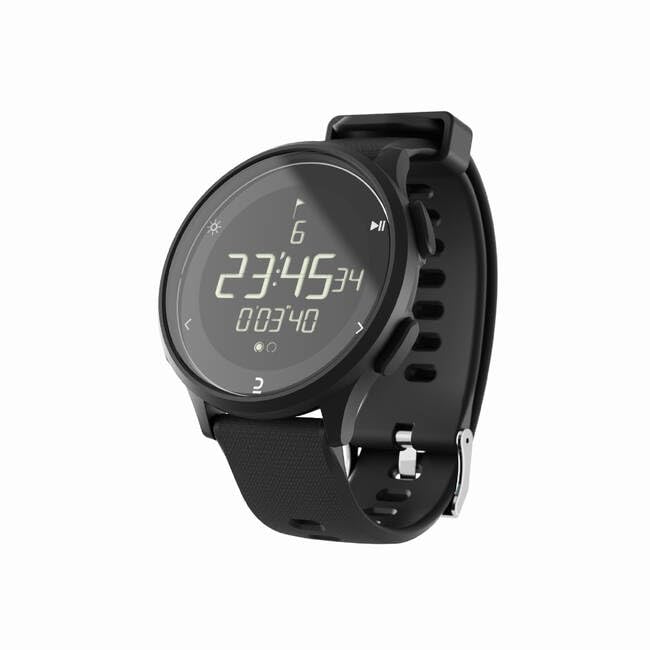
Image: The DECATHLON W500M Running Stopwatch, featuring a black rectangular display with digital time and stopwatch readings, and a black silicone strap. The watch face shows '23:45:34' and '0'03'40' with small icons for backlight, mode, and play/pause.
Enstalasyon
Before first use, ensure the watch is powered on and set correctly.
- Premye pouvwa sou: If the screen is blank, press and hold any button for a few seconds to activate the display.
- Tan Anviwònman ak Dat:
- Peze a MÒD button (usually on the side) until you reach the Time/Date setting screen.
- Sèvi ak la AJISTE or SET button (refer to watch specific button labels) to enter edit mode.
- Sèvi ak la MWEN / DESANN or LAP / Reyajiste buttons to adjust values (hours, minutes, day, month, year).
- Peze MÒD or SET again to confirm and move to the next setting, or exit.
- Understanding Buttons: Familiarize yourself with the watch's buttons. Typically, there are buttons for MODE, START/STOP, LAP/RESET, and LIGHT/BACKLIGHT.
Enstriksyon Operasyon
Mode kronomètr
- Peze a MÒD button until the stopwatch display appears (usually indicated by '00:00:00').
- Peze a KÒMANSE/KANPE bouton pou kòmanse konte tan.
- Peze KÒMANSE/KANPE again to pause the stopwatch. Press again to resume.
- Pandan kronomèt la ap mache, peze bouton an LAP / Reyajiste button to record a lap time. The current lap time will be displayed briefly.
- Lè w pran poz, peze la LAP / Reyajiste bouton pou mete kronomèt la a zewo.
Interval Training Mode
The W500M allows for 5 customizable interval phases.
- Navigate to the Interval Mode using the MÒD bouton.
- Enter the settings menu for Interval Mode (refer to watch specific button for 'SET' or 'ADJUST').
- Set the duration for each of the 5 phases (e.g., warm-up, active, rest, cool-down).
- Once phases are set, press KÒMANSE/KANPE to begin the interval training sequence. The watch will alert you when to transition between phases.
Fonksyon alam
- Peze a MÒD button until you reach the Alarm setting screen.
- Sèvi ak la AJISTE or SET bouton pou antre nan mòd editè.
- Set the desired alarm time using the MWEN / DESANN bouton.
- Activate or deactivate the alarm using the designated button (often a separate toggle or a press of the KÒMANSE/KANPE bouton).
Ekleraj
Pou klere ekran an nan kondisyon ki pa twò klere, peze bouton an LIMYÈ button (usually located on the top left or right side of the watch).
Viewing Istwa
The W500M stores your stopwatch and lap time history.
- Navigate to the History/Memory mode using the MÒD bouton.
- Sèvi ak la MWEN / DESANN or LAP / Reyajiste buttons to scroll through recorded times and dates.
Antretyen
- Netwayaj: Siye mont lan regilyèman avèk yon twal mou,amp twal. Evite pwodui chimik ki agresif oswa materyèl abrazif.
- Rezistans dlo: The watch is waterproof to 5 ATM (50 meters). This means it is suitable for showering, swimming, and surface water sports. Do not press buttons underwater beyond the specified depth or pressure limits. Avoid exposing the watch to hot water or steam, as this can compromise the seals.
- Ranplasman senti: The strap can be easily changed without tools. Simply locate the quick-release pins on the underside of the strap and detach. Attach a new compatible strap by aligning the pins and securing them.
- Depo: Sere mont lan nan yon kote ki fre epi sèk lè w pa ap itilize li.
Depanaj
| Pwoblèm | Kòz posib | Solisyon |
|---|---|---|
| Ekran an vid oswa li fèb. | Low battery or watch is in sleep mode. | Press any button to wake the watch. If still blank, consider battery replacement (consult service center if not user-replaceable). |
| Bouton yo pa reponn. | Pwoblèm lojisyèl tanporè oswa debri. | Try pressing buttons firmly. If unresponsive, attempt a soft reset (refer to specific model instructions for reset, often holding multiple buttons). Ensure no debris is lodged around buttons. |
| Stopwatch not accurate. | Rare software issue. | Perform a full reset of the watch (this may clear all settings and data). If problem persists, contact customer support. |
Espesifikasyon
| Karakteristik | Detay |
|---|---|
| Non modèl | W500M |
| Nimewo Modèl Atik | 8602734 |
| Mak | DECATHLON |
| Rezistans dlo | 5 ATM (50 mèt) |
| Karakteristik espesyal | Revèy |
| GPS | Pa gen GPS |
| Fòm | Rektangilè |
Garanti ak sipò
For warranty information and customer support, please refer to the official DECATHLON websit la oubyen kontakte sèvis kliyan yo dirèkteman. Kenbe prèv acha ou a pou nenpòt reklamasyon garanti.
Sipò sou entènèt: Visit the official DECATHLON support page for FAQs, troubleshooting guides, and contact options.
Sant sèvis: For repairs or in-person assistance, locate your nearest authorized DECATHLON service center.


