Pwodwi souview
The SHARGE Disk M.2 NVMe SSD Enclosure is a compact and robust external storage solution designed for high-speed data transfer and active cooling. It supports M.2 NVMe SSDs (M-Key, 2230 size) up to 2TB, offering 10Gbps USB 3.2 Gen2 connectivity. Its durable design includes IP54 water and dust resistance, 6.6ft drop protection, and a built-in high-speed fan to maintain optimal performance.

Image: The SHARGE Disk M.2 NVMe SSD Enclosure, demonstrating its small and portable design when held in a hand.
Karakteristik kle:
- Sistèm Refwadisman Aktif: Features a built-in high-speed fan (11,000 rpm) for efficient heat dissipation, ensuring stable SSD performance during intensive use.
- Transfè Done gwo vitès: Achieves 10Gbps transmission speeds via USB-C 3.2 Gen2, allowing rapid transfer of large files.
- Kontra enfòmèl ant ak pòtab: Weighs only 24g (0.84 ounces) and is approximately half the size of a credit card, making it ideal for on-the-go use.
- Write Protection: Includes a physical write protection switch to safeguard data from accidental deletion, unauthorized tampering, or viruses.
- Konsepsyon dirab: IP54-rated for water and dust resistance, with 6.6ft drop protection, providing secure data storage in various environments.
- Lajè konpatibilite: Equipped with a built-in USB-C male port for direct connection to smartphones, PS5, Steam Deck, laptops, and more. Compatible with Windows, MacOS, iPad OS, Linux, Android, ChromeOS, and Harmony systems.
Ki sa ki nan bwat la
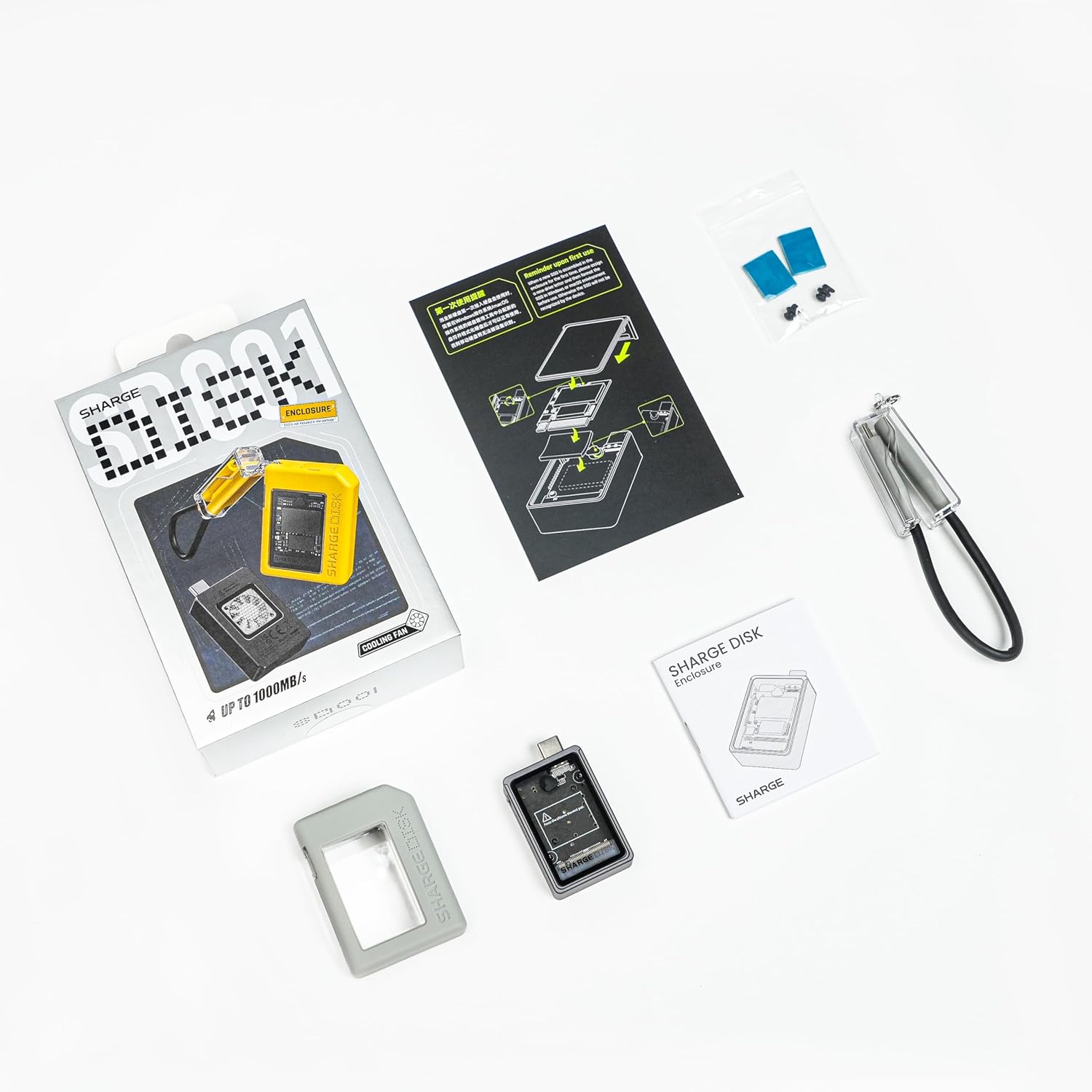
Image: All items included in the SHARGE Disk package: the enclosure, a data cable, and thermal pads.
- SHARGE Disk M.2 NVMe SSD Enclosure × 1
- Kab Done USB-C × 1
- Thermal Pads × 1 set
Gid Enstalasyon
Follow these steps to install your M.2 NVMe SSD into the SHARGE Disk Enclosure:
- Open the Transparent Cover: Gently slide or lift the transparent protective cover of the enclosure.
- Remove the Inner Casing: Carefully pull off the inner casing to expose the SSD slot.
- Aplike kousen tèmik la: Paste the silicone thermal pad onto the M.2 NVMe SSD. Ensure it covers the main chip area for optimal heat dissipation.
- Mete SSD a: Align your M-Key M.2 NVMe SSD (2230 size only) with the slot inside the enclosure and gently push it in until it is fully seated.
- Secure with Rubber Clips: Use the provided rubber clips to secure the SSD in place.
- Replace Inner Casing and Cover: Slide the inner casing back into place, then close the transparent protective cover until it clicks securely.
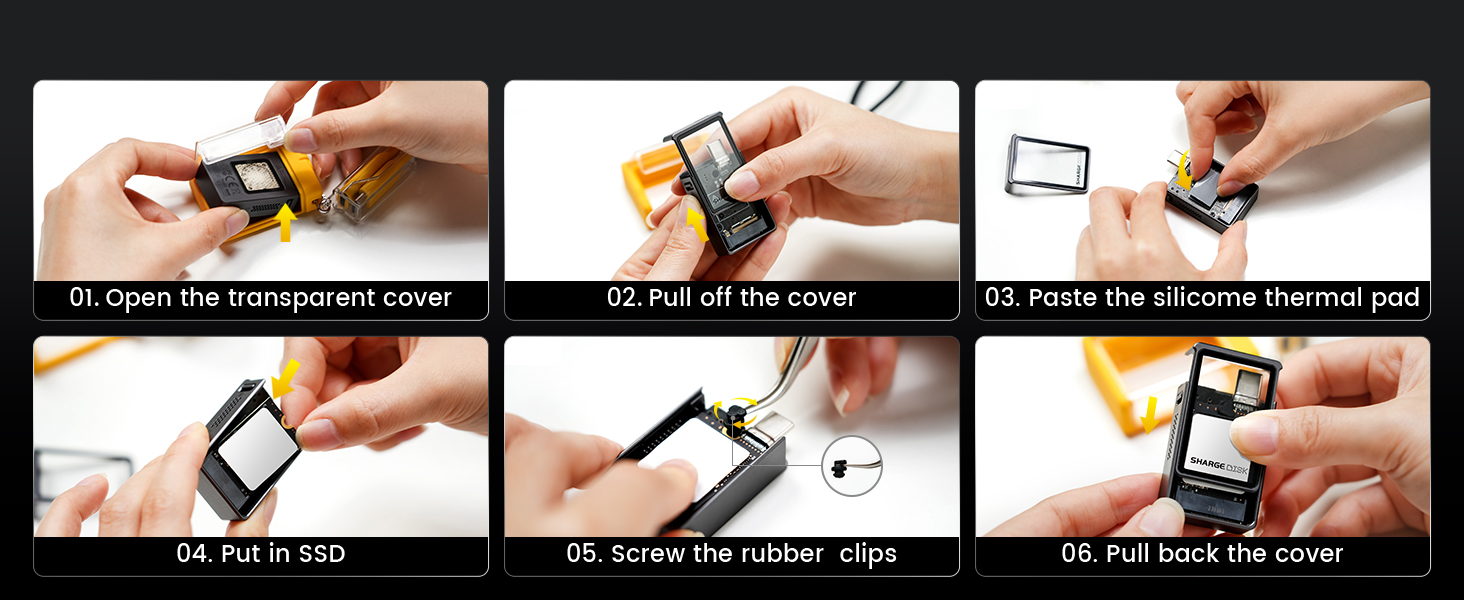
Image: A step-by-step visual guide demonstrating the installation process of an M.2 NVMe SSD into the enclosure.
Once the SSD is installed, connect the SHARGE Disk to your device using the integrated USB-C connector or the provided USB-C cable if using the silicone protective case.
Enstriksyon Operasyon
Transfè Done:
The SHARGE Disk supports USB 3.2 Gen2, providing data transfer speeds up to 10Gbps. For optimal performance, ensure your host device and connection cables support USB 3.2 Gen2 and UASP mode is enabled. Performance may vary based on host configuration and SSD used.

Image: The enclosure connected to a laptop, highlighting its 10Gbps transfer capability for large files like games, movies, and photos.
Sistèm Refwadisman Aktif:
The built-in fan operates at 11,000 RPM to actively dissipate heat generated by the SSD, maintaining stable performance even during prolonged high-speed operations. This helps prevent thermal throttling and ensures data integrity.

Imaj: Yon entèn view of the SHARGE Disk, illustrating the high-power cooling fan and its airflow for heat dissipation.
Write Protection:
Utilize the physical write protection switch on the enclosure to prevent accidental data deletion, unauthorized modifications, or virus infections, especially when connecting to public or unfamiliar computers.

Imaj: Yon gwo plan view of the write protection switch, indicating its function to secure data.
Konpatibilite:
The SHARGE Disk is broadly compatible with various devices and operating systems:
- Aparèy: Laptops, PCs, Smartphones, iPad Pro, PS5, Steam Deck, SLR cameras (for external recording).
- Sistèm operasyon: Windows 7/8.1/10/11, MacOS 10 or later, iPad OS 12.0.1 or later, Linux, Android, ChromeOS, Harmony.
Note: B Key, B&M Key, SATA, and Nintendo Switch SSDs are not supported.

Image: The SHARGE Disk demonstrating its extensive application scenarios, connected to a laptop, a gaming handheld, a camera, and a smartphone.
Antretyen
To ensure the longevity and optimal performance of your SHARGE Disk M.2 NVMe SSD Enclosure, follow these maintenance guidelines:
- Netwayaj: Use a soft, dry cloth to wipe the exterior of the enclosure. For dust accumulation in the fan area, use compressed air. Do not use liquid cleaners or abrasive materials.
- Depo: Sere bwat la nan yon kote ki fre epi sèk, lwen limyè solèy dirèk ak tanperati ekstrèm.
- Manyen: While the enclosure is durable with 6.6ft drop protection and IP54 rating, avoid unnecessary drops or impacts. Ensure the transparent cover is securely closed to maintain dust and water resistance.
- Mizajou mikrolojisyèl: Periodically check the official SHARGE website for any available firmware updates for your device to ensure continued compatibility and performance improvements.
Depanaj
If you encounter issues with your SHARGE Disk, refer to the following common troubleshooting steps:
- Aparèy pa rekonèt:
- Ensure the SSD is correctly installed and seated firmly within the enclosure.
- Eseye konekte aparèy ou an sou yon lòt pò USB-C.
- Test with a different USB-C cable if you are using one.
- Verify that the SSD itself is functional by testing it in another compatible enclosure or system if possible.
- For new SSDs, ensure they are initialized and formatted in your operating system's Disk Management (Windows) or Disk Utility (macOS).
- Vitès transfè ki ba:
- Confirm that your host device's USB-C port supports USB 3.2 Gen2 (10Gbps). Older USB versions will result in lower speeds.
- Ensure the USB-C cable used is rated for 10Gbps data transfer.
- Check if UASP (USB Attached SCSI Protocol) is enabled on your system, as it significantly improves performance.
- Verifye si SSD a li menm kapab sipòte gwo vitès.
- Fèmen lòt aplikasyon ki ta ka ap konsome resous sistèm oswa antre/soti sou disk la.
- Fan Noise/Operation:
- The fan is designed to activate when the SSD generates heat to maintain optimal temperature. Some noise is normal during operation.
- If the fan is excessively loud or not spinning, ensure there are no obstructions to the fan blades.
- Ensure the thermal pad is correctly applied to the SSD to facilitate heat transfer to the cooling system.
- Write Protection Issue:
- Ensure the write protection switch on the enclosure is in the unlocked position if you intend to write data to the SSD.
If these steps do not resolve your issue, please contact SHARGE customer support for further assistance.
Espesifikasyon
| Karakteristik | Detay |
|---|---|
| Nimewo Modèl | SD 001 |
| Materyèl | Gray-Silicone |
| Pwa atik | 24 gram (0.847 ons) |
| Kapasite Depo Memwa (Maksimòm) | 2 TB (SSD not included) |
| Aparèy konpatib | Laptop, PC, SLR (support external recording), Smartphone, iPad Pro, PS5, Steam Deck |
| Pousantaj Transfè Done | 10 Gigabit pa segonn (USB 3.2 Gen 2) |
| Manifakti | Sharge Teknoloji (Shenzhen) co, Ltd. |
| Dimansyon pwodwi | 1.96 x 1.1 x 0.51 pous (49.8 x 27.9 x 13 mm) |
| Entèfas Materyèl | USB 3.2 Gen 2 |
| Koulè | Gri |
| Platfòm pyès ki nan konpitè | Windows, MacOS, iPad OS, Linux, Android, ChromeOS, Harmony |
| Pwoteksyon dlo/pousyè | IP54 rated |
| Pwoteksyon gout | 6.6 pye (2 mèt) |
Garanti ak sipò
SHARGE products are designed and manufactured to the highest quality standards. For warranty information and customer support, please refer to the documentation included with your purchase or visit the official SHARGE websit.
For technical assistance or inquiries, you may contact SHARGE customer support through their official channels. Please have your product model number (SD 001) and purchase details ready when contacting support.
Official SHARGE Store: SHARGE Official Store on Amazon


