1. Entwodiksyon
Thank you for choosing the INNOVV K6 Motorcycle Dash Cam. This manual provides detailed instructions for the proper installation, operation, and maintenance of your dual-channel QHD 2K+1080P dash camera system. Please read this manual thoroughly before using the product to ensure optimal performance and longevity.
The INNOVV K6 is designed to capture both front and rear views in high definition, offering reliable recording for motorcycles, scooters, e-bikes, ATVs, and UTVs. Its robust IP67 waterproof and dustproof design ensures performance in various weather conditions.
2. Pake kontni
Verifye ke tout konpozan yo prezan nan pake ou a:
- DVR (Front Camera) x 1
- Kamera dèyè x 1
- Accessory Package Set x 2 (includes various mounts, cables, and adhesive pads)
- Manyèl itilizatè x 1

Image: Contents of the INNOVV K6 Dash Cam package, including the front camera (DVR), rear camera, various mounting accessories, cables, and the user manual.
3. Gid Enstalasyon
The INNOVV K6 is designed for straightforward installation. The DVR is integrated into the compact front camera, simplifying wiring. It is recommended to plan your cable routing before permanent installation.
3.1 Plasman Kamera
- Kamera devan: Mount the front camera in a location that provides a clear, unobstructed view of the road ahead. Ensure it is securely fastened using the provided mounts.
- Kamera dèyè: Position the rear camera to capture the view behind your vehicle. Its compact size allows for discreet placement.

Image: Diagram illustrating the recommended placement of the front and rear cameras on a motorcycle for optimal coverage and easy installation.

Imaj: Yon gwo plan view of the compact front camera mounted on a motorcycle handlebar, demonstrating its small footprint and discreet integration.
3.2 Koneksyon fil elektrik
Connect the cameras to the main DVR unit and then connect the power cable to your motorcycle's battery via the DC converter. This setup enables automatic recording with ignition.

Image: A detailed wiring diagram showing how to connect the front camera, rear camera, DC converter, and power source on a motorcycle.
Nòt: A power bank can be supported but is not included in the package. Ensure all connections are secure and routed away from moving parts or heat sources.
3.3 Enstalasyon Kat MicroSD
The INNOVV K6 supports up to a 256GB MicroSD card (not included). It is crucial to use a MicroSD card with a U3 data recording speed (e.g., V30, V60, or V90) for reliable operation. Using a slower card may lead to recording issues or system instability.

Imaj: Yon gwo plan view of the INNOVV K6 camera unit, highlighting the TF (MicroSD) card slot and Type-C USB port for data access and charging.
- Locate the TF card slot on the DVR unit.
- Mete kat MicroSD a avèk prekosyon nan fant lan jiskaske li fè yon klik pou l antre nan plas li.
- Pou retire kat la, pouse kat la dousman jiskaske li soti.
4. Operasyon
4.1 Anrejistreman Otomatik
Once properly installed and connected to your motorcycle's power, the INNOVV K6 will automatically begin recording when the ignition is turned on. This ensures you never miss a moment of your ride.
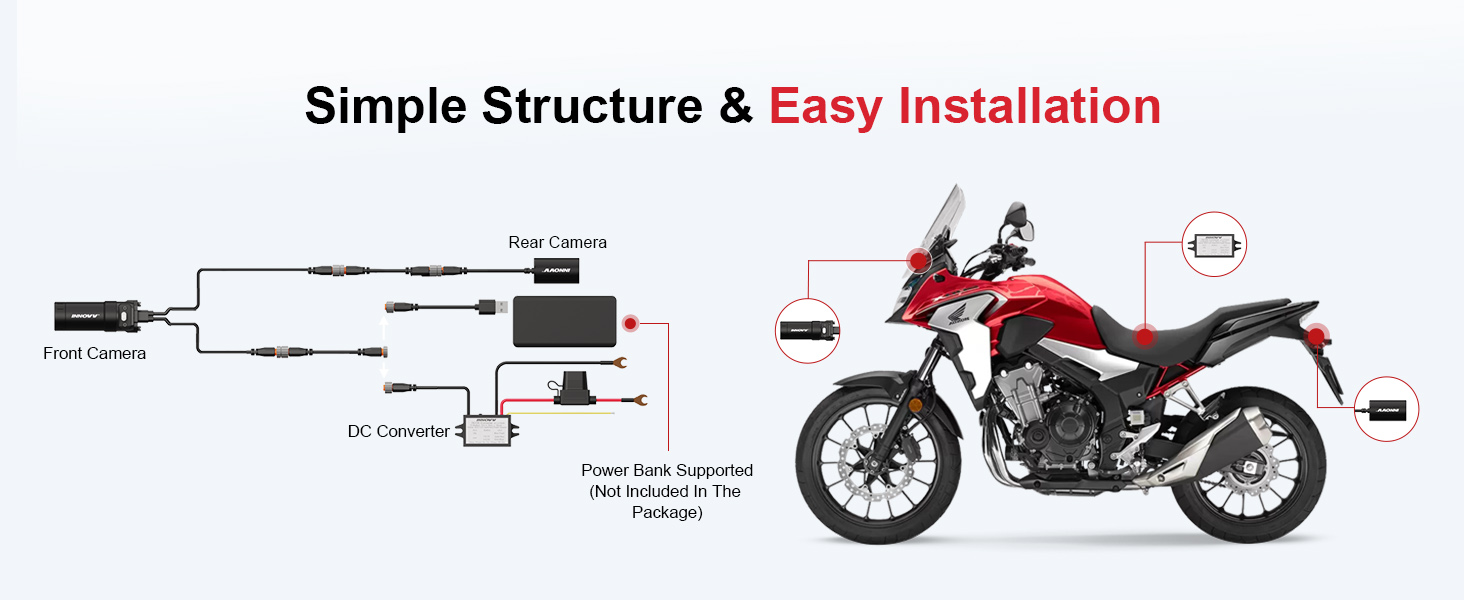
Image: A graphic depicting a motorcycle dashboard with a "START" button, illustrating the automatic recording feature that activates with the vehicle's ignition.
4.2 INNOVV App and Wi-Fi Connectivity
The INNOVV K6 features built-in Wi-Fi for seamless connectivity with the INNOVV App on your smartphone. The app allows you to view viv footage, manage recordings, change settings, and share videos.

Image: Screenshots of the INNOVV smartphone application interface, showing options for camera settings, video playback, and file management, with a motorcycle in the background.
- Download the INNOVV App from the Google Play Store or Apple App Store.
- Turn on your motorcycle's ignition to power on the dash cam.
- On your smartphone, connect to the INNOVV K6's Wi-Fi network (SSID and password can be found in the app or device settings).
- Open the INNOVV App to access features like live view, video playback, and settings adjustments.
4.3 Anrejistreman Doub Chanèl
The K6 records simultaneously from both the front (2K QHD 1440P 30FPS) and rear (1080P 30FPS) cameras, providing comprehensive coverage of your journey.

Image: A split image showing footage from the front camera (2K Quad HD) and the rear camera (1080P Full HD) during motorcycle operation, demonstrating dual-channel recording capability.
4.4 G-Sensor Detection and Emergency Recording
The built-in G-Sensor detects sudden impacts or collisions. In such events, the system automatically locks the current video footage, anpeche anrejistreman bouk la ranplase li. Sa asire ke prèv enpòtan yo prezève.

Image: A motorcycle lying on its side next to a car, with a red lock icon superimposed, indicating the activation of emergency recording due to an impact.
4.5 Anrejistreman bouk
The K6 utilizes loop recording, continuously recording over the oldest files when the MicroSD card is full. Emergency recordings are protected from this process.

Image: A circular diagram illustrating the concept of loop recording, where new footage continuously overwrites the oldest non-locked files on the storage card.
5. Antretyen
5.1 Waterproof and Dustproof Design
The INNOVV K6 boasts an IP67 waterproof and dustproof rating, allowing it to withstand submersion in 0.5 meters of water for 30 minutes. This design ensures reliable operation in various environmental conditions. Regular cleaning of the camera lenses with a soft, damp cloth is recommended to maintain clear video quality.

Image: The INNOVV K6 camera unit with water droplets on its surface, emphasizing its IP67 waterproof and dustproof capabilities.
5.2 Jesyon Kat MicroSD
Periodically format the MicroSD card using the INNOVV App to ensure optimal performance and prevent data corruption. Back up any important footage anvan fòma.
Ensure the MicroSD card is a high-speed U3 (V30 or higher) card. Lower speed cards can cause recording errors or system crashes.
NAN. Depanaj
- Camera not recording or freezing:
- Ensure a high-speed MicroSD card (U3/V30 or higher) is used. Lower speed cards can cause issues.
- Format the MicroSD card regularly through the INNOVV App.
- Check power connections to ensure the device is receiving consistent power.
- Pwoblèm koneksyon Wi-Fi:
- Asire w ke kamera tablodbò a limen.
- Restart your smartphone's Wi-Fi and try connecting again.
- Verify the Wi-Fi SSID and password in the app settings.
- Move kalite videyo:
- Clean camera lenses to remove dirt or smudges.
- Ensure cameras are securely mounted and not vibrating excessively.
- Check video resolution settings in the INNOVV App.
- Device getting warm:
- Some warmth during operation is normal, especially in high temperatures.
- If the device becomes excessively hot and malfunctions, ensure proper ventilation and check for any short circuits in the power supply.
- Verify the MicroSD card speed; a slow card can cause the unit to work harder and generate more heat.
7. Espesifikasyon
| Karakteristik | Detay |
|---|---|
| Non modèl | INNOVV K6 |
| Rezolisyon kamera devan | 2K Quad HD 1440P 30FPS (STARVIS Sensor) |
| Rezolisyon kamera dèyè | 1080P 30FPS |
| Evalyasyon ki enpèmeyab | IP67 |
| Koneksyon | Wi-Fi (for App control) |
| Jaden nan View | 120 Degre |
| Sipò pou Depo | Up to 256GB MicroSD (U3/V30 or higher recommended) |
| Karakteristik espesyal | G-Sensor Detection, Loop Recording, Automatic Recording with Ignition, Full Aluminum Alloy Body |
| Product Dimensions (DVR) | 80.5mm x 30mm (apeprè 3.2 x 1.2 pous) |
| Product Dimensions (Rear Camera) | 44mm x 25mm (apeprè 1.7 x 0.98 pous) |
| Pwa atik | 1.61 liv (pwa total pake a) |
| Fonksyone Tanperati Range | Designed to handle extreme temperatures (specific range not provided, but implied by "Full Aluminum Alloy Body" and "disperse heat effectively") |
8. Garanti ak sipò
For warranty information and technical support, please refer to the official INNOVV website or contact their customer service directly. Details are typically provided in the included warranty card or on the manufacturer's support pages.
Enpòtan: Kenbe resi acha ou a kòm prèv acha pou reklamasyon garanti.


