1. Entwodiksyon
This manual provides comprehensive instructions for the setup, operation, and maintenance of your AULA F2023 Wired USB Gaming Keyboard. Please read this manual carefully to ensure proper use and to maximize your gaming and typing experience.

Image 1.1: The AULA F2023 Wired USB Gaming Keyboard, showcasing tout layout li yo ak ekleraj dèyè RGB.
2. Pake kontni
Asire w tout atik yo prezan nan pakè a:
- AULA F2023 Wired USB Gaming Keyboard
- Keycap Puller
- Manyèl Itilizatè (dokiman sa a)
3. Enstriksyon Enstalasyon
- Depake klavye a: Retire klavye a ak tout akseswa yo nan anbalaj la avèk prekosyon.
- Konekte ak òdinatè: Locate an available USB-A port on your computer. Insert the USB connector of the AULA F2023 keyboard into the USB-A port.
- Enstalasyon chofè: The keyboard is plug-and-play. Your operating system (Windows, macOS, Linux) should automatically detect and install the necessary drivers. No additional software installation is typically required.
- Plasman: Position the keyboard comfortably on your desk. The integrated phone holder can be used to conveniently place your smartphone.
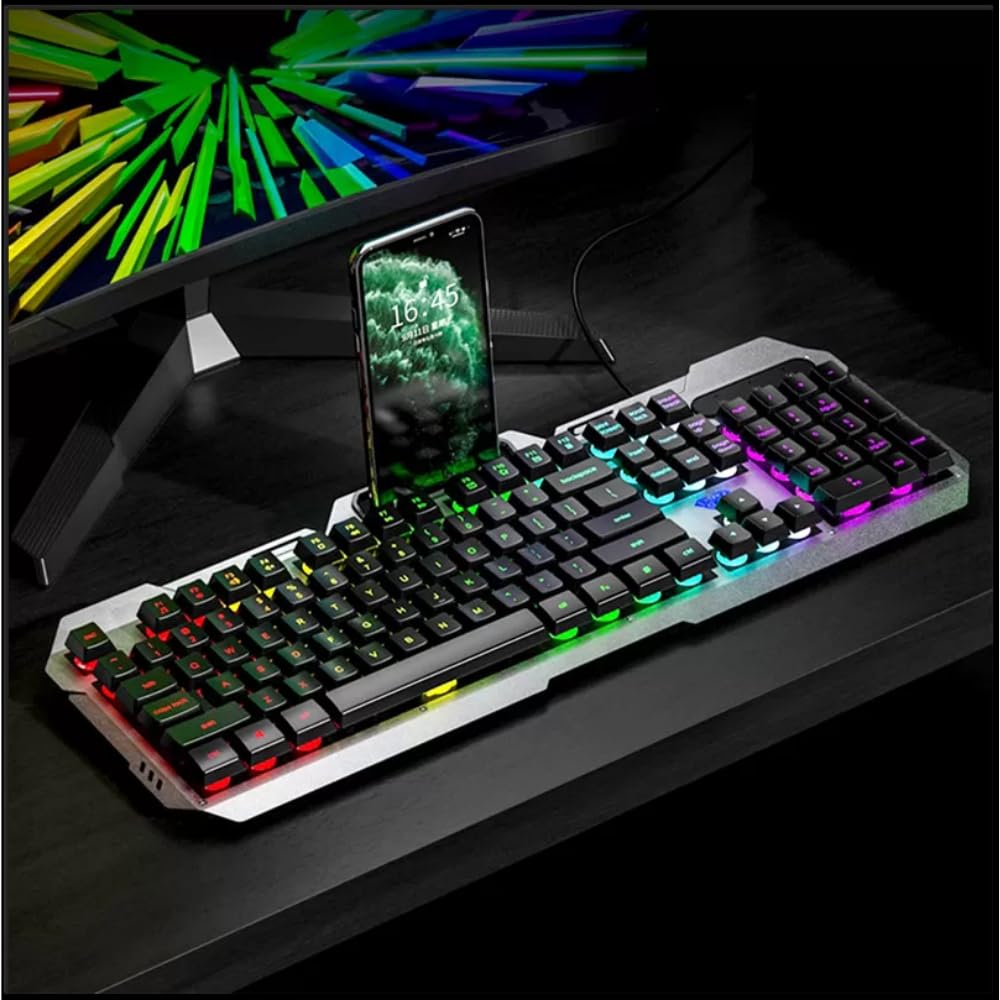
Image 3.1: The AULA F2023 keyboard in use, demonstrating the integrated smartphone holder for convenience.
4. Operasyon Enstriksyon
4.1. Kontwòl Miltimedya
The AULA F2023 keyboard features dedicated function keys for multimedia control. Press the Fn key in combination with the corresponding F-key:
- Fn+F2: Volim desann
- Fn+F3: Volim leve
- Fn+F4: bèbè
- Fn+F5: One Stop lèktur
- Fn+F6: Previous Track
- Fn+F7: Jwe/Poz
- Fn+F8: Next Track
4.2. Kontwòl ekleraj
The keyboard features customizable RGB rainbow backlighting. Adjust the lighting effects and brightness using the following key combinations:
- Fn + PgUp: Increase Brightness / Frequency of lighting effect.
- Fn + PgDn: Decrease Brightness / Frequency of lighting effect.
- Fn + 1: Activates lighting mode, allowing adjustment between 3 types of light effects.

Imaj 4.1: Yon gwo plan view of the keyboard's function keys, highlighting the Fn key and its role in activating lighting modes and other functions.
4.3. Anti-Ghosting and Win Lock
- 26-Key Rollover Anti-Ghosting: This technology ensures that up to 26 keys pressed simultaneously are registered accurately, which is crucial for intense gaming scenarios.
- Win Lock Function: The Win Lock function prevents accidental presses of the Windows key during gaming or typing, avoiding interruptions.

Imaj 4.2: Yon imaj detaye view of the keyboard's keys, illustrating the design that supports 26-key rollover for enhanced gaming performance.
4.4. Konpatibilite
The AULA F2023 keyboard is compatible with a wide range of operating systems and devices:
- Sistèm operasyon: Windows XP / Vista / 7 / 8 / 10, macOS, Linux
- Aparèy: PC, Laptop, Google TV, Smart TV, PS4, Xbox One
5. Antretyen
To ensure the longevity and optimal performance of your AULA F2023 keyboard, follow these maintenance guidelines:
- Netwayaj: Regularly clean the keyboard with a soft, dry cloth. For deeper cleaning, use a can of compressed air to remove dust and debris from between the keys.
- Retire kouvèti kle a: Use the included keycap puller to carefully remove keycaps for thorough cleaning. Avoid excessive force to prevent damage.
- Evite likid: Pa ekspoze klavye a nan kontak ak likid. Si likid la koule aksidantèlman, dekonekte klavye a imedyatman epi kite l sèk nèt anvan ou rekonekte li.
- Depo: Sere klavye a nan yon kote ki fre epi sèk, lwen limyè solèy dirèk ak tanperati ekstrèm lè w pa itilize li pou yon bon bout tan.
NAN. Depanaj
If you encounter issues with your AULA F2023 keyboard, refer to the following common solutions:
- Klavye a pa reponn:
- Asire w kab USB a byen konekte ak klavye a ak òdinatè a.
- Eseye konekte klavye a nan yon lòt pò USB sou òdinatè w la.
- Rekòmanse òdinatè w lan.
- Teste klavye a sou yon lòt òdinatè pou detèmine si pwoblèm nan se ak klavye a oswa ak òdinatè a.
- Limyè dèyè a pa fonksyone oswa li fèb:
- Check if the backlight brightness is set to maximum using Fn + PgUp.
- Ensure no software or system settings are overriding the keyboard's backlight controls.
- Kle yo pa anrejistre byen:
- Clean the affected keys and surrounding areas to remove any debris that might be obstructing key presses.
- If using a KVM switch or USB hub, try connecting the keyboard directly to the computer.
- Keyboard Enters Sleep Mode: The keyboard is designed to automatically enter sleep mode after 5 minutes of inactivity. Press any key to wake it up.
7. Espesifikasyon
Detailed technical specifications for the AULA F2023 Wired USB Gaming Keyboard:
| Karakteristik | Detay |
|---|---|
| Mak | AULA |
| Nimewo Modèl | F2023 |
| Koneksyon Teknoloji | USB-A (Avèk fil) |
| Deskripsyon klavye | Gaming, Membrane |
| Materyèl | Top-grade Aluminium Alloy Panel |
| Koulè | Nwa |
| Anti-Ghosting | 26-Key Rollover |
| Ekleraj | RGB Rainbow Backlight |
| Dimansyon pwodwi (LxWxH) | 45.7 x 16.6 x 2.8 cm |
| Pwa atik | 562 g |
| Sistèm operasyon konpatibilite | Linux, Windows XP, Vista, 7, 8, 10, macOS |
| Konpozan ki enkli | Keycap Puller |

Image 7.1: A visual representation of the AULA F2023 keyboard's dimensions, indicating its length, width, and height.
8. Enfòmasyon sou Garanti
The AULA F2023 Wired USB Gaming Keyboard comes with a 1 ane garanti apati dat acha a. Garanti sa a kouvri domaj fabrikasyon ak fonksyònman ki pa kòrèk nan itilizasyon nòmal. Li pa kouvri domaj ki koze pa move itilizasyon, aksidan, modifikasyon san otorizasyon, oswa mete ak chire nòmal.
Tanpri kenbe prèv ou achte pou reklamasyon garanti.
9. Sipò
For further assistance, technical support, or warranty inquiries, please contact your retailer or the official AULA support channels. Refer to the product packaging or the AULA official websit pou detay kontak.


