1. Entwodiksyon
This manual provides essential instructions for the safe and efficient use of your GOBOULT Z40 Pro Truly Wireless Stereo (TWS) Earbuds. Please read this manual thoroughly before using the product and retain it for future reference.
Kontni pake:
- GOBOULT Z40 Pro TWS Earbuds
- Ka chaje
- Kab chaje rapid tip C
- Bouchon zòrèy (divès gwosè)
- Manyèl itilizatè
- Kat Garanti
2. Enstalasyon
2.1 Premye chaj
Before first use, ensure the earbuds and charging case are fully charged. Remove any protective film from the charging contacts on the earbuds.
- Mete ekoutè yo nan ka chaje a.
- Connect the Type-C charging cable to the charging port on the case and to a power source.
- The indicator light on the case will show charging status. A full charge takes approximately 90 minutes.

2.2 Pairing ak yon Aparèy
The GOBOULT Z40 Pro earbuds utilize Bluetooth 5.3 for a stable and efficient connection.
- Open the charging case lid. The earbuds will automatically enter pairing mode (indicated by flashing lights).
- Sou aparèy ou an (telefòn entelijan, tablèt, òdinatè pòtab), aktive Bluetooth.
- Chèche pou available devices and select "GOBOULT Z40 Pro" from the list.
- Once connected, the earbuds will indicate successful pairing, and the indicator lights will turn off or show a steady light.

3. Operasyon Enstriksyon
3.1 Kontwòl manyen
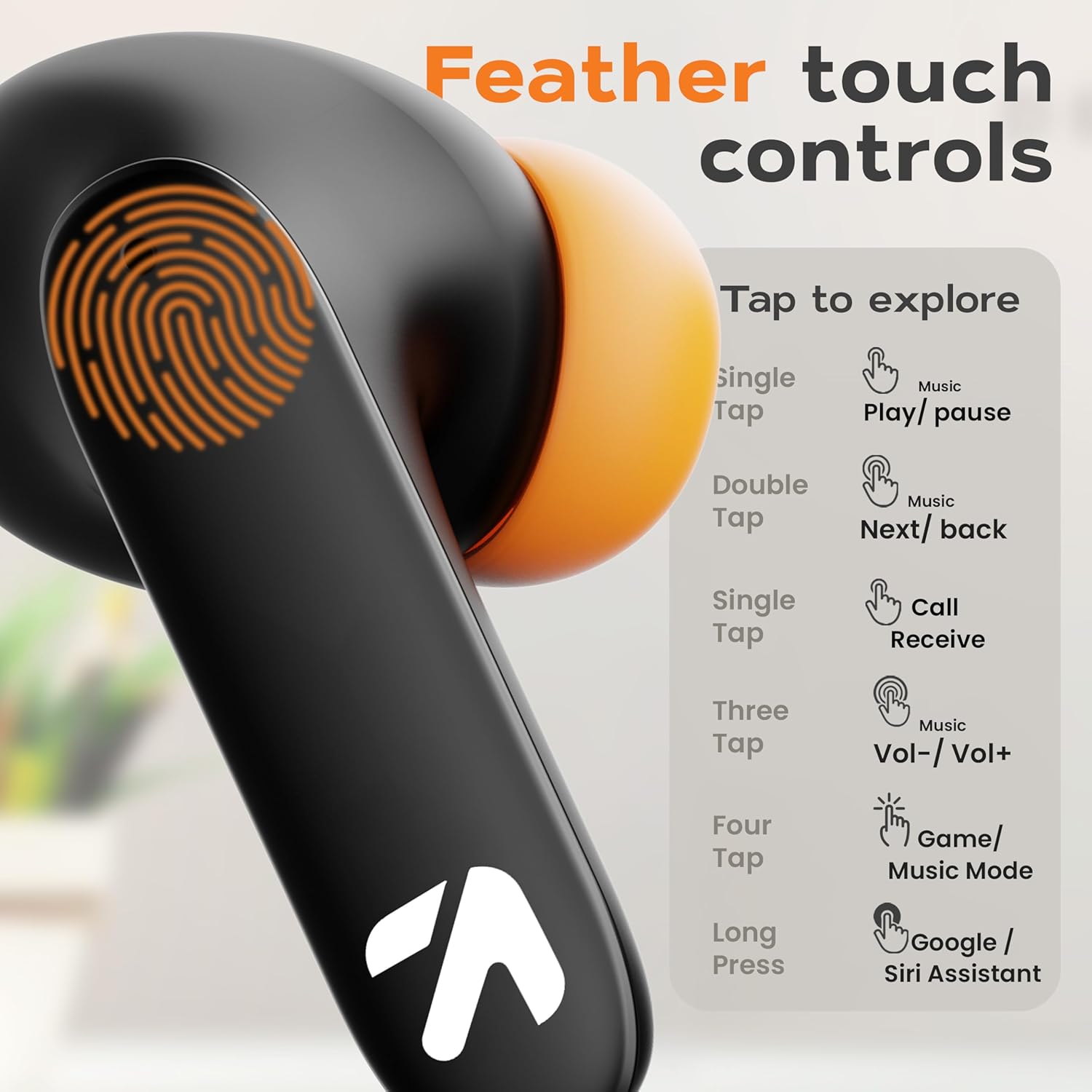
The GOBOULT Z40 Pro earbuds feature intuitive feather-touch controls on each earbud.
| Aksyon | Ekoutè Goch | Dwa ekouteur |
|---|---|---|
| Single Tap | Jwe mizik/Pòz, Resevwa apèl | Jwe mizik/Pòz, Resevwa apèl |
| Double Tap | Previous Song | Next Song |
| Triple Tap | Volim desann | Volim leve |
| Kat Tap | Aktive Mòd Konba (Mòd Jwèt) | |
| Long Press (2s) | Aktive Asistan Vwa a (Google/Siri) | |
3.2 Gaming Mode (Combat Mode)
Activate Combat Mode for an ultra-low latency experience of 45ms, ideal for gaming. This synchronizes audio with visual action for a competitive edge.
- To activate: Tap either earbud four times.
- To deactivate: Tap either earbud four times again.

3.3 Asistan Vwa
Access your device's voice assistant (Google Assistant or Siri) directly from the earbuds.
- To activate: Long press either earbud for 2 seconds.

3.4 Jesyon Apèl
The Zen Quad Mic ENC (Environmental Noise Cancellation) technology ensures clear calls by minimizing background noise.
- Receive Call: Single tap either earbud.
- End Call: Single tap either earbud during a call.
- Reject Call: Long press either earbud for 2 seconds.

4. Antretyen
4.1 Netwayaj
- Netwaye ekoutè yo ak bwat chaje a regilyèman avèk yon twal mou, sèk, epi ki pa gen pousyè.
- Pa sèvi ak pwodui netwayaj abrazif, solvan, oswa espre ayewosòl.
- Asire w ke kontak chaje yo sou tou de ekoutè yo ak bwat la pa gen pousyè ak debri.
4.2 Rezistans dlo
The GOBOULT Z40 Pro earbuds are IPX5 rated, meaning they are resistant to sweat, splashes, and light rain. They are not designed for submersion in water.
- Avoid exposing the earbuds to strong jets of water or prolonged submersion.
- If wet, dry the earbuds thoroughly before placing them back in the charging case to prevent damage.

4.3 Depo
Lè w pa ap itilize ekoutè yo, sere yo nan bwat chaje yo pou pwoteje yo epi asire yo rete chaje.
NAN. Depanaj
If you encounter issues with your GOBOULT Z40 Pro earbuds, refer to the following common solutions:
5.1 Pwoblèm koneksyon
- Ekoutè yo pa konekte ak aparèy la: Ensure Bluetooth is enabled on your device. Make sure the earbuds are charged and within range. Try forgetting the device in your phone's Bluetooth settings and re-pairing.
- Yon sèl ekoutè konekte: Place both earbuds back into the charging case, close the lid for a few seconds, then open it again. This often resets the connection between the earbuds.
5.2 Pwoblèm Son
- Pa gen son oswa volim ki ba: Check the volume levels on both your device and the earbuds. Ensure the earbuds are properly seated in your ears. Clean any debris from the earbud grilles.
- Son tanzantan: Asire w pa gen okenn obstak ant aparèy ou an ak ekoutè yo. Pwoche pi pre aparèy ou an. Evite anviwònman ki gen gwo entèferans elektwomayetik.
5.3 Pwoblèm chaj
- Ekoutè yo pa chaje: Ensure the charging contacts on the earbuds and inside the case are clean and dry. Verify the charging cable and power adapter are working correctly.
- Ka a pa chaje: Check the Type-C cable and power source. Ensure the cable is securely connected.
6. Espesifikasyon
| Karakteristik | Detay |
|---|---|
| Non modèl | AirBass |
| Koneksyon Teknoloji | San fil (Bluetooth 5.3) |
| Gamme Bluetooth | 10 mèt |
| Gwosè Chofè Audio | 13mm chofè dinamik |
| Repons Frekans | 20 Hz - 20,000 Hz |
| Sansiblite | 115 dB |
| Enpedans | 32 Ohm |
| Dire Batri (Total) | Jiska 100 èdtan (ak bwat chaje) |
| Tan pou chaje | Apeprè. 90 minit |
| Latansi Audio | 45 Milliseconds (Combat Mode) |
| Kontwòl bri | Anilasyon Bri Pasif, ENC Mikwofòn Kat |
| Nivo rezistans dlo | IPX5 (Sweat and Splashproof) |
| Kalite kontwòl | Manyen, Vwa |
| Pwa atik | 50 gram |
| Dimansyon pwodwi | 6 x 2.7 x 4.8 cm |
| Materyèl | Kawotchou |
7. Garanti ak sipò
7.1 Enfòmasyon sou Garanti
Your GOBOULT Z40 Pro earbuds come with a standard warranty. Please refer to the included Warranty Card in your package for detailed terms and conditions, including warranty period and coverage.
7.2 Sipò pou Kliyan
For any product-related queries, technical assistance, or warranty claims, please contact the manufacturer:
- Manifakti: Exotic Mile Pvt. Ltd.
- Adrès: B67 Zòn Endistriyèl Wazirpur, Nouvo Delhi 110052
- Ou kapab vizite ofisyèl la tou GOBOULT Store on Amazon pou plis enfòmasyon.


