Mesqool Digital Alarm Clock Radio User Manual
Modèl: CR1025
Entwodiksyon
Mèsi pou acha aasing the Mesqool Digital Alarm Clock Radio. This device combines a digital alarm clock, FM radio, Bluetooth speaker, and charging station, designed to enhance your daily routine. Please read this manual carefully before use to ensure proper operation and to fully utilize all features.
Enfòmasyon enpòtan sou sekirite
- Pa ekspoze aparèy la nan dlo oswa imidite twòp.
- Evite mete aparèy la toupre sous chalè tankou radyatè, recho, recho, oswa lòt aparèy (ki gen ladan amplifiers) ki pwodui chalè.
- Itilize sèlman atachman/akseswa manifakti a espesifye.
- Deploge aparèy sa a pandan tanpèt zèklè oswa lè li pa itilize pou yon peryòd tan ki long.
- Pa bloke okenn ouvèti vantilasyon. Enstale li dapre enstriksyon manifakti a.
- Pwoteje kòd elektrik la pou yo pa mache oswa kwense, sitou nan priz, resipyan konvenyans, ak pwen kote yo sòti nan aparèy la.
Kontni pake
Tanpri tcheke pake a pou atik sa yo:
- Mesqool Digital Alarm Clock Radio
- Power Adapter (USB cable and wall plug)
- Manyèl itilizatè

Image: The Mesqool Digital Alarm Clock Radio, showing the main unit, a USB power cable, and a wall adapter.
Pwodwi souview
Familiarize yourself with the various parts and controls of your Mesqool Digital Alarm Clock Radio.
Front Panel & Display:
- Gwo ekspozisyon dirije: Shows time, alarm status, Bluetooth indicator, FM frequency, and DST (Daylight Saving Time) indicator.
- Night Light Bar: Located below the display, provides soft ambient lighting.
Kontwòl Panel Top:
| Kontwòl | Fonksyon |
|---|---|
| SNOOZE / limyè bouton | Press to snooze alarm (9 minutes). Press and hold to turn night light on/off. Short press to adjust night light brightness. |
| Bouton Alam | Peze pou mete Alam 1 oswa Alam 2. |
| Time/DST Button | Press to set time. Press and hold to activate/deactivate Daylight Saving Time. |
| Bouton jwe/poz/mòd | Press to play/pause Bluetooth audio. Press and hold to switch between FM Radio and Bluetooth modes. |
| Volume/Tuning Knob (Left) | Rotate to adjust volume. In FM mode, rotate to tune frequency. |
| Brightness/Time Setting Knob (Right) | Rotate to adjust display brightness. In time setting mode, rotate to adjust hours/minutes. |
Pò panèl dèyè:
- DC IN Pò: Pou koneksyon adaptè kouran.
- USB-A chaje pò: Pou chaje aparèy ekstèn yo.
- USB-C chaje pò: Pou chaje aparèy ekstèn yo.
- CR2032 Battery Compartment: For backup battery (pre-installed).

Imaj: Dèyè view of the alarm clock, highlighting the DC power input, USB-A and USB-C charging ports, and the CR2032 battery compartment for memory backup.
Enstalasyon
1. Koneksyon pouvwa
- Konekte adaptè kouran ki vini ak revèy la nan pò DC IN ki sou dèyè revèy la.
- Ploge adaptè pouvwa a nan yon priz miray estanda.
- Ekran an ap limen, sa vle di aparèy la limen.
Note: This alarm clock operates solely on AC power. The pre-installed CR2032 battery serves as a backup for time and alarm settings during power outages, but does not power the display or other functions.
2. Anviwònman Tan Inisyal
- Peze epi kenbe la Time/DST button on the top panel until the hour digits start flashing.
- Vire a Brightness/Time Setting Knob (Right) to adjust the hour. Press the Time/DST Peze bouton an ankò pou konfime lè a epi ale nan anviwònman minit la.
- Vire a Brightness/Time Setting Knob (Right) to adjust the minutes. Press the Time/DST button again to confirm the minutes.
- Tan an fikse kounye a.
3. Ajisteman lè ete (DST)
- To activate or deactivate DST, press and hold the Time/DST button. The DST indicator on the display will appear or disappear accordingly.
Enstriksyon Operasyon
Mete Alam yo (Alam 1 ak Alam 2)
- Peze a Alam button once to set Alarm 1. The Alarm 1 icon and hour digits will flash.
- Vire a Brightness/Time Setting Knob (Right) to adjust the hour. Press the Alam button to confirm and move to minute setting.
- Vire a Brightness/Time Setting Knob (Right) to adjust the minutes. Press the Alam button to confirm and move to alarm sound selection.
- Vire a Brightness/Time Setting Knob (Right) to choose between FM radio or a standard beep sound for the alarm. Press the Alam bouton pou konfime.
- The alarm is now set and activated. The corresponding alarm icon will appear on the display.
- Repete pwosesis la lè w peze bouton an Alam button twice to set Alarm 2.

Image: The alarm clock display showing time and alarm icons, with an illustration of adjustable volume levels (45db to 116db) for wake-up modes (Radio or Beep).
Fonksyon Snooze
- Lè alam la son, peze la SNOOZE / limyè button on the top panel to activate the snooze function. The alarm will pause for 9 minutes and then sound again.
- To turn off the alarm completely, press any other button on the top panel (e.g., Alarm, Time/DST, Play/Pause/Mode).
Ajiste klète ekspozisyon
- Vire a Brightness/Time Setting Knob (Right) to cycle through 5 levels of display brightness. Select the level that suits your preference.

Image: The alarm clock display demonstrating five distinct levels of brightness adjustment, from dim to bright, suitable for various lighting conditions.
Ajiste Volim
- Vire a Volume/Tuning Knob (Left) to adjust the volume level. There are 16 levels of volume adjustment.
Operasyon radyo FM
- Peze epi kenbe la Jwe/Poz/Mòd button to switch to FM Radio mode. The FM frequency will appear on the display.
- Oto Scan: Nan mòd FM, peze epi kenbe la Volume/Tuning Knob (Left) pou eskane epi sove estasyon FM ki disponib yo otomatikman.
- Manyèl akor: Vire a Volume/Tuning Knob (Left) to manually tune to a specific frequency.
- The radio has an FM range of 87.5 MHz to 108.0 MHz and can store up to 20 stations.

Image: The alarm clock displaying an FM radio frequency, illustrating its capability to receive signals within the 87.5 MHz to 108.0 MHz range, with options for auto-scan and manual station selection.
Pè Bluetooth
- Peze epi kenbe la Jwe/Poz/Mòd button to switch to Bluetooth mode. The Bluetooth icon will flash on the display, indicating it's ready for pairing.
- On your mobile device, enable Bluetooth and search for "Mesqool CR1025" (or similar name).
- Select the device to pair. Once connected, the Bluetooth icon on the alarm clock display will stop flashing and remain solid.
- You can now play audio from your device through the alarm clock's speaker.
- Peze a Jwe/Poz/Mòd bouton pou jwe oswa pran yon poz odyo.

Image: The alarm clock connected via Bluetooth to a smartphone, demonstrating its wireless audio streaming capability with Bluetooth 5.0 for stable connection up to 30 meters.
Using USB & Type-C Charging Ports
- The alarm clock is equipped with a USB-A and a USB-C charging port on the rear.
- Connect your electronic devices (e.g., smartphone, smartwatch) to these ports using their respective charging cables.
- These ports provide power to charge your devices simultaneously.
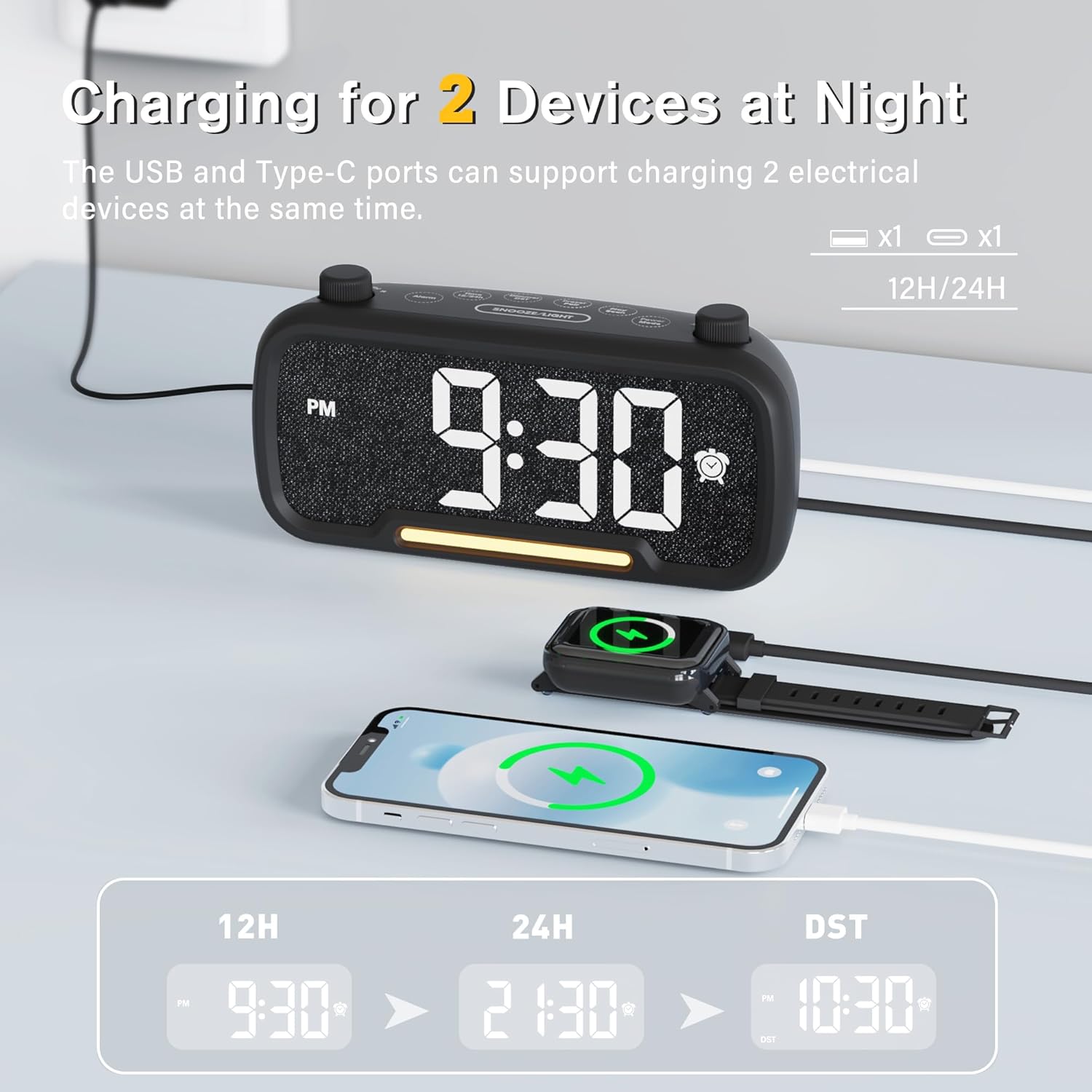
Image: The alarm clock with a smartphone and a smartwatch connected to its USB-A and USB-C charging ports, illustrating its ability to charge two devices concurrently.
Fonksyon limyè lannwit
- Peze epi kenbe la SNOOZE / limyè button to turn the night light on or off.
- When the night light is on, short press the SNOOZE / limyè button to cycle through different brightness levels for the night light.
Antretyen
- Netwayaj: Use a soft, dry cloth to clean the surface of the alarm clock. Do not use liquid cleaners or aerosol cleaners.
- Depo: If storing the device for an extended period, unplug it from the power outlet.
- Ranplasman batri: The CR2032 backup battery typically lasts for several years. If you notice time or alarm settings are lost after a power outage, the battery may need replacement. Open the battery compartment on the rear and replace with a new CR2032 battery.
Depanaj
If you encounter any issues with your Mesqool Digital Alarm Clock Radio, please refer to the following table for common problems and solutions.
| Pwoblèm | Kòz posib / Solisyon |
|---|---|
| Ekran an etenn / Pa gen kouran | Ensure the power adapter is securely plugged into the clock and the wall outlet. Check if the wall outlet is functional. |
| Alam pa sonnen | Verify that the alarm is set and activated (alarm icon visible). Check the alarm volume level. Ensure the alarm time is not set for AM/PM incorrectly. |
| Pa ka pè Bluetooth | Ensure the clock is in Bluetooth mode (flashing Bluetooth icon). Make sure your device's Bluetooth is on and within range. Try forgetting the device on your phone and re-pairing. |
| Move resepsyon radyo FM | Extend the FM antenna fully. Try repositioning the clock to improve signal. Perform an auto-scan to find stronger stations. |
| Paramèt lè/alam pèdi apre kouran an koupe.tage | The CR2032 backup battery may be depleted. Replace the battery. |
| USB/Type-C charging not working | Ensure the clock is powered on. Check the charging cable and the device being charged. Some devices may require more power than the clock can provide. |
Espesifikasyon
| Karakteristik | Detay |
|---|---|
| Mak | Mesqool |
| Nimewo Modèl | CR1025 |
| Koulè | Nwa |
| Dimansyon pwodwi | 16.8 x 3.81 x 0.84 cm |
| Pwa atik | 212 g |
| Kalite ekspozisyon | Dijital dirije |
| Sous pouvwa | Electrical (AC Powered Only) |
| Batri sovgad | CR2032 (for memory function) |
| Bluetooth vèsyon | 5.0 |
| FM Radio Range | 87.5 MHz - 108.0 MHz |
| Chaje pò | 1x USB-A, 1x USB-C |
| Nivo klète | 5 (Display), Multiple (Night Light) |
| Nivo volim | 16 |
Garanti ak sipò
Mesqool products are designed and manufactured to the highest quality standards. For any questions, technical support, or warranty claims, please contact Mesqool customer service through the retailer where you purchased the product or visit the official Mesqool websit pou enfòmasyon kontak.
Tanpri konsève prèv acha ou a pou rezon garanti.


