1. Entwodiksyon
This manual provides essential information for the safe and efficient operation of your THOMSON 40FD2S13 40 Inch LED Full HD Easy TV. Please read it thoroughly before using the television and retain it for future reference.
Your THOMSON Easy TV is designed for straightforward entertainment, featuring a Full HD display, multiple connectivity options, and a triple tuner for versatile signal reception.

Imaj: Devan view of the THOMSON 40FD2S13 40 Inch LED Full HD Easy TV, showcasing ekran li yo ak konsepsyon elegant li yo.
2. Enfòmasyon sou Sekirite
Toujou swiv prekosyon sekirite debaz yo lè w ap itilize televizyon sa a pou diminye risk dife, chòk elektrik, ak blesi.
- Pa ekspoze televizyon an ak lapli oswa imidite.
- Do not open the cabinet; refer all servicing to qualified personnel.
- Asire bon vantilasyon alantou televizyon an.
- Kenbe televizyon an lwen limyè solèy dirèk ak sous chalè.
- Dekonekte televizyon an pandan tanpèt zèklè oswa lè ou pa itilize li pou yon bon bout tan.
- Position the TV on a stable, level surface or securely wall-mount it.
3. Pake kontni
Verifye ke tout atik yo prezan nan pakè a:
- THOMSON 40FD2S13 40 Inch LED Full HD Easy TV
- Kontwòl Remote
- Pouvwa kab
- Manyèl Itilizatè (dokiman sa a)
- TV Stands (if applicable, check packaging)
- Vis pou sipò televizyon (si sa aplikab)
4. Enstalasyon
4.1 Enstale Sipò Televizyon yo
If you are not wall-mounting the television, attach the included stands to the bottom of the TV. Ensure the stands are securely fastened with the provided screws to prevent the TV from tipping.

Image: Diagram showing the dimensions of the THOMSON 40FD2S13 TV, including stand measurements, to assist with placement.
4.2 Montaj mi
For wall mounting, use a VESA-compatible wall mount kit (not included) that matches the TV's specifications. Follow the instructions provided with your wall mount kit carefully. Ensure the wall can support the weight of the TV.
4.3 Konekte periferik
Your THOMSON TV offers various connection ports for external devices. Refer to the image below for port locations and types.
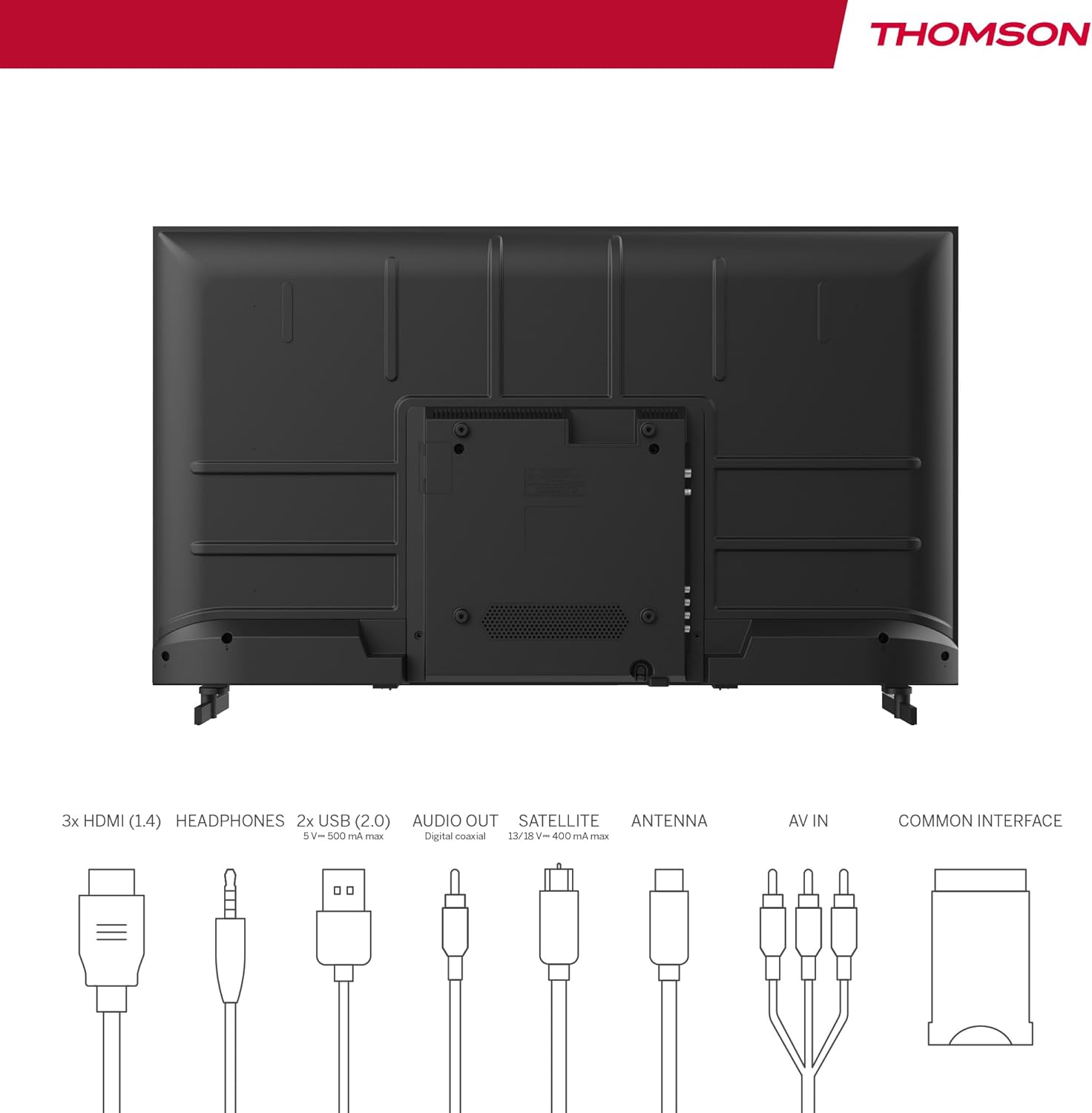
Image: Rear panel of the THOMSON 40FD2S13 TV, illustrating the location of all input and output ports, including HDMI, USB, Audio Out, Satellite, Antenna, AV IN, and Common Interface.
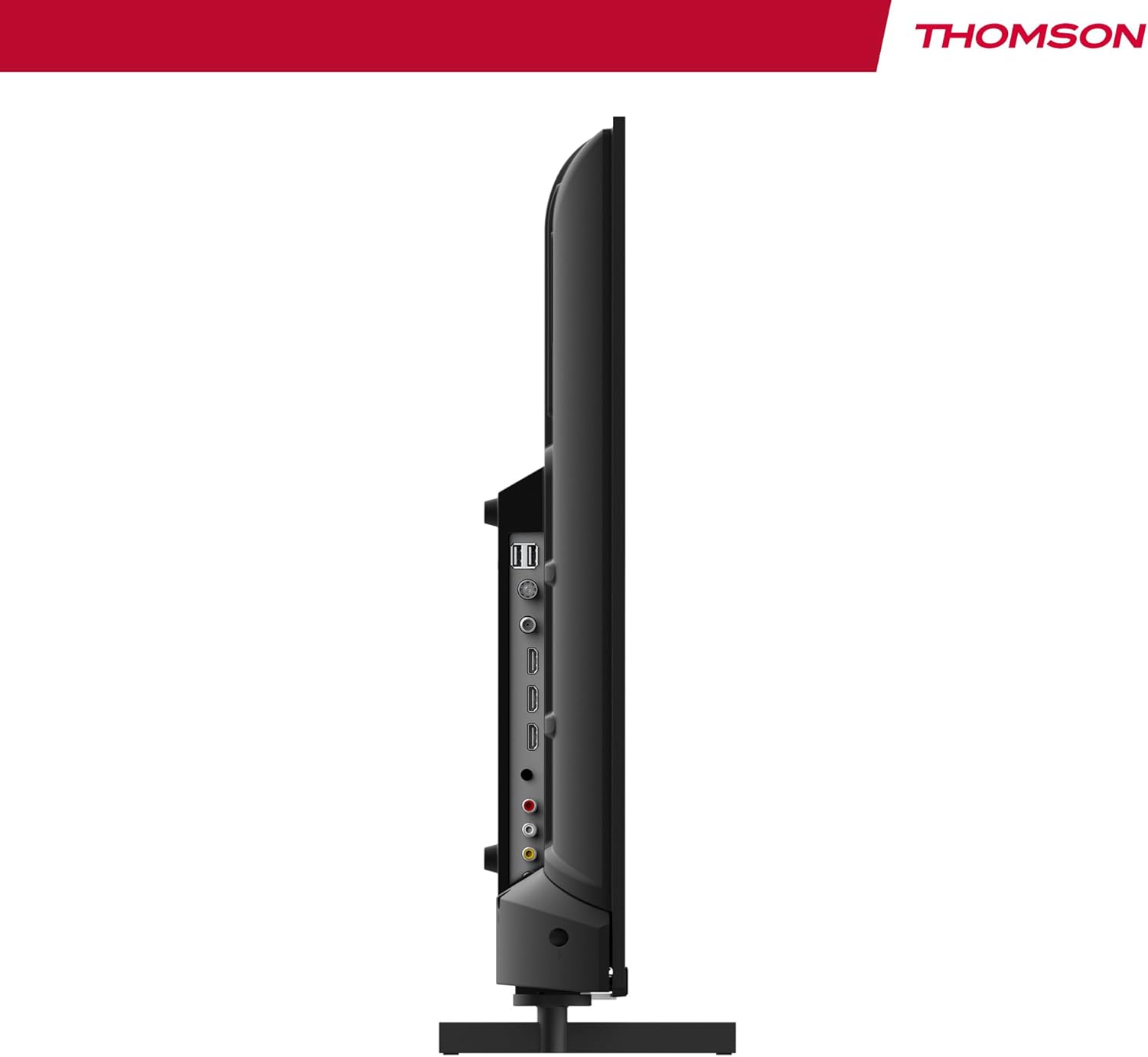
Imaj: Bò kote view of the THOMSON 40FD2S13 TV, highlighting the conveniently located side ports for easy access.
- HDMI (x3): Konekte lektè Blu-ray, konsola jwèt, dekodeur, oswa lòt aparèy ki gen HDMI.
- USB (x2): Konekte aparèy depo USB pou lekti medya.
- AV NAN: Konekte ansyen aparèy yo lè l sèvi avèk kab videyo konpoze ak kab odyo stereo.
- Ekoutè: Konekte kas ekoutè pou tande prive.
- Soti odyo dijital: Connect to an external audio system for enhanced sound.
- Antèn (DVB-T2): Connect a terrestrial antenna for digital broadcast reception.
- Satelit (DVB-S2): Connect a satellite dish for satellite broadcast reception.
- Plas CI+: Insert a Conditional Access Module (CAM) and smart card for encrypted channels.
4.4 Koneksyon pouvwa
After connecting all necessary cables, plug the power cable into the TV's power input and then into a wall outlet. The TV will enter standby mode.
5. Itilizasyon televizyon an
5.1 Kontwòl Remote
The included remote control allows you to access all TV functions. It features backlit buttons for easy navigation in dim lighting.

Image: The THOMSON TV remote control, highlighting its ergonomic design and backlit buttons for convenient use.
- Bouton pouvwa: Limen/etenn televizyon an oubyen li mete l nan mòd veille.
- Bouton nimewo: Chwazi chanèl yo dirèkteman.
- Volim +/-: Ajiste nivo volim.
- Chèn +/-: Change channels sequentially.
- Bouton meni: Ale nan meni prensipal la pou paramèt yo.
- Bouton Navigasyon (Anwo/Anba/Agoch/Dwat/OK): Navige nan meni yo epi konfime seleksyon yo.
- Sous bouton: Select input sources (HDMI, AV, Tuner).
- INFO bouton: Display current channel information.
- Bouton GID: Access the Electronic Program Guide (EPG).
- Bouton REC: Initiate recording to a connected USB storage device (if supported and configured).
5.2 Konfigirasyon Inisyal ak Eskane Chanèl
Upon first power-on, the TV will guide you through the initial setup process, including language selection, country, and channel scanning. Select your preferred reception type (Antenna, Cable, or Satellite) and follow the on-screen instructions to scan for available channels.

Image: Close-up of the TV's tuner inputs, indicating compatibility with DVB-T2 (terrestrial antenna), DVB-C (cable), and DVB-S2 (satellite) signals.
5.3 Media Player
Connect a USB storage device to one of the USB ports to access photos, music, videos, and text files directly on your TV. Use the remote control to navigate the media player interface.
5.4 Karakteristik espesyal
- Gid Pwogram Elektwonik (EPG): View upcoming program schedules and set reminders.
- Reta Tan: Pause live TV broadcasts (requires a connected USB storage device).
- Kontwòl Paran: Set restrictions on channels or programs based on age ratings.
- Mòd otèl: Configure specific settings for use in hotel environments, such as default volume and input source.
- Dolby Audio: Experience enhanced sound quality with Dolby Audio technology.

Image: A family enjoying content on the THOMSON TV, with the Dolby Audio logo indicating superior sound experience.
6. Antretyen
To ensure the longevity and optimal performance of your THOMSON TV, follow these maintenance guidelines:
- Netwaye ekran an: Siye ekran an dousman avèk yon twal mou ki pa gen pousyè. Pou mak ki difisil pou retire, siye l yon ti kras.ampRense twal la avèk dlo oswa yon pwodui netwayaj ekran espesyalize. Pa janm flite likid dirèkteman sou ekran an.
- Netwaye kabinè a: Sèvi ak yon twal mou epi sèk pou siye kabinè televizyon an. Evite itilize pwodui netwayaj abrazif oswa solvan.
- Vantilasyon: Asire w ouvèti vantilasyon yo sou dèyè televizyon an pa bloke.
- Kòd pouvwa: Tcheke kòd kouran an regilyèman pou wè si li domaje. Si li domaje, kontakte sèvis kliyan pou yo ranplase li.
NAN. Depanaj
If you encounter issues with your TV, consult the following common troubleshooting steps before contacting customer support.
| Pwoblèm | Kòz posib | Solisyon |
|---|---|---|
| Pa gen pouvwa | Kòd kouran an pa konekte; priz kouran an pa fonksyone. | Ensure the power cord is securely plugged into the TV and a working wall outlet. Check the power switch on the TV (if present). |
| Pa gen imaj, men gen son | Sous antre ki pa kòrèk la chwazi; pwoblèm ekleraj dèyè. | Press the "Source" button on the remote to select the correct input. Try adjusting brightness/contrast settings. |
| Pa gen son, men imaj la la | Volim nan twò ba oswa twò ba; paramèt pwodiksyon odyo yo pa kòrèk. | Press the "Volume +" button or unmute the TV. Check audio output settings in the TV menu. |
| Remote kontwòl pa travay | Pil yo mouri oswa yo mal mete; gen yon blokaj ant telekòmand lan ak televizyon an. | Replace batteries with new ones, ensuring correct polarity. Remove any obstructions. Point the remote directly at the TV's IR sensor. |
| Poor picture quality / No signal | Antenna/cable/satellite connection loose or damaged; incorrect tuner settings. | Check all antenna/cable/satellite connections. Perform a channel scan again. Ensure the correct tuner input is selected. |
8. Espesifikasyon
| Karakteristik | Detay |
|---|---|
| Mak | THOMSON |
| Modèl | 40FD2S13 |
| Gwosè ekran | 40 pous (101 cm) |
| Teknoloji ekspozisyon | dirije |
| Rezolisyon | 1920 x 1080 (Full HD) |
| Rafrechisman pousantaj | 60 Hz |
| Tuner Teknoloji | DVB-C, DVB-S2, DVB-T2 |
| Pò HDMI | 3 |
| Pò USB | 2 |
| Lòt entèfas | AV IN, Headphone, Digital Audio Out, CI+ Slot |
| Dekodaj odyo | DD (Dolby Digital) |
| Konfigirasyon Oratè | 2.0 Son antoure |
| Voltage | 230 Volt |
| Klas efikasite enèji | E |
| Pwodwi Dimansyon (W x H x D) | 72 x 42 x 8.2 cm (without stand, approx.) |
| Pwa | 6.9 kg (apeprè) |
9. Enfòmasyon sou Garanti
Your THOMSON 40FD2S13 TV comes with a 3-ane garanti from the date of purchase. This warranty covers manufacturing defects and ensures that your product meets high-quality standards. Please retain your proof of purchase for warranty claims.
For detailed warranty terms and conditions, please refer to the warranty card included with your product or visit the official THOMSON websit.
10. Sipò pou Kliyan
If you require further assistance, have questions not covered in this manual, or need technical support, please contact THOMSON customer service.
- Sipò sou entènèt: Visit the official THOMSON support websit pou FAQ, gid depanaj, ak fòm kontak.
- Sipò nan telefòn: Refer to your product packaging or the THOMSON websit pou nimewo kontak sèvis kliyan rejyonal yo.
When contacting support, please have your TV model number (40FD2S13) and serial number ready.


