Entwodiksyon
This manual provides detailed instructions for the setup, operation, and maintenance of your KSIX Compass Smartwatch. Designed for active lifestyles, this smartwatch features integrated GPS, call functionality, notification alerts, and comprehensive health monitoring. Please read this manual thoroughly to ensure proper use and to maximize your device's capabilities.
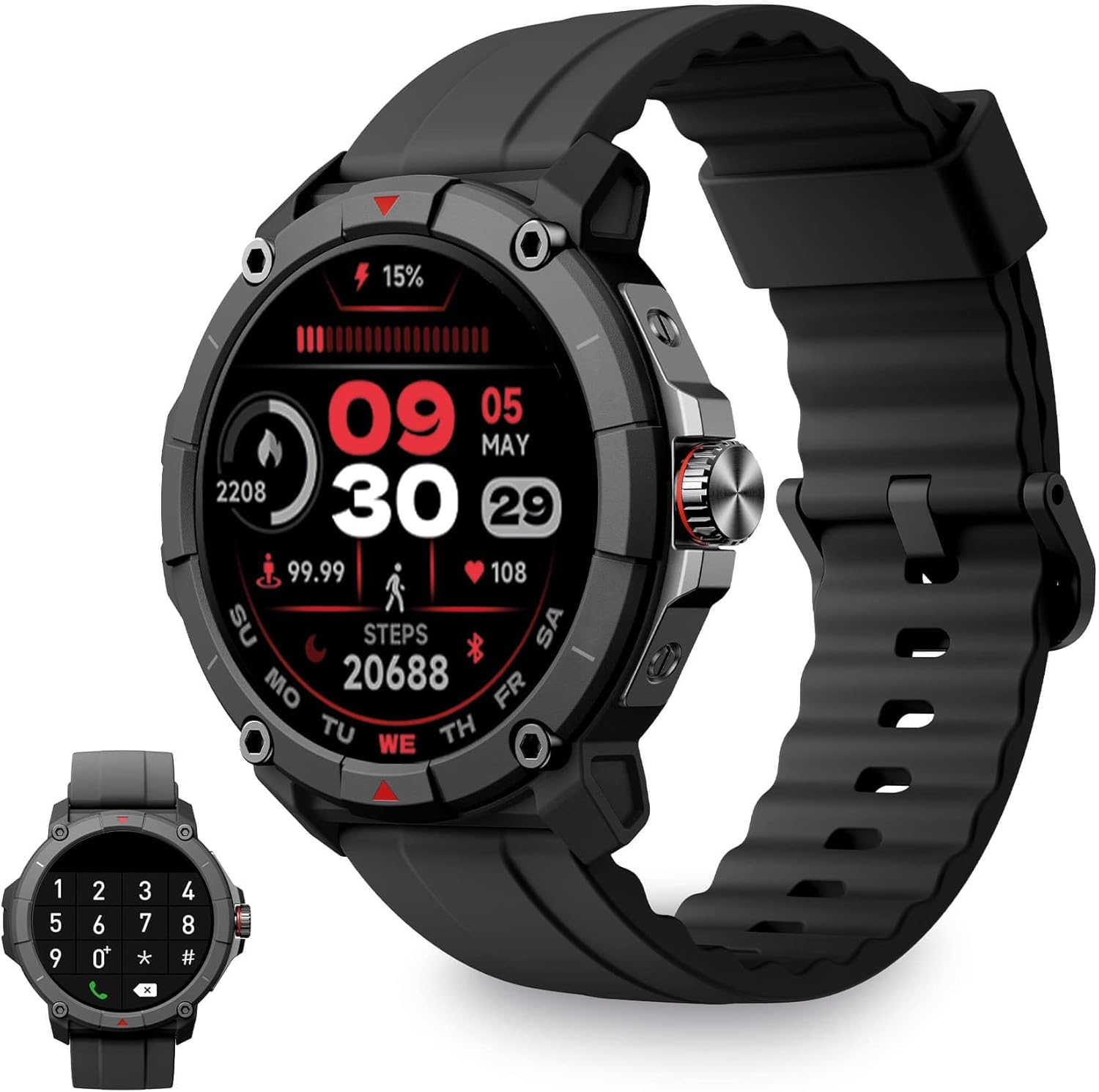
Image: KSIX Compass Smartwatch, front view showing the round display with a digital watch face, and the black silicone strap. A smaller inset image shows the dial pad on the watch screen.
1. Enstalasyon
1.1 Chaje Aparèy la
Before initial use, fully charge your KSIX Compass Smartwatch.
- Konekte kab chaje a nan pò chaje ki dèyè mont entelijan an.
- Konekte lòt bout kab la nan yon adaptè kouran USB (pa enkli) oubyen nan yon pò USB òdinatè.
- Ekran mont lan ap endike eta chaj la.
Yon chaj konplè anjeneral pran apeprè 2.5 èdtan epi li bay jiska 7 jou of battery life, depending on usage.

Image: Close-up of the KSIX Compass Smartwatch's side, highlighting the rotating crown. Text overlays indicate "Charging Time: 2.5h" and "Battery Life: 7 days".
1.2 Konekte ak telefòn entelijan ou
To unlock all features, pair your smartwatch with the companion app.
- Telechaje la VeryFit app from the App Store (iOS 9.0 and above) or Google Play Store (Android 6.0 and above).
- Asire w ke Bluetooth aktive sou smartphone ou.
- Open the VeryFit app and follow the on-screen instructions to create an account or log in.
- Select "Add Device" or similar option within the app and choose your KSIX Compass Smartwatch from the list of available devices.
- Konfime demann koneksyon an sou tou de smartphone ou ak smartwatch la.
The watch uses Wireless BLE 5.3 for a stable connection.
2. Operasyon Enstriksyon
2.1 Navigasyon debaz
- Ekran tactile: Glise agoch, adwat, anlè, oswa anba pou navige nan meni ak fonksyon yo. Tape pou chwazi.
- Kouwòn wotasyon: Rotate the crown on the side of the watch to scroll through lists or adjust settings. Press the crown to return to the home screen or confirm selections.

Image: The KSIX Compass Smartwatch displaying its 1.38-inch full-color TFT-LCD touchscreen. Several customizable watch faces are shown below, demonstrating different layouts and information displays.
2.2 Fonksyonalite Apèl
The KSIX Compass Smartwatch allows you to make and receive calls directly from your wrist using its built-in microphone and speaker.
- Fè apèl: Access the dial pad or contact list on the watch screen to initiate a call.
- Resevwa apèl: When a call comes in, you can answer or reject it directly from the watch.
2.3 Notifikasyon
Receive notifications from various applications (e.g., WhatsApp, Instagram, Twitter) directly on your smartwatch when connected to your phone.

Image: The KSIX Compass Smartwatch displaying a call screen with options for frequent contacts and a dial pad. Below, icons for various social media and messaging apps (WhatsApp, Instagram, Twitter, Facebook, Gmail) are shown, representing notification capabilities.
2.4 Asistan Vwa
The smartwatch is compatible with your preferred voice assistant (Alexa, Siri, or Google Assistant). Activate the voice assistant feature on your watch and speak your commands.
2.5 Sport Modes and GPS Tracking
The KSIX Compass Smartwatch includes integrated GPS for tracking your routes during outdoor activities like running and hiking. It supports over 100 sport modes.
- Chwazi mòd espò ou vle a nan meni mont lan.
- Ensure GPS connection is successful before starting your activity.
- Track your route and performance data in real-time.
- Review detailed activity logs in the VeryFit app after your workout.

Image: The KSIX Compass Smartwatch display showing "GPS connection successful" with a green pin icon, ready to start an activity. A blurred outdoor path is visible in the background.
2.6 Siveyans Sante
Monitor various health metrics directly from your wrist.
- Monitè batman kè: Li kontinye ap swiv batman kè ou.
- Monitè oksijèn san (SpO2): Mezire nivo saturation oksijèn nan san an.
- Monitè tansyon: Bay lekti tansyon.
- Monitè dòmi: Suivi modèl ak kalite dòmi.
- Pedomètr: Counts steps taken throughout the day.
- Stress Meter: Monitors stress levels.
- Egzèsis pou respire: Guides you through relaxation breathing.
- Suivi Sik Menstruèl: Ede swiv epi predi sik règ yo.
Tout done sou sante yo kapab viewed in detail within the VeryFit app.
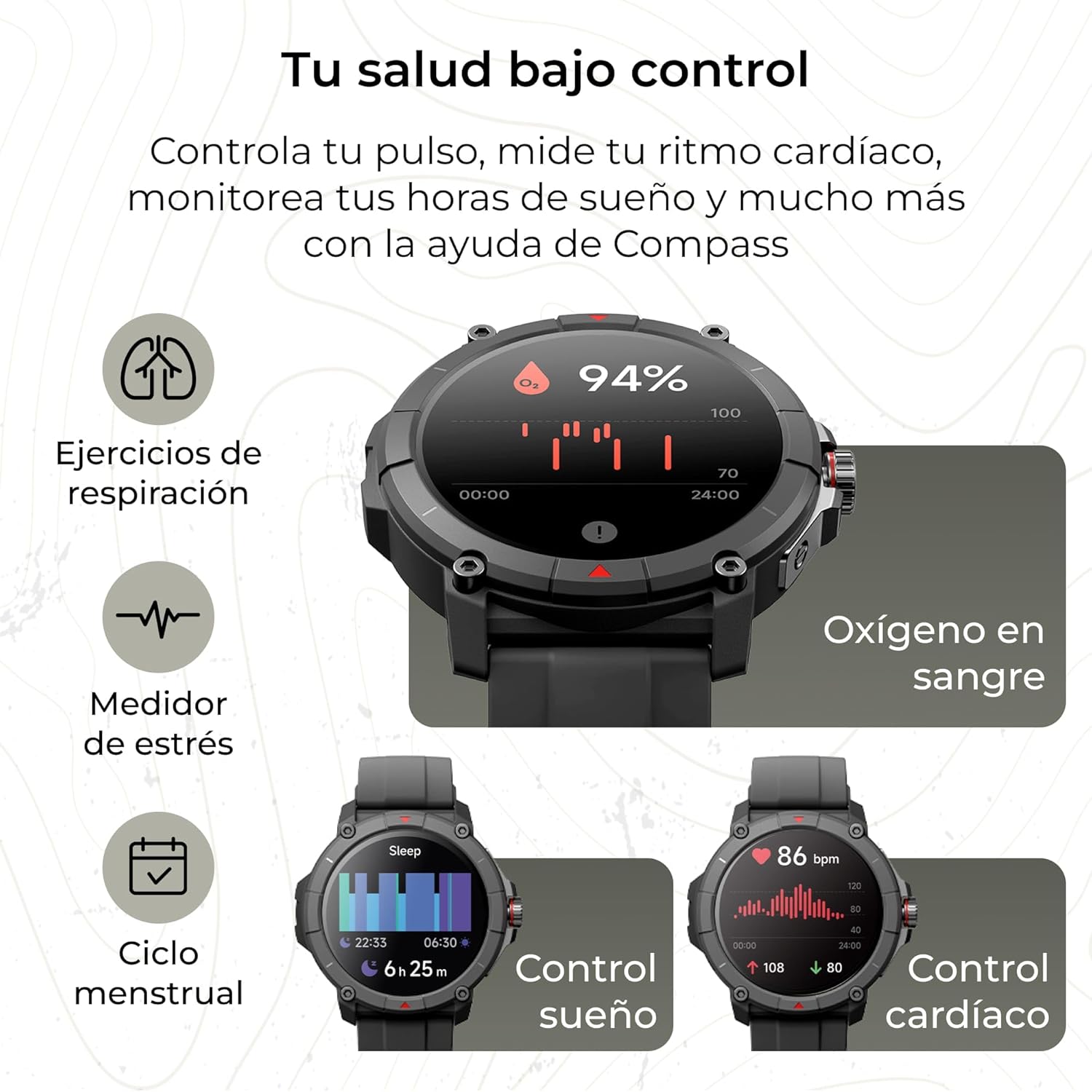
Image: The KSIX Compass Smartwatch displaying various health monitoring features. These include blood oxygen saturation (94%), heart rate control (86 bpm), sleep tracking (6h 25m), stress measurement, breathing exercises, and menstrual cycle tracking.
2.7 Lòt Karakteristik
- Flach: Access a quick flashlight function.
- Kamera Remote: Control your smartphone's camera remotely.
- Kadran personnalisable: Choose from multiple watch faces to personalize your device.
3. Antretyen
3.1 Netwaye Smartwatch ou a
Regularly clean your smartwatch to ensure optimal performance and hygiene.
- Siye ekran an ak kò a ak yon twal mou ki pa gen pousyè.
- Pou pousyè tè ki difisil pou retire, yon ti kras dampen twal la ak dlo.
- Evite itilize pwodwi chimik piman bouk oswa materyèl abrazif.
- Asire w ke kontak chaj yo pwòp epi sèk anvan ou chaje yo.
3.2 Rezistans dlo
The KSIX Compass Smartwatch is water-resistant up to 2 meters for 30 minutes, with an IP68 and 2ATM protection rating.
- It is suitable for daily use, such as hand washing, rain, and shallow swimming.
- Avoid hot water, saunas, or high-pressure water jets.
- Do not press buttons or operate the touchscreen underwater.
- Dry the watch thoroughly after exposure to water.

Imaj: Yon imaj konpoze ki montreasing various features of the KSIX Compass Smartwatch. Key elements include "100+ Sport Modes", "Integrated GPS", "2ATM Submersible" (with an image of the watch partially submerged in water), "7 Days Battery Life", "Hands-free Calling", "Customizable Dials", "Voice Assistants", and "24h Health Monitoring".
NAN. Depanaj
4.1 Pwoblèm koneksyon
- Gade dekonekte souvan:
- Asire w ke mont entelijan an nan zòn Bluetooth telefòn ou an.
- Tcheke si aplikasyon VeryFit la ap fonksyone nan background nan epi li gen otorizasyon nesesè yo.
- Restart both your phone's Bluetooth and the smartwatch.
- If issues persist, try unpairing and re-pairing the device through the VeryFit app.
- Pa ka konekte:
- Make sure the smartwatch is charged.
- Verify Bluetooth is enabled on your phone.
- Ensure no other devices are currently paired with the smartwatch.
- Restart your phone and the smartwatch, then try pairing again.
4.2 GPS Presizyon
- Inaccurate GPS Readings:
- Asire w ou nan yon zòn deyò ouvè ki klè. view nan syèl la pou resepsyon siyal GPS optimal.
- Wait for the "GPS connection successful" message before starting your activity.
- Sync the watch with the VeryFit app regularly to update GPS assistance data.
4.3 Optimizasyon lavi batri a
- Diminye klète ekran an.
- Dezaktive siveyans kontinyèl batman kè a si ou pa bezwen li.
- Limite kantite notifikasyon aplikasyon yo.
- Turn off "Always-On Display" if available.
- Use power-saving modes if offered by the device.
5. Espesifikasyon
| Mak | KSIX entelijan teknoloji ou |
| Non modèl | Bousòl |
| Nimewo Modèl | BXSW18N |
| Koulè | Nwa |
| Sistèm operasyon | Wear OS [UNCERTAIN] (Compatible with iOS 9.0+ and Android 6.0+) |
| Gwosè ekran | 1.38 Inches (TFT-LCD Touchscreen) |
| Koneksyon | Wireless Bluetooth (BLE 5.3) |
| Karakteristik espesyal | Compass, GPS, Heart Rate Monitor, SpO2, Blood Pressure, Sleep Tracker, Pedometer, Voice Assistant, Call Functionality, Notifications, Flashlight, Camera Remote |
| Aparèy konpatib | Smartphone, tablèt |
| Konpozisyon batri | Lityòm-ion |
| Lavi batri | Jiska 7 jou (itilizasyon tipik) |
| Tan pou chaje | Apeprè. 2.5 èdtan |
| Rezistans dlo | 2ATM, IP68 (up to 2 meters for 30 minutes) |
6. Enfòmasyon sou Sekirite
Tanpri obsève direktiv sekirite sa yo:
- Pa eseye demonte oswa modifye aparèy la.
- Kenbe aparèy la lwen tanperati ekstrèm ak limyè solèy la dirèk.
- Evite ekspoze aparèy la a gwo enpak oswa tonbe.
- Consult a medical professional before starting any new exercise regimen or if you have health concerns. The health monitoring features are for informational purposes and not for medical diagnosis.
- Jete aparèy la ak batri li yon fason responsab dapre règleman lokal yo.


