1. Entwodiksyon
This manual provides detailed instructions for the installation, operation, and maintenance of your UCOCARE 2.5K Baby Monitor, Model OB-2K01. This device is designed to provide reliable indoor surveillance for monitoring babies, pets, or elderly family members, offering advanced features such as high-resolution video, motion tracking, and environmental sensing.
2. Enfòmasyon sou Sekirite
Tanpri li epi konprann tout enstriksyon sekirite yo anvan ou itilize pwodui sa a. Si ou pa swiv enstriksyon sa yo, sa ka lakòz chòk elektrik, dife oswa lòt danje.
- Sekirite elektrik: Use only the provided power adapter. Do not expose the device to water or moisture. Ensure the power cable is not damaged or pinched.
- Plasman: Keep the camera and its power cord out of reach of children and pets to prevent strangulation hazards. Do not place the camera near heat sources or in direct sunlight.
- Vantilasyon: Ensure adequate ventilation around the camera to prevent overheating. Do not cover the device.
- Netwayaj: Disconnect power before cleaning. Use a dry, soft cloth. Do not use liquid or aerosol cleaners.
3. Pake kontni
Verifye ke tout atik yo prezan nan pakè ou a:
- 1 x UCOCARE Baby Camera
- 1 x pouvwa adaptè
- 1 x Set of Screws and Installation Tools
- 1 x manyèl itilizatè
- 1 x 32GB Micro SD Card (pre-installed or included separately)
4. Pwodwi souview
The UCOCARE 2.5K Baby Monitor is equipped with advanced features for comprehensive monitoring. Key components include the camera lens, microphone, speaker, temperature/humidity sensor, and a Micro SD card slot.

Image: UCOCARE 2.5K Baby Monitor, highlighting 5G connectivity, 2.5K resolution, and included 32GB SD card.
Karakteristik kle:
- Rezolisyon 2.5K Super HD: Provides clear and detailed video.
- Doub Band WiFi: Supports both 2.4GHz and 5GHz networks for flexible connectivity.
- Pan / Panche / Zoom: 355° horizontal rotation, 120° vertical tilt, and 4x digital zoom for full room coverage.
- Vizyon lannwit: Delivers clear images in low-light conditions.
- De-fason Audio: Pèmèt kominikasyon an tan reyèl atravè kamera a.
- Cry and Sound Detection: Sends instant alerts upon detecting specific sounds.
- Human Detection & Auto-Tracking: Identifies human presence and follows movement.
- Capteur Tanperati ak Imidite: Monitors the environment for optimal comfort.
- Lullabies: 14 pre-programmed lullabies to soothe.
- Depo lokal: Includes a 32GB Micro SD card for video recording without subscription.
- Depo nwaj: Optional cloud service for backup.
- Entegrasyon kay entelijan: Konpatib ak Google Asistan ak Amazon Alexa.
5. Enstalasyon
5.1 Limen Aparèy la
- Konekte adaptè kouran an nan pò antre kouran kamera a.
- Plug the adapter into a standard electrical outlet. The camera will power on and initiate its startup sequence.
5.2 Enstalasyon Aplikasyon ak Kreyasyon Kont
- Download the UCOCARE mobile application from your device's app store (iOS or Android).
- Louvri aplikasyon an epi swiv enstriksyon ki sou ekran an pou kreye yon nouvo kont oubyen konekte si ou deja genyen youn.
5.3 Konekte ak Wi-Fi
The camera supports dual-band Wi-Fi (2.4GHz and 5GHz) for flexible network integration.
- In the UCOCARE app, tap 'Add Device' or the '+' icon.
- Chwazi modèl kamera ou nan lis la.
- Follow the app's instructions to connect the camera to your Wi-Fi network. This typically involves scanning a QR code displayed on your phone with the camera, or entering your Wi-Fi credentials.
- Ensure your smartphone is connected to the same Wi-Fi network you intend to connect the camera to during the setup process.

Image: Illustration of the camera's dual-band WiFi capability, supporting both 5GHz and 2.4GHz networks.
5.4 Monte Kamera a
The camera can be mounted in various ways to suit your monitoring needs:
- Sifas mòn: Mete kamera a sou yon sifas ki plat tankou yon tab oswa yon etajè.
- Mi Mount: Use the included screws and tools to secure the camera to a wall.
- Plafon mòn: Use the included screws and tools to secure the camera to the ceiling.
Asire w ke kote enstalasyon an bay yon kote ki klè view nan zòn ou vle siveye a epi ki nan zòn siyal Wi-Fi ou a.

Image: Demonstrates different installation methods for the camera, including table, wall, and ceiling mounts.
6. Operasyon Enstriksyon
6.1 Viv View ak Kontwòl Kamera
Once connected, open the UCOCARE app to access the live video feed. You can:
- Pan / Panche: Glise sou live la view screen to remotely adjust the camera's horizontal (355°) and vertical (120°) angles.
- Zoom: Pinch to zoom in on the live feed (4x digital zoom).
- De-fason Audio: Tap the microphone icon to speak through the camera's speaker. Tap the speaker icon to listen to audio from the camera's microphone.
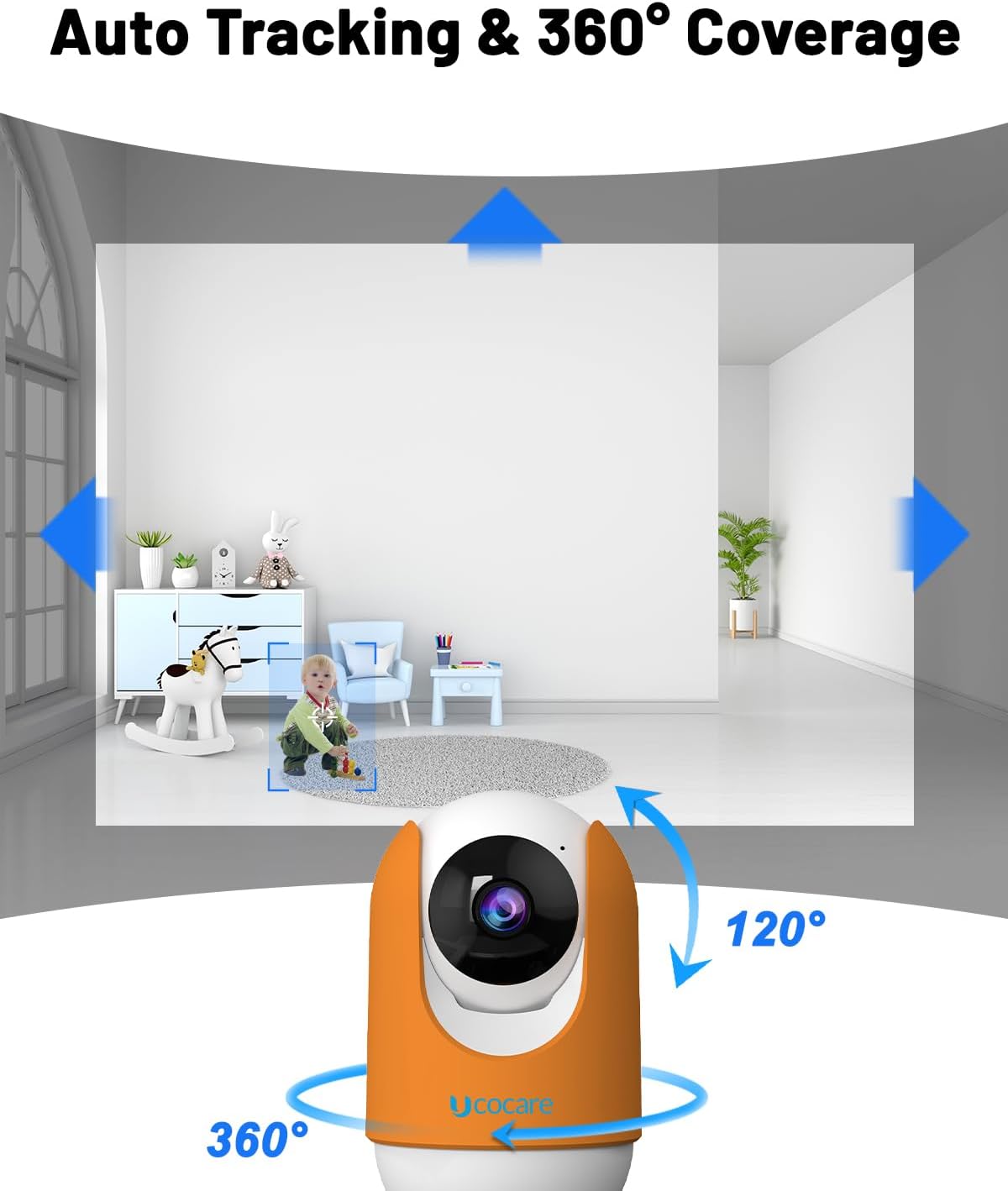
Image: Illustrates the camera's 360° pan and 120° tilt capabilities, along with its auto-tracking function.

Image: Depicts the two-way audio feature, allowing interaction with individuals near the camera.
6.2 Anrejistreman ak Depo
Kamera a sipòte plizyè opsyon anrejistreman:
- Kat mikwo SD: The included 32GB Micro SD card allows for local storage of video recordings. The camera supports both event-triggered and continuous recording modes.
- Depo nwaj: An optional cloud storage service is available for secure off-site backup of your recordings. Refer to the app for subscription details.
- NVR (Anrejistrè Videyo Rezo): The camera can integrate with compatible NVR systems for 24/7 video recording.

Imaj: Plis paseview of available storage options: 32GB SD card (included), NVR for 24/7 recording, and cloud storage.
6.3 Detection and Alerts
Configure detection settings in the app to receive timely notifications:
- Cry and Sound Detection: The camera detects baby crying or other significant noises and sends instant alerts to your smartphone.
- Deteksyon imen: Advanced algorithms identify human presence, reducing false alarms.
- Tracking Mouvman: When motion is detected, the camera automatically tracks the moving object within its field of view.

Image: Demonstrates the cry detection feature, showing an alert notification on a smartphone when a baby cries.

Image: Illustrates human and pet detection with instant alerts sent to a smartphone.
6.4 Environmental Monitoring and Lullabies
- Tanperati ak imidite: Monitor the room's temperature and humidity levels directly from the app to ensure a comfortable environment.
- Lullabies: Access 14 pre-recorded lullabies through the app to play for your baby.

Image: Shows the camera playing lullabies to a sleeping child, indicating the soothing feature.
6.5 Entegrasyon Kay Entelijan
The UCOCARE 2.5K Baby Monitor is compatible with:
- Google Asistan: Sèvi ak kòmandman vwa pou view the camera feed on compatible smart displays.
- Amazon Alexa: Sèvi ak kòmandman vwa pou view the camera feed on compatible Echo Show devices.

Image: Demonstrates compatibility with Google Assistant and Amazon Alexa for viewing the camera feed on smart displays.
6.6 Pwoteksyon Konfidansyalite
Manage your privacy settings within the app:
- Lens On/Off: Manually turn the camera lens on or off for real-time monitoring and recording.
- Privacy Schedule: Set specific times for the camera to automatically turn off or on.

Image: Illustrates the privacy protection features available in the app, including lens control and scheduling.
6.7 Pataj Fanmi
The UCOCARE app supports family-sharing functionality, allowing multiple authorized users within your household to access and monitor the camera feed simultaneously. This feature can be configured within the app's settings.

Image: Depicts the family sharing feature, enabling multiple users to view fim kamera a an menm tan.
7. Antretyen
7.1 Netwayaj Kamera a
To maintain optimal performance, regularly clean the camera lens and exterior:
- Ensure the camera is powered off and unplugged before cleaning.
- Use a soft, dry, lint-free cloth to gently wipe the lens and camera body.
- Do not use harsh chemicals, abrasive cleaners, or solvents, as these can damage the device.
7.2 Mizajou Firmware
Periodically check the UCOCARE app for available firmware updates. Updates often include performance improvements, new features, and security enhancements. Follow the in-app instructions to perform any necessary updates.
NAN. Depanaj
If you encounter issues with your UCOCARE 2.5K Baby Monitor, refer to the following common problems and solutions:
- Kamera a pa konekte ak Wi-Fi a:
- Ensure your Wi-Fi network is active and the password is correct.
- Verifye kamera a nan zòn routeur Wi-Fi ou a.
- Eseye rekòmanse routeur ou a ak kamera a.
- Confirm you are selecting the correct Wi-Fi band (2.4GHz or 5GHz) if your router supports both.
- Move kalite videyo:
- Tcheke vitès koneksyon entènèt ou. Ou bezwen yon koneksyon ki estab e rapid pou difizyon 2.5K.
- Asire w ke lantiy kamera a pwòp epi li pa gen okenn obstak.
- Adjust the camera's position to optimize lighting conditions.
- Pa gen alèt ki resevwa:
- Verify that detection settings (cry, sound, human detection) are enabled in the app.
- Check your phone's notification settings to ensure the UCOCARE app is permitted to send notifications.
- Asire w kamera a gen yon koneksyon entènèt ki estab.
- Odyo bidireksyonèl la pa fonksyone:
- Tcheke paramèt volim yo sou telefòn entelijan ou ak nan aplikasyon an.
- Ensure the microphone and speaker icons are enabled in the live view.
- Test the feature in a quiet environment to rule out background noise interference.
- Kamera a pa reponn:
- Unplug the camera from the power source, wait 10 seconds, and plug it back in.
- If the issue persists, perform a factory reset (refer to the app or product support for specific instructions).
9. Espesifikasyon
| Karakteristik | Spesifikasyon |
|---|---|
| Nimewo Modèl | OB-2K01 |
| Rezolisyon Capture Videyo | 2.5K |
| Teknoloji kominikasyon san fil | Wi-Fi (2.4GHz ak 5GHz) |
| Pan / Panche Range | 355 ° orizontal, 120 ° vètikal |
| Zoom dijital | 4x |
| To Frame | 30 fps |
| Depo | 32GB Micro SD Card (Included), Cloud Storage, NVR |
| Karakteristik espesyal | Night Vision, Cry/Sound Detection, Human Detection, Auto-Tracking, Temperature/Humidity Sensor, Lullabies, Two-Way Audio |
| Konpatibilite | Google Assistant, Amazon Alexa, Smartphone, Tablet |
| Sous pouvwa | Fil elektrik (5 volts) |
| Kalite aliye | Surface Mount, Wall Mount, Ceiling Mount |
| Dimansyon (L x W x H) | 14 x 13 x 8 cm |
| Pwa atik | 390 g |
| Itilizasyon Andedan kay la / Deyò | Andedan kay la |
10. Garanti ak sipò
10.1 Enfòmasyon sou Garanti
Your UCOCARE 2.5K Baby Monitor is covered by a Garanti manifakti 3 zanGaranti sa a kouvri domaj nan materyèl ak nan fabrikasyon anba itilizasyon nòmal. Tanpri konsève prèv acha ou pou reklamasyon garanti.
10.2 Sipò pou Kliyan
For technical assistance, troubleshooting, or any questions regarding your product, please contact UCOCARE customer support:
- Imèl: support@ucocare.net
Our dedicated support team is available to assist you.