1. Pwodwi souview
The Vorago BSP-500-V2 is a portable Bluetooth speaker designed for robust performance and durability. It features IPX5 water resistance, making it suitable for various environments, including outdoor adventures and parties. This manual provides detailed instructions for setting up, operating, and maintaining your speaker.
Karakteristik kle:
- Konektivite Vrè Stereo San Fil (TWS): Connect two BSP-500-V2 speakers for an immersive stereo sound experience.
- Pwolonje lavi batri: Enjoy up to 7 hours of music playback at 70% volume, thanks to its 2000 mAh battery.
- USB tip-C chaje: Convenient and modern USB-C port for charging.
- Koneksyon versatile: Supports Bluetooth for wireless streaming and a 3.5mm auxiliary input for wired connections.
- IPX5 rezistans dlo: Protected against low-pressure water jets from any direction.
Kontni pake:
- Vorago BSP-500-V2 Bluetooth Oratè
- USB Kalite-C Chaje Kab
- 3.5mm Audio Kab
- Manyèl Itilizatè (dokiman sa a)
Dyagram pwodwi:

Figi 1.1: Devan view of the Vorago BSP-500-V2 Bluetooth speaker, showcasing its mesh grille and central Vorago logo.

Figi 1.2: Angle view of the speaker, highlighting its robust, rectangular design and integrated carrying strap.

Figi 1.3: Top view showing the control panel with power, volume down, play/pause, and volume up buttons.
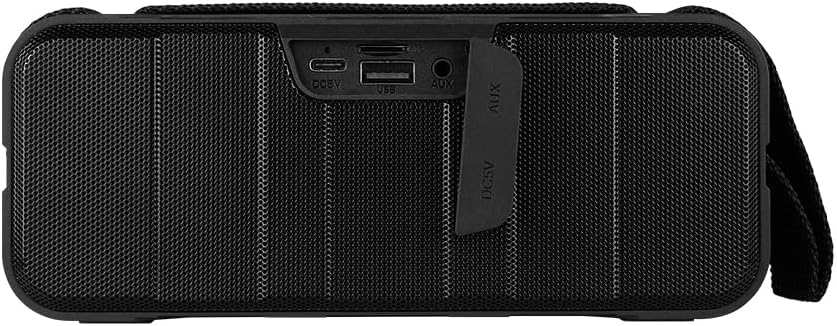
Figi 1.4: Dèyè view of the speaker, showing the protective flap covering the input ports.

Figure 1.5: Close-up of the input ports, including DC 5V (USB-C), USB-A, and AUX (3.5mm) inputs, protected by a rubber cover.
2. Enfòmasyon sou Sekirite
- Pa ekspoze oratè a nan tanperati ekstrèm (cho oswa frèt).
- Evite jete oswa soumèt oratè a nan gwo enpak.
- Keep the speaker away from direct sunlight and heat sources.
- Pa demonte, repare, oswa modifye oratè a tèt ou. Sa ap anile garanti a.
- Ensure the port cover is securely closed when using the speaker near water to maintain IPX5 water resistance.
- Do not immerse the speaker in water. IPX5 rating protects against splashes and light rain, not submersion.
- Use only the provided charging cable or a certified USB Type-C cable for charging.
- Netwaye oratè a avèk yon twal mou epi sèk. Pa sèvi ak pwodui netwayaj abrazif oswa solvan.
3. Enstalasyon
3.1 Chaje Oratè a
- Open the protective rubber cover on the rear of the speaker to access the charging port.
- Connect the USB Type-C end of the charging cable to the speaker's DC 5V port.
- Konekte lòt bout kab USB a nan yon adaptè kouran USB (pa enkli) oubyen nan yon pò USB òdinatè.
- Limyè endikatè chaj la ap limen pandan chaj la epi li ap etenn lè li fin chaje nèt.
- Once charging is complete, securely close the protective rubber cover to maintain water resistance.
3.2 Limen/Etenyen
- Pou limen: Peze epi kenbe la Bouton pouvwa on the top panel for approximately 3 seconds until you hear an audible prompt.
- Pou etenn: Peze epi kenbe la Bouton pouvwa for approximately 3 seconds until you hear an audible prompt.
3.3 Bluetooth Pairing
- Asire w ke oratè a limen. Li pral antre otomatikman nan mòd koneksyon Bluetooth, sa ap endike ak yon limyè LED k ap flache.
- Sou aparèy ou an (telefòn entelijan, tablèt, òdinatè pòtab), aktive Bluetooth epi chèche aparèy ki disponib yo.
- Select "BSP-500-V2" from the list of found devices.
- Once successfully paired, the speaker will emit an audible confirmation, and the LED light will stop flashing and remain solid.
- Oratè a ap rekonekte otomatikman ak dènye aparèy ki konekte a lè li limen, si aparèy la nan zòn li epi Bluetooth la aktive.
3.4 Vrèman san fil stereo (TWS) koneksyon
TWS allows you to connect two BSP-500-V2 speakers together for a true stereo sound experience.
- Ensure both BSP-500-V2 speakers are powered on and not connected to any other Bluetooth device.
- Sou youn nan oratè yo (sa a pral oratè prensipal la), peze de fwa bouton an Bouton jwe/pozOratè a pral antre nan mòd koneksyon TWS.
- The two speakers will automatically search for and connect to each other. You will hear an audible confirmation once they are successfully paired.
- Once TWS is established, connect your device to the primary speaker via Bluetooth as described in Section 3.3.
- To disconnect TWS, double-press the Bouton jwe/poz sou swa oratè.
3.5 Koneksyon oksilyè (AUX).
For devices without Bluetooth, you can use the 3.5mm audio cable.
- Open the protective rubber cover on the rear of the speaker.
- Konekte yon bout kab odyo 3.5mm lan nan pò AUX oratè a.
- Connect the other end of the cable to the audio output jack of your device.
- Oratè a ap chanje otomatikman nan mòd AUX.
- Once disconnected, securely close the protective rubber cover.
4. Operasyon Enstriksyon
4.1 Button Functions:
| Bouton | Fonksyon (Peze kout) | Fonksyon (Long Press) |
|---|---|---|
| Bouton pouvwa | N/A | Power On/Off |
| Bouton volim desann | Diminye Volim | Previous Track |
| Bouton jwe/poz | Jwe/Pòz Mizik, Reponn/Fen Apèl | Reject Call, Double-press for TWS Pairing |
| Bouton Volim moute | Ogmante Volim | Next Track |
5. Antretyen
- Netwayaj: Use a soft, dry, lint-free cloth to clean the speaker's surface. For stubborn dirt, slightly dampRense twal la avèk dlo. Pa sèvi ak pwodui chimik ki agresif, solvan netwayaj, oswa detèjan fò.
- Swen Rezistans Dlo: Always ensure the rubber port cover on the back of the speaker is fully and securely sealed when using the speaker outdoors or near water. This maintains its IPX5 water resistance. After exposure to water, wipe the speaker dry before opening the port cover for charging or auxiliary connections.
- Depo: When not in use for extended periods, store the speaker in a cool, dry place, away from direct sunlight and extreme temperatures. It is recommended to charge the speaker fully before storing and to recharge it every few months to maintain battery health.
- Swen batri: To prolong battery life, avoid fully discharging the battery frequently. Charge the speaker when the low battery indicator is active.
NAN. Depanaj
| Pwoblèm | Kòz posib | Solisyon |
|---|---|---|
| Oratè a pa limen. | Batri ki ba. | Charge the speaker fully using the provided USB Type-C cable. |
| Pa ka konekte atravè Bluetooth. | Speaker is not in pairing mode; Device's Bluetooth is off; Speaker is already connected to another device; Device is too far from speaker. | Ensure speaker is powered on and flashing (pairing mode). Turn on Bluetooth on your device. Disconnect from other devices. Move device closer to speaker (within 10 meters). |
| Pa gen son oswa volim nan ba. | Volume too low on speaker or device; Incorrect input mode; Speaker not connected. | Increase volume on both speaker and connected device. Ensure correct mode (Bluetooth or AUX) is active. Verify successful Bluetooth pairing or AUX cable connection. |
| Son deformation. | Volume too high; Device too far from speaker; Interference. | Reduce volume on speaker and/or device. Move device closer to speaker. Avoid obstacles between speaker and device. |
| Koneksyon TWS la echwe. | Speakers are already paired to a device; Speakers are too far apart. | Ensure both speakers are disconnected from any Bluetooth devices. Place speakers close to each other during TWS pairing. |
7. Espesifikasyon
| Karakteristik | Detay |
|---|---|
| Non modèl | BSP-500-V2 |
| Kalite Oratè | Miltimedya |
| Karakteristik espesyal | Bluetooth |
| Itilizasyon Rekòmande | Pou jwè mizik yo |
| Aparèy konpatib | Odinatè pòtab, lektè MP3, telefòn entelijan, tablèt |
| Kalite kontwolè | Bouton |
| Konfigirasyon chanèl son antoure | 5.0 |
| Lavi batri | 7 èdtan |
| Eleman enkli | Oratè |
| Dimansyon pwodwi | 5D x 15W x 18H santimèt |
| Pwa pwodwi | 1 Kilogram |
| Ki enpèmeyab | Wi (IPX5) |
| Kapasite batri | 2000 mAh |
| AmpKalite lifier | Aktif |
| Sous pouvwa | Batri |
| Repons Frekans | 180 Hz |
| Koneksyon Teknoloji | Bluetooth |
| Audio Sòti Mode | Stereo |
| Kalite aliye | Tabletop mòn |
8. Garanti ak sipò
The Vorago BSP-500-V2 Bluetooth Speaker comes with a limited warranty. Please refer to the warranty card included with your product for specific terms and conditions, or visit the official Vorago websit pou plis detay.
For technical support, troubleshooting assistance, or warranty claims, please contact Vorago customer service through their official channels. You can find more information and contact details on the Vorago Brand Store on Amazon oswa ofisyèl yo websit.
Tanpri konsève prèv acha ou a pou rezon garanti.


