Entwodiksyon
This manual provides detailed instructions for the safe and efficient use of your Fockety Portable MP3 Player. Please read this manual thoroughly before operating the device and retain it for future reference.
Kontni pake
Verifye ke tout atik ki nan lis anba a yo prezan nan pakè ou a:
- 1 x Fockety MP3 Player
- 1 x Headphones
- 1 x USB Chaje Kab

Image: Fockety MP3 Player, included headphones, and USB charging cable.
Pwodwi souview
The Fockety MP3 Player is designed for portable music playback. It features a compact design, an LCD screen, and a clip for easy attachment.
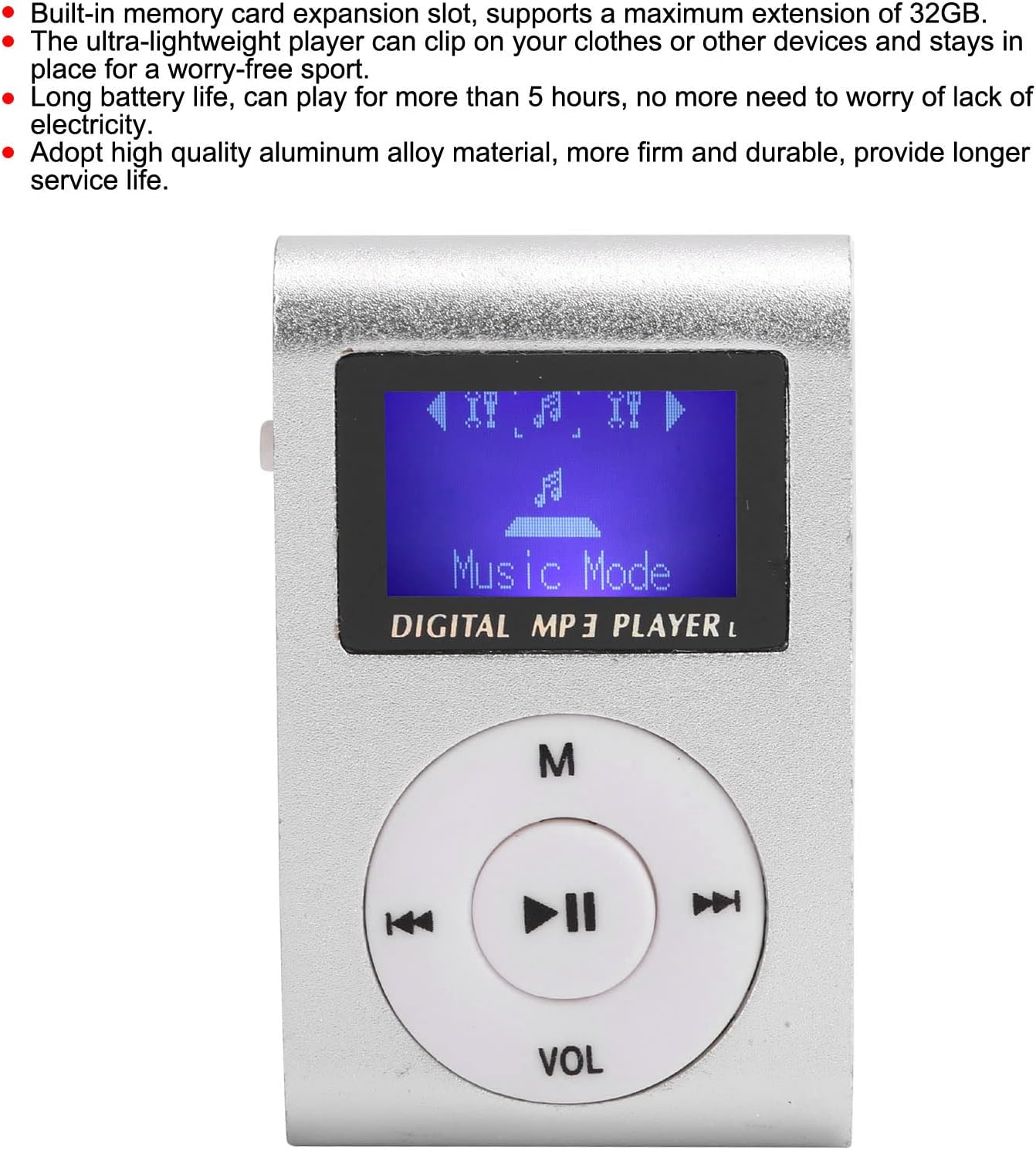
Imaj: Devan view of the MP3 player, displaying the LCD screen and circular control panel with 'M', play/pause, skip, and 'VOL' buttons.
Karakteristik kle:
- Memory Card Expansion: Supports up to 32 GB via a memory card slot (memory card not included).
- Konsepsyon pòtab: Ultra-lightweight with a clip for secure attachment to clothing or other items.
- Pwolonje lavi batri: Provides over 5 hours of continuous playback on a full charge.
- Ekran LCD: Displays song progress and navigation information clearly.
- Konstriksyon dirab: Made from high-quality aluminum alloy for enhanced durability.
Layout aparèy
Familiarize yourself with the various ports and controls of your MP3 player.

Imaj: Bò kote view of the MP3 player, highlighting the 3.5mm headphone jack, MicroSD card slot, and the On/Off power switch.
- 3.5mm Audio Jack: Pou konekte kas ekoutè.
- MicroSD Kat plas: Mete kat memwa ou la a.
- Pouvwa switch: Slide to turn the device On or Off.
- Mini USB pò: Itilize pou chaje aparèy la.
- Bouton kontwòl: (M) Menu, Play/Pause, Skip Forward, Skip Backward, (VOL) Volume.
Enstalasyon
1. Mete yon kat memwa
- Ensure the MP3 player is powered off.
- Jwenn fant kat MicroSD a sou bò aparèy la.
- Gently insert a MicroSD card (up to 32GB, not included) into the slot until it clicks into place.
- Pou retire li, pouse kat la dousman ankò jiskaske li soti.
2. Konekte kas ekoutè
Plug the 3.5mm jack of your headphones into the audio port on the side of the MP3 player.
Enstriksyon Operasyon
Limen / Off
- To turn on: Slide the power switch to the "ON" position. The LCD screen will illuminate.
- To turn off: Slide the power switch to the "OFF" position. The screen will turn off.
Jwe Mizik
- Ensure a memory card with MP3 files mete.
- Pouvwa sou aparèy la.
- The player should automatically enter "Music Mode" or display a menu. Use the skip buttons (<< / >>) to navigate through songs or menu options.
- Peze a Jwe/Poz button (center button) to start or pause playback.
- Peze a M button to access the menu for different modes or settings.
Kontwòl Volim
Peze a VOL button. While the volume indicator is displayed on the screen, use the skip buttons (<< / >>) to adjust the volume level. Press VOL again or wait a few seconds for the volume indicator to disappear.
Chaje Aparèy la
The MP3 player has a built-in rechargeable lithium battery. When the battery is low, the device will indicate this on the screen or power off automatically.
- Locate the Mini USB port on the side of the MP3 player.
- Connect the smaller end of the provided USB charging cable to the Mini USB port on the player.
- Connect the standard USB-A end of the cable to a USB power adapter (not included) or a computer's USB port.
- The device will begin charging. A full charge provides over 5 hours of playback time.
Important Note: The USB port on this device is for charging only. It cannot be used to transfer files to or from a computer.

Image: The Fockety MP3 Player with its Mini USB charging port visible on the side.
Antretyen
- Kenbe aparèy la sèk. Evite ekspoze li a imidite oswa likid.
- Netwaye aparèy la avèk yon twal mou epi sèk. Pa sèvi ak pwodui chimik ki agresif oswa pwodui netwayaj abrazif.
- Evite jete oswa sibi aparèy la nan gwo enpak.
- Sere aparèy la nan yon kote ki fre, sèk lè li pa itilize.
- Pa eseye demonte oswa repare aparèy la tèt ou. Sa ap anile garanti a.
Depanaj
| Pwoblèm | Solisyon posib |
|---|---|
| Aparèy pa limen. |
|
| Pa gen son nan kas ekoutè yo. |
|
| Pa ka jwenn mizik files. |
|
| Aparèy la bloke oswa li pa reponn. |
|
Espesifikasyon
| Non modèl | Fockety0aq9m3vb6e-11 |
| Mak | Fockety |
| Ekspozisyon | LCD Mini Screen |
| Kalite memwa | Memory Card (MicroSD) |
| Max. Ekspansyon | 32 GB |
| Fòma odyo sipòte | MP3 |
| Entèfas | 1 x Mini USB (charging only), 1 x 3.5mm Audio Jack, 1 x Memory Card Slot |
| Kalite batri | Bati-an 250mAh ityòm batri |
| Orè travay | Plis pase 5 èdtan |
| Materyèl | Aliminyòm alyaj |
| Pwa atik | 47 gram |
Garanti ak sipò
For warranty information or technical support, please refer to the documentation provided at the time of purchase or contact Fockety customer service directly. Keep your purchase receipt as proof of purchase.
Do not attempt to open or modify the device, as this may void your warranty.


