Entwodiksyon
This manual provides detailed instructions for the setup, operation, and maintenance of your Crivit Auriol Radio-Controlled Alarm Clock. Please read this manual thoroughly before using the device to ensure proper function and safety.

Figi 1: Devan view of the Crivit Auriol Radio-Controlled Alarm Clock. The LCD screen displays the current time, date, and indoor temperature.
Enfòmasyon sou Sekirite
- Pa ekspoze aparèy la nan tanperati ekstrèm, limyè solèy dirèk, oswa imidite ki wo.
- Evite jete aparèy la oswa soumèt li a gwo enpak.
- Pa demonte oswa eseye repare aparèy la tèt ou. Konfye tout antretyen bay pèsonèl kalifye.
- Kenbe aparèy la lwen dlo ak lòt likid.
- Use only the provided power adapter or recommended batteries.
- Asire bon vantilasyon alantou aparèy la.
Kontni pake
Tanpri verifye ke tout atik yo prezan epi yo an bon kondisyon:
- Crivit Auriol Radio-Controlled Alarm Clock (Model: 373928)
- AC pouvwa adaptè
- Manyèl Itilizatè (dokiman sa a)
- (Batteries not included, typically requires 2x AAA for backup)
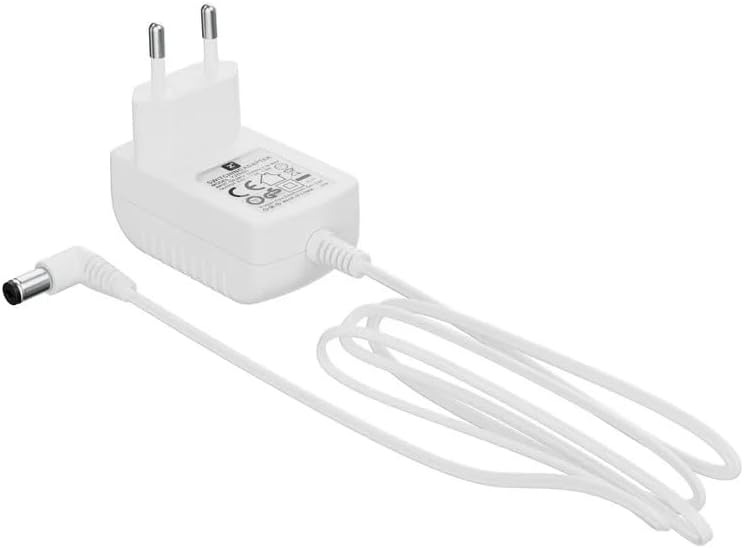
Figure 2: Included AC Power Adapter for the alarm clock.
Karakteristik pwodwi
- Radio-Controlled Time: Automatic time synchronization for accuracy.
- Fonksyon pwojeksyon: Projects time, alarm time, or ambient temperature onto a wall or ceiling.
- Adjustable Projection: 4 adjustable projection orientations and easy focus adjustment via a dial.
- Doub Alam: Two independent alarms with snooze function.
- Ekspozisyon LCD: Clear display showing time, date (day, month), and day of the week or calendar week.
- Manyen Capteur: For short-term projection activation and display backlight.
- Opsyon pouvwa: Operates on battery or AC adapter.
- USB-A Sòti: 5V, 800mA output for charging electronic devices.
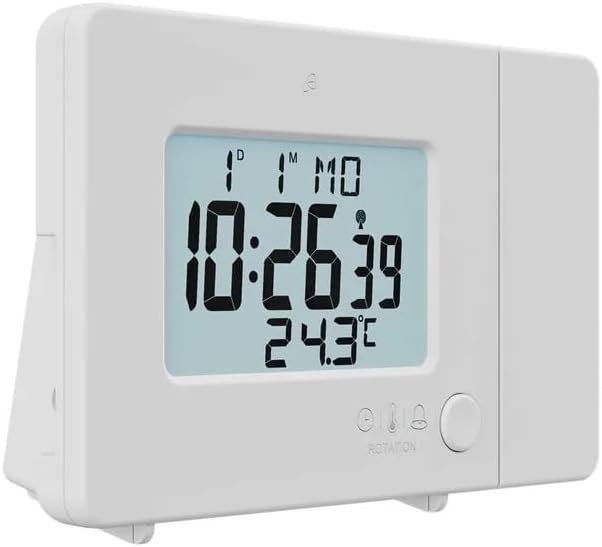
Figure 3: The alarm clock with its projection arm extended, ready to project information onto a surface.
Enstalasyon
1. Alimente Aparèy la
The alarm clock can be powered by the included AC adapter or by batteries (for backup). For continuous operation and to use the USB charging feature, the AC adapter is recommended.
- AC pouvwa: Connect the provided AC adapter to the DC IN port on the back of the alarm clock. Plug the adapter into a standard wall outlet.
- Batri Backup: Open the battery compartment on the back of the device. Insert 2x AAA batteries (not included), ensuring correct polarity (+/-). Batteries primarily serve as backup in case of power outage, maintaining time settings.

Figi 4: Dèyè view of the alarm clock, showing the battery compartment cover and various control buttons for settings.
2. Inisyal Konfigirasyon
Upon first power-on, the device will attempt to synchronize with the radio-controlled time signal. This process may take several minutes. Ensure the device is placed away from electronic interference.
- Anviwònman lang: Press the "LANG" button (located on the back) to cycle through the available languages for the day of the week display (e.g., English, German, French, Italian, Spanish).
- Fòma tan: Press the "12/24" button to switch between 12-hour and 24-hour time formats.
- Inite Tanperati: Press the "°C/°F" button to toggle between Celsius and Fahrenheit for temperature display.

Figure 5: Detail of the control buttons on the back of the alarm clock, including LANG, 12/24, and °C/°F buttons, and the FOCUS wheel for the projection.
Enstriksyon Operasyon
Setting Time and Date Manually (if radio control fails)
In rare cases or areas with poor signal, you may need to set the time manually.
- Press and hold the "MODE" button (usually located on the back or bottom) until the hour digits flash.
- Sèvi ak bouton "+" oswa "-" yo pou ajiste lè a.
- Press "MODE" again to move to minutes, then year, month, and day, adjusting each with "+" or "-".
- Press "MODE" to confirm settings and exit.
Mete Alam
Aparèy la sipòte de alam endepandan (Alam 1 ak Alam 2).
- Press the "ALARM" button (often indicated by a bell icon) once to select Alarm 1, twice for Alarm 2. The alarm icon will flash.
- Press and hold the "ALARM" button until the alarm hour digits flash.
- Use the "+" or "-" buttons to set the desired alarm hour.
- Press "ALARM" again to move to minutes, then adjust with "+" or "-".
- Press "ALARM" to confirm. To activate/deactivate an alarm, press the "ALARM" button briefly until the alarm icon appears/disappears on the display.
Fonksyon Snooze
When an alarm sounds, touch the sensor area (or press the snooze button, if present) to activate the snooze function. The alarm will temporarily stop and sound again after approximately 5-10 minutes (duration may vary by model). To turn off the alarm completely, press any other button.
Karakteristik Pwojeksyon
The alarm clock can project time, alarm time, or temperature onto a surface.
- Aktive Pwojeksyon: Extend the projection arm. Touch the sensor area on top of the clock to activate the projection for a short period. For continuous projection, ensure the AC adapter is connected and check if there's a dedicated projection ON/OFF switch (refer to device markings).
- Changing Projected Information: Some models allow cycling through time, alarm time, or temperature projection by pressing a specific button (e.g., "PROJECTION" or "MODE" repeatedly while projection is active).
- Ajiste Ang Pwojeksyon an: The projection arm can be pivoted to direct the projection onto the desired surface (wall or ceiling).
- Ajisteman konsantre: Use the "FOCUS" wheel (located on the projection arm) to sharpen the projected image.
- Projection Orientation: The device offers 4 adjustable projection orientations. This typically involves rotating the projection lens or using a dedicated button to flip the projected image.

Figure 6: The alarm clock in operation, demonstrating its time projection feature on a wall.
Display Backlight
The LCD display has a backlight for improved visibility in low light conditions. Touch the sensor area to activate the backlight for a few seconds. Some models may have adjustable brightness settings, typically controlled by a dedicated button or by holding the touch sensor.
USB-A Chaje Sòti
The alarm clock features a USB-A port (5V, 800mA) on its side, allowing you to charge small electronic devices like smartphones or MP3 players. Ensure the alarm clock is powered by the AC adapter for this function.
Antretyen
Netwayaj
To clean the device, use a soft, dry cloth. Do not use abrasive cleaners, solvents, or chemical sprays, as these may damage the surface or internal components. For the projection lens, use a lens cleaning cloth to avoid scratches.
Depanaj
| Pwoblèm | Kòz posib | Solisyon |
|---|---|---|
| Ekran an vid oswa li fèb. | No power, low batteries, or backlight off. | Check AC adapter connection. Replace batteries. Touch sensor for backlight. |
| Lè a pa kòrèk. | Poor radio signal, manual setting error. | Relocate device for better signal. Manually set time (see "Setting Time and Date Manually"). |
| Pwojeksyon an twoub. | Focus not adjusted, incorrect distance. | Adjust the "FOCUS" wheel on the projection arm. Ensure optimal projection distance. |
| Alam lan pa sonnen. | Alarm not activated, volume too low (if adjustable). | Ensure alarm icon is visible on display. Check alarm settings. |
| Chaje USB a pa fonksyone. | Device not connected to AC power. | The USB charging port only functions when the alarm clock is powered by the AC adapter. |
Espesifikasyon
| Atribi | Detay |
|---|---|
| Mak | Krivit |
| Nimewo Modèl | 373928 |
| Koulè | Black (Note: Product images show white, but specification states black.) |
| Materyèl | Plastik |
| Dimansyon pwodwi (L x W x H) | 15 x 3.81 x 9.5 cm |
| Kalite ekspozisyon | Digital |
| Karakteristik espesyal | Snooze, Adjustable Brightness, Projection |
| Sous pouvwa | Battery operated, Corded Electric |
| USB Sòti | 5V, 800mA (for charging external devices) |
Garanti ak sipò
For warranty information and customer support, please refer to the documentation provided at the time of purchase or contact the retailer/manufacturer directly. Keep your proof of purchase for any warranty claims.
For further assistance, visit the official Crivit websit oswa kontakte depatman sèvis kliyan yo.


