1. Pwodwi souview
The TECLAST T40Air is a high-performance tablet designed for various tasks, from entertainment to productivity. It features a 10.4-inch display, 16GB RAM, 256GB ROM, and runs on Android 13, powered by an octa-core processor. Its lightweight design and robust battery ensure portability and extended usage.

Imaj 1.1: Devan ak dèyè view of the TECLAST T40Air Tablet, showcasing its sleek design and dual rear cameras.
Videyo 1.1: Yon ofisyèl finiview of the TECLAST T40Air Android Tablet, highlighting its key features and design.
2. Inisyal Enstalasyon
2.1 Unboxing and First Use
Carefully remove the tablet and all accessories from the packaging. Inspect the device for any physical damage. Before first use, it is recommended to fully charge the tablet.
2.2 Chaje tablèt la
Connect the provided USB-C cable to the tablet's charging port and the other end to the 18W PD fast charging adapter. Plug the adapter into a power outlet. The battery indicator on the screen will show the charging status. A full charge typically takes approximately 2-3 hours.
2.3 Limen/Etenyen
- Pou limen: Press and hold the Power button located on the side of the tablet until the TECLAST logo appears on the screen.
- Pou etenn: Press and hold the Power button until a power menu appears. Select 'Power off' and confirm.
- Pou rekòmanse: From the power menu, select 'Restart'.
2.4 Inisyal Konfigirasyon
Lè w limen tablèt la pou premye fwa, li pral gide w nan pwosesis konfigirasyon inisyal la:
- Seleksyon Lang: Chwazi lang ou prefere.
- Koneksyon Wi-Fi: Chwazi rezo Wi-Fi ou a epi antre modpas la pou konekte ak entènèt la.
- Kont Google: Sign in with your Google account or create a new one. This is essential for downloading apps from the Google Play Store and syncing data.
- Dat ak Lè: Mete dat ak lè ki kòrèk la, oubyen kite rezo a mete l otomatikman.
- Sekirite: Konfigure yon blòk ekran (Kòd PIN, modèl, modpas, oswa Déblokaj vizaj).
2.5 Enstalasyon Kat SIM (Si ou vle)
The T40Air supports 4G LTE connectivity. To install a SIM card:
- Jwenn plato kat SIM lan sou bò tablèt la.
- Sèvi ak zouti ejèksyon SIM ki vini ak li a pou ouvri plato a.
- Place the Nano-SIM card(s) into the designated slots, ensuring correct orientation.
- Dousman pouse plato a tounen nan tablèt la jiskaske li fè yon klik.

Image 2.1: The TECLAST T40Air Tablet highlighting its 4G LTE support and SIM card tray location.
3. Operasyon Enstriksyon
3.1 Navige sou Android 13
The TECLAST T40Air runs on Android 13, offering an intuitive user experience. Use touch gestures to navigate:
- Tape: Chwazi yon atik.
- Glise: Defile nan ekran yo oswa lis yo.
- Zoom-pou-zoom: Agrandi oswa diminye imaj yo epi web paj.
- Long peze: Jwenn aksè nan meni kontèks yo oubyen deplase ikòn yo.
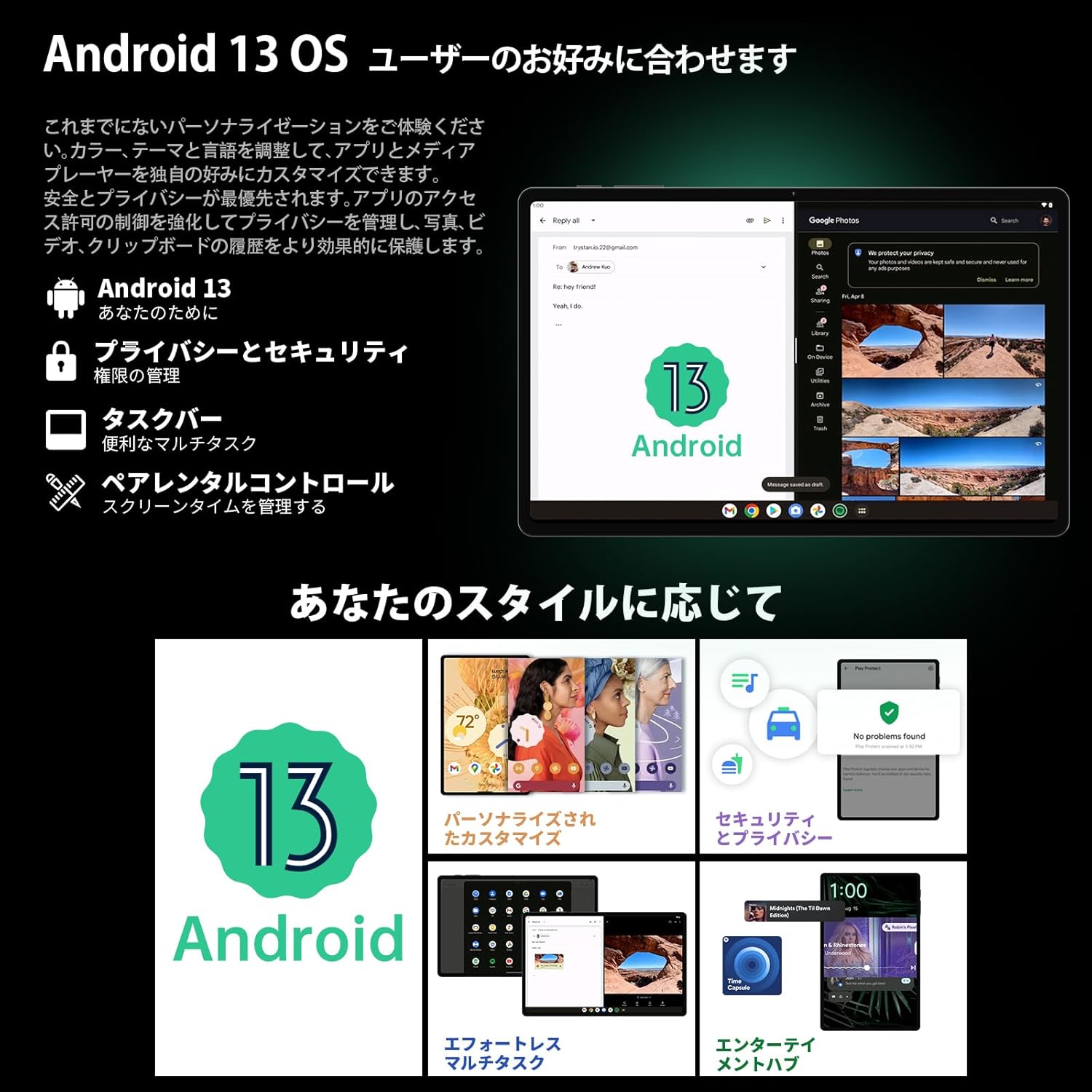
Image 3.1: The Android 13 interface on the TECLAST T40Air Tablet, showing personalization and security features.
3.2 Ekspozisyon Karakteristik
The 10.4-inch 2K FHD IPS display provides vibrant colors and sharp details. It features:
- TDDI Fully Laminated: Enhances touch responsiveness and visual clarity.
- Mòd Pwoteksyon Je: Reduces blue light to prevent eye strain.
- Mòd lekti: Optimizes the screen for comfortable reading.
- Dark Mode & Dim Mode: Adjusts screen brightness and color for different lighting conditions.

Image 3.2: Visual representation of the TECLAST T40Air Tablet's display features, including eye protection and reading modes.
3.3 Itilizasyon Kamera
The tablet is equipped with a 13MP rear dual camera and an 8MP front camera.
- Lè w ap pran foto: Louvri aplikasyon Kamera a, ankadre foto w la, epi tape bouton deklanchè a.
- Anrejistreman Videyo: Chanje nan mòd videyo nan aplikasyon Kamera a epi tape bouton anrejistreman an.
- Kamera devan: Use for video calls and selfies.

Image 3.3: The TECLAST T40Air Tablet showcasing its camera capabilities and 3.5mm headphone jack.
3.4 Odyo ak Konektivite
- SWEET 4 Speakers: Enjoy immersive audio with the tablet's quad-speaker system and Smart K Digital Amplifier.
- Jack ekoutè 3.5mm: Connect your wired headphones for private listening.
- Wi-Fi: Supports 2.4GHz and 5GHz dual-band Wi-Fi (802.11ac) for stable and fast internet.
- Bluetooth 5.0: Connect wireless accessories like headphones, keyboards, and mice.
- VoLTE: Enables high-quality voice calls over 4G LTE networks.
3.5 Degaje figi
The tablet supports Face Unlock for convenient and secure access. Set it up in the Security settings. Ensure good lighting conditions for optimal performance.
4. Antretyen
4.1 Netwaye Tablèt la
Pou netwaye tablèt ou a, sèvi ak yon twal mou ki pa gen pousyè. Pou tach ki difisil pou retire, siye yon ti kras.ampLave twal la avèk dlo oswa yon pwodui netwayaj ekran. Evite itilize pwodui chimik ki agresif, materyèl abrazif, oswa imidite twòp.
4.2 Swen Batri
- Evite ekspoze tablèt la nan tanperati ekstrèm.
- Pa kite batri a dechaje nèt souvan.
- Use the original charger or a certified 18W PD charger for optimal charging.
4.3 Mizajou lojisyèl
Tcheke epi enstale mizajou lojisyèl regilyèman pou asire tablèt ou a gen dènye karakteristik yo, patch sekirite yo ak amelyorasyon pèfòmans yo. Ale nan Anviwònman > Sistèm > Mizajou sistèm.
4.4 Jesyon Depo
The tablet comes with 256GB of internal storage, expandable via microSD card up to 1TB. Regularly manage your storage by:
- Efase pa nesesè files ak apps.
- Deplase an gwo files nan yon kat microSD.
- Utilizing cloud storage services.

Image 4.1: The TECLAST T40Air Tablet highlighting its 16GB RAM, 256GB ROM, and support for microSD card expansion.
NAN. Depanaj
This section addresses common issues you might encounter with your TECLAST T40Air Tablet.
5.1 Aparèy la pa limen
- Asire w batri a byen chaje. Konekte plato a epi tann kèk minit anvan ou eseye limen l.
- Peze epi kenbe bouton Pouvwa a pou omwen 10-15 segonn pou fòse yon rekòmanse.
5.2 Pwoblèm Koneksyon Wi-Fi
- Tcheke si Wi-Fi a aktive nan Anviwònman > Rezo ak entènèt > Wi-Fi.
- Asire w ou te antre kòrèk modpas Wi-Fi.
- Rekòmanse routeur Wi-Fi ou a ak tablèt la.
- Try connecting to a different Wi-Fi network to isolate the issue.
5.3 Pèfòmans Ralanti
- Fèmen aplikasyon ki pa itilize nan background nan.
- Clear cache data for apps that are running slowly (Anviwònman > Aplikasyon > [Non aplikasyon an] > Depo ak kach > Efase kach).
- Asire w ou gen ase espas depo lib.
- Rekòmanse tablèt la.
5.4 Ekran an pa reponn
- Rekòmanse tablèt la lè w kenbe bouton Pouvwa a peze.
- Asire w ekran an pwòp epi li pa gen imidite oswa debri.
5.5 Reyajisteman faktori (Dènye rekou)
If issues persist, you may consider performing a factory reset. Avètisman: Sa ap efase tout done ki sou tablèt ou a. Fè yon kopi done enpòtan yo anvan ou kontinye.
Ale nan Anviwònman> Sistèm> Opsyon Reyajiste> Efase tout done (reset faktori) epi swiv enstriksyon ki sou ekran an.
6. Espesifikasyon
Below are the technical specifications for the TECLAST T40Air Tablet:
| Karakteristik | Spesifikasyon |
|---|---|
| Nimewo Modèl | T40Air |
| Gwosè ekspozisyon | 10.4 pous |
| Rezolisyon ekran | 1920 x 1080 pixels (2K FHD IPS) |
| RAM | 16 GB |
| Gwosè Memwa Flash (ROM) | 256 GB |
| Mak processeur | Rockchip or Unisoc (Octa-core) |
| Sistèm operasyon | Android 13 |
| Kalite san fil | 5 GHz Radio Frequency, 802.11a/b/g/n/ac |
| Bluetooth | Bluetooth 5.0 |
| Mwayèn lavi batri | 5 èdtan (7200mAh) |
| Pwa atik | 1.01 liv (apeprè 460g) |
| Dimansyon pwodwi | 9.6 x 6.1 x 0.3 pous |
| Karakteristik espesyal | Lejè |
7. Garanti ak sipò
7.1 Pwodwi Garanti
The TECLAST T40Air Tablet comes with a standard manufacturer's warranty. Please refer to the warranty card included in your product packaging for specific terms, conditions, and duration. Keep your proof of purchase for warranty claims.
7.2 Sipò pou Kliyan
If you encounter any issues not covered in this manual or require further assistance, please contact TECLAST customer support. You can typically find contact information on the official TECLAST websit entènèt la oubyen atravè chanèl sipò détayan ou an.
- Visit the official TECLAST websit pou FAQ ak resous sipò.
- Contact the seller or retailer for product-specific support and return policies.


