1. Entwodiksyon
This manual provides detailed instructions for the setup, operation, and maintenance of your MarCum M5LR Flasher System. The M5LR is an advanced ice fishing fish finder designed to provide clear and precise sonar readings, enhancing your fishing experience. It features Max Brightness and Clarity (MBC) lighting, 2,500 watts of power, a dual-beam transducer, superior target separation, and patented infinitely adjustable zoom.
2. Enstalasyon
2.1 Debalaj ak Idantifikasyon Konpozan
Carefully unpack all components and verify the contents:
- MarCum M5LR Flasher Unit
- Roamer Case
- MarCum Brute 12V10AH Lithium LiFePO4 Battery
- 3-amp Rapid Charger
- Dual Beam 8/20 Degree Transducer with 8 ft. cable

Image: The MarCum M5LR Flasher System housed within its Roamer Case, with the transducer visible at the front.
2.2 Batri Chaje
Before first use, fully charge the MarCum Brute 12V10AH Lithium LiFePO4 Battery. Connect the 3-amp Rapid Charger to the battery and plug it into a standard wall outlet. The charger's indicator light will show charging status. Ensure the battery is fully charged for optimal performance.
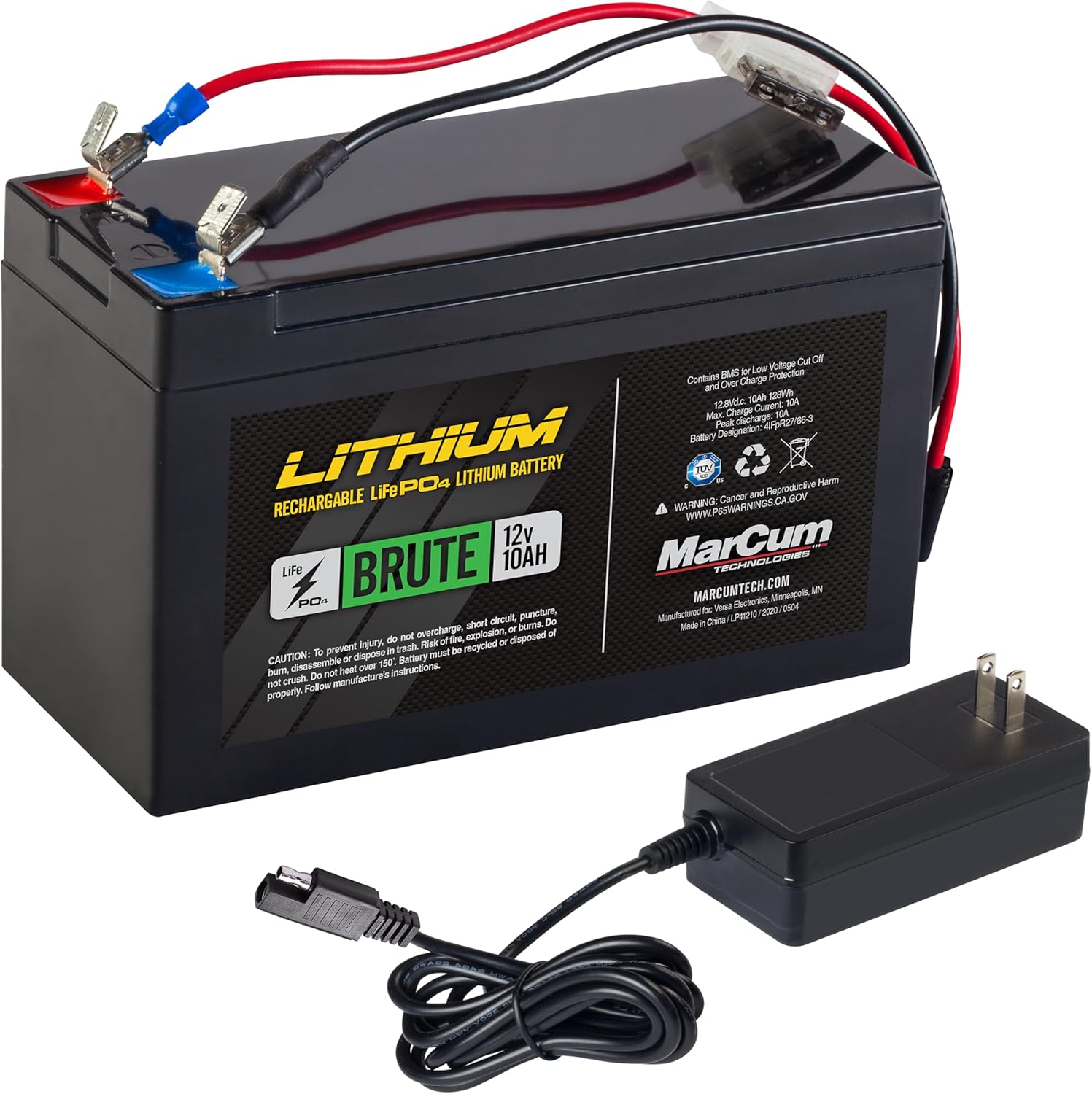
Image: The MarCum Brute 12V10AH Lithium LiFePO4 Battery alongside its 3-amp Rapid Charger.
2.3 System Assembly
- Place the M5LR Flasher Unit securely into the designated compartment within the Roamer Case.
- Insert the fully charged Lithium battery into the battery compartment of the Roamer Case.
- Connect the power cables from the flasher unit to the battery terminals (red to positive, black to negative).
- Route the transducer cable through the designated opening in the case and connect it to the flasher unit.

Image: The MarCum Roamer Case opened, revealing the internal compartments for the flasher unit and battery.
2.4 Transducer Deployment
For ice fishing, lower the transducer into the ice hole. Ensure it hangs freely and is level in the water. Adjust the depth so the transducer is below the ice but not touching the bottom, allowing for optimal sonar signal transmission.
3. Operasyon Enstriksyon
3.1 Limen/Etenyen
To power on the M5LR, turn the GAIN knob clockwise from the 'OFF' position. To power off, turn the GAIN knob counter-clockwise until it clicks into the 'OFF' position.
3.2 Kontwòl ak Fonksyon

Imaj: Yon imaj detaye view of the MarCum M5LR Flasher's circular display and control knobs/buttons.
- Bouton GAIN: Controls the sensitivity of the sonar signal. Start with a lower setting and gradually increase until you see a clear bottom reading and desired targets. Avoid excessive gain, which can introduce clutter.
- RANGE Knob: Selects the depth range for the display. Available ranges are 20', 40', 80', and 160'. Choose a range appropriate for your fishing depth.
- ZM (Zoom) Button: Activates the patented Infinitely Adjustable Zoom feature. Pressing this button allows you to zoom in on any section of the water column, providing a magnified view for precise target identification. Use the UP/DOWN buttons to adjust the zoom window.
- IR (Interference Rejection) Button: Cycles through 12 interference rejection settings. If you experience signal interference from other sonar units, press this button to find a setting that minimizes noise and clarifies your display.
- NBT (Noise Blanker) Button: Provides additional noise reduction, particularly useful in electrically noisy environments.
- SFL (Split Flasher) Button: (If applicable) This feature may split the flasher display to show a full-screen view and a zoomed view simultaneously, offering enhanced detail.
3.3 Entèpretasyon Ekspozisyon an
The M5LR's circular flasher display shows real-time sonar returns. Different colors indicate signal strength:
- Vèt: Weakest signal returns, typically small fish or bait.
- Orange/Yellow: Medium strength returns, often larger fish.
- Wouj: Strongest returns, indicating large fish or the bottom.
The 3/4-inch target separation allows you to distinguish individual fish, even in schools, and differentiate them from the bottom structure.
4. Antretyen
4.1 Netwayaj
- Wipe the flasher unit and transducer with a soft, damp twal apre chak itilizasyon. Evite pwodui netwayaj abrazif oswa solvan.
- Ensure the transducer face is clean and free of debris for accurate readings.
- Clean the Roamer Case with a mild soap and water solution if necessary.
4.2 Swen ak Depo Batri
- Always fully charge the Lithium battery before long-term storage.
- Store the battery in a cool, dry place. Avoid extreme temperatures.
- Periodically check the battery charge during extended storage and recharge if necessary to maintain battery health.
NAN. Depanaj
- Pa gen pouvwa: Ensure the battery is fully charged and all power connections are secure. Check for any loose wires or corrosion on terminals.
- Weak or No Signal: Verify the transducer is properly submerged and connected. Adjust the GAIN setting. Check for ice buildup on the transducer face.
- Excessive Noise/Clutter: Utilize the IR (Interference Rejection) and NBT (Noise Blanker) functions. Move away from other sonar units if possible.
- Incorrect Depth Readings: Ensure the transducer is level and not obstructed. Verify the RANGE setting is appropriate for the current depth.
If issues persist, consult the MarCum websit oswa kontakte sipò kliyan pou plis asistans.
6. Espesifikasyon
| Karakteristik | Spesifikasyon |
|---|---|
| Mak | MarCum |
| Non modèl | M5LR |
| Sous pouvwa | Battery Powered (MarCum Brute 12V10AH Lithium LiFePO4) |
| Gwosè ekran | 4 Inches (Flasher Display) |
| Kalite ekspozisyon | Koulè TFT |
| Sorti pouvwa | 2,500 Watts (Peak-to-Peak) |
| Transducer | Dual Beam 8/20 Degree |
| Sib Separasyon | 3/4-pous |
| Ranje seleksyone | 20', 40', 80', 160' |
| Rejè entèferans | 12 Anviwònman |
| Zoom Feature | Patented Infinitely Adjustable Zoom |
| Konpozan ki enkli | Complete M5LR Flasher System |
| Dimansyon atik (LxWxH) | 10 x 8 x 11 pous |
| UPC | 850013782444 |
7. Garanti ak sipò
7.1 Enfòmasyon sou Garanti
The MarCum M5LR Flasher System comes with a Two Year System Warranty. Please retain your proof of purchase for warranty claims. For specific terms and conditions, refer to the warranty documentation included with your product or visit the official MarCum websit.
7.2 Sipò pou Kliyan
For technical assistance, troubleshooting, or service inquiries, please contact MarCum customer support. Contact information can typically be found on the MarCum websit la oubyen nan materyèl anbalaj yo.


