1. Entwodiksyon
Welcome to the user manual for your Canon PowerShot IXUS 285 HS Digital Camera. This guide provides essential information on setting up, operating, and maintaining your camera to help you capture high-quality photos and videos. The IXUS 285 HS combines a 20.2MP 1/2.3" CMOS sensor with a DIGIC 4+ image processor, offering 12x optical zoom and Full HD 1080p video recording capabilities.
2. Pake kontni
Tanpri asire w ke tout atik sa yo enkli nan pakè w la:
- Canon PowerShot IXUS 285 HS Digital Camera (Black)
- NB11L Replacement Battery
- Sandisk 64GB Ultra Memory Card
- Small Camera Case
- Charger batri ekstèn
- Lektè kat memwa
- Tripod fleksib 12 pous
- Twous netwayaj
- Bous Kat Memwa

Image: Canon PowerShot IXUS 285 HS camera with included accessories: NB11L battery, external charger, and wrist strap.
3. Pati ak Kontwòl Kamera
Familiarize yourself with the main components and controls of your camera.
3.1 Devan View

Imaj: Devan view of the Canon PowerShot IXUS 285 HS camera, showing the lens, flash, and Canon branding.
- Lantiy: 12x Optical Zoom lens.
- Flash: Flash entegre pou kondisyon ki pa twò klere.
- AF-assist Beam/Self-timer Lamp: Assists autofocus and indicates self-timer operation.
- Mikwofòn: Anrejistre odyo pandan kaptire videyo.
3.2 Dèyè View
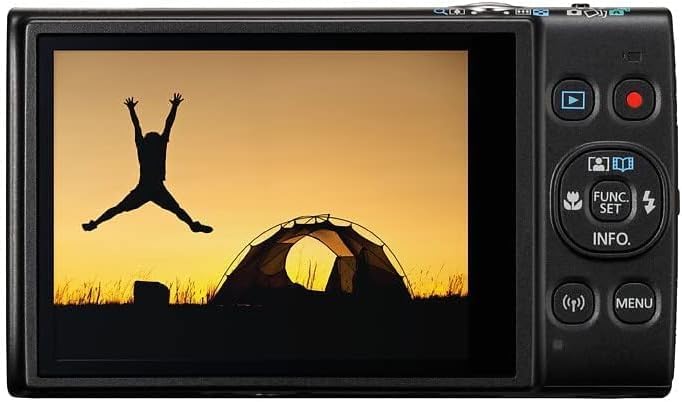
Imaj: Dèyè view of the Canon PowerShot IXUS 285 HS camera, displaying the 3.0-inch LCD monitor and various control buttons.
- LCD ki monitè kè bebe: 3.0-inch 461k-dot display for composing and reviewimaj yo.
- bouton Lekti: Antre nan mòd lekti pou view foto ak videyo.
- Bouton Fim: Kòmanse epi sispann anrejistreman videyo.
- Bouton FONKSYON/SET: Accesses shooting functions and confirms selections.
- Bouton direksyon (Anwo/Anba/Agoch/Dwat): Navigates menus and adjusts settings.
- Bouton MENI: Opens the camera's main menu.
- Wi-Fi/NFC Button: Activates wireless connectivity features.
4. Enstalasyon
4.1 Enstale batri a
- Open the battery cover on the bottom of the camera.
- Insert the NB11L battery pack with the contacts facing the correct direction, as indicated inside the compartment.
- Gently push the battery until it locks into place.
- Fèmen kouvèti batri a byen.
4.2 Mete yon kat memwa
- Louvri kouvèti batri/kat memwa a ki anba kamera a.
- Insert the Sandisk 64GB Ultra Memory Card into the card slot with the label facing the correct direction.
- Pouse kat la dousman jiskaske li fè yon klik pou l antre nan plas li.
- Fèmen kouvèti a byen.
4.3 Chaje batri a
- Remove the NB11L battery from the camera.
- Insert the battery into the external charger (CB-2LF).
- Branche chargeur a nan yon priz kouran. Limyè endikatè chaj la ap limen.
- Yon fwa chajman an fini, limyè endikatè a ap chanje oswa etenn. Retire batri a nan chajè a.
5. Itilizasyon Kamera a
5.1 Limen/Etenyen
- Pou pouvwa sou, peze la ON/OFF bouton ki sitiye anlè kamera a.
- Pou koupe pouvwa, peze la ON/OFF bouton ankò.
5.2 Fotografi Debaz (Mòd Otomatik)
- Turn on the camera. It will typically start in Smart Auto mode.
- Ankadre sijè w la avèk monitè LCD a.
- Use the zoom lever (around the shutter button) to adjust the optical zoom.
- Peze bouton deklanchè a mwatye pou fè fokus. Kad fokus la ap vin vèt lè ou fin fè fokus la.
- Peze bouton deklanchè a nèt pou pran foto a.
5.3 Anrejistreman videyo
- With the camera powered on, press the dedicated Bouton Fim on the rear of the camera to start recording.
- Peze a Bouton Fim ankò pou sispann anrejistreman.
- The camera records Full HD 1080p video at 30 frames per second.
5.4 Lektur
- Peze a Bouton lèktur (often indicated by a triangle icon) on the rear of the camera.
- Sèvi ak bouton direksyon yo pou navige nan foto ak videyo ou yo.
- Pou sòti nan mòd lecture, peze a Bouton lèktur again or the shutter button to return to shooting mode.
5.5 Koneksyon Wi-Fi ak NFC
The camera features built-in Wi-Fi with NFC for wireless sharing of images and videos to a linked smartphone or tablet. Refer to the camera's on-screen menu for detailed instructions on connecting to a device and using the Canon Camera Connect app.
6. Antretyen
6.1 Netwayaj Kamera a
- Kò kamera: Sèvi ak yon twal mou epi sèk pou siye kò kamera a. Pou pousyè tè ki difisil pou retire, siye l yon ti kras.ampen twal la ak dlo.
- Lantiy: Use a lens brush or a blower to remove dust. For smudges, use a lens cleaning cloth and lens cleaning fluid. Avoid touching the lens surface with your fingers.
- LCD ki monitè kè bebe: Siye ekran an dousman avèk yon twal mou epi sèk. Evite peze twòp sou li.
6.2 Depo
- When not in use, store the camera in a cool, dry, well-ventilated area, away from direct sunlight and high humidity.
- Retire batri a si kamera a pa pral itilize pou yon peryòd pwolonje.
- Use the provided camera case for protection during transport.
NAN. Depanaj
Si ou rankontre pwoblèm ak kamera ou a, eseye etap debaz sa yo pou depanaj:
- Kamera a pa limen: Asire w ke batri a byen chaje epi li byen mete l.
- Pa ka pran foto: Tcheke si yon kat memwa antre epi li gen ase espas lib. Asire w ke bouchon lantiy la retire.
- Imaj yo twoub: Ensure the lens is clean. Check if the camera is focusing correctly (press the shutter button halfway). Use Intelligent IS for sharper handheld shots.
- Flash la pa tire: Check flash settings to ensure it's not set to 'Off' or 'Flash Off'.
- Pwoblèm koneksyon Wi-Fi: Ensure Wi-Fi is enabled on both the camera and your smart device. Refer to the Canon Camera Connect app instructions.
For more detailed troubleshooting, please refer to the official Canon support websit.
8. Espesifikasyon
| Karakteristik | Spesifikasyon |
|---|---|
| Nimewo Modèl | 1076C001 |
| Capteur Imaj | 20.2MP 1/2.3" CMOS |
| Imaj processeur | DIGIC 4+ |
| Zoom optik | 12x |
| Focal Length (35mm Equiv.) | 25-300mm |
| Estabilizasyon Imaj | Intelligent IS (Optical) |
| Anrejistreman videyo | Full HD 1080p nan 30 fps |
| LCD ki monitè kè bebe | 3.0" 461k-dot |
| Koneksyon | Built-in Wi-Fi with NFC |
| ISO sansiblite | Jiska 3200 |
| Fiziyad kontinyèl | 7.2 fps |
| Dimansyon (W x H x P) | 3.9 x 2.3 x 0.9 pous (apeprè) |
| Pwa | 2.4 ons (apeprè) |
| Manifakti | Canon |
9. Garanti ak sipò
For information regarding your product's warranty, please refer to the warranty card included in your original packaging or visit the official Canon website. For technical support, product registration, or service inquiries, please contact Canon customer support directly or visit their support portal online.
Sipò ofisyèl Canon Websit: https://www.usa.canon.com/support


