1. Entwodiksyon
This manual provides detailed instructions for the safe and effective operation of your Wouxun KG-UVD1P FM Transceiver. Please read this manual thoroughly before using the device to ensure proper functionality and to prevent damage.
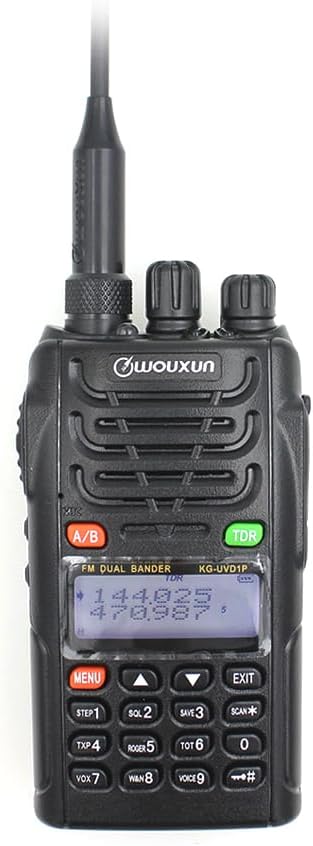
Deskripsyon imaj: Yon devan view of the Wouxun KG-UVD1P FM Transceiver, showcasing li nwa casing, antenna, LCD display, keypad, and control knobs. The display shows frequency information.
2. Pake kontni
Verifye ke tout atik ki nan lis anba a yo enkli nan pakè ou a:
- Radio Body
- Batri
- Antèn
- Clip senti
- Charger (Desktop Charger and Power Adaptor)
- Manyèl itilizatè
- Men braslè
- Machin Charger Kab

Deskripsyon imaj: Yon anlè view displaying all components included in the standard Wouxun KG-UVD1P package. Items are numbered and include the radio, battery, antenna, belt clip, desktop charger, power adaptor, hand strap, and car charger cable.
3. Pwodwi souview
3.1. Konpozan Radyo
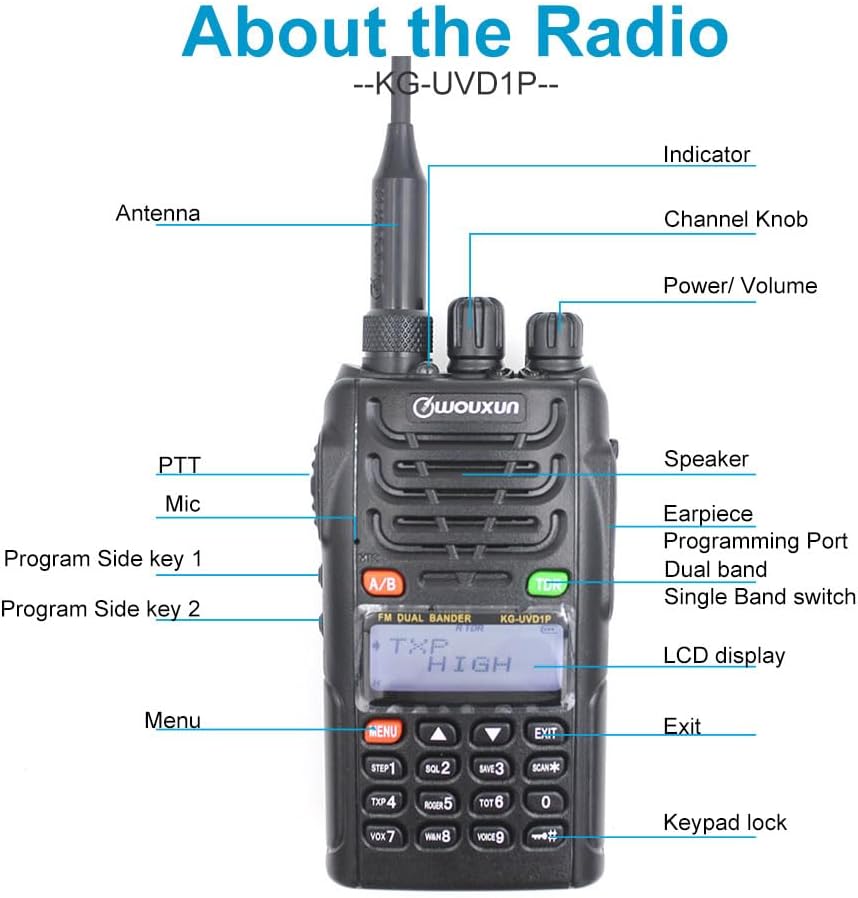
Deskripsyon imaj: A detailed diagram of the Wouxun KG-UVD1P radio with various parts labeled, including the antenna, indicator light, channel knob, power/volume knob, speaker, earpiece, programming port, dual band switch, LCD display, PTT button, microphone, program side keys, Menu button, Exit button, and keypad lock.
- Antèn: Pou transmèt ak resevwa siyal radyo.
- Endikatè: LED light indicating transmission (red) or reception (green).
- Bouton chanèl: Used to select channels or adjust settings.
- Pouvwa / Volim: Vire pou limen/etenn radyo a epi ajiste volim nan.
- Oratè: Sòti odyo.
- Earpiece/Programming Port: Connects accessories or programming cable.
- Dual Band Switch (A/B): Toggles between VHF and UHF bands or display modes.
- Ekspozisyon LCD: Shows frequency, channel, and status information.
- PTT (Push-To-Talk): Press and hold to transmit.
- Mikwo: Mikwofòn pou antre vwa.
- Program Side Keys: Customizable function buttons.
- Klavye: For entering frequencies, channels, and accessing menu functions.
3.2. Dimansyon Fizik

Deskripsyon imaj: Plizyè views of the Wouxun KG-UVD1P radio, including front, left side, right side, and back, illustrating its compact design and the placement of the belt clip and battery pack.
4. Enstalasyon
4.1. Enstalasyon batri
- Aliyen pake batri a ak rainur ki sou dèyè radyo a.
- Glise pake batri a anlè jiskaske li fè yon klik nan plas li.
- Pou retire li, peze lokèt pou lage batri a (si genyen) epi glise batri a anba.
4.2. Antèn Koneksyon
- Vise antèn lan nan sans zegwi mont lan nan konektè ki anlè radyo a jiskaske li sere ak dwèt li.
- Pa twò sere.
4.3. Chaje batri a

Deskripsyon imaj: The Wouxun smart charger in use, showing the radio docked for charging and a separate battery pack being charged simultaneously. The image highlights the 7.4V 1700mAh Lithium-ion battery.
- Connect the power adaptor to the desktop charger and plug it into a power outlet.
- Place the radio with the battery installed, or the battery alone, into the charging slot.
- Limyè endikatè chajè a ap anjeneral parèt wouj pandan chaj la epi li vin vèt lè li konplètman chaje.
- Yon chaj konplè anjeneral pran plizyè èdtan.
5. Operasyon Enstriksyon
5.1. Pouvwa pou limen/etenn ak kontwòl volim
- Pouvwa sou: Rotate the Power/Volume knob clockwise until a click is heard and the display illuminates.
- Pouvwa Off: Rotate the Power/Volume knob counter-clockwise until a click is heard and the display turns off.
- Ajisteman Volim: Rotate the Power/Volume knob to increase (clockwise) or decrease (counter-clockwise) the audio output.
5.2. Seleksyon Chanèl ak Frekans
- Mòd frekans: Directly enter frequencies using the keypad.
- Mòd chanèl: Use the Channel knob or keypad to select pre-programmed channels.
- Multi-step Frequency: Supports 5K/6.25K/10K/12.5K/25K/50K/100K steps for precise frequency tuning.
5.3. Transmit and Receive (PTT)
- Pou transmèt, peze epi kenbe bouton PTT ki sou kote radyo a. Pale klè nan mikwofòn nan.
- Lage bouton PTT pou resevwa.
- The indicator light will be red during transmission and green during reception.
5.4. Dual Band, Dual Frequency, Dual Display, and Dual Standby
- The radio supports simultaneous monitoring of two different frequencies (VHF&UHF, UHF&UHF, or VHF&VHF).
- Use the A/B button to switch between the primary and secondary display frequencies.
- The radio will automatically switch to the active frequency when a signal is detected.
5.5. VOX Transmission
- VOX (Voice Operated Transmit) allows hands-free transmission.
- Activate VOX through the menu. The radio will transmit automatically when it detects your voice.
- Adjust VOX sensitivity in the menu to prevent accidental transmissions or missed voice activation.
5.6. Digital FM Radio
- The radio includes a digital FM radio function.
- Access the FM radio through the menu. It supports automatic tuning and storing of radio frequencies.
5.7. Lòt Fonksyon
- High/Low Power Selection: Adjust transmit power via the menu for battery conservation or extended range.
- Wide/Narrow Bandwidth: Select 25KHz (wide) or 12.5KHz (narrow) bandwidth based on channel requirements.
- Edit Non Chèn: Customize channel names for easier identification.
- D.C.S/CTCSS: Utilize 105 groups of D.C.S (Digital Coded Squelch) and 50 groups of CTCSS (Continuous Tone-Coded Squelch) for selective calling.
- Fonksyon kronomètr: Integrated stopwatch utility.
- Low-voltage Voice Prompt: Alerts the user when the battery level is low.
- Busy Channel Lockout (BCL): Anpeche transmisyon sou yon kanal ki deja okipe.
- Transmit Over Timer (TOT): Limits continuous transmission time to prevent channel hogging and overheating.
- Keyboard Lock: Prevents accidental key presses (Auto/Manual options).
- Multiple Scan Modes: Scan channels or frequencies for activity.
- Wire Clone Function: Allows copying settings from one radio to another using a cloning cable.
- Bright Flashlight Illumination: Built-in LED flashlight for convenience.
- Fonksyon SOS: Activates an emergency signal.
- 1750Hz Tone: Used for repeater access.
- DTMF Encoding Function: For sending Dual-Tone Multi-Frequency signals.
- English Voice Guide: Provides audible prompts for menu navigation and settings.
6. Antretyen
6.1. Netwayaj
- Netwaye sifas radyo a avèk yon twal mou,amp twal.
- Pa sèvi ak pwodwi chimik piman bouk oswa pwodui netwayaj abrazif.
- Asire w ke radyo a etenn epi ke pil la retire anvan ou netwaye li.
6.2. Swen batri
- Evite chaje batri a twòp oswa dechaje li nèt.
- Sere pil yo nan yon kote ki fre, sèk lè yo pa itilize yo.
- Si w ap sere l pou yon bon bout tan, chaje batri a apeprè 50% kapasite li.
6.3. Depo
- Store the radio in a dry, dust-free environment.
- Keep away from direct sunlight and extreme temperatures.
- Remove the battery if the radio will not be used for an extended period.
NAN. Depanaj
| Pwoblèm | Kòz posib | Solisyon |
|---|---|---|
| Radyo a pa limen | Battery discharged or improperly installed | Charge the battery; ensure battery is correctly seated. |
| Pa ka transmèt oswa resevwa | Incorrect frequency/channel; antenna not attached; low battery; Busy Channel Lockout active | Verify frequency/channel; attach antenna securely; charge battery; disable BCL. |
| Pòv kalite odyo | Weak signal; incorrect squelch level; antenna issue | Move to an area with better signal; adjust squelch; check antenna connection. |
| Klavye pa reponn | Blokaj klavye a aktif | Unlock the keypad (refer to operating instructions). |
8. Espesifikasyon
| Karakteristik | Detay |
|---|---|
| Nimewo Modèl | KG UVD1P |
| Gamme frekans | 30-300 MHz |
| Kantite Chanèl | 40 |
| Kalite batri | 1700mAh Lithium-ion (1 A battery required, included) |
| Voltage | 1.2 Vòlt (DC) |
| Nivo rezistans dlo | Ki enpèmeyab |
| Pwa atik | 1.65 liv |
| Dimansyon pake | 10.12 x 9.53 x 4.53 pous |
| Manifakti | WOUXUN |
| UPC | 781912417284 |
| Aparèy konpatib | Two-way radios with compatible frequencies and bandwidths, external antennas |
9. Garanti ak sipò
9.1. Enfòmasyon sou Garanti
The Wouxun KG-UVD1P FM Transceiver comes with a 1-ane garanti apati dat acha a. Garanti sa a kouvri domaj fabrikasyon anba itilizasyon nòmal. Tanpri konsève prèv acha ou pou reklamasyon garanti.
9.2. Sipò pou Kliyan
For technical assistance, troubleshooting beyond this manual, or warranty inquiries, please contact your authorized Wouxun dealer or visit the official Wouxun websit pou resous sipò.


