Entwodiksyon
Mèsi pou acha aasing the Timex Expedition CAT Digital Watch. This manual provides essential information for setting up, operating, maintaining, and troubleshooting your new timepiece. Please read it thoroughly to ensure optimal performance and longevity of your watch.

Figi 1: Devan view of the Timex Expedition CAT Digital Watch.
Karakteristik kle
- Konstriksyon dirab: Designed for outdoor activities with a robust 33mm round case.
- Ekspozisyon dijital: Clear and easy-to-read digital time and date display.
- Limyè lannwit INDIGLO®: Timex's signature illumination for visibility in low light conditions.
- Rezistans dlo: Rezistan a dlo jiska 100 mèt (330 pye), apwopriye pou naje ak plonje ak tib.
- Braslè konfòtab: Features a 7.5-inch black fabric strap for a secure and comfortable fit.
- Acrylic Lens: A durable acrylic lens protects the digital display.
Enstalasyon ak premye itilizasyon
1. Activating the Watch
Your watch comes with a battery installed. If the display is blank, gently pull out the plastic tab from the side of the watch, if present. The watch should then power on.
2. Mete Tan ak Dat
- Antre nan Mòd Anrejistreman: Peze epi kenbe la SET button (usually located on the top left side of the watch) until the display flashes, indicating you are in set mode.
- Ajiste Tan: Sèvi ak la K STARTMANSE / FANN button (top right) to increase the flashing digit (hours, minutes). Use the SISPANN / Reyajiste button (bottom right) to move to the next digit or setting.
- Set AM/PM: Ensure AM or PM is correctly set for 12-hour format.
- Mete Dat: Continue to adjust the month, day, and year using the same buttons.
- Sòti nan Mòd Anrejistreman: Peze a SET button again to save your settings and exit set mode.

Figi 2: Side view illustrating button placement for setting.
Enstriksyon Operasyon
1. Using INDIGLO® Night-Light
Peze a INDIGLO button (bottom center) to illuminate the watch face for a few seconds. This feature is useful in low-light conditions.
2. Chanje Mòd Afichaj
Peze a MÒD button (bottom left) to cycle through different display modes such as Time, Date, Alarm, Stopwatch, and Timer. Refer to the on-screen indicators for the current mode.
3. Fonksyon kronomètr
- Navigate to the Stopwatch mode using the MÒD bouton.
- Peze K STARTMANSE / FANN pou kòmanse distribisyon.
- Peze K STARTMANSE / FANN again to record a lap/split time without stopping the main timer.
- Peze SISPANN / Reyajiste to pause the stopwatch. Press again to reset to zero.
4. Fonksyon alam
- Go to Alarm mode using the MÒD bouton.
- Peze SET pou antre nan anviwònman alam.
- Ajiste lè alam lan lè l sèvi avèk K STARTMANSE / FANN epi SISPANN / Reyajiste.
- Peze SET pou konfime ak sòti.
- Pou aktive/dezaktive alam lan, peze K STARTMANSE / FANN while in Alarm mode (not setting mode).
Swen ak Antretyen
- Netwayaj: Siye bwat mont lan ak braslè a ak yon twal mou,amp twal. Evite pwodui chimik ki agresif oswa pwodui netwayaj abrazif.
- Rezistans dlo: While water resistant to 100 meters, avoid pressing buttons underwater to prevent water ingress. Rinse with fresh water after exposure to salt water or chlorine.
- Ranplasman batri: The watch uses 1 Lithium Metal battery (CR2016 cell). Battery replacement should ideally be performed by a qualified watch technician to ensure proper sealing and water resistance.
- Depo: Sere mont ou a nan yon kote ki fre epi sèk, lwen limyè solèy dirèk ak tanperati ekstrèm lè w pa ap itilize li.
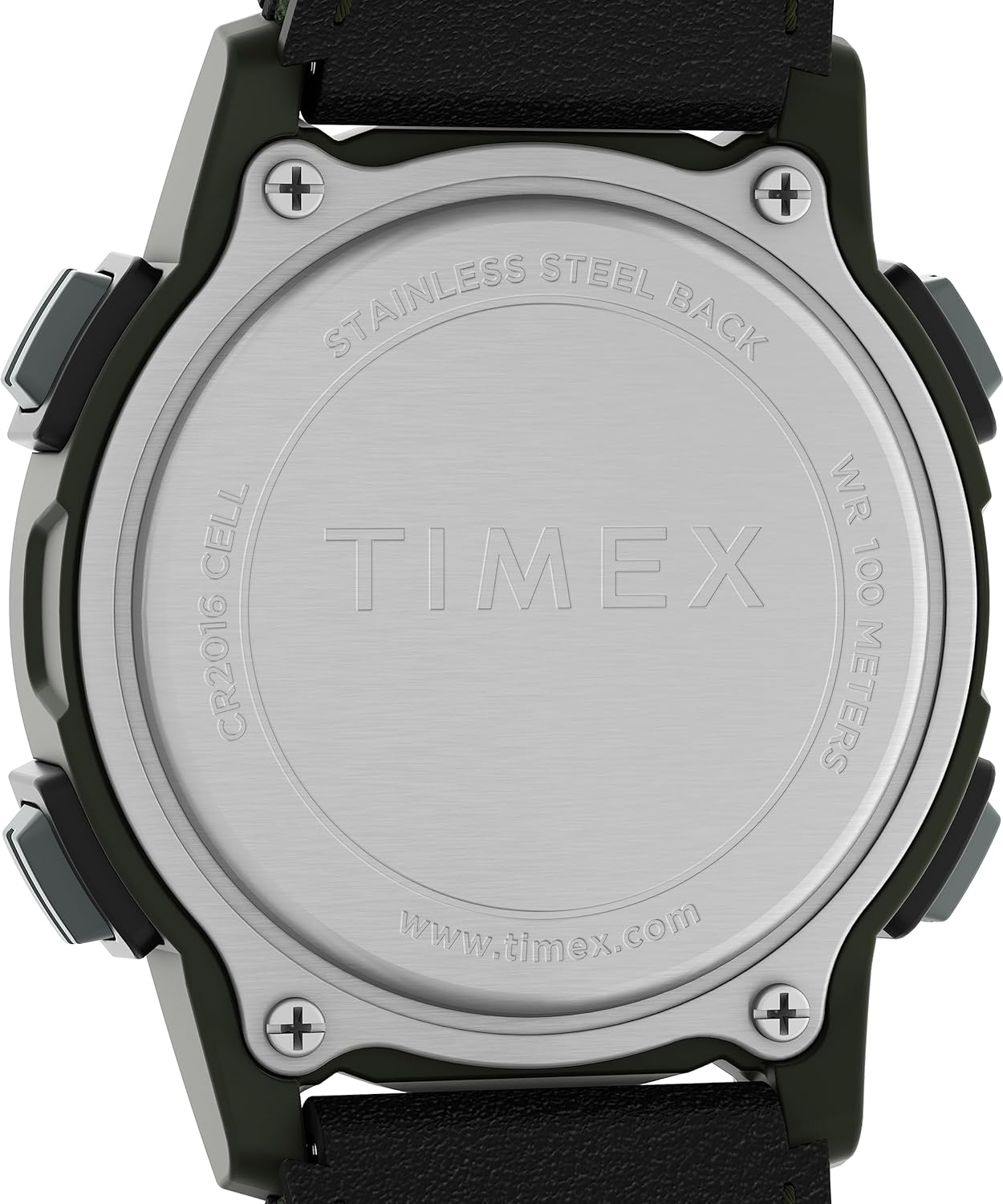
Figure 3: Back of the watch indicating water resistance and battery type.
Depanaj
| Pwoblèm | Kòz posib | Solisyon |
|---|---|---|
| Ekran an vid oswa li fèb. | Batri a fèb oswa mouri. | Replace the battery (CR2016). See Maintenance section. |
| Lè a pa kòrèk. | Lè a pa t byen fikse oubyen li pa t re-mete. | Re-set the time and date. See Setup section. |
| Bouton yo pa reponn. | Mont lan petèt bloke oubyen li gen yon pwoblèm entèn. | Try pressing all buttons firmly. If issue persists, a battery reset (removing and reinserting battery) might be needed, or contact support. |
| Dlo anndan mont lan. | Sele a domaje oswa bouton yo peze anba dlo. | Pote mont lan imedyatman nan yon sèvis reparasyon mont pwofesyonèl. Pa eseye seche l tèt ou. |
Espesifikasyon
- Nimewo Modèl: TW4B287009J
- Dyamèt ka: 33mm
- Longè braslè: 7.5 pous
- Materyèl lantiy: Acrylic
- Rezistans dlo: 100 mèt (330 pye)
- Kalite batri: CR2016 Lityòm Metal (enkli)
- Pwa: Apeprè 2.08 ons
- Depatman: Unisex
- Manifakti: Timex
Garanti ak sipò
Timex watches are manufactured to the highest quality standards and are warranted against manufacturing defects for a period of one year from the original date of purchase. This warranty does not cover normal wear and tear, battery life, or damage caused by misuse or accidents.
For warranty claims, service, or additional support, please visit the official Timex websit la oubyen kontakte depatman sèvis kliyan yo. Kenbe prèv acha ou a pou validasyon garanti a.
Ofisyèl Timex Websit: www.timex.com


