1. Enstriksyon Sekirite Enpòtan
Tanpri li tout enstriksyon yo ak anpil atansyon anvan ou itilize aparèy sa a. Kenbe manyèl sa a pou referans pita.
- Aparèy sa a fèt pou itilize nan kay la sèlman.
- Pa plonje aparèy la nan dlo oswa nan lòt likid.
- Keep the appliance away from water sources, especially when charging.
- Do not use the appliance if the cord or plug is damaged. Contact customer support for repair.
- Always ensure the appliance is switched off before cleaning or performing maintenance.
- Kenbe lwen timoun yo. Aparèy sa a se pa yon jwèt.
- Evite kontak ak pati k ap deplase.
- Do not use the trimmer on irritated skin or open wounds.
- Sèlman sèvi ak adaptè chaj ki vini ak aparèy la.
2. Pwodwi souview
The HTC AT-206A is a rechargeable hair trimmer designed for precise grooming tasks such as edging, outlining, dry shaving, and light shaping around areas like the neck, ears, and sideburns.

Image 2.1: HTC AT-206A Trimmer and its retail packaging, showing the device and included accessories.
Eleman:
- Trimmer Unit (HTC AT-206A)
- Chaje kab
- Netwayaj Bwòs
- Boutèy lwil lubrifyan
- Atachman peny
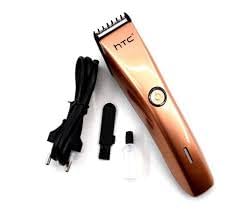
Image 2.2: The HTC AT-206A trimmer displayed with its charging cable, cleaning brush, oil bottle, and comb attachment.
3. Enstalasyon ak Chaje
3.1 Premye chaj
- Before first use, fully charge the trimmer for approximately 8-10 hours.
- Asire ke régler la etenn.
- Konekte kab chaje a nan pò chaje taye-tonbe a.
- Plug the adapter into a suitable electrical outlet.
- The charging indicator light (if present) will illuminate to show charging is in progress.
- Once fully charged, disconnect the charger from the outlet and the trimmer.
3.2 Attaching the Comb Attachment
- Asire ke régler la etenn.
- Align the comb attachment with the trimmer blade.
- Gently push the comb attachment onto the blade until it clicks into place.
- To remove, gently pull the comb attachment away from the blade.
4. Operasyon Enstriksyon
4.1 Operasyon debaz
- Asire w ke taye a chaje.
- Peze bouton pouvwa a pou limen taye zèb la.
- Peze bouton pouvwa a ankò pou etenn taye zèb la.
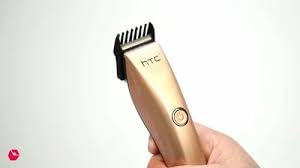
Image 4.1: The HTC AT-206A trimmer held in hand, demonstrating its ergonomic design for ease of use.
4.2 Teknik pou koupe
- For best results, use the trimmer on clean, dry hair.
- Hold the trimmer at a slight angle against the skin.
- Deplase taye cheve a dousman epi byen fèm nan direksyon kontrè ak direksyon kwasans pwal yo.
- Use the comb attachment for longer hair lengths (0.5mm-13mm).
- For edging and outlining, use the trimmer without the comb attachment for a closer trim.
- Stretch the skin taut with your free hand to ensure a smooth surface for trimming.
5. Antretyen ak netwayaj
Regular cleaning and maintenance will ensure optimal performance and extend the life of your trimmer.
5.1 Netwayaj lam yo
- Ensure the trimmer is switched off and disconnected from the charger.
- Use the provided cleaning brush to remove any loose hairs from the blades.
- For a more thorough clean, you may carefully detach the blade head (refer to specific instructions if provided with your model for blade removal).
- Do not rinse the entire trimmer under water unless explicitly stated as waterproof.
5.2 Luilye lam yo
- After cleaning, apply 1-2 drops of the provided lubricating oil onto the blades.
- Turn the trimmer on for a few seconds to allow the oil to distribute evenly.
- Siye nenpòt ki depase lwil oliv ak yon twal mou.
- Oiling the blades regularly (e.g., after every few uses) helps maintain cutting efficiency and prevents rust.
5.3 Depo
Store the trimmer in a cool, dry place, away from direct sunlight and moisture. Ensure it is fully charged before storing for extended periods.
NAN. Depanaj
If you encounter any issues with your trimmer, refer to the following common problems and solutions:
- Tondèz la pa limen:
Ensure the trimmer is fully charged. Check if the charging cable is properly connected and the power outlet is functional. - Poor trimming performance / pulling hair:
The blades may be dull or clogged with hair. Clean and oil the blades as described in the Maintenance section. Ensure the trimmer is adequately charged. - Batri pa kenbe chaj:
Ensure the trimmer is charged for the recommended duration. If the issue persists, the battery may need replacement. Contact customer support. - Twòp bri oswa Vibration:
The blades might be misaligned or require oiling. Clean and oil the blades. If the problem continues, discontinue use and contact customer support.
7. Espesifikasyon
| Karakteristik | Spesifikasyon |
|---|---|
| Nimewo Modèl | AT-206A (SA-144) |
| Sous pouvwa | Batri rechargeable |
| Materyèl lam | Stainless Steel (Metal) |
| Cutting Length Range | 0.5mm - 13mm (with comb attachment) |
| Dimansyon (L x W x H) | 18.7 x 4.9 x 11.2 cm |
| Itilizasyon Rekòmande | Dry Shaving, Edging, Light Shaping, Outlining (Neck, Ears, Sideburns, Face) |
| Koulè | Nwa |
| Manifakti | LA CHIN |
8. Garanti ak sipò
This product is covered by a standard manufacturer's warranty. Please refer to the product packaging or contact your retailer for specific warranty terms and conditions.
For technical support, troubleshooting assistance, or warranty claims, please contact the retailer or manufacturer directly. Keep your proof of purchase for any warranty-related inquiries.


