Entwodiksyon
Thank you for choosing the GOBOULT Z60 Wireless Earbuds. This manual provides detailed instructions to help you set up, operate, and maintain your earbuds for an optimal audio experience. Please read this manual thoroughly before use and retain it for future reference.

Image: GOBOULT Z60 Earbuds, illustrating the brand transition from BOULT to GOBOULT, highlighting the new logo and packaging while assuring consistent product performance.
Ki sa ki nan bwat la
Asire w tout atik yo prezan nan pakè a:
- GOBOULT Z60 Wireless Earbuds (Left and Right)
- Ka chaje
- USB Kalite-C Chaje Kab
- Bouchon zòrèy (divès gwosè)
- Manyèl itilizatè
- Kat Garanti

Image: The GOBOULT Z60 Wireless Earbuds and their charging case, showcasing the product's design and included accessories.
Pwodwi souview
The GOBOULT Z60 earbuds are designed for comfort and high-quality audio. Each earbud features a 13mm bass driver and multiple microphones for clear calls. The charging case provides extended battery life.
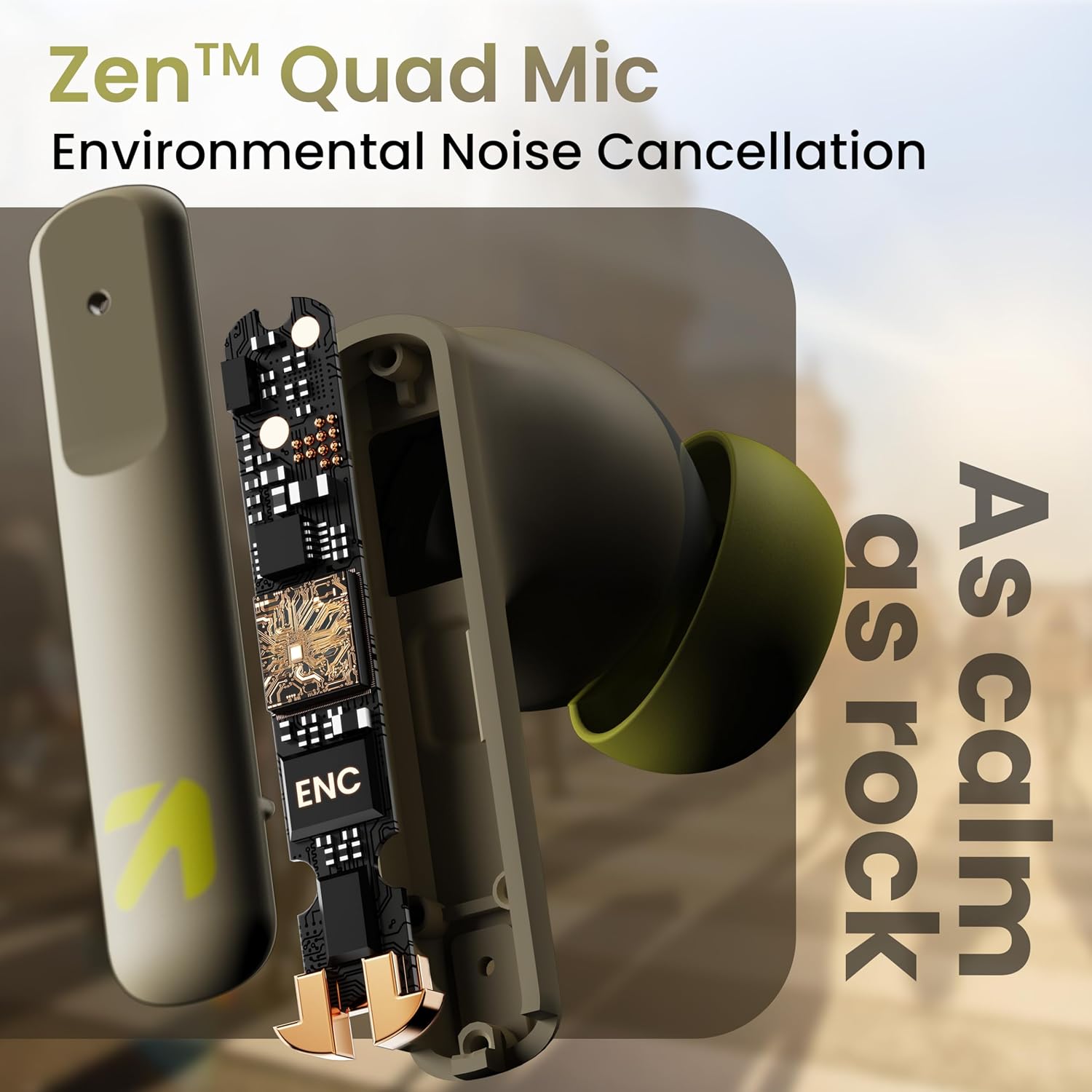
Imaj: Yon entèn view of a GOBOULT Z60 earbud, highlighting the Zen Quad Mic Environmental Noise Cancellation (ENC) technology for clear audio.

Image: A close-up of a GOBOULT Z60 earbud, emphasizing the 13mm BoomX Drivers responsible for rich bass and superior sound quality.
Chaje
To charge your GOBOULT Z60 earbuds and charging case:
- Mete ekoutè yo nan bwat chaje a. Asire w yo byen chita.
- Konekte kab chaje USB Kalite-C a nan pò chaje ki sou bwat la epi nan yon sous kouran.
- Endikatè LED ki sou bwat la ap montre eta chaj la.
A full charge provides up to 60 hours of total playtime with the charging case. A quick 10-minute charge can provide up to 150 minutes of playtime.

Image: The GOBOULT Z60 charging case connected via a Type-C cable, illustrating the fast charging capability with indicators for 10 minutes charge yielding 150 minutes playtime.

Image: GOBOULT Z60 earbuds in their charging case, highlighting the impressive 60 hours of total playtime and 8 hours of playtime on a single earbud charge.
Setup: Pairing with Your Device
The GOBOULT Z60 earbuds utilize Bluetooth 5.3 for stable and efficient wireless connectivity.
- Pwen inisyal:
- Louvri bwat chaje a. Ekoutè yo ap antre otomatikman nan mòd koneksyon.
- Sou aparèy ou an (telefòn entelijan, tablèt, òdinatè pòtab), aktive Bluetooth.
- Chèche pou "GOBOULT Z60" in the list of available Bluetooth devices and select it to connect.
- Once connected, you will hear an audio prompt, and the LED indicator on the case will change.
- Re-paire: Ekoutè yo ap konekte otomatikman ak dènye aparèy ki te konekte a lè yo retire yo nan bwat la, si Bluetooth aktive sou aparèy la.

Image: GOBOULT Z60 earbuds and their open charging case next to a smartphone, illustrating the Bluetooth 5.3 "Blink & Pair" feature for quick and stable connection.
Kijan pou w itilize ekoutè w yo
Kontwòl manyen
The GOBOULT Z60 earbuds feature intuitive touch controls. The specific functions are:
- Lektur Mizik:
- Tape sèl: jwe/poz
- Double tap (Right earbud): Next track
- Double tap (Left earbud): Previous track
- Triple tap (Right earbud): Volume Up
- Triple tap (Left earbud): Volume Down
- Jesyon apèl:
- Tape sèl: Reponn/Fen apèl
- Long press: Reject call
- Asistan vwa: Long press (either earbud) to activate Google Assistant or Siri.
- Mode Gaming: Tap 4 times on either earbud to activate/deactivate Combat Gaming Mode (50ms low latency).

Image: A visual guide to the GOBOULT Z60's touch controls, detailing actions for music playback (play/pause, next/back, volume), call management, activating voice assistance, and toggling game/music mode.
Mòd Gaming
Activate the 50ms low latency Combat Gaming Mode for a synchronized audio-visual experience during gaming. Tap 4 times on either earbud to switch between gaming and normal modes.

Image: GOBOULT Z60 earbuds in use with a smartphone displaying a racing game, emphasizing the "Combat Gaming Mode" with 50ms ultra-low latency, activated by tapping the earbud 4 times.
Asistan vwa
Access your device's voice assistant (Google Assistant or Siri) by long-pressing either earbud. This allows for hands-free control of your device.

Image: GOBOULT Z60 earbuds and their charging case, illustrating how to activate voice assistance (Ok Google, Hey Siri) with a long press on an earbud.
Antretyen
To ensure the longevity and optimal performance of your GOBOULT Z60 earbuds:
- Netwayaj: Netwaye ekoutè yo ak bwat chaje a regilyèman avèk yon twal mou epi sèk. Evite itilize pwodui chimik ki agresif oswa materyèl abrazif.
- Bout zòrèy: Remove and clean the eartips periodically. Ensure they are dry before reattaching.
- Rezistans dlo: The earbuds are IPX5 water-resistant, meaning they can withstand sweat and light rain. Do not submerge them in water or expose them to heavy downpours. Ensure the charging port is dry before charging.
- Depo: Lè w pa ap itilize ekoutè yo, sere yo nan bwat chaje yo pou pwoteje yo epi kenbe yo chaje.

Image: A GOBOULT Z60 earbud with water droplets on its surface, illustrating its IPX5 water resistance, suitable for protection against sweat, rain, and splashes.
Depanaj
If you encounter issues with your GOBOULT Z60 earbuds, refer to the following common solutions:
| Pwoblèm | Solisyon posib |
|---|---|
| Ekoutè pa asosye |
|
| Pa gen son nan yon sèl ekoutè |
|
| Ekoutè pa chaje |
|
| Volim ki ba oswa kalite son ki pa bon |
|
Espesifikasyon
| Karakteristik | Detay |
|---|---|
| Non modèl | AirBass (Z60) |
| Koneksyon Teknoloji | San fil (Bluetooth) |
| Bluetooth vèsyon | 5.3 |
| Gamme Bluetooth | 10 mèt |
| Gwosè Chofè Audio | 13 Milimèt |
| Kalite chofè odyo | Chofè dinamik |
| Dire Batri (Total) | Jiska 60 èdtan (ak bwat chaje) |
| Tan pou chaje | Apeprè 90 minit |
| Chaje vit | 10 minit chaj = 150 minit tan lekti |
| Port chaje | Kalite-C |
| Mikwofòn | 4 ENC Mics for Clear Calling |
| Latansi Audio | 50 Milisegond (Mòd Jwèt) |
| Rezistans dlo | IPX5 (Reziste kont swè, lapli, ak dlo) |
| Metòd kontwòl | Manyen, Vwa |
| Pwa atik | 41.5 gram |
| Peyi orijin | peyi Zend |
Garanti ak sipò
Your GOBOULT Z60 Wireless Earbuds come with a Garanti manifakti 1 ane soti nan dat acha a.
For any support, warranty claims, or technical assistance, please refer to the contact information provided on your warranty card or visit the official GOBOULT support websit.


