1. Entwodiksyon
Thank you for choosing the Dragon Touch Notepad-102 Android 12 Tablet. This manual provides essential information for setting up, operating, maintaining, and troubleshooting your device. Please read it thoroughly to ensure optimal performance and longevity of your tablet.
2. Pwodwi souview
The Dragon Touch Notepad-102 is a 10.1-inch Android 12 tablet designed for versatile use, from entertainment to productivity. It features an 8-core CPU, 8GB RAM, 128GB internal storage, and a vibrant IPS display.

Imaj 2.1: Devan ak dèyè view of the Dragon Touch Notepad-102 tablet. The front displays 'Android 12' and '8GB+128GB', while the back shows a silver finish and the rear camera module.
2.1. Konpozan ak Pò
Familiarize yourself with the tablet's physical features:
- Ekspozisyon: 10.1-inch IPS screen.
- Kamera devan: 8MP, typically located at the top center when held vertically.
- Kamera dèyè: 13MP, located on the back panel.
- Bouton pouvwa: Used to turn the tablet on/off or put it to sleep.
- Bouton Volim: Ajiste nivo odyo yo.
- USB Kalite-C Port: Pou chaje ak transfè done.
- Jack ekoutè 3.5mm: Pou pwodiksyon odyo.
- MicroSD Kat plas: For storage expansion (up to 128GB).
- Oratè: Dual stereo speakers for audio output.

Imaj 2.2: Side view of the tablet highlighting the various ports and buttons, including the USB Type-C port and volume controls.
3. Enstalasyon
3.1. Premye Limen
- Peze epi kenbe la Bouton pouvwa jiskaske ekran an limen.
- Swiv enstriksyon yo sou ekran an pou chwazi lang ou, rejyon ou, epi aksepte tèm ak kondisyon yo.
3.2. Koneksyon Wi-Fi
- During initial setup or later, navigate to Anviwònman > Rezo ak entènèt > Wi-Fi.
- Aktive Wi-Fi a On.
- Chwazi rezo Wi-Fi ou vle a nan lis la.
- Antre modpas rezo a si yo mande w, epi tape Konekte.
3.3. Konfigirasyon Kont Google
Sign in with your Google account to access the Google Play Store, Gmail, and other Google services. If you don't have an account, you can create one during this step.
4. Operasyon debaz
4.1. Navige sou Android 12
The tablet runs on Android 12, offering an intuitive user interface. Common gestures include:
- Tape: Chwazi yon atik oubyen louvri yon aplikasyon.
- Glise: Defile nan paj yo oswa meni yo.
- Zoom-pou-zoom: Enlarge or shrink content on the screen.
- Long Press: Jwenn aksè nan meni kontèks yo oubyen deplase ikòn yo.
4.2. Enstalasyon aplikasyon an
Download and install applications from the Google Play Store. Ensure you have a stable internet connection.

Imaj 4.1: The tablet screen showing a collection of application icons and photo thumbnails, demonstrating its multimedia capabilities and storage capacity.
5. Karakteristik avanse
5.1. Kamera
The tablet is equipped with an 8MP front camera and a 13MP rear camera. Open the Camera app to capture photos and videos. The front camera is ideal for video calls and selfies.

Imaj 5.1: The tablet displaying a video call, showcasing the clarity of the front-facing camera for communication.
5.2. Pwojeksyon san fil
The tablet supports wireless projection, allowing you to mirror its screen to a compatible large display, such as a TV. This feature is useful for presentations or sharing media.
5.3. Docking Keyboard Support
Enhance your productivity by connecting a compatible docking keyboard (sold separately). This transforms your tablet into a laptop-like device, suitable for typing and work tasks.
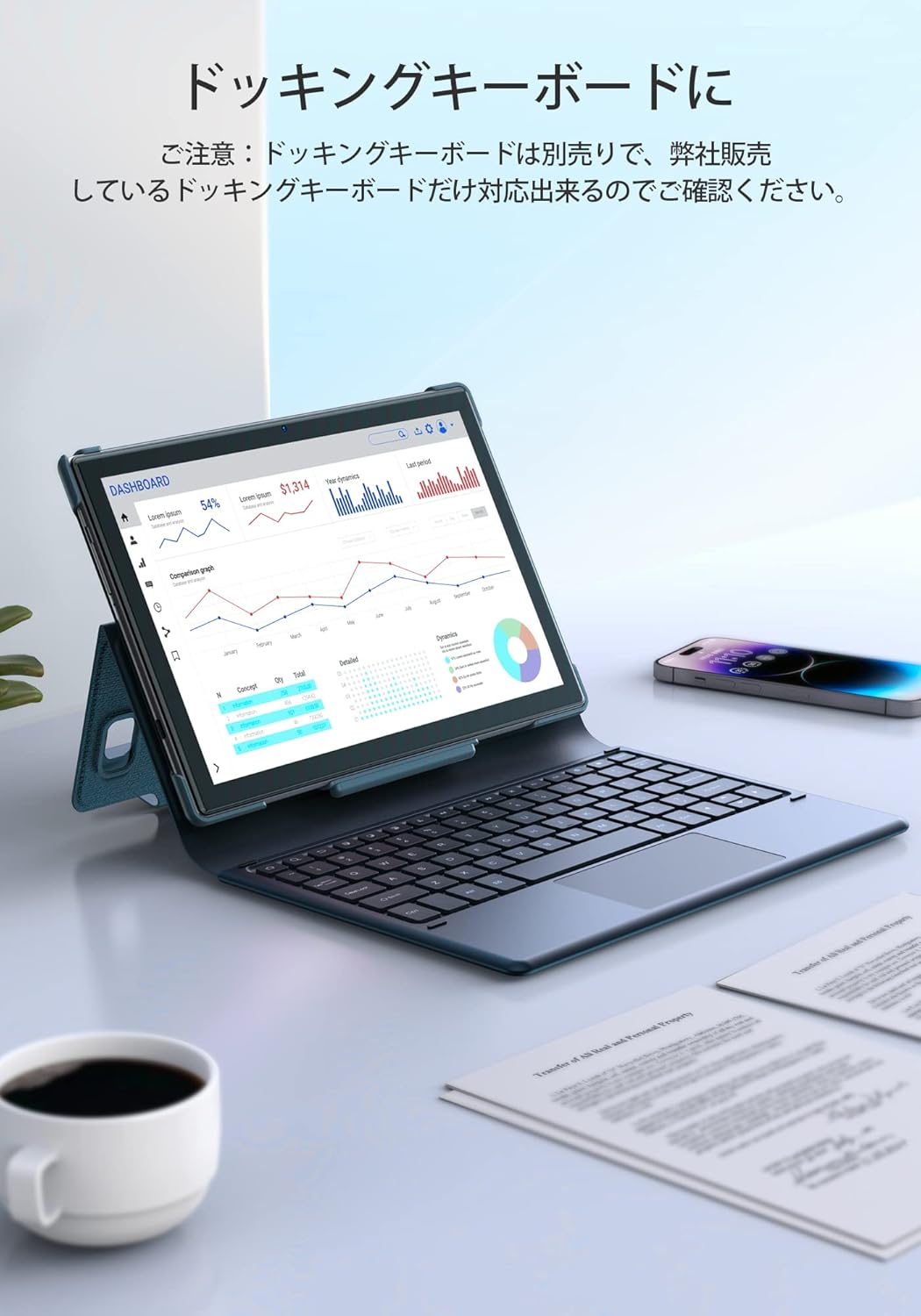
Imaj 5.2: The tablet docked with a keyboard accessory, displaying a dashboard with charts, illustrating its use for productivity.
6. Koneksyon
6.1. WiFi
The tablet supports dual-band Wi-Fi (2.4GHz and 5GHz) with 802.11ac technology for stable and high-speed internet access. To manage Wi-Fi settings, go to Anviwònman > Rezo ak entènèt > Wi-Fi.
6.2.Bluetooth
Connect wireless headphones, speakers, or other Bluetooth-enabled devices. Access Bluetooth settings via Anviwònman > Aparèy ki konekte > Bluetooth.
7. Jesyon batri
The Notepad-102 is equipped with a 6000mAh battery. To charge, connect the included Type-C cable to the tablet's Type-C port and a compatible 5V/2A power adapter.
7.1. Battery Life Tips
- Diminye klète ekran an.
- Etenn Wi-Fi ak Bluetooth lè w pa ap itilize yo.
- Fèmen aplikasyon ki an background.
- Aktive mòd ekonomize batri a.
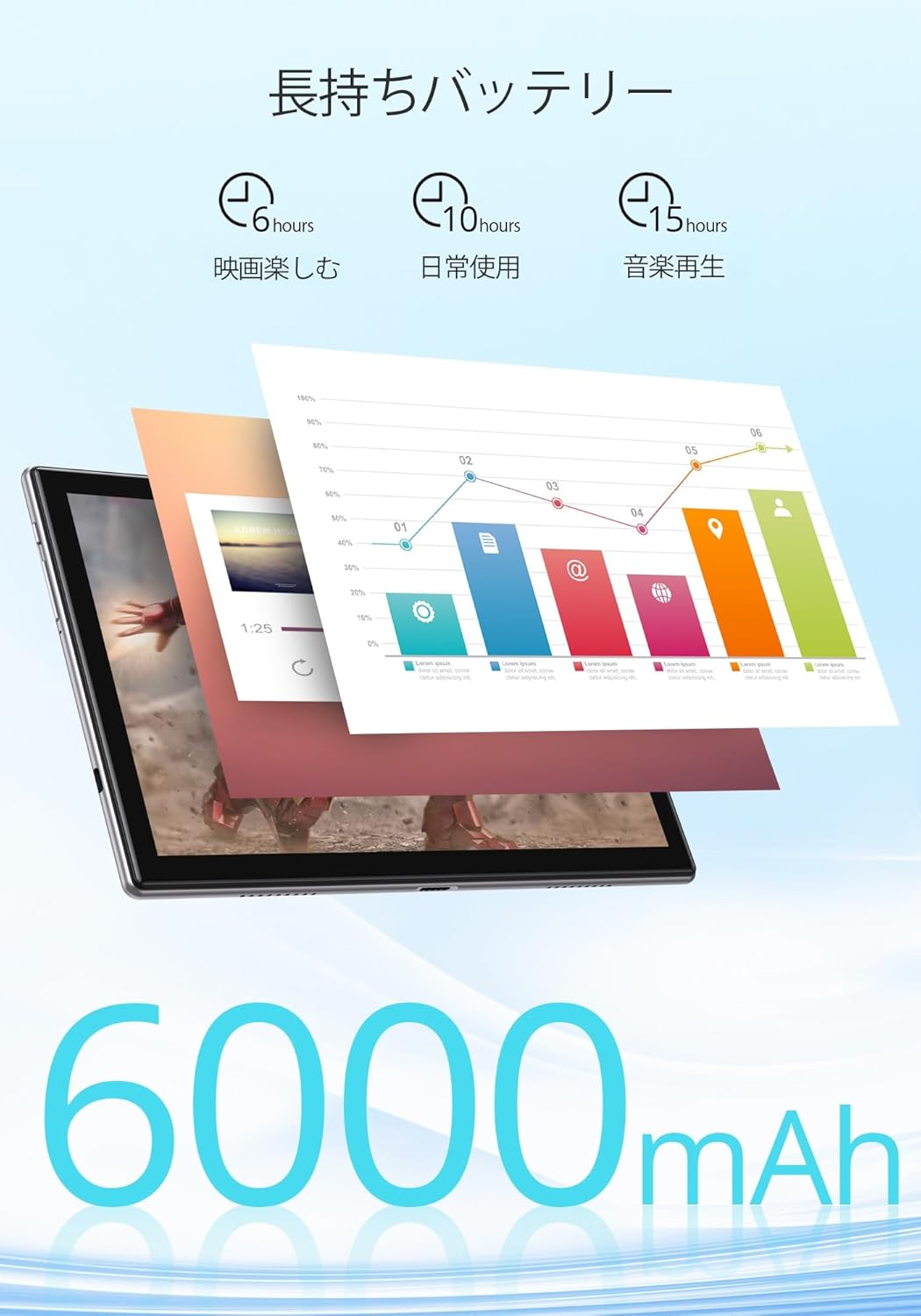
Imaj 7.1: An infographic showing estimated battery life for various activities: 6 hours for movies, 10 hours for daily use, and 15 hours for music playback, powered by the 6000mAh battery.
8. Antretyen ak Swen
- Keep the tablet away from extreme temperatures and direct sunlight.
- Avoid dropping the tablet or subjecting it to strong impacts.
- Clean the screen with a soft, lint-free cloth. Do not use harsh chemicals.
- Asire w ke pò chaje a pa gen pousyè ak debri.
NAN. Depanaj
9.1. Tablet Not Turning On
- Asire w ke tablèt la byen chaje. Konekte l nan yon sous kouran pou omwen 30 minit.
- Peze epi kenbe bouton Pouvwa a pandan 10-15 segonn pou fòse rekòmanse.
9.2. Pwoblèm koneksyon Wi-Fi
- Rekòmanse routeur Wi-Fi ou a ak tablèt la.
- Asire w ou nan zòn siyal Wi-Fi a.
- Bliye rezo a nan paramèt Wi-Fi yo epi rekonekte li.
- Tcheke si lòt aparèy yo ka konekte sou menm rezo Wi-Fi a.
9.3. Aplikasyon ki bloke oswa ki bloke
- Fèmen epi relouvri aplikasyon an.
- Efase kach aplikasyon an ak done yo nan Anviwònman > Aplikasyon yo > [Non Aplikasyon an] > Depo ak kach.
- Asire w ke aplikasyon an mete ajou nan dènye vèsyon li.
10. Espesifikasyon
| Karakteristik | Spesifikasyon |
|---|---|
| Mak | Dragon Touch |
| Modèl | Notepad-102 |
| Sistèm operasyon | Android 12 (GMS sètifye) |
| Gwosè ekspozisyon | 10.1 pous |
| Rezolisyon ekspozisyon | 1280 x 800 pixels (IPS) |
| Processeur | 8-core CPU (2.0GHz) |
| RAM | 8GB |
| Depo Entèn | 128GB |
| Depo dilatabl | MicroSD jiska 128GB |
| Wi-Fi | 2.4Ghz/5Ghz Dual-band (802.11ac) |
| Bluetooth | Wi |
| Kamera devan | 8MP |
| Kamera dèyè | 13MP |
| Kapasite batri | 6000mAh |
| Port chaje | Kalite-C |
| Dimansyon | 27.1 x 20 x 4.9 cm |
| Pwa | 940 g |
11. Garanti ak sipò
The Dragon Touch Notepad-102 tablet comes with a one-year warranty. For any inquiries or support needs, please contact customer service through your Amazon purchase history, providing your order number. Our support team is dedicated to assisting you.
Nòt: Please use the provided charging cable and a 5V/2A power adapter for optimal charging.


