1. Entwodiksyon
Thank you for choosing the iFFALCON 43-inch 4K Ultra HD Smart QLED Google TV, model iFF43Q73. This manual provides essential information for the safe and efficient use of your television. Please read it thoroughly before operating the device and retain it for future reference.
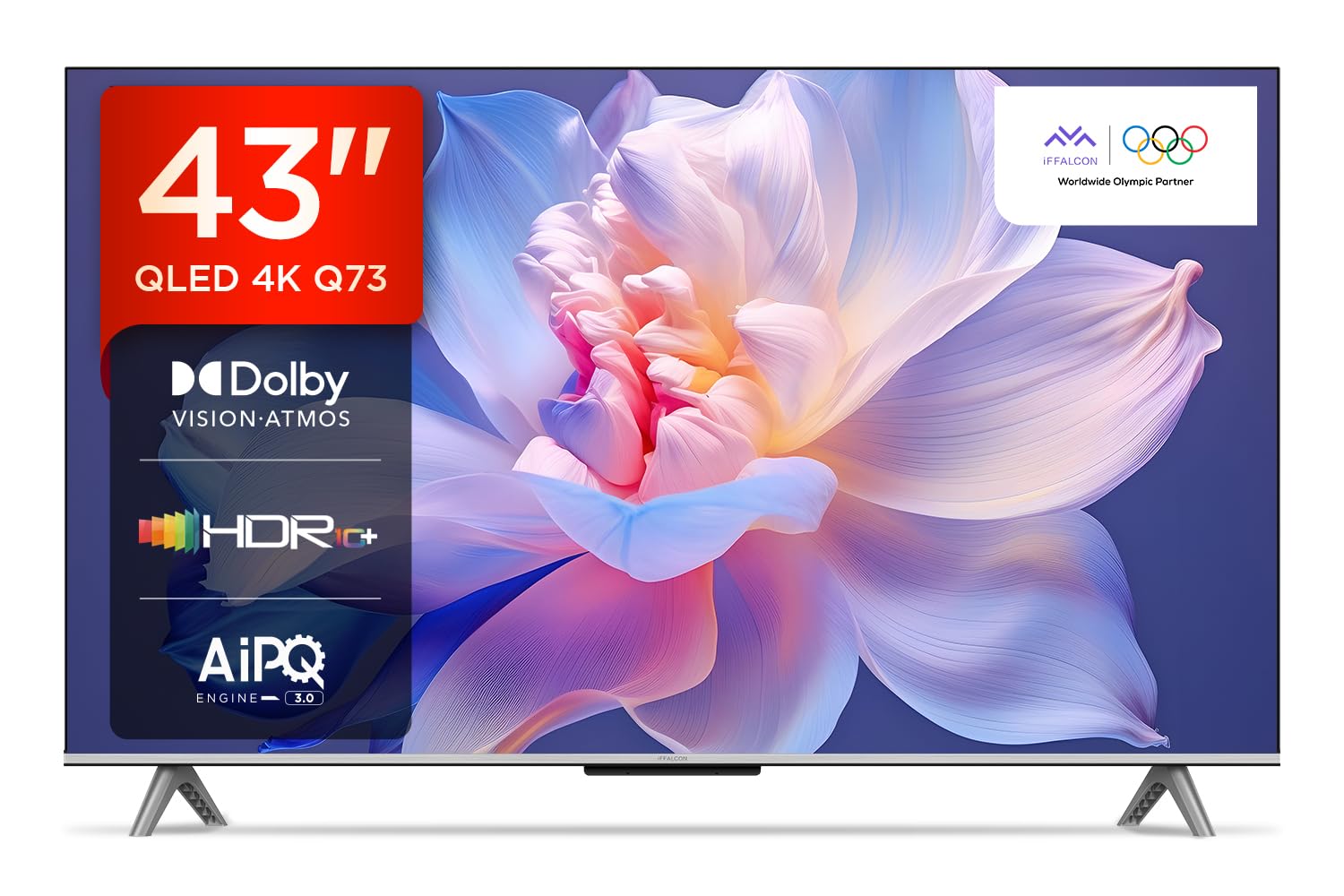
Imaj: Devan view of the iFFALCON 43-inch 4K Ultra HD Smart QLED Google TV.
2. Enfòmasyon sou Sekirite
Toujou respekte règ sekirite sa yo pou evite chòk elektrik, dife oswa domaj nan televizyon an:
- Pa ekspoze televizyon an ak lapli oswa imidite.
- Asire bon vantilasyon; pa bouche ouvèti vantilasyon yo.
- Sèvi ak sèlman atachman/akseswa manifakti a espesifye.
- Dekonekte televizyon an pandan tanpèt zèklè oswa lè ou pa itilize li pou yon bon bout tan.
- Refere tout sèvis yo bay pèsonèl sèvis kalifye.
3. Ki sa ki nan bwat la
Lè w ap debale, verifye si tout bagay yo la:
- Televizyon 1N LED
- 1N Audio Kab
- Sipò 1N (pou monte sou tab)
- 1N Manyèl Itilizatè
- 1N Remote Control
- Kat Garanti 1N
- 2N pil AAA (pou kontwòl remote)
4. Enstalasyon
4.1 Enstalasyon Fizik
Your iFFALCON TV can be installed on a table stand or wall-mounted. Ensure the installation surface is stable and can support the TV's weight.

Image: The iFFALCON TV placed on a media console, illustrating a typical table-top setup.
Montaj tab la:
- Carefully place the TV face down on a soft, flat surface.
- Attach the provided stand legs to the designated slots on the bottom of the TV using the screws included.
- Ensure the stand is securely fastened before carefully lifting the TV to its upright position.
Montaj mi:
For wall mounting, a compatible VESA wall mount kit (not included) is required. Follow the instructions provided with your wall mount kit. Professional installation is recommended.

Image: The iFFALCON TV displayed as wall-mounted in a modern living room setting.
4.2 Premye Limen ak Konfigirasyon
- Konekte kòd kouran an nan televizyon an epi answit nan yon priz kouran.
- Mete pil AAA yo bay yo nan kontwòl remote la.
- Peze bouton pouvwa a sou kontwòl remote la oswa televizyon an pou limen li.
- Swiv enstriksyon ki sou ekran an pou w konplete konfigirasyon inisyal la, tankou seleksyon lang lan, koneksyon rezo a (Wi-Fi oswa Ethernet), epi koneksyon ak kont Google la.
5. Opere televizyon ou
5.1 Kontwòl Remote
Kontwòl remote entelijan an bay aksè rapid a divès fonksyon ak sèvis difizyon.

Image: The iFFALCON smart remote control, highlighting dedicated buttons for Netflix, Prime Video, YouTube, and TCL Channel, along with Google Assistant functionality.
5.2 Entèfas Google TV
Your TV runs on Google TV, offering a personalized experience with content recommendations and easy access to apps.

Imaj: Ekran prensipal Google TV a ap montre plizyè aplikasyon difizyon ak rekòmandasyon kontni.

Image: A visual representation of the Google TV platform, emphasizing its user-friendly interface.
Karakteristik kle:
- Kontwòl vwa men-gratis: Use "Ok Google" to search for content, control smart home devices, and get information.
- Google Watchlist: Add movies and TV shows to a unified watchlist from various services.
- Google Kids: Access curated content suitable for children.
- Google Meet: Conduct video calls directly from your TV (requires compatible camera, not included).

Image: A user interacting with the TV using the "Ok Google" voice command to check the weather.

Image: The Google Watchlist feature shown across both a mobile device and the TV screen.

Image: The Google Kids interface, displaying child-friendly content and shows.

Image: A video call in progress using Google Meet on the iFFALCON TV.
6. Koneksyon
The iFFALCON iFF43Q73 offers multiple connectivity options for external devices and networks.

Imaj: Yon imaj detaye view of the TV's side panel, illustrating the various input and output ports.
- Pò HDMI (3): Connect set-top boxes, Blu-ray players, and gaming consoles. HDMI 3 supports eARC/ARC for enhanced audio return.
- Pò USB (1): Pou konekte aparèy depo USB pou li medya.
- LAN (Etènèt): Pou yon koneksyon entènèt filaire.
- Sòti ekoutè: Pou konekte kas ekoutè oswa oratè ekstèn.
- Sòti Odyo Dijital (Optik): Pou konekte ak ba son oswa sistèm sinema lakay.
- Antèn/Kab Antre: Pou konekte yon antèn oswa yon siyal televizyon kab.
- Adaptè Antre AV: Pou konekte ansyen aparèy ki itilize videyo konpoze ak odyo stereo.
- Wi-Fi: Built-in for wireless internet access.
- Bluetooth: Pou konekte akseswa san fil tankou kas ekoutè oswa kontwolè jwèt.

Image: An illustration of an HDMI 2.1 cable connecting to the TV, highlighting its advanced capabilities.

Image: A laptop screen being cast to the iFFALCON TV, demonstrating low latency casting functionality.
7. Karakteristik ekspozisyon
Fè eksperyans vizyèl sansasyonèl ak teknoloji ekspozisyon avanse.

Imaj: Yon plis paseview of the iFFALCON TV's key display and audio features, including QLED, Dolby Vision Atmos, HDR10+, MEMC, High Brightness, DTS:X, Gaming in Dolby Vision, Game Master, and Edgeless Design.
- Ekspozisyon QLED: Quantum Dot technology delivers vibrant colors and improved brightness.
- 4K Ultra HD (3840 x 2160): Provides four times the resolution of Full HD for incredible detail.
- Vizyon Dolby ak HDR10+: Advanced HDR formats for enhanced contrast, brightness, and color accuracy.
- 4K HDR Pwofesyonèl: Optimizes HDR content for a superior vieweksperyans nan.
- AIPQ 3.0 Engine: AI-powered picture quality engine for intelligent optimization of color, contrast, and clarity.
- MEMC (Estimasyon Mouvman, Konpansasyon Mouvman): Reduces motion blur and makes fast-moving scenes smoother.
- High Brightness (300 nits): Ensures clear visibility even in well-lit rooms.
- 178 Degre Wide Viewing Ang: Consistent picture quality from various viewpozisyon yo.

Image: An illustration demonstrating the layers and technology behind a QLED display.

Image: The Dolby Vision logo displayed over a vibrant, colorful abstract image, representing enhanced visual quality.

Image: The HDR10+ logo positioned next to an image of a colorful, explosive visual effect, symbolizing dynamic range.

Image: A split image demonstrating the difference between standard and high brightness, showing a more vivid landscape on the right.

Image: A comparison showing a skier with motion blur (Without MEMC) versus a clear image (With MEMC), illustrating the motion compensation technology.
8. Karakteristik Odyo
Immersive sound experience with integrated speaker boxes.
- 30 Watt Sòti: Powerful audio for clear sound.
- MS12Z with Dolby Atmos: Li bay yon son miltidimansyonèl ki deplase toutotou ou.
- DTS Virtual:X: Creates an immersive audio experience without the need for additional speakers.
- Integrated Speaker Boxes (Bottom Side): Optimized speaker placement for enhanced sound delivery.

Image: An illustration of the Dolby Atmos sound experience, showing sound waves emanating from the TV and surrounding the viewer.

Image: A visual representation of Dolby Atmos audio filling a living room, with sound waves surrounding the TV.

Image: The DTS:X logo with an illustration of dolphins jumping out of water, depicting immersive sound.

Image: A visual representation of DTS:X audio, showing sound waves emanating from the TV and surrounding a viewer on a couch.
9. Karakteristik jwèt yo
Enhance your gaming experience with dedicated features.
- Mèt jwèt la: A suite of features designed for gamers.
- Gaming in Dolby Vision: Experience games with enhanced visuals and dynamic range.
- ALLM (Mod Auto Low Latansi): Chanje televizyon an otomatikman nan yon mòd latans ki ba lè yo detekte yon konsole jwèt, sa ki diminye latans opinyon an.
- Ba jwèt: Quick access to game-related settings and information during gameplay.

Image: The Game Master feature displayed on the TV screen, showing icons for Game Bar, ALLM, and Aiming Aid.

Image: A gaming scene displayed on the TV with the 'Gaming in Dolby Vision' logo, indicating enhanced visual quality for games.

Image: The Game Master logo with icons for Game Bar, ALLM, and Aiming Aid, illustrating the gaming optimization features.

Image: The Game Bar interface displayed at the bottom of the TV screen during gameplay, showing options like HGIG, StatsBar, Boost, and Toolbox.

Image: A split screen comparison of a racing game with ALLM Mode OFF (left) and ALLM Mode ON (right), demonstrating reduced input lag.
10. Antretyen
Bon swen asire lonjevite ak pèfòmans televizyon ou an.
- Netwaye ekran an: Use a soft, lint-free cloth specifically designed for electronics. Do not use abrasive cleaners or solvents.
- Netwaye ankadreman an: Wipe with a soft, dry cloth. For stubborn marks, a slightly damp Ou ka itilize yon twal, epi apre sa, yon twal sèk.
- Vantilasyon: Ensure the TV's ventilation openings are clear of dust and obstructions.
- Kòd pouvwa: Tcheke kòd elektrik la regilyèman pou wè si li pa domaje.
NAN. Depanaj
Gade seksyon sa a pou pwoblèm komen ak solisyon yo.
| Pwoblèm | Kòz posib | Solisyon |
|---|---|---|
| Pa gen pouvwa | Power cord disconnected, no power from outlet. | Tcheke koneksyon kòd kouran an. Teste priz la ak yon lòt aparèy. |
| Pa gen imaj, men gen son | Incorrect input source, faulty cable. | Verifye sous antre ki kòrèk la. Tcheke koneksyon kab HDMI/AV yo. |
| Pa gen son, men imaj la la | Volume muted, external audio device issue. | Unmute volume. Check audio settings. Ensure external audio devices are connected correctly. |
| Remote kontwòl pa travay | Pil mouri, obstak, telekòmand pa konekte. | Replace batteries. Remove obstructions. Re-pair Bluetooth remote if applicable. |
| Pwoblèm koneksyon Wi-Fi | Incorrect password, router issue, signal interference. | Antre modpas Wi-Fi a ankò. Rekòmanse routeur la. Pi pre routeur la oswa diminye entèferans lan. |
12. Espesifikasyon
Detailed technical specifications for the iFFALCON 43-inch 4K Ultra HD Smart QLED Google TV.

Image: A diagram illustrating the dimensions and weight of the iFFALCON 43-inch TV, both with and without the stand.
| Karakteristik | Detay |
|---|---|
| Modèl | iFF43Q73 |
| Gwosè ekran | 43 pous (108 cm) |
| Teknoloji ekspozisyon | QLED |
| Rezolisyon | 4K Ultra HD (3840 x 2160) |
| Rafrechisman pousantaj | 60 Hz |
| Sistèm operasyon | Google TV |
| Processeur | Processeur kat nwayo 64-bit |
| RAM | 2 GB |
| Depo | 16 GB |
| Sòti odyo | 30 Watts |
| Son Teknoloji | Dolby Atmos, DTS Virtual:X |
| Koneksyon | 3 HDMI Ports, 1 USB Port, Wi-Fi, Bluetooth, Ethernet |
| Konsomasyon enèji (mòd aktif) | 130 Watts |
| Dimansyon pwodwi (ak sipò) | 8 x 95.7 x 60.3 cm |
| Pwa Atik (ak sipò) | 6.7 kg |
13. Garanti ak sipò
Your iFFALCON TV comes with a 2-ane garanti provided by the manufacturer from the date of purchase. For warranty claims, please use your Amazon e-invoice as proof of purchase.
For technical support or service inquiries, please refer to the contact information provided on the warranty card or visit the official iFFALCON support websit.


