Entwodiksyon
The Xetron DMG-10X is a state-of-the-art digital HVAC manifold gauge designed for precise refrigeration system diagnosis. It offers advanced features such as remote firmware updates (OTA), integrated temperature compensation, and compatibility with a wide range of refrigerants. This manual provides detailed instructions for the proper setup, operation, and maintenance of your DMG-10X manifold gauge to ensure accurate and reliable performance.
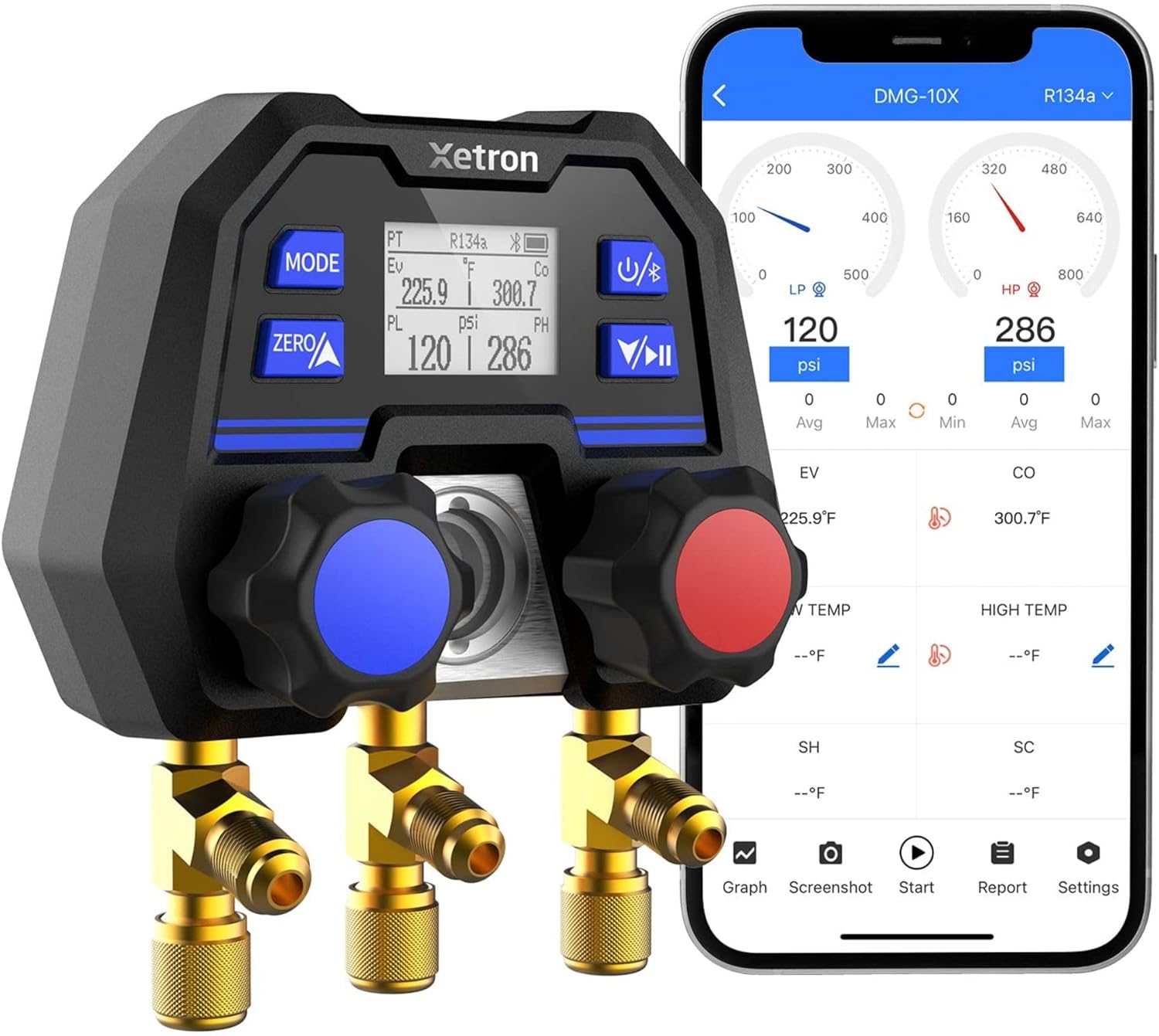
Figure 1: The Xetron DMG-10X Digital HVAC Manifold Gauge shown with its mobile application interface, demonstrating real-time data display.
Enfòmasyon sou Sekirite
Always adhere to standard safety practices when working with HVAC and refrigeration systems. This includes wearing appropriate personal protective equipment (PPE) such as safety glasses and gloves. Ensure proper ventilation in your work area.
- Pa ekspoze aparèy la anba tanperati ekstrèm oswa anba limyè solèy dirèk pou yon peryòd tan pwolonje.
- Avoid dropping the device or subjecting it to severe impacts.
- Ensure all connections are secure before applying pressure.
- Refer to ASHRAE 34 standard for refrigerant safety classifications to take appropriate protective measures.

Figure 2: The DMG-10X interface showing refrigerant safety information based on ASHRAE 34 standards, highlighting toxicity and flammability.
Pwodwi souview
The Xetron DMG-10X features a robust design with advanced sensor technology for accurate measurements.
Karakteristik kle:
- OTA (Over-The-Air) Firmware Updates: Keep your device updated with the latest features and refrigerant profiles.
- Built-in Temperature Compensation: Eliminates temperature-related pressure measurement errors.
- Extensive Refrigerant Support: Supports over 141 refrigerants, with the ability to customize up to 18 types for your specific needs. Continuously updated via the application.
- Real-time App Data View & Intelligent Analysis: Monitor pressure, temperature, superheat (SH), subcool (SC), and other parameters directly on your mobile device.
- Advanced Thick Film Ceramics MEMS Sensor: Provides reliable and stable pressure sensing, superior to mechanical shrapnel structures.
- Konstriksyon dirab: Features an aluminum valve body reinforcement for enhanced resistance to collisions and drops.

Figi 3: Plis paseview of the DMG-10X's main features, including OTA updates, built-in temperature compensation, customizable refrigerant support, and real-time app data analysis.

Figure 4: Illustration comparing the robust Thick Film Ceramics MEMS Sensor of the DMG-10X with the easily damaged mechanical shrapnel structure of traditional gauges.
Enstalasyon
1. Debalaj ak enspeksyon:
Carefully unpack the Xetron DMG-10X and all accessories. Verify that all components listed in the packing list are present and undamaged.
- 1x Digital Manifold
- 1x Packaging Box
- 1x manyèl
- 1x sak

Figure 5: Contents of the Xetron DMG-10X package, including the digital manifold, its packaging, user manual, and a carrying bag.
2. Initial Power-On and Calibration:
Before first use, ensure the device is powered on and perform a zero calibration. This is crucial for accurate readings.
- Peze bouton pouvwa a pou limen aparèy la.
- With no pressure applied to the ports, press the ZERO button to calibrate the pressure sensors.
3. Enstalasyon ak Koneksyon Aplikasyon an:
Download the official Xetron app from your mobile device's app store (App Store for iOS, Google Play for Android).
- Chèche pou "Xetron" or "DMG-10X" in your app store.
- Enstale aplikasyon an.
- Pèmèt Bluetooth sou aparèy mobil ou.
- Open the Xetron app and follow the on-screen instructions to pair with your DMG-10X manifold gauge.
Enstriksyon Operasyon
1. Selecting Refrigerants:
The DMG-10X allows you to select from over 141 refrigerants and customize your preferred list.
- Access the refrigerant management section within the Xetron app.
- Select the desired refrigerants for your current task. The app allows for DIY customization of up to 18 types for quick access.

Figure 6: The DMG-10X allows users to customize and select from a wide range of refrigerants, offering flexibility compared to mechanical gauges.
2. Pressure and Temperature Measurement Mode:
This mode provides real-time pressure and temperature readings, along with calculated superheat (SH) and subcool (SC) values.
- Connect the manifold hoses to the refrigeration system.
- Ensure the correct refrigerant is selected in the app.
- View real-time data including minimum, maximum, average pressure, EV, and CO on the app's home page.
- Set high/low pressure alarm limits as needed for your application.
3. Vacuum Test Mode:
Perform vacuum tests to ensure system integrity.
- Navigate to the Vacuum Test section in the app.
- The app displays vacuum values and a progress bar for intuitive monitoring.
- Utilize the built-in timer to accurately judge the vacuum duration.

Figure 7: The DMG-10X app displaying the vacuum testing interface, featuring a parallel display of vacuum value, a progress bar, and a built-in timer for convenience.
4. Hold Pressure Test Mode:
Conduct pressure holding tests for system leak detection.
- Access the Hold Pressure Test function in the app.
- The temperature compensation algorithm ensures more accurate tightness testing results.
- The app automatically analyzes and presents the results during the pressure holding process.

Figure 8: The DMG-10X app interface for hold pressure testing, illustrating how temperature compensation contributes to more accurate results and automatic analysis.
5. Anrejistre done:
The DMG-10X supports local data recording for analysis and export.
- Enable data recording within the app settings.
- The device can record up to 3,000 data points.
- The recording interval can be adjusted for efficiency and flexibility.
- Export recorded data for further analysis and reporting.

Figure 9: The DMG-10X app's data recording capabilities, highlighting local storage, data analysis, export options, and adjustable recording intervals.
Antretyen
Netwayaj:
Siye aparèy la ak yon mou, damp cloth. Do not use abrasive cleaners or solvents. Ensure the ports are free of debris.
Depo:
Store the DMG-10X in its protective bag or case in a cool, dry place when not in use.

Figure 10: The compact design of the DMG-10X allows for convenient portability and attachment to a utility belt for field work.
Depanaj
| Pwoblèm | Kòz posib | Solisyon |
|---|---|---|
| Lekti presyon ki pa kòrèk | Needs calibration; temperature compensation error (less likely with DMG-10X); incorrect refrigerant selected. | Perform zero calibration. Ensure the correct refrigerant is selected in the app. |
| Aplikasyon an pa konekte via Bluetooth | Bluetooth off; device out of range; app not updated. | Ensure Bluetooth is enabled on both devices. Move closer to the manifold. Update the app to the latest version. |
| Aparèy pa limen | Batri ki ba. | Charge or replace batteries as per manufacturer's instructions (if applicable, though not specified in input). |
| Vacuum leak detected during test | Loose connections; system leak. | Check all hose connections for tightness. Inspect the system for leaks and repair as necessary. |
Espesifikasyon
- Mak: Xetron
- Nimewo Modèl: DMG-10X
- Dimansyon pwodwi: 11 x 7.5 x 13.5 cm
- Pwa pwodwi: 839 g
- Materyèl: Aliminyòm
- Inite presyon: psi, kPa, Mpa, bar, inHg
- Inite Tanperati: ℉ (Fahrenheit), ℃ (Celsius)
- Kalite Capteur: Thick Film Ceramics MEMS Sensor
- Sipò febrifuj: Over 141 refrigerants (continuously updated via app), DIY 18 types.
- Koneksyon: Bluetooth for app integration and OTA updates.
Garanti ak sipò
Xetron offers a one-year warranty for the DMG-10X Digital HVAC Manifold Gauge. For any technical assistance, troubleshooting, or warranty claims, please contact Xetron customer service.
- Peryòd garanti: 1 ane
- Sèvis Kliyan: Available 24/7 (as per product feature bullets). Refer to your purchase documentation for specific contact details or visit the official Xetron websit.


