1. Entwodiksyon
Welcome to the user manual for your Optoma HD30LV 1080p Full HD Home Projector. This document provides essential information for the safe and efficient operation of your device. Please read these instructions carefully before using the projector and retain them for future reference.
2. Pwodwi souview
The Optoma HD30LV is designed to deliver a high-quality visual experience for home theater and gaming. It features 1080p Full HD resolution, 4K HDR input compatibility, and a compact design for versatile placement.
Karakteristik kle:
- 4,500 Lumen: Provides bright images suitable for various lighting conditions.
- 4K UHD and HDR Compatible: Supports high-resolution and high dynamic range content for enhanced detail and color.
- Pòtab ak lejè: Designed for easy transport and flexible installation.
- Mòd Gaming Amelyore: Offers lightning-fast response times for a smooth gaming experience.
- Dual HDMI Connectors: Pèmèt koneksyon ak plizyè aparèy an menm tan.
Ki sa ki nan bwat la:
- Optoma HD30LV Projector
- Pouvwa kab
- Kontwòl Remote
- Manyèl Itilizatè (dokiman sa a)
Vizyèl pwodwi yo:

Devan view of the Optoma HD30LV projector, showcasing the lens and ventilation.

Top view of the Optoma HD30LV projector, showing the control panel and focus/zoom adjustments.
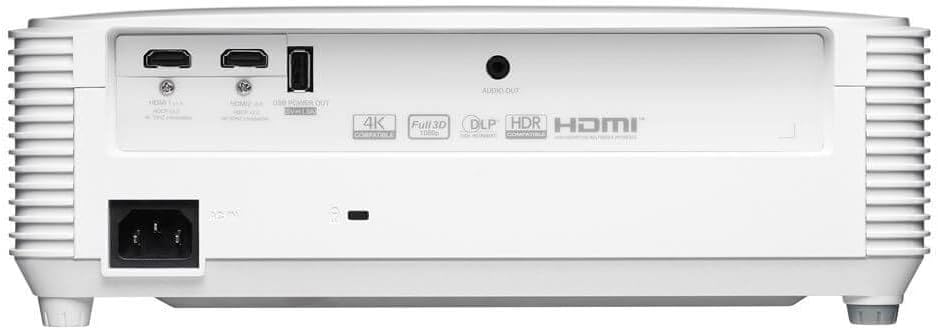
Dèyè view of the Optoma HD30LV projector, detailing the input and output ports.
Videyo pwodwi:
Yon pwodwi ofisyèl finiview video demonstrating the features and design of the Optoma HD30LV projector.
3. Enstalasyon
3.1 Debalaj ak plasman
- Retire pwojektè a ak tout akseswa yo nan anbalaj la avèk prekosyon.
- Place the projector on a stable, flat surface or mount it securely according to the manufacturer's guidelines. Ensure adequate ventilation around the unit.
- Consider the throw distance for your desired screen size. The HD30LV can project a 120-inch image from approximately 13 feet 10 inches (4.22 meters) away.

Diagram illustrating recommended throw distances for 100-inch and 120-inch screen sizes for the HD30LV projector.
3.2 Konekte Aparèy
The HD30LV features multiple connectivity options. Refer to the diagram below for port locations.

Detaye view of the Optoma HD30LV projector's dimensions and labeled connectivity ports, including HDMI and USB.
- Pouvwa: Connect the power cable to the projector and a suitable power outlet.
- HDMI: Use an HDMI cable to connect your video source (e.g., Blu-ray player, gaming console, streaming device) to one of the two HDMI 2.0 ports.
- USB pouvwa soti: A USB port (5V/1.5A) is available for powering compatible devices.
- Odyo Deyò: Connect external audio systems via the 3.5mm stereo audio jack if desired.
- Kensington Lock: For security, a Kensington lock slot is provided.
4. Operasyon Enstriksyon
4.1 Limen/Etenyen
- Peze bouton pouvwa a sou pwojektè a oswa sou kontwòl remote la pou limen aparèy la.
- To power off, press the power button again. Confirm shutdown if prompted.
4.2 Ajiste imaj la
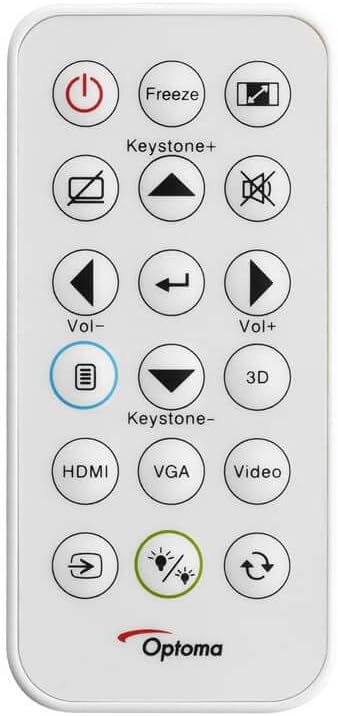
The remote control for the Optoma HD30LV projector, showing buttons for power, input, keystone, volume, and 3D functions.
- Konsantre: Vire bag konsantre a sou lantiy la jiskaske imaj la vin byen file epi klè.
- Zoom: Ajiste bag zoom lan sou lantiy la pou chanje gwosè imaj la san ou pa deplase pwojektè a.
- Koreksyon Keystone: Use the 'Keystone+' and 'Keystone-' buttons on the remote control or the projector's control panel to correct trapezoidal image distortion.
- Sous Antre: Press the 'HDMI' button on the remote or the 'Source' button on the projector to cycle through available input sources.
4.3 Enhanced Features
- 4K HDR Input: The projector is compatible with 4K HDR signals, providing enhanced contrast and color. Ensure your source device is configured to output HDR.
- Mòd Gaming Amelyore: Activate this mode through the projector's menu for reduced input lag, optimizing your gaming experience.
- Full 3D: The projector supports Full 3D content from compatible sources. Active DLP Link 3D glasses (sold separately) are required for 3D viewing.

Visual comparison of different resolutions (SD, HD, Full HD 1080p) to demonstrate the clarity of the HD30LV's native 1080p output.
5. Antretyen
Antretyen regilye asire pèfòmans optimal epi pwolonje dire lavi pwojektè ou a.
- Netwaye lantiy la: Sèvi ak yon twal mou ki pa gen pousyè, espesyalman fèt pou lantiy optik. Evite materyèl abrazif oswa pwodui chimik ki agresif.
- Cleaning the Projector Casing: Siye eksteryè a ak yon mou, damp twal. Pa sèvi ak pwodui netwayaj abrazif oswa solvang.
- Vantilasyon: Ensure the projector's ventilation openings are clear and unobstructed to prevent overheating. Do not block air vents.
- Depo: Lè w pa itilize pwojektè a pou yon bon bout tan, sere l nan yon kote ki fre epi sèk, pwoteje kont pousyè ak tanperati ekstrèm.
NAN. Depanaj
If you encounter issues with your Optoma HD30LV projector, refer to the following common problems and solutions:
| Pwoblèm | Solisyon posib |
|---|---|
| Pa gen imaj ki parèt | Check power connections. Ensure the correct input source is selected. Verify the video cable is securely connected. |
| Imaj la twoub | Adjust the focus ring on the lens. Ensure the projection surface is flat and the projector is stable. |
| Imaj la se trapezoidal | Use the keystone correction function on the remote or projector control panel. Position the projector perpendicular to the screen if possible. |
| Pa gen son | Check volume settings on the projector and source device. Ensure external audio systems are correctly connected and powered on. |
| Pwojektè a chofe twòp oswa li fèmen | Ensure ventilation openings are clear. Operate the projector in a well-ventilated area. |
For more detailed troubleshooting or issues not listed here, please refer to the comprehensive support section on the Optoma websit oswa kontakte sipò kliyan.
7. Espesifikasyon
| Karakteristik | Detay |
|---|---|
| Nimewo Modèl | HD30LV |
| Rezolisyon ekspozisyon | 1920 x 1080 (1080p Full HD) |
| Klète | 4,500 Lumen |
| Koneksyon Teknoloji | HDMI, USB |
| Karakteristik espesyal | 4K HDR Input, Compact Size, Full 3D, High Brightness, Low Input Lag |
| Dimansyon pwodwi | 9.61 x 12.44 x 4.25 pous (244 x 316 x 108 mm) |
| Pwa atik | 6.35 liv (2.88 kg) |
| Manifakti | Optoma Technology Inc |
| Batri | 1 Lithium Metal battery required (included for remote) |
8. Garanti ak sipò
For information regarding your product's warranty, please refer to the warranty card included with your projector or visit the official Optoma website. Optoma provides customer support for technical assistance, service, and parts.
Sipò sou entènèt: Vizite la Optoma Support Page for FAQs, downloads, and contact information.
Enfòmasyon pou kontakte: Refer to your product packaging or the Optoma websit la pou jwenn enfòmasyon kontak sèvis kliyan ki pi resan yo.


