1. Entwodiksyon
Thank you for choosing the Fastrack Analog-Digital Watch, Model 68029PP03. This manual provides comprehensive instructions for the proper setup, operation, and maintenance of your watch. Please read this manual carefully to ensure optimal performance and longevity of your timepiece.
2. Pwodwi souview
The Fastrack Analog-Digital Watch combines traditional analog time display with modern digital functionalities. It features a durable construction and a range of useful functions for daily wear.
Karakteristik kle:
- Ekspozisyon tan analòg ak dijital
- 10 ATM Rezistans Dlo
- Fonksyon alam
- Fonksyon kronomètr
- EL Backlight for Digital Display
- Kalandriye Display
- Hourly Sone
Konpozan Montre:
Refer to the image below for an illustration of the watch components.

Figi 2.1: Devan view of the Fastrack Analog-Digital Watch, highlighting the analog hands, digital display, and control buttons.
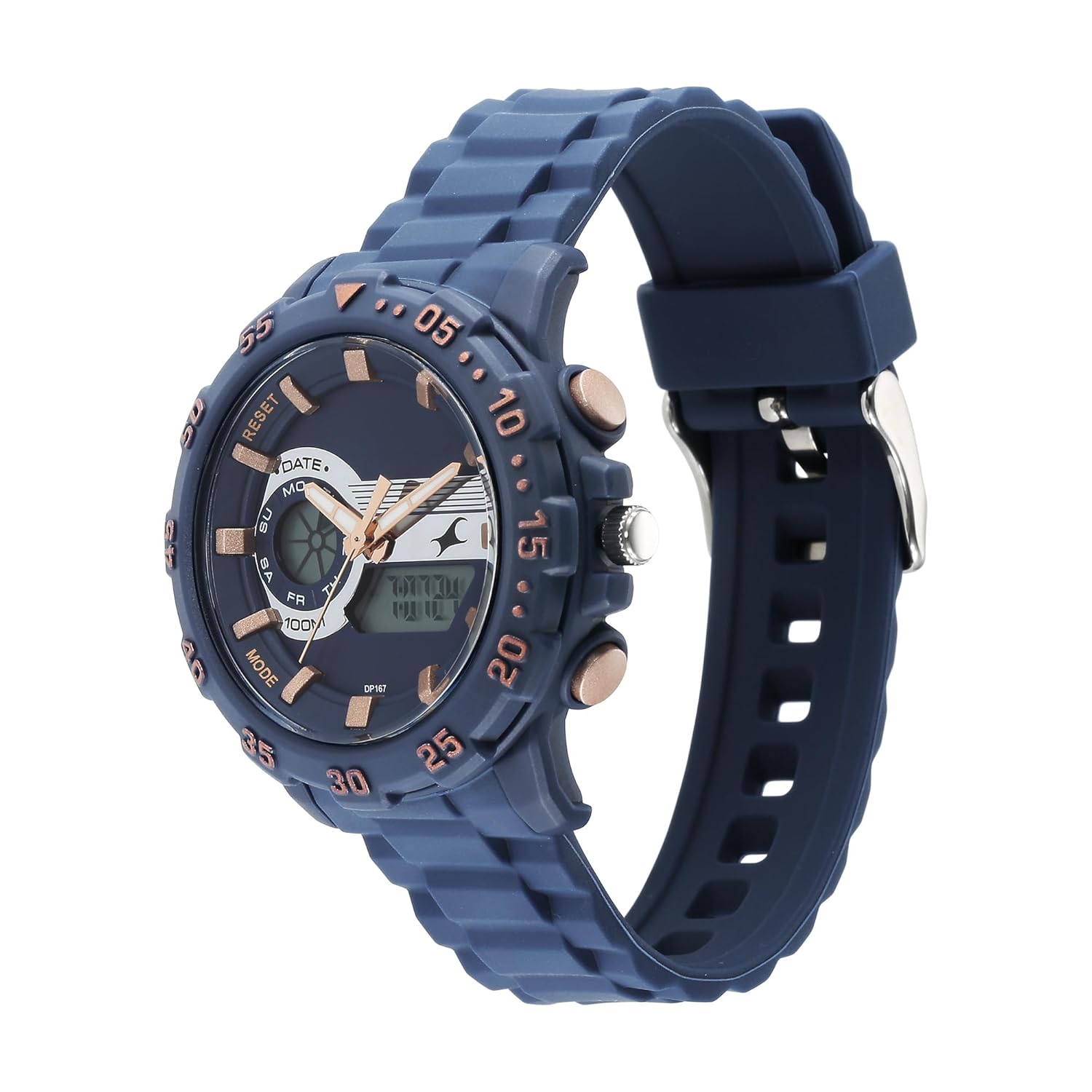
Figi 2.2: Side view illustrating the crown (for analog time setting) and push buttons (for digital functions).
- Kouwòn: Used for setting analog time.
- Bouton A (Anlè Agòch): Typically used for Mode selection or Reset.
- Bouton B (Anba Agòch): Typically used for Light or Adjust.
- Bouton C (Anlè adwat): Typically used for Start/Stop or setting increments.
- Bouton D (Anba Adwat): Typically used for setting decrements or switching display.
3. Enstalasyon
3.1 Inisyal Enstalasyon
Your watch comes with a pre-installed Lithium Polymer battery. No initial charging or battery installation is required. If the digital display is blank or analog hands are not moving, the battery may need replacement (refer to Section 5.2).
3.2 Mete lè analòg la
- Rale kouwòn lan soti nan premye pozisyon an.
- Vire kouwòn lan pou mete zegwi èdtan ak minit yo sou lè ou vle a.
- Pouse kouwòn lan tounen nan pozisyon nòmal li pou kòmanse mezire tan analòg la.
3.3 Mete lè ak dat dijital
- Peze Bouton A repeatedly until the digital display shows the Time Setting mode (usually indicated by flashing digits).
- Peze Bouton C to select the digit you wish to adjust (e.g., seconds, hours, minutes, month, date, day). The selected digit will flash.
- Sèvi ak Bouton D ogmante valè a oswa Bouton B (if applicable) to decrease the value of the flashing digit.
- Repeat steps 2 and 3 to set all desired time and date parameters.
- Yon fwa tout paramèt yo fini, peze Bouton A to exit the Time Setting mode.
4. Operasyon Enstriksyon
4.1 Fonksyon alam
- Peze Bouton A to cycle through modes until you reach the Alarm mode (indicated by 'AL' or a bell icon).
- Nan mòd alam, peze Bouton C to select the hour or minute digits for setting.
- Sèvi ak Bouton D to adjust the flashing digits to your desired alarm time.
- Peze Bouton A pou konfime ak sòti paramèt alam.
- Pou aktive/dezaktive alam lan, peze Bouton D while in Alarm mode. A bell icon will appear/disappear to indicate status.
- To stop a sounding alarm, press any button.
4.2 Fonksyon Kronomèt
- Peze Bouton A to cycle through modes until you reach the Stopwatch mode (indicated by 'ST' or 'STOP').
- Peze Bouton C yo kòmanse kronomètr la.
- Peze Bouton C ankò pou sispann kronomèt la.
- Peze Bouton D pou reset kronomèt la a zewo.
4.3 EL Backlight
To illuminate the digital display in low-light conditions, press Bouton B. The backlight will remain active for a few seconds.
4.4 Ekspozisyon Kalandriye
The digital display automatically shows the current date (month, day, day of the week) in the normal timekeeping mode. No manual adjustment is typically needed unless the initial setup was incorrect or after a battery change.
4.5 Hourly Sone
Pou aktive oswa dezaktive ho aurlsonnen, peze Bouton A to navigate to the normal timekeeping mode. Then, press and hold Bouton D (or a combination of buttons as per specific model) until the chime indicator (e.g., a small icon) appears or disappears on the digital display. Consult the watch's specific button configuration if this method does not work.
5. Gid pou Rezistans Dlo
Your Fastrack watch is rated for 10 ATM (100 meters) water resistance. This means it is suitable for:
- Everyday use, including splashes, rain, and showering.
- Swimming and snorkeling.
Li se pa apwopriye pou:
- High-impact water sports.
- Scuba diving or deep-sea diving.
Important: Do not operate any buttons or the crown while the watch is submerged in water or wet, as this can compromise the water resistance seal.
6. Antretyen
6.1 Netwayaj
Siye bwat mont lan ak braslè a regilyèman avèk yon twal mou epi sèk. Pou pousyè tè ki difisil pou retire, siye yon ti kras.amp cloth can be used, followed by immediate drying. Avoid using chemical cleaners, as they may damage the watch's finish or seals.
6.2 Ranplasman batri
The watch uses 1 Lithium Polymer battery. When the digital display fades or the analog hands stop, it indicates a low battery. Battery replacement should be performed by a qualified watch technician to ensure proper sealing and water resistance. Attempting to replace the battery yourself may void the warranty and damage the watch.
6.3 Depo
Lè w pa itilize mont ou a pou yon bon bout tan, sere l nan yon kote ki fre epi sèk, lwen limyè solèy dirèk, tanperati ekstrèm ak chan mayetik fò.
NAN. Depanaj
| Pwoblèm | Kòz posib | Solisyon |
|---|---|---|
| Zegwi analòg yo pa deplase | Low battery; Crown pulled out. | Push crown in; Replace battery by a professional. |
| Ekran dijital la vid oswa fèb | Low battery; Extreme temperature. | Replace battery by a professional; Return to normal operating temperature. |
| Tan pa kòrèk | Lè a pa byen fikse; Ou peze bouton an aksidantèlman. | Refer to Section 3.2 and 3.3 to reset time. |
| Siveyans dlo anndan | Crown/buttons operated underwater; Damaged seal. | Immediately take to a service center for inspection and repair. |
8. Espesifikasyon
| Karakteristik | Detay |
|---|---|
| Mak | Fastrack |
| Non modèl | 68029PP03 |
| Kalite ekspozisyon | Analòg-dijital |
| Rezistans dlo | 10 ATM (100 mèt) |
| Sous pouvwa | Batri Powered |
| Kalite batri | Lityòm Polymè (1 obligatwa, enkli) |
| Karakteristik espesyal | Alarm, Stopwatch, EL Backlight, Calendar, Chime |
| Dimansyon pwodwi | 14 x 7 x 10 cm |
| Pwa atik | 150 g |
| Peyi orijin | peyi Zend |
| Manifakti | Titan Co Ltd No |
9. Garanti ak sipò
Your Fastrack watch is covered by a manufacturer's warranty against defects in materials and workmanship. Please refer to the warranty card included with your purchase for specific terms, conditions, and duration. For warranty claims, service, or technical support, please contact Fastrack customer service or visit an authorized service center.
For more information, you may visit the official Fastrack websit: www.fastrack.in


