1. Entwodiksyon
The Dyson Pure Humidify + Cool PH01 is a multi-functional device engineered to improve your indoor air quality. It purifies, humidifies, and cools the air in your room, providing a more comfortable environment. Its fully-sealed filtration system captures gases and particles, while Air Multiplier technology projects purified, humidified air throughout the space.
This manual provides essential information for the safe and effective use of your appliance. Please read it thoroughly before operation and retain it for future reference.

Image 1.1: The Dyson Pure Humidify + Cool PH01 unit, showcasing its sleek design and integrated display.
2. Enfòmasyon sou Sekirite
Toujou swiv prekosyon sekirite debaz yo lè w ap itilize aparèy elektrik pou diminye risk dife, chòk elektrik, oswa blesi.
- Pa itilize deyò oswa sou sifas mouye.
- Asire w mete aparèy la sou yon sifas ki estab ak nivo.
- Unplug from the power supply before cleaning or performing maintenance.
- Keep out of reach of children and individuals with reduced physical, sensory, or reasoning capabilities.
3. Enstalasyon
3.1 Debalaj ak Asanble
- Ak anpil atansyon retire tout eleman nan anbalaj la.
- Mete inite prensipal la sou yon sifas ki plat ki estab.
- Ensure the filters are correctly installed. The unit typically comes with HEPA and activated carbon filters.
- Fill the water tank with clean tap water up to the maximum fill line.
- Securely place the water tank back into the base of the unit.
3.2 Koneksyon pouvwa
Connect the power cord to the appliance and then plug it into a suitable wall outlet. The appliance is now ready for initial operation.
3.3 App Connectivity (Optional)
For enhanced control and monitoring, download the Dyson Link app from your device's app store. Follow the in-app instructions to connect your PH01 unit to your home Wi-Fi network. This allows for remote control, scheduling, and detailed air quality reports.

Image 3.1: A smartphone displaying the Dyson Link app interface, showing real-time air quality data and control options for the purifier.
4. Operasyon Enstriksyon
4.1 Kontwòl debaz yo
The Dyson Pure Humidify + Cool PH01 is operated via button controls located on the unit or through the remote control. The Dyson Link app also provides full control functionality.
- Bouton pouvwa: Limen oswa etenn inite a.
- Mòd oto: Automatically adjusts purification and humidification based on detected air quality and humidity levels.
- Vitès fanatik: Increases or decreases the airflow speed.
- Imidifikasyon: Activates or adjusts the humidification function.
- Osilasyon: Controls the oscillation of the unit to project air across the room.
- Bouton Enfòmasyon: Cycles through various air quality and humidity readings on the LCD screen.

Image 4.1: A close-up of the unit's display, illustrating the real-time air quality (AQ) and humidity (water droplet icon) indicators.
4.2 Sensing and Reporting
The appliance continuously monitors airborne particles, gases, temperature, and humidity levels. This data is displayed on the integrated LCD screen and within the Dyson Link app, allowing you to track your indoor environment in real time.
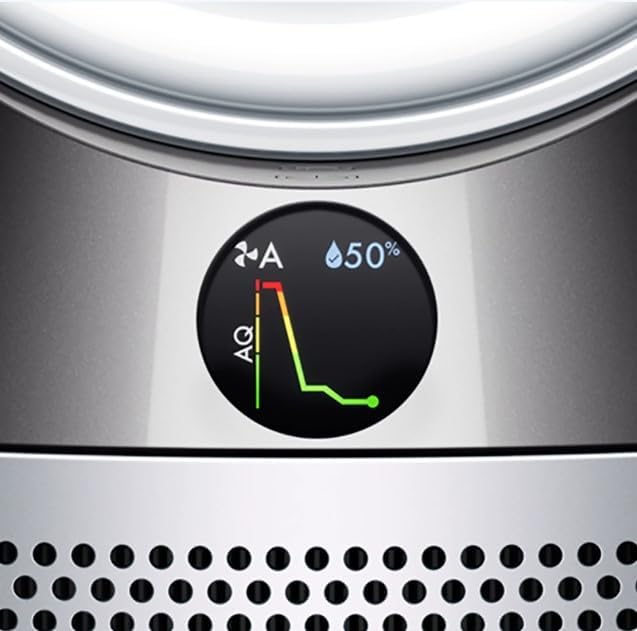
Imaj 4.2: Yon imaj detaye view of the LCD screen, showing a 50% humidity reading and a graph representing changes in air quality over time.
4.3 Airflow and Cooling
Air Multiplier technology projects purified and humidified air throughout the room. The cooling function provides a refreshing airflow, ideal for warmer conditions.

Image 4.3: The Dyson Pure Humidify + Cool PH01 positioned in an open-plan living area, demonstrating its ability to circulate air effectively throughout a large space.
4.4 Mòd lannwit
Activate Night Mode for quieter operation and a dimmed display, ensuring minimal disturbance during sleep. The unit continues to monitor and purify the air.

Image 4.4: The Dyson Pure Humidify + Cool PH01 operating in a bedroom at night, illustrating its discreet presence and suitability for nighttime use.
5. Antretyen
Regular maintenance ensures optimal performance and longevity of your Dyson Pure Humidify + Cool PH01.
5.1 Ranplasman Filtè
The unit uses HEPA and activated carbon filters to capture allergens, pollutants, and odors. The display will indicate when filters need replacement. Refer to the Dyson Link app or the unit's display for specific instructions.
- Turn off and unplug the appliance before replacing filters.
- Remove the outer shroud and old filters.
- Install new filters, ensuring they click securely into place.
- Replace the outer shroud.
- Reset the filter life counter via the unit's controls or the Dyson Link app.

Image 5.1: An internal cutaway view of the Dyson Pure Humidify + Cool PH01, highlighting the placement of the HEPA and activated carbon filters and the humidification system.
5.2 Netwayaj Imidifikatè
The Dyson Pure Humidify + Cool PH01 features Ultraviolet Cleanse technology to hygienically remove 99.9% of bacteria in the water. However, regular cleaning of the water tank and humidifier components is still necessary to prevent mineral buildup and maintain efficiency.
- The unit will prompt you when a deep clean cycle is required.
- Follow the on-screen instructions or Dyson Link app guidance for the cleaning process, which typically involves using a citric acid solution.
- Ensure the water tank is thoroughly cleaned and rinsed.
5.3 Netwayaj jeneral
Siye sifas ekstèn aparèy la ak yon twal mou, damp cloth. Do not use detergents or polishes. Ensure no water enters the motor housing.
NAN. Depanaj
If you encounter issues with your Dyson Pure Humidify + Cool PH01, refer to the following common solutions:
| Pwoblèm | Kòz posib | Solisyon |
|---|---|---|
| Inite pa limen | Pa gen kouran, koneksyon ki lach | Check power cord connection, ensure outlet is functional. |
| Humidifier not working / Low humidity output | Empty water tank, mineral buildup, humidifier error | Refill water tank, perform a deep clean cycle, check for error codes on display/app. |
| Pirifikasyon lè pòv | Clogged or old filters | Check filter life, replace filters if necessary. |
| Osilasyon an pa fonksyone | Obstruction, motor issue | Ensure no obstructions, restart the unit. If issue persists, contact support. |
| Pwoblèm koneksyon Wi-Fi | Incorrect network, signal interference | Ensure connecting to a 2.4GHz network (if 5GHz is problematic), restart router and unit, re-attempt pairing via Dyson Link app. |
For persistent issues or error codes not listed, consult the Dyson Link app for specific guidance or contact Dyson customer support.
7. Espesifikasyon
| Karakteristik | Detay |
|---|---|
| Dimansyon pwodwi | 3.1"P x 8.66"L x 36.4"H (7.87 cm P x 22 cm L x 92.46 cm H) |
| Nimewo Modèl Atik | 275371-02 |
| Batri | 1 Lithium Metal battery (included, for remote control) |
| Kalite filtre | HEPA ak kabòn aktive |
| Kalite kontwolè | Button Control, Remote Control, App Control |
| Karakteristik espesyal | Multi-functional air purifier with humidification and cooling capabilities, Air Multiplier technology, Ultraviolet Cleanse technology |
8. Garanti ak sipò
Your Dyson Pure Humidify + Cool PH01 comes with a manufacturer's warranty. Please refer to the warranty documentation provided with your purchase for specific terms and conditions, including coverage duration and claim procedures.
For technical assistance, troubleshooting, or to purchase replacement parts and filters, please visit the official Dyson support website or contact their customer service department. Have your model number (PH01) and serial number ready when contacting support.


