Entwodiksyon
Thank you for choosing the KERDOM Ergonomic Office Chair Model 977. This manual provides essential information for the safe and efficient use of your new office chair. Please read these instructions carefully before assembly and use, and retain them for future reference.

Image 1: The KERDOM Ergonomic Office Chair Model 977, showcasing its design and mesh backrest.
Enstalasyon ak Asanble
The KERDOM Ergonomic Office Chair Model 977 is designed for straightforward assembly. All necessary accessories and tools are included in the package. Assembly typically takes approximately 15 minutes.
Etap Asanble Jeneral la:
- Unpack all components and verify against the parts list provided in the included physical manual.
- Mete wou yo sou baz chèz la.
- Mete silenn asansè gaz la nan sant baz chèz la.
- Assemble the seat and backrest components according to the detailed diagrams in the physical manual.
- Attach the assembled seat and backrest to the gas lift cylinder.
- Install the headrest and armrests.
- Asire w tout vis yo byen sere anvan w itilize li.
For detailed, step-by-step visual instructions, please refer to the assembly guide included in your product packaging. If you encounter any difficulties, please contact customer support.
Enstriksyon Operasyon
Your KERDOM Ergonomic Office Chair Model 977 offers multiple adjustment features to customize your seating experience for optimal comfort and support.
1. Ajisteman Wotè Chèz la
- To adjust the chair height, locate the lever under the seat on the right side.
- To raise the chair, lift the lever while taking your weight off the seat.
- To lower the chair, lift the lever while seated.
- The chair height is adjustable by approximately 10 cm.
2. Backrest Recline and Lock
- The chair features a rocking mechanism with three lockable positions: 90° (upright), 105° (relaxed), and 130° (deep recline).
- To recline, pull the lever located under the seat on the left side. Lean back to your desired angle.
- To lock the backrest in position, push the lever back in.
- To adjust the tilt tension, rotate the round knob located under the seat at the front. Turn clockwise to increase tension, counter-clockwise to decrease.

Image 2: Illustration of the chair's recline function, showing 90°, 115°, and 135° positions, along with tilt tension adjustment and lock lever.
3. Ajisteman apui tèt
- The headrest can be adjusted vertically by approximately 8.5 cm.
- It also features a tilt adjustment of up to 15° (or 30° as shown in some visuals) to support your neck and head comfortably.
- Gently push or pull the headrest to adjust its height and angle.

Image 3: Visual guide for adjusting the headrest height (up and down 8.5 cm) and tilt angle (45° rotation shown).
4. Ajisteman sipò lonbèr
- The lumbar support is adjustable in both height and depth to conform to your lower back curve.
- To adjust height, locate the knob on the backrest and slide it up or down (approx. 8 cm range).
- To adjust depth, rotate the knob to move the lumbar support forward or backward (approx. 2.5 cm range).

Imaj 4: Detaye view of the lumbar support adjustment mechanism, illustrating 8 cm vertical and 2.5 cm horizontal adjustment.
5. Ajisteman akoudwa
- The 3D armrests can be adjusted in multiple directions for personalized comfort.
- Ajisteman wotè: Press the button on the side of the armrest and slide it up or down (approx. 7 cm range).
- Ajisteman pou pi devan/pou dèyè: Slide the armrest pad forward or backward (approx. 6 cm range).
- Wotasyon: Pivot the armrest pad inward or outward (approx. 15° rotation).

Image 5: Visual representation of the armrest's 3D adjustment capabilities, including height, forward/backward, and rotational movement.
6. Fonksyon pivotman
- The chair is equipped with a 360° swivel function, allowing for easy rotation and movement around your workspace.
Antretyen
Regular maintenance helps prolong the life and appearance of your KERDOM office chair.
- Netwayaj: Wipe down surfaces with a soft, damp cloth. For mesh and fabric areas, use a mild soap solution if necessary, and blot dry. Avoid harsh chemicals or abrasive cleaners.
- Enspeksyon: Tcheke tout vis ak boulon yo detanzantan pou asire yo byen sere. Sere boulon yo jan sa nesesè pou anpeche yo tranble oswa enstabilite.
- Woulèt: Keep casters clean from hair and debris to ensure smooth rolling.
Depanaj
Si ou rankontre nenpòt pwoblèm ak chèz ou a, tanpri al gade solisyon komen sa yo:
- Chèz la ap tranble: Ensure all assembly screws are securely tightened. Check that the gas lift is properly seated in the base.
- Chair height adjustment not working: Verifye ke levye asansè gaz la byen angaje. Si pwoblèm nan pèsiste, ou ka bezwen ranplase asansè gaz la.
- Dokiman an pa ka panche oswa bloke: Check that the recline lever is functioning correctly and not obstructed. Ensure the tilt tension knob is not overtightened.
- Rou yo pa woule byen: Netwaye tout debri (cheve, pousyè) sou wou yo.
For issues not covered here, or if troubleshooting steps do not resolve the problem, please contact KERDOM customer support.
Espesifikasyon
| Karakteristik | Detay |
|---|---|
| Mak | KERDOOM |
| Nimewo Modèl | 977 |
| Koulè | Nwa |
| Materyèl | Nylon (Mesh, Frame), High-Density Foam (Seat) |
| Dimansyon pwodwi (L x W x H) | 68 x 28.5 x 56 cm (apeprè 26.8 x 11.2 x 22 pous) |
| Pwa atik | 17 kilogram (apeprè 37.5 liv) |
| Kapasite chaj maksimòm | 150 kilogram (apeprè 330 liv) |
| Ajisteman Wotè chèz | Apeprè. 10 cm |
| Backrest Recline Angles | 90°, 105°, 130° (lockable) |
| Ajisteman Headrest | Approx. 8.5 cm height, 15-30° tilt |
| Ajisteman sipò lonbèr | Approx. 8 cm height, 2.5 cm depth |
| Ajisteman akoudwar | 3D (approx. 7 cm height, 6 cm forward/backward, 15° rotation) |
| Swivel | 360° |
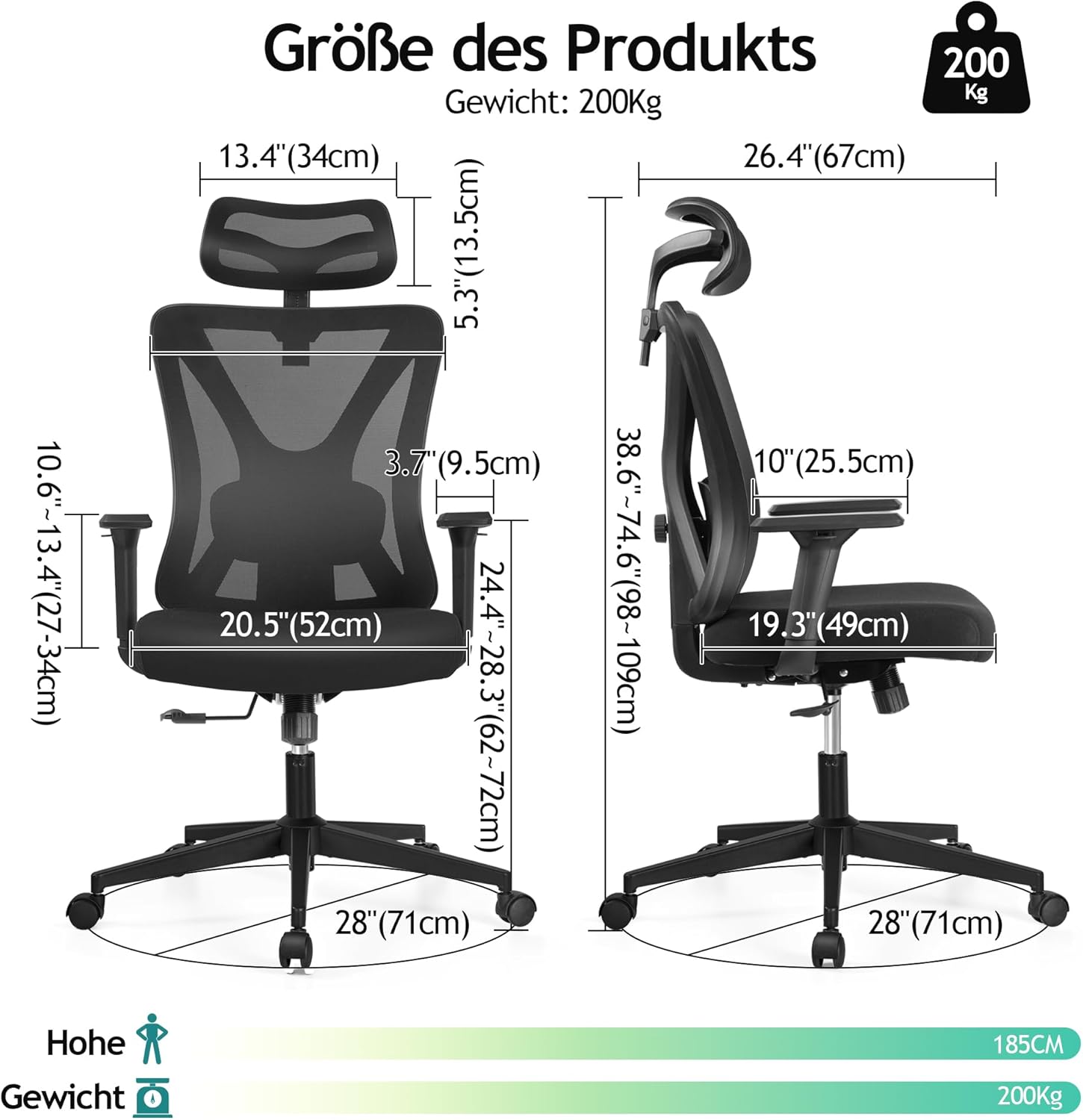
Image 6: Diagram illustrating the key dimensions of the KERDOM Ergonomic Office Chair Model 977.
Garanti ak sipò
KERDOM is committed to providing high-quality products and customer satisfaction. While specific warranty details are typically provided with your purchase documentation, we offer comprehensive support for our products.
If you encounter any problems with your KERDOM Ergonomic Office Chair Model 977, require assistance with assembly, or have questions regarding its operation or maintenance, please do not hesitate to contact our customer support team. Our representatives are available to assist you.
Please refer to your purchase receipt or the KERDOM official website for contact information and detailed warranty terms.