1. Pwodwi souview
The DARKROCK MH200 is a mid-tower PC computer case designed for Micro ATX and Mini ITX motherboards. It features a high-airflow design with mesh front and side panels, providing excellent cooling performance. The case supports various cooling options, including up to 280mm radiators and multiple fans. It also includes modern connectivity with a Type-C port and USB 3.0 ports on the I/O panel.

Figi 1.1: Devan-gòch view of the DARKROCK MH200 PC Computer Case, showcasing konsepsyon nwa elegant li yo ak panno may li yo.
Karakteristik kle:
- High-Airflow Design: Front and side mesh panels for enhanced ventilation.
- Dust Filtration: Magnetic mesh dust filters on top and bottom panels.
- Enteryè Spacious: Supports CPU coolers up to 165mm and GPUs up to 330mm.
- Modern I/O: Top-mounted Type-C and USB 3.0 ports.
- Cooling Versatility: Accommodates up to 8 fans and 280mm radiators.
- Vantilatè pre-enstale: One ARGB LED 120mm fan included in the rear.
2. Enfòmasyon sou Sekirite
Please read all safety instructions carefully before installing or operating the DARKROCK MH200 PC Computer Case. Failure to follow these instructions may result in damage to the product, personal injury, or voiding of the warranty.
- Toujou dekonekte kouran an nan tout konpozan anvan enstalasyon oswa antretyen.
- Handle components with care to avoid static discharge. Consider using an anti-static wrist strap.
- Kenbe bwat la lwen likid ak imidite twòp.
- Ensure proper ventilation around the case to prevent overheating.
- Do not attempt to modify the case structure or components.
- Kenbe soti nan atenn timoun yo.
3. Enstalasyon ak Enstalasyon
This section provides step-by-step instructions for setting up your DARKROCK MH200 PC Computer Case and installing your components.
3.1 Unpacking the Case
- Retire bwat la nan anbalaj li avèk prekosyon.
- Enspekte bwat la pou wè si li gen nenpòt siy domaj pandan transpò a. Kontakte revandè ou imedyatman si ou jwenn domaj.
- Remove all protective films and internal packaging materials.
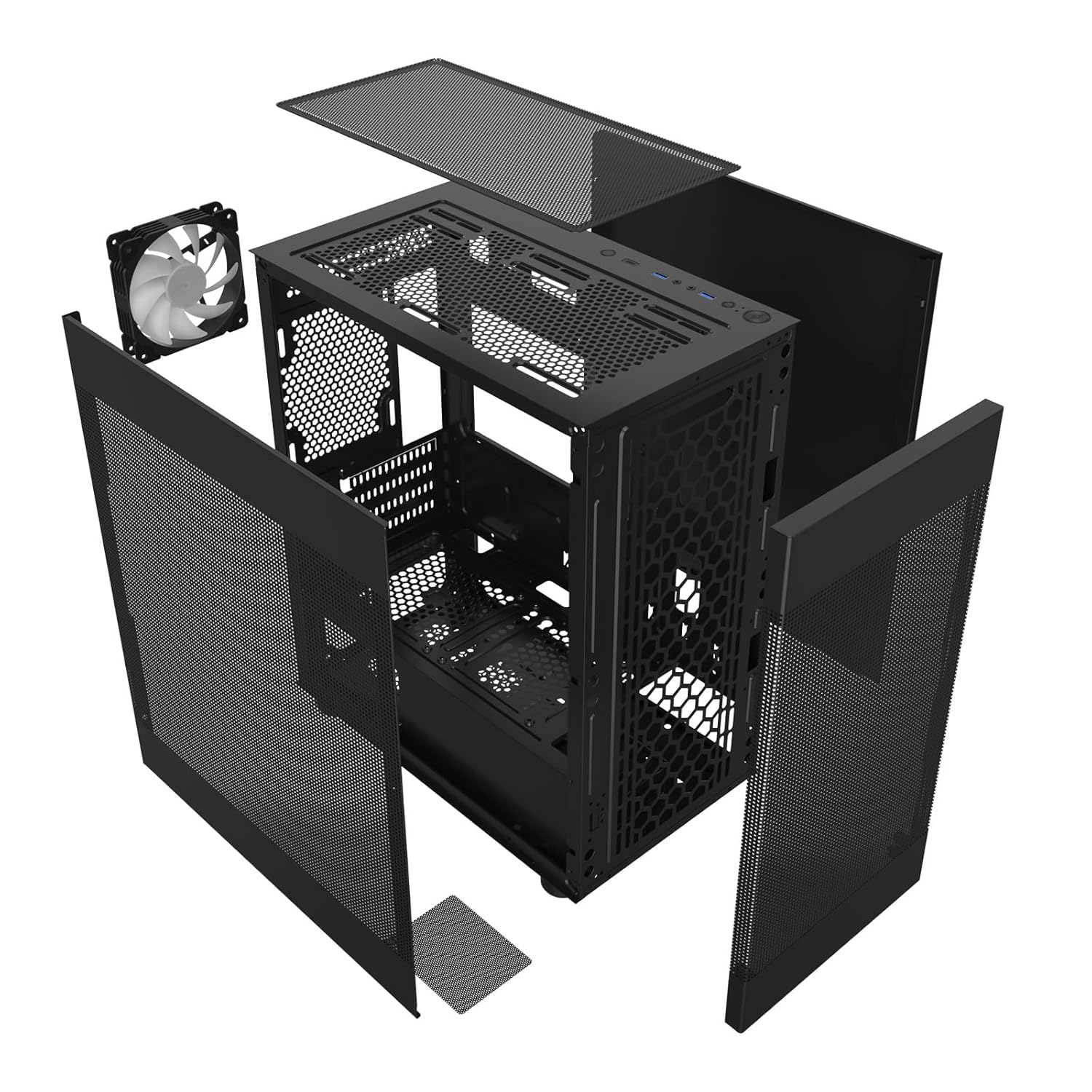
Figi 3.1: Eksploze view showing the removable panels and internal structure of the MH200 case, including the fan and dust filters.
3.2 Retire Panel
The MH200 features easily removable panels for convenient access during installation.
- Panno Side: Gently pull the side panels from the rear of the case to detach them.
- Panèl devan: The front mesh panel can be carefully detached by pulling it away from the chassis.
- Top Panel: The top panel, which includes a magnetic dust filter, can be lifted off.

Figure 3.2: The dual mesh panel design of the MH200, illustrating how the front and side panels can be removed for access.
3.3 Enstalasyon Konpozan
- Enstalasyon Carte Mè: Align your Micro ATX or Mini ITX motherboard with the standoffs inside the case. Secure it with the provided screws.
- Enstalasyon inite ekipman pou pouvwa (PSU): Install your PSU into the dedicated compartment at the bottom rear of the case. Ensure the fan faces the correct direction for optimal airflow. The case supports PSUs up to 180mm in length.
- Enstalasyon Drive Depo:
- SSD 2.5 pous: Mount SSDs to the designated SSD trays behind the motherboard tray.
- Disk Difisil 3.5 pous: Install HDDs into the removable drive cage located near the PSU compartment.
- Enstalasyon Kat Grafik (GPU): Install your graphics card into the appropriate PCIe slot on your motherboard. The case supports GPUs up to 330mm in length.
- Enstalasyon Refwadisè CPU a: Install your CPU cooler. The case accommodates CPU coolers up to 165mm in height.
- Enstalasyon vantilatè ak radyatè:
- The case supports up to 8 fans.
- Top: Supports up to 2x 120mm or 2x 140mm fans, or a 240mm/280mm radiator.
- Devan: Supports up to 3x 120mm fans.
- Dèyè: Supports 1x 120mm fan (one ARGB 120mm fan pre-installed).
- Anba: Supports up to 2x 120mm fans.
- Jesyon kab: Utilize the space behind the motherboard tray for routing and managing cables to ensure optimal airflow and a clean build.
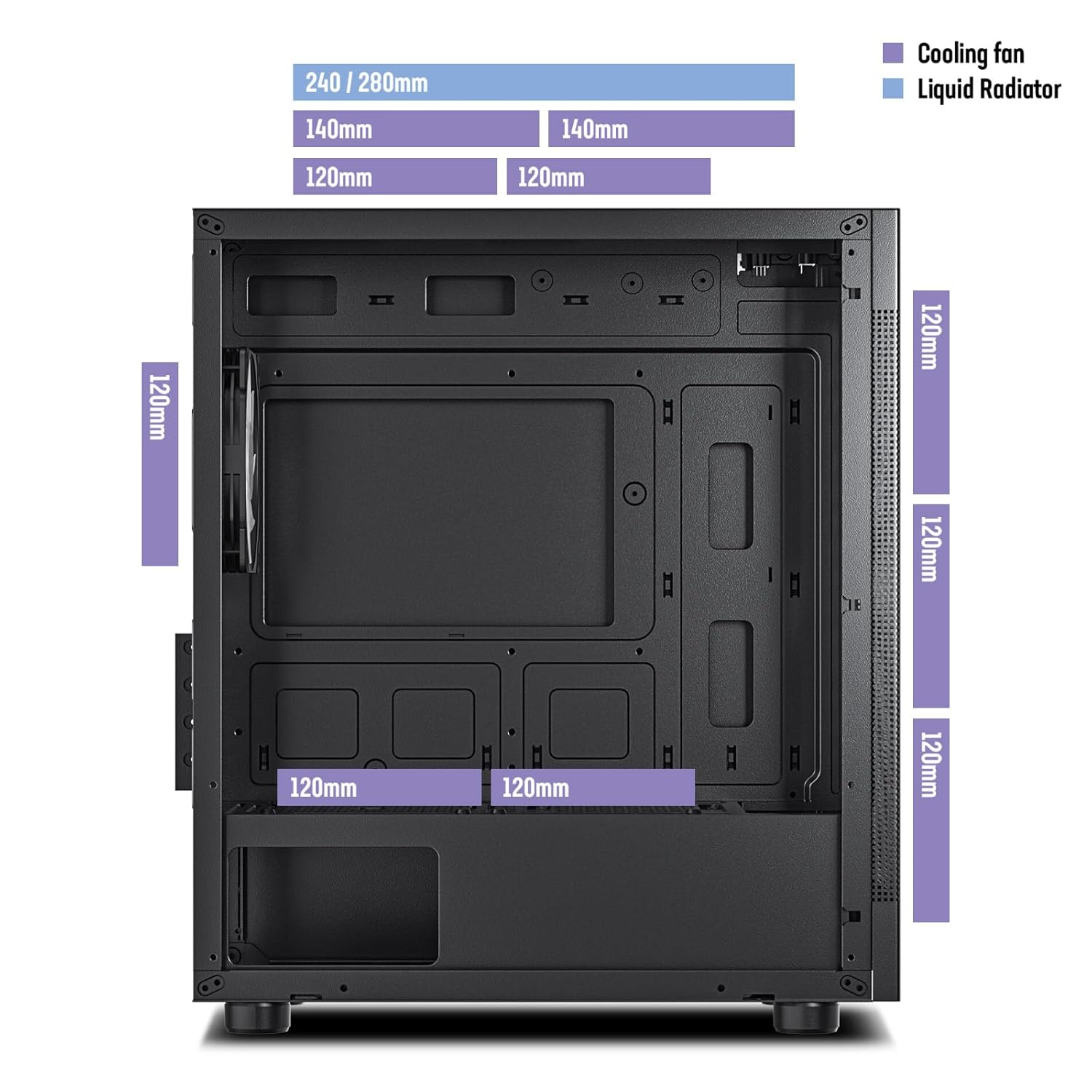
Figure 3.3: Diagram illustrating the various fan and liquid radiator mounting options and sizes supported within the MH200 case.

Figure 3.4: Diagram indicating the maximum CPU cooler height (165mm) and GPU length (330mm) supported by the MH200 case for M-ATX and ITX motherboards.

Figure 3.5: Diagram detailing the overall dimensions of the MH200 case, along with locations for SSDs, HDDs, and the maximum PSU length (180mm).
3.4 Connecting Front I/O Cables
Connect the front panel I/O cables to the corresponding headers on your motherboard.
- USB 3.0: Connect the USB 3.0 cable to your motherboard's USB 3.0 header.
- Kalite-C: Connect the Type-C cable to your motherboard's Type-C header (if available).
- Odyo: Connect the HD Audio cable to your motherboard's audio header.
- Konektè panèl devan: Connect the Power SW, Reset SW, HDD LED, and Power LED cables to the appropriate pins on your motherboard's front panel header. Refer to your motherboard manual for pinout details.
- LED ARGB: Connect the ARGB fan cable to a compatible ARGB header on your motherboard or a dedicated ARGB controller.

Figi 3.6: Detaye view of the MH200's top-mounted I/O panel, showing the LED button, Type-C port, USB 3.0 ports, audio jacks, reset button, and power button.
4. Opere Ka a
Yon fwa tout konpozan yo enstale epi konekte, ou ka limen sistèm ou an.
- Press the Power button on the top I/O panel to turn on your computer.
- The pre-installed ARGB fan will illuminate upon power-on. If connected to a motherboard ARGB header, you can control its lighting effects via your motherboard's software.
- Utilize the front panel USB 3.0 and Type-C ports for connecting peripherals and external storage devices.
4.1 Airflow and Cooling
The MH200 is designed for optimal airflow. Ensure that fans are installed to create a positive or negative pressure system that suits your cooling needs.

Figure 4.1: Illustration of the high-airflow design of the MH200 case, showing air intake through the front and side mesh panels and exhaust from the top and rear.
5. Antretyen
Regular maintenance helps ensure the longevity and optimal performance of your PC case and components.
- Netwayaj Filtè Pousyè: The top and bottom panels are equipped with magnetic dust filters. Regularly remove and clean these filters by rinsing them with water or using a soft brush. Ensure they are completely dry before reattaching.
- Interior Dust Removal: Periodically open the side panels and use compressed air to remove dust buildup from internal components and fan blades.
- Netwayaj eksteryè: Siye deyò bwat la ak yon twal mou, damp twal. Evite pwodui netwayaj abrazif oswa solvan.
NAN. Depanaj
Seksyon sa a adrese pwoblèm komen ou ka rankontre ak bwat PC ou a.
| Pwoblèm | Kòz posib | Solisyon |
|---|---|---|
| Sistèm pa limen. | Power button cable not connected correctly to motherboard. | Check the Power SW connection on your motherboard. Refer to your motherboard manual. |
| Front USB ports not working. | USB 3.0 or Type-C cable not connected to motherboard. | Ensure the USB 3.0 and Type-C cables are securely connected to the correct headers on your motherboard. |
| No audio from front audio jacks. | HD Audio cable not connected to motherboard. | Verify the HD Audio cable is properly connected to your motherboard's audio header. |
| ARGB fan not lighting up. | ARGB cable not connected or incorrect header. | Check the ARGB cable connection to your motherboard's ARGB header or controller. Ensure software control is enabled if applicable. |
| Move sikilasyon lè oswa tanperati ki wo. | Dust buildup on filters or fans; incorrect fan orientation. | Clean dust filters and internal components. Verify fan directions for optimal intake and exhaust. |
7. Espesifikasyon
Detailed technical specifications for the DARKROCK MH200 PC Computer Case.
| Karakteristik | Detay |
|---|---|
| Modèl | MH200 |
| Kalite Ka | Mid Tower |
| Sipò pou plak mèr | Mikwo ATX, Mini ITX |
| Dimansyon (L x W x H) | 35.99 x 21.21 x 41.99 cm (14.17 x 8.35 x 16.53 pous) |
| Pwa atik | 3.81 kg (8.4 liv) |
| Materyèl | Steel, Mesh |
| Fant ekspansyon | 4 |
| Kondwi Bays | 1x 3.5" HDD, 1x 2.5" SSD (or 2x 2.5" SSD if 3.5" bay unused) |
| Max GPU Longè | 330mm |
| Max CPU Cooler Wotè | 165mm |
| Max PSU Longè | 180mm |
| Sipò fanatik |
|
| Sipò pou radyatè |
|
| Front I / O pò | 1x USB Type-C, 2x USB 3.0, Audio In/Out, Power Button, Reset Button, LED Button |
| Filtè Pousyè | Top (magnetic), Bottom (magnetic) |
8. Garanti ak sipò
For warranty information and technical support, please refer to the official DARKROCK websit la oubyen kontakte détayan lokal ou a.
- Ofisyèl Websit: www.darkrock.com (Nòt: Sa a se yon espas rezève URL. Please refer to actual product documentation for correct support links.)
- Sipò Kliyan: Contact details can typically be found on the manufacturer's websit oswa anbalaj pwodwi a.
Tanpri kenbe prèv ou achte pou reklamasyon garanti.


