Entwodiksyon
Thank you for choosing The Voice Hollywood Wireless Headphones. These headphones are designed to provide a superior audio experience with the convenience of wireless connectivity. Featuring HD Ultra Max Sound, a comfortable adjustable headband, and a tri-fold design for portability, they are optimized for seamless integration with Siri and Google Assistant. This manual provides detailed instructions for setup, operation, maintenance, and troubleshooting to ensure optimal performance and longevity of your device.
Enfòmasyon sou Sekirite
- Pa ekspoze kas ekoutè yo nan tanperati ekstrèm, imidite, oswa sibstans koroziv.
- Evite koute nan nivo volim wo pou peryòd pwolonje pou anpeche domaj tande.
- Do not use the headphones while driving, cycling, or in situations where inability to hear ambient sounds could be dangerous.
- Keep the headphones away from children and pets.
- Only use the provided charging cable and accessories.
- Pa eseye demonte oswa modifye kas ekoutè yo. Sa ap anile garanti a.
Kontni pake
Tanpri verifye ke tout atik yo prezan nan pakè ou a:
- The Voice Hollywood Wireless Headphones
- USB Kalite-C Chaje Kab
- Kab Odyo 3.5mm (AUX)

Figure 1: Included components and key features of the headphones.
Pwodwi souview
The Hollywood Wireless Headphones feature an ergonomic design for extended comfort and intuitive controls for ease of use. The over-ear cups provide a comfortable fit, and the adjustable headband ensures a secure fit for various head sizes. The tri-fold design allows for compact storage and portability.

Figi 2: Devan view nan kas ekoutè yo.

Figure 3: Headphones in folded position for portability.
Kontwòl ak pò
Refer to Figure 1 for a visual guide to the controls and ports. The main controls are located on the ear cups and include:
- Bouton pouvwa: Used to power on/off and initiate Bluetooth pairing.
- Bouton Volim Monte/Pwochen Mizik: Peze yon ti kras pou ogmante volim, peze lontan pou pwochen mizik la.
- Bouton Diminye Volim/Mizik Presedan: Peze yon ti kras pou bese volim nan, peze lontan pou ale nan mizik anvan an.
- Bouton milti-fonksyon (MFB): Jwe/mete poz, reponn/fini apèl, aktive asistan vwa a.
- USB Kalite-C Port: Pou chaje kas ekoutè yo.
- 3.5mm Audio Jack: For wired connection using the AUX cable.
- Mikwofòn entegre: Pou apèl men lib ak kòmandman asistan vwa.
Enstalasyon
Chaje kas ekoutè yo
Before first use, fully charge your headphones. A full charge typically takes approximately 2-3 hours.
- Connect the small end of the USB Type-C charging cable to the charging port on the headphone ear cup.
- Konekte pi gwo bout kab USB a nan yon adaptè kouran USB (pa enkli) oubyen nan yon pò USB òdinatè.
- The LED indicator light will illuminate during charging and turn off or change color once fully charged.
Pè Bluetooth
Pair your headphones with your Bluetooth-enabled device (e.g., smartphone, tablet, computer).
- Asire w ke kas ekoutè yo etenn.
- Press and hold the Power button for approximately 5-7 seconds until the LED indicator light flashes blue and red alternately, indicating pairing mode.
- Sou aparèy ou an, aktive Bluetooth epi chèche nouvo aparèy.
- Select "Hollywood" from the list of available devices.
- Once successfully paired, the LED indicator will flash blue slowly or turn solid blue.
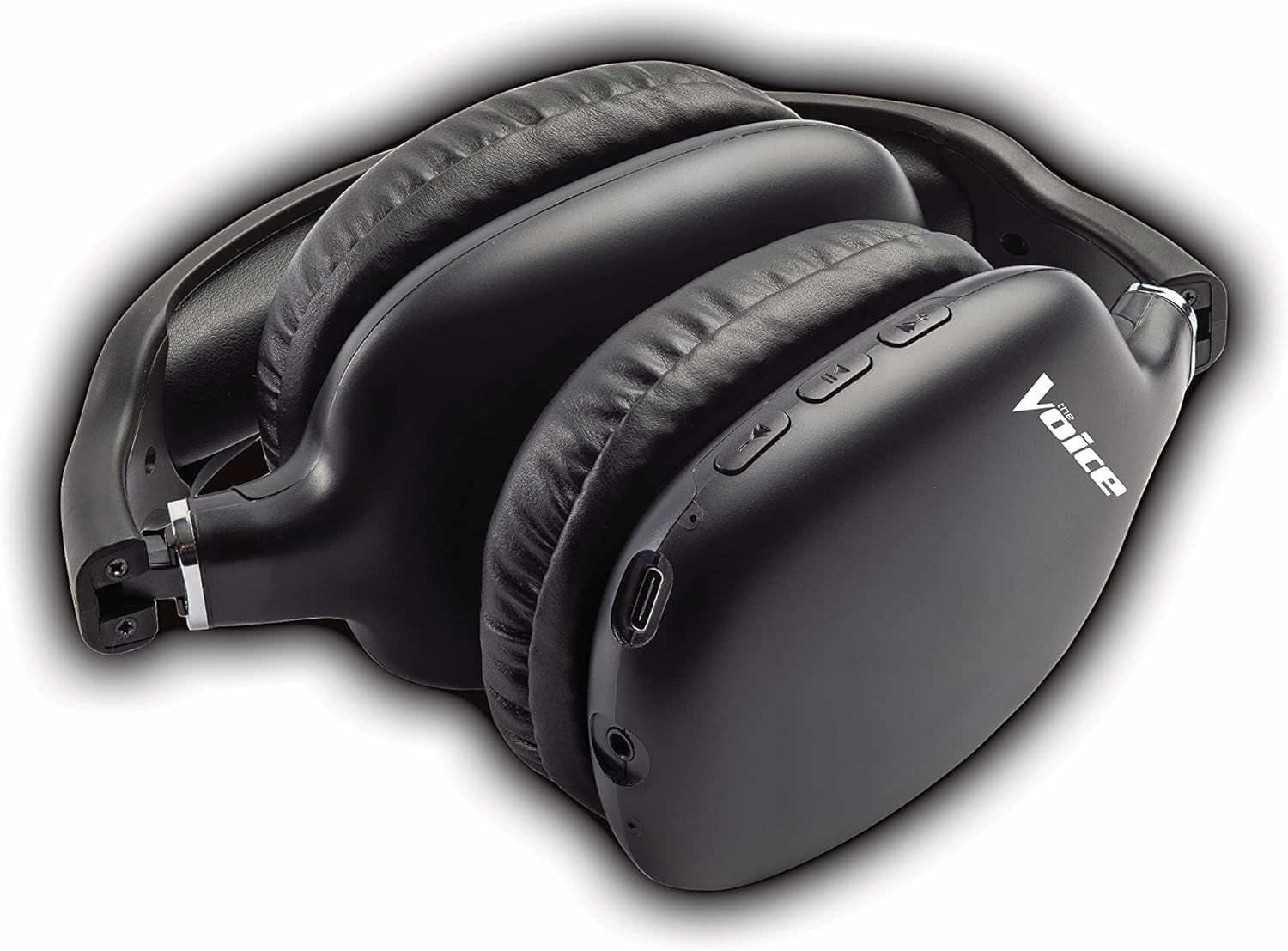
Figure 4: Headphones paired with a smartphone.
Koneksyon Filaire (Mòd AUX)
You can use the headphones with non-Bluetooth devices or when the battery is depleted using the included 3.5mm audio cable.
- Plug one end of the 3.5mm audio cable into the audio jack on the headphone ear cup.
- Plug the other end into the 3.5mm audio output jack of your device.
- Kas ekoutè yo ap chanje otomatikman nan mòd filaire.
Enstriksyon Operasyon
Power On/Off
- Pouvwa sou: Peze epi kenbe bouton Power la pou apeprè 3 segonn jiskaske endikatè LED la flache an ble.
- Pouvwa Off: Peze epi kenbe bouton Power la pou apeprè 3 segonn jiskaske endikatè LED la etenn.
Lèktur Klas Mizik
- Jwe/Poz: Peze bouton milti-fonksyon an (MFB) yon ti tan.
- Pwochen Track: Peze bouton Volim Monte a pandan lontan.
- Track Previous: Peze bouton Diminye Volim nan pandan lontan.
- Volim moute: Peze bouton Volim Monte a yon ti tan.
- Volim desann: Peze bouton Diminye Volim nan yon ti tan.
Jesyon Rele
- Reponn/Fen Apèl: Peze bouton milti-fonksyon an (MFB) yon ti tan.
- Rejte apèl: Long press the Multi-function Button (MFB).
- Recomposition Dènye Nimewo: Double-press the Multi-function Button (MFB).
Vwa Asistan Aktivasyon
- Activate Siri/Google Assistant: Triple-press the Multi-function Button (MFB).
Video 1: Demonstrates the adjustable and padded comfort, built-in mic, and connectivity to Google or Siri for The Voice Hollywood Wireless Headphones.

Figure 5: User enjoying audio with the headphones, highlighting comfort and usability.
Antretyen
Netwayaj
Regular cleaning helps maintain the headphones' appearance and functionality.
- Wipe the ear cups and headband with a soft, dry, lint-free cloth.
- Pou pousyè tè ki difisil pou retire, yon ti kras dampRense twal la avèk dlo ak savon dou, apresa siye l sèk imedyatman.
- Pa sèvi ak pwodui netwayaj abrazif, alkòl, oswa solvan chimik.
Depo
When not in use, store your headphones in a cool, dry place, away from direct sunlight and extreme temperatures. Utilize the tri-fold feature for compact storage.
Depanaj
If you encounter issues with your headphones, refer to the table below for common problems and solutions.
| Pwoblèm | Kòz posib | Solisyon |
|---|---|---|
| Kas ekoutè yo pa limen | Batri ki ba | Chaje kas ekoutè yo konplètman. |
| Pa ka konekte ak aparèy la | Kas ekoutè a pa nan mòd koneksyon; Bluetooth aparèy la etenn; Twò lwen aparèy la | Ensure headphones are in pairing mode (flashing red/blue). Turn device Bluetooth on/off. Move headphones closer to device (within 10 meters). |
| Pa gen son | Volume too low; Not connected; Incorrect audio source | Increase volume on headphones and device. Ensure headphones are properly paired/connected. Check audio output settings on your device. |
| Distorsion son | Interference; Device volume too high | Move away from other wireless devices. Lower the volume on your device. |
| Mikwofòn pa mache | Not connected; Device settings | Ensure headphones are properly paired. Check microphone input settings on your device. |
Espesifikasyon
| Karakteristik | Detay |
|---|---|
| Non modèl | Hollywood |
| Koneksyon Teknoloji | Wireless, Wired (Bluetooth) |
| Plasman Zòrèy | Sou Zòrèy |
| Faktè fòm | Sou Zòrèy |
| Kalite kontwòl | Voice Control, Built-in buttons and microphone |
| Gamme frekans | 20Hz - 20kHz |
| Pwa atik | 13.4 ons |
| Dimansyon (Pake) | 9.65 x 8.35 x 3.58 pous |
| Nimewo Modèl | VHOL-6/2069 |
| UPC | 841133120698 |
Garanti ak sipò
The Voice Hollywood Wireless Headphones come with a standard manufacturer's warranty. For detailed warranty information, technical support, or service inquiries, please refer to the warranty card included in your product packaging or visit the official The Voice Electronics website. Do not attempt to repair the product yourself.


