Entwodiksyon
Mèsi pou acha aasing The Voice Legend Wireless Bluetooth Speaker. This portable speaker is designed to deliver clear audio with a vibrant LED light show, making it perfect for various settings. It features Bluetooth connectivity for seamless music streaming, FM radio, hands-free calling, and support for USB and Micro SD playback. Its durable and lightweight design ensures portability and ease of use.
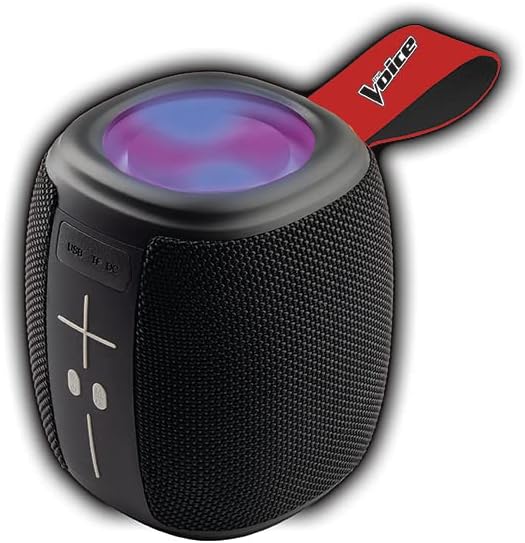
Image: The Voice Legend Wireless Bluetooth Speaker, showcasing its compact design and top-mounted LED light panel.
Ki sa ki nan bwat la
Tanpri verifye sa ki nan pake a pou asire w ke tout atik yo la:
- 1x The Voice Legend Bluetooth Speaker
- 1x USB-C Chaje Kab
- 1x manyèl enstriksyon

Image: A visual representation of the package contents, including the speaker, USB-C charging cable, and the user manual.
Karakteristik pwodwi
- Koneksyon Bluetooth san fil: Easily connect to your smartphone, tablet, or laptop from up to 30 feet away.
- Montre limyè ki ap dirije vibran: Features multiple color modes for a dynamic visual experience, suitable for parties or ambient lighting.
- Konsepsyon pòtab ak lejè: Compact dimensions (4.49 x 4.49 x 5.16 inches) and light weight (1.4 pounds) with a handy carrying strap for easy transport.
- Radyo FM: Konekte sou estasyon radyo ou pi renmen yo.
- Apèl men lib: Built-in microphone allows for clear speakerphone calls.
- Plizyè Opsyon Lekti: Supports music playback via USB and Micro SD card slots.
- Batri rechargeable: Provides up to 4 hours of playtime on a single charge.
- Oversize Controls: Easy-to-use large buttons for volume and playback control.
- Fonksyonalite Vrè Stereo San Fil (TWS): Connect two The Voice Legend speakers for an enhanced stereo sound experience.
- Enpèmeyab: Fèt pou reziste kont dlo ak lapli lejè.
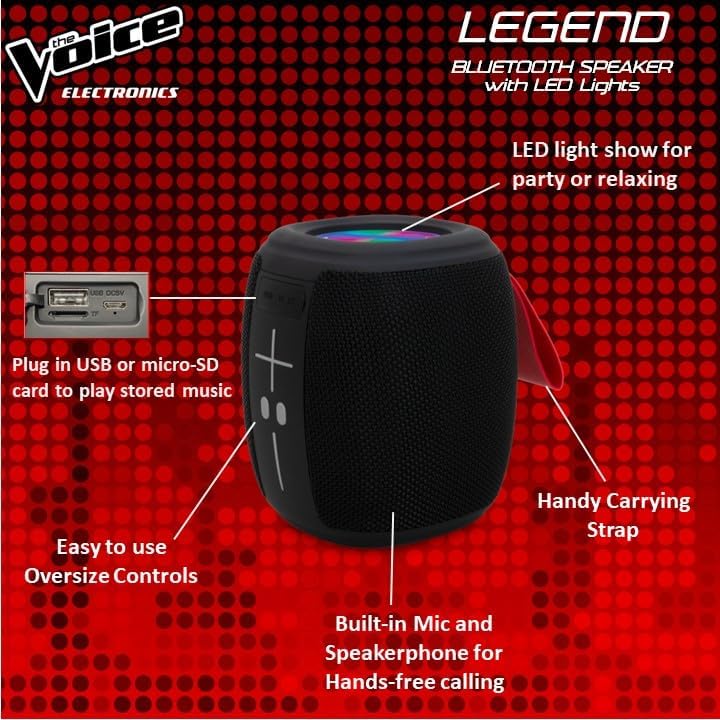
Imaj: Detaye view of the speaker's side, pointing out the oversized controls, USB and Micro-SD card slots, built-in microphone for hands-free calling, and the handy carrying strap.
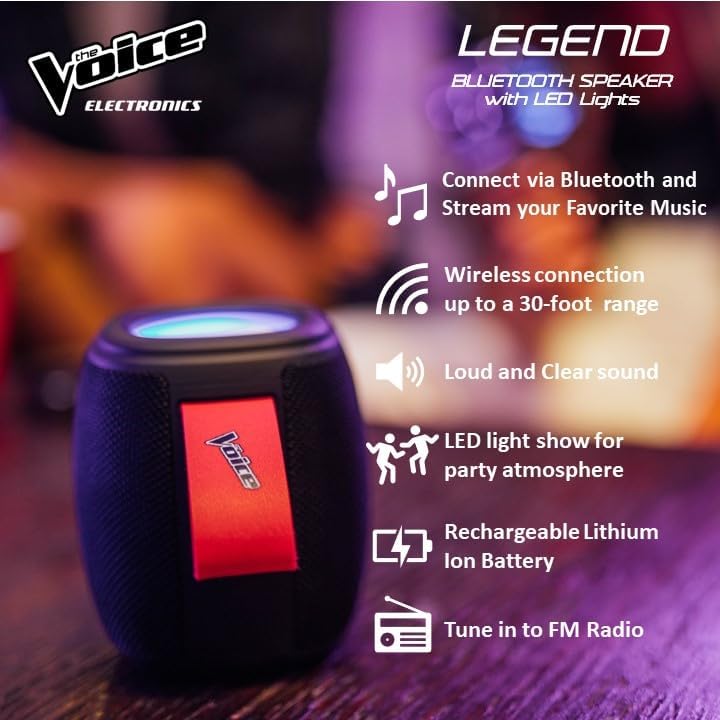
Imaj: Montre enfografikasing key features like Bluetooth connectivity, 30-foot wireless range, loud and clear sound, LED light show, rechargeable lithium-ion battery, and FM radio tuning.

Image: Demonstrating the speaker's lightweight and durable nature, and how to activate the LED light show for different ambiances.
Enstalasyon
1. Chaje Oratè a
Before first use, fully charge the speaker. Connect the provided USB-C charging cable to the speaker's DC 5V port and the other end to a USB power adapter (not included) or a computer USB port. The charging indicator light will show charging status and turn off when fully charged. A full charge provides approximately 4 hours of playtime.
2. Powering On / Off
Press and hold the power button (usually marked with a circle or power symbol) for a few seconds to turn the speaker ON or OFF. A sound prompt will indicate the power status.
3. Pè Bluetooth
- Ensure the speaker is powered ON and in Bluetooth pairing mode. A blue LED light will flash rapidly, indicating it's ready to pair.
- Sou aparèy ou an (telefòn entelijan, tablèt, elatriye), ale nan paramèt Bluetooth yo.
- Chèche pou "The Voice Legend" in the list of available devices.
- Select "The Voice Legend" to connect. Once connected, the blue LED light will stop flashing and remain solid, and you will hear a confirmation sound.
Video: An official product video demonstrating the features and ease of use of The Voice Legend Bluetooth Speaker, including its LED light show and portability.
Enstriksyon Operasyon
1. Music Playback (Bluetooth Mode)
- Once paired, open your music app on your device and start playing.
- Sèvi ak la + epi - buttons on the speaker to adjust volume. Press and hold for volume control.
- Kout peze la + bouton pou ale nan pwochen track la.
- Kout peze la - bouton pou yo ale nan tras la anvan yo.
- Press the Play/Pause button (often marked with a play/pause symbol) to pause or resume playback.
2. FM Radio Mode
- Press the Mode button (often marked "M") to switch to FM Radio mode.
- Oratè a pral otomatikman eskane epi sove estasyon radyo ki disponib yo.
- Sèvi ak la + epi - bouton pou navige ant estasyon ki anrejistre yo.
- For better reception, try repositioning the speaker.
3. USB / Micro SD Playback
- Insert a USB drive or Micro SD card (with pre-loaded MP3 audio files) into the respective slot.
- The speaker will automatically detect the media and begin playback.
- Use the playback controls (volume, next/previous track, play/pause) as in Bluetooth mode.
4. Rele men-gratis
- Lè yon apèl rive pandan w konekte via Bluetooth, mizik la ap pran yon poz.
- Peze bouton Jwe/Pòz la pou reponn yon apèl k ap antre.
- Peze bouton Jwe/Pòz la ankò pou fini apèl la.
- Peze epi kenbe bouton Jwe/Paz la pou rejte yon apèl k ap fèk ap rantre.
5. dirije limyè kontwòl
The speaker features a dynamic LED light show. Press the dedicated light button (if available, or refer to specific button functions in the included manual) to cycle through different light modes or turn the lights off. There are typically 4 different color modes.
6. Koneksyon Vrè Stereo San Fil (TWS)
To achieve a true stereo sound experience, you can pair two The Voice Legend speakers together:
- Ensure both speakers are powered ON and not connected to any Bluetooth device.
- On one speaker (this will be your primary speaker), press and hold the TWS pairing button (refer to the included manual for exact button location, often a dedicated button or a long press on a multi-function button).
- Oratè prensipal la ap chèche oratè segondè a. Yon fwa konekte, ou ap tande yon son konfimasyon.
- Now, connect your device to the primary speaker via Bluetooth as described in the "Bluetooth Pairing" section. Audio will play in stereo through both speakers.

Image: Two The Voice Legend speakers shown side-by-side, illustrating their True Wireless Functionality (TWS) for connecting and streaming stereo audio.
Antretyen
- Netwayaj: Siye oratè a avèk yon twal mou epi sèk. Pa sèvi ak pwodui netwayaj abrazif oswa solvan.
- Depo: Sere oratè a nan yon kote ki fre epi sèk, lwen limyè solèy dirèk ak tanperati ekstrèm.
- Swen batri: Pou pwolonje lavi batri a, evite dechaje batri a nèt souvan. Chaje oratè a regilyèman, menm si w pa itilize l pandan yon bon bout tan.
- Rezistans dlo: While waterproof, avoid submerging the speaker in water for prolonged periods. Ensure charging ports are dry before charging.
Depanaj
| Pwoblèm | Kòz posib | Solisyon |
|---|---|---|
| Speaker does not turn ON. | Batri ki ba. | Chaje oratè a nèt. |
| Pa ka asosye ak aparèy Bluetooth. | Oratè a pa nan mòd koneksyon; Bluetooth aparèy la etenn; li twò lwen oratè a. | Ensure speaker is flashing blue LED. Turn device Bluetooth off/on. Move device closer (within 30 ft). |
| Pa gen son oswa son defòme. | Volim twò ba; oratè a pa konekte; pwoblèm sous odyo a. | Ogmante volim oratè a ak aparèy la. Rekonekte Bluetooth la. Tcheke sous odyo a. |
| FM Radio static/poor reception. | Siyal fèb. | Reposition the speaker to find a stronger signal. |
| Cannot play from USB/Micro SD. | Pa kòrèk file fòma; kat/distribisyon an pa byen mete. | Asire w files are MP3. Reinsert card/drive. |
Espesifikasyon
- Non modèl: The Voice Legend
- Kalite oratè: Portable Wireless Oratè
- Koneksyon Teknoloji: Bluetooth
- Teknoloji kominikasyon san fil: Bluetooth
- Gamme Bluetooth: Jiska 30 pye (9.14 mèt)
- Audio Sòti Mode: Stereo (ak TWS)
- Oratè maksimòm pwodiksyon pouvwa: 3 Watts
- Lavi batri: Jiska 4 èdtan
- Sous pouvwa: Batri Powered
- Eleman ki enkli: Rechargeable battery, Built-in microphone
- Enpèmeyab: Wi
- Metòd kontwòl: Kontwòl vwa
- Dimansyon pwodwi: 4.49 x 4.49 x 5.16 pous
- Pwa atik: 1.4 liv
- UPC: 841133120667
- Manifakti: Vwa a
Garanti ak sipò
The Voice Legend Wireless Bluetooth Speaker comes with a Garanti limite. Please refer to the warranty card included in your package for specific terms and conditions, including coverage period and details on how to obtain service.
For technical support, troubleshooting assistance, or warranty claims, please contact The Voice customer service. Contact information can typically be found on the product packaging or on the official The Voice Electronics websit.
Tanpri konsève prèv acha ou a pou rezon garanti.


