1. Entwodiksyon
Mèsi pou acha aasing the FEELWORLD F6 PLUSX 5.5-inch 4K HDMI Field Monitor. This manual provides essential information for the safe and efficient operation of your device. Please read it thoroughly before use and retain it for future reference.
2. Enfòmasyon sou Sekirite
- Do not expose the monitor to rain or moisture to avoid electric shock or fire.
- Evite mete monitè a nan limyè solèy la dirèk oswa tou pre sous chalè.
- Use only the specified power adapter or compatible battery types.
- Pa eseye demonte oswa modifye monitè a. Konfye tout antretyen bay pèsonèl kalifye.
- Netwaye ekran an ak yon twal mou, sèk. Evite itilize pwodwi chimik piman bouk yo.
3. Pake kontni
Verifye ke tout atik ki nan lis anba a yo enkli nan pakè ou a:
- FEELWORLD F6 PLUSX Monitor x1
- Micro HDMI Cable x1
- Tilt Arm x1
- Sunshade x1
- Manyèl itilizatè x1

4. Pwodwi souview
4.1 Karakteristik kle
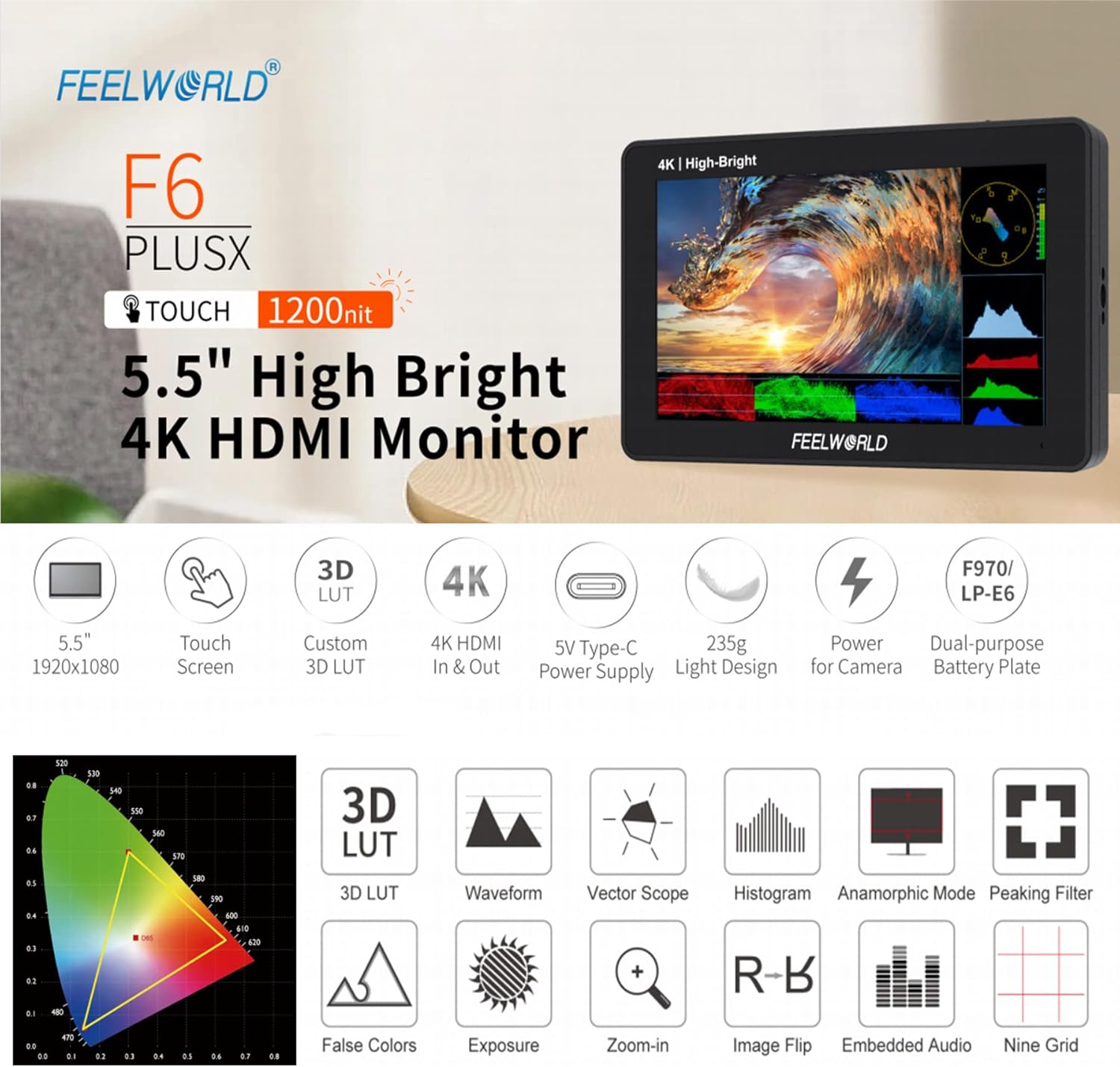
- 5.5-inch IPS Touchscreen Display with 1920x1080 resolution.
- 1200 nits high brightness for outdoor visibility.
- 4K HDMI Input and Loop Output.
- Support for 3D LUT import via SD card.
- HDR (High Dynamic Range) monitoring.
- Advanced monitoring functions: Waveform, Vector Scope, Histogram, False Colors, Peaking Filter, Zoom-in, Image Flip, Embedded Audio, Nine Grid, Anamorphic Mode.
- Flexible power options: DC 12V input, 5V Type-C input, and dual-purpose battery plate (F970/LP-E6).
- Lightweight design (235g).

4.2 Monitor Layout and Ports
The F6 PLUSX features multiple ports for connectivity and power:
- HDMI nan: Connects to your camera or video source.
- HDMI SOTI: Loops out the HDMI signal to another monitor or device.
- DC SOTI 8V: Provides power to compatible cameras or accessories.
- Plas kat SD: For importing 3D LUTs and firmware updates.
- DC nan 12V: Main power input for the monitor.
- 3.5mm Ear Phone Slot: Pou siveyans odyo.
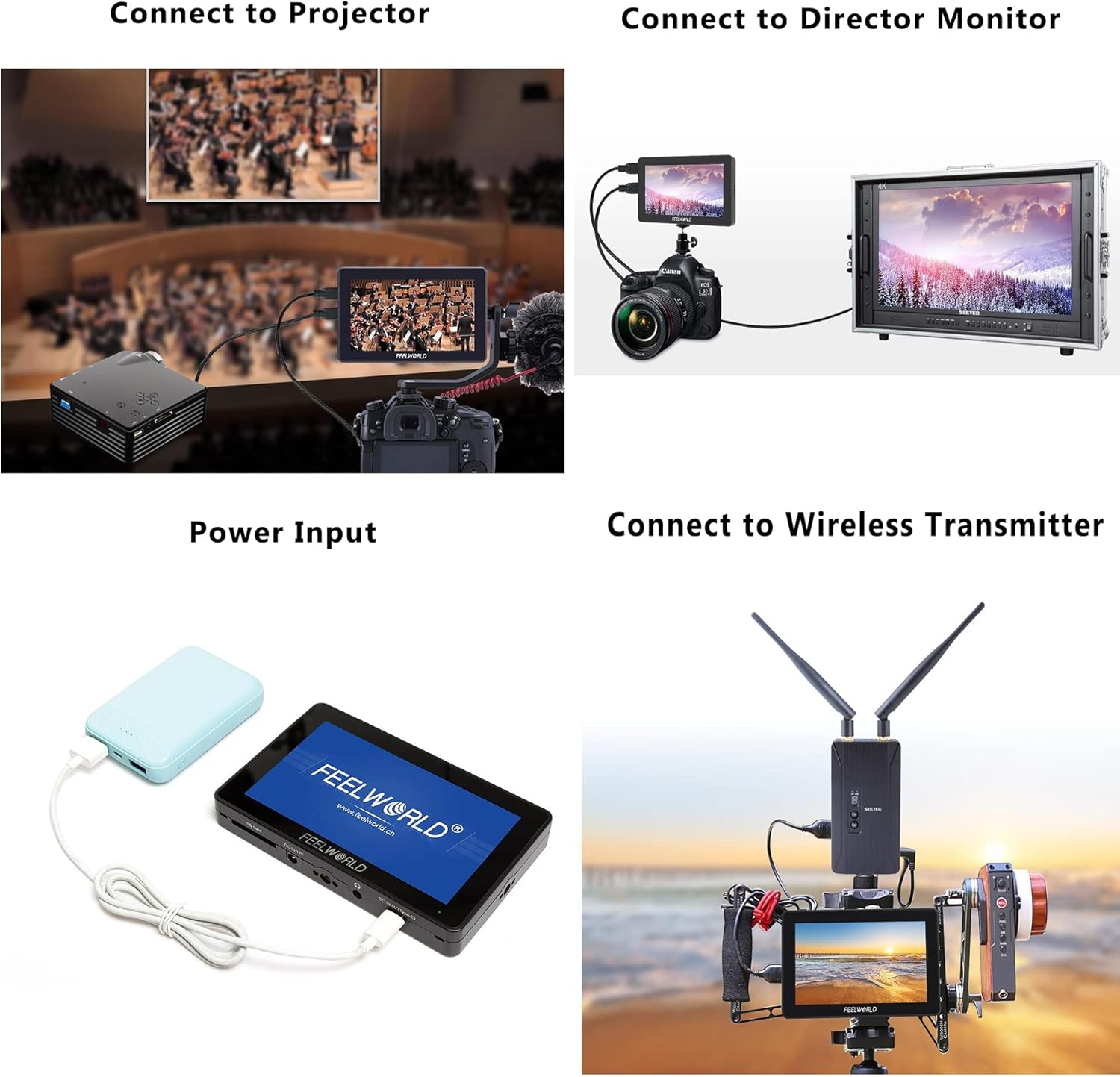
- DC IN 5V (Tip-C): Alternative power input, compatible with portable power banks.

4.3 Kontwòl
The monitor features a touchscreen interface and physical controls for navigation:
- Power Button / Touch Lock: Press and hold to power on/off. Short press to lock/unlock the touchscreen.
- Menu Scroll Wheel: Itilize pou navige nan meni yo epi konfime seleksyon yo.
- 1/4 Screw Holes: For mounting the monitor to various camera rigs or accessories.

5. Enstalasyon
5.1 Alimente monitè a
The F6 PLUSX offers several power options:
- DC 12V Antre: Connect the included power adapter to the DC 12V port.
- 5V Type-C Input: Use a compatible USB Type-C cable and a 5V power source (e.g., power bank) to the DC IN 5V (Type-C) port.
- Plak batri: Attach a compatible F970 or LP-E6 battery to the battery plate on the rear of the monitor.
5.2 Konekte ak yon Kamera
- Ensure both the monitor and your camera are powered off.
- Connect one end of the Micro HDMI cable to your camera's HDMI output port.
- Connect the other end of the Micro HDMI cable to the HDMI IN port on the F6 PLUSX monitor.
- Power on the monitor, then power on your camera. The camera's video feed should appear on the monitor.
5.3 Enstalasyon Monitè a
Use the included tilt arm or other compatible mounting accessories with the 1/4 screw holes to attach the monitor to your camera, cage, or stand.
6. Operasyon Enstriksyon
6.1 Operasyon debaz
- Limen/Etenyen: Press and hold the power button on the top of the monitor.
- Kontwòl Touchscreen: Tap icons or swipe on the screen to access and adjust settings.
- Navigasyon nan meni: Use the menu scroll wheel to navigate through menu options and press to confirm.
- Touch Lock: Short press the power button to lock or unlock the touchscreen to prevent accidental changes.
6.2 Sèvi ak LUT 3D
The F6 PLUSX supports importing custom 3D LUTs to preview foo outage with specific color grades or log conversions.
- Save your .cube format 3D LUT files nan yon kat SD.
- Mete kat SD a nan fant kat SD monitè a.
- Access the LUT menu via the touchscreen or scroll wheel.
- Select 'Import LUT' and choose the desired LUT file soti nan kat SD la.
- Once imported, you can apply the LUT to your video feed for real-time preview.

6.3 Advanced Monitoring Functions
The monitor includes various tools to assist with exposure, focus, and color accuracy:
- Form: Montre nivo luminans ak krominans siyal videyo ou a.
- Dimansyon vektè: Shows the color information of your video signal, useful for color balancing.
- False Colors: Helps set proper exposure by displaying different exposure levels as distinct colors.
- Peaking Filter: Highlights sharp edges in the image to assist with focus.
- Zoom nan: Magnifies a portion of the image for critical focus checking.
- HDR Monitoring: Pèmèt viewing of HDR signals for enhanced clarity and detail.
7. Antretyen
- Netwayaj: Use a soft, lint-free cloth to clean the screen and body of the monitor. For stubborn marks, slightly dampen the cloth with water. Avoid alcohol or abrasive cleaners.
- Depo: Lè w pa ap itilize monitè a, sere l nan yon kote ki sèk epi fre, lwen limyè solèy dirèk ak tanperati ekstrèm.
- Mizajou mikrolojisyèl: Periodically check the FEELWORLD official websit la pou mizajou firmwèr pou asire pèfòmans optimal ak aksè a nouvo fonksyonalite yo. Swiv enstriksyon yo bay ak mizajou firmwèr la ak anpil atansyon.
NAN. Depanaj
- Pa gen imaj sou ekran an:
- Ensure the monitor is powered on and receiving power.
- Check HDMI cable connections at both the camera and monitor.
- Verify the camera's HDMI output is active and configured correctly.
- Eseye yon lòt kab HDMI.
- Pa gen odyo:
- Ensure headphones are properly connected to the 3.5mm jack.
- Check the audio settings on both the monitor and the camera.
- Ekran taktil la pa reponn:
- Check if the touchscreen lock is enabled (short press the power button to toggle).
- Restart the monitor.
- Monitor Overheating:
- Asire w ke gen ase vantilasyon toutotou monitè a.
- Avoid prolonged use in direct sunlight or high ambient temperatures.
9. Espesifikasyon
| Karakteristik | Spesifikasyon |
|---|---|
| Gwosè ekspozisyon | 5.5 pous |
| Rezolisyon | 1920 x 1080 piksèl |
| Klète | 1200 nits |
| Pwopòsyon kontras | 1000:1 |
| Viewing Ang | 160° (H/V) |
| Pò Antre | 1 x HDMI, 1 x DC 12V, 1 x DC 5V (Type-C) |
| Sòti pò | 1 x HDMI, 1 x DC OUT 8V, 1 x 3.5mm Ear Phone |
| Kat SD plas | Yes (for 3D LUTs and firmware) |
| Konsomasyon pouvwa | Apeprè. 8W |
| Plak batri | F970 / LP-E6 compatible |
| Dimansyon | Apeprè. 148mm x 93mm x 20mm |
| Pwa | Apeprè. 235g |
10. Garanti ak sipò
FEELWORLD products are designed and manufactured to high quality standards. For warranty information and technical support, please refer to the warranty card included with your product or visit the official FEELWORLD websit la. Kenbe resi acha ou kòm prèv acha pou reklamasyon garanti.


