1. Entwodiksyon
The COMFAST CF-726B is a versatile 2-in-1 USB adapter designed to provide both Bluetooth 4.2 and dual-band Wi-Fi connectivity to your computer. This device allows you to connect to wireless networks at speeds up to 650Mbps and pair with various Bluetooth peripherals, enhancing your system's wireless capabilities.
This manual provides essential information for the proper setup, operation, and maintenance of your CF-726B adapter.
2. Pwodwi Features
- Fonksyonalite 2-an-1: Combines Wi-Fi and Bluetooth capabilities in a single USB device.
- Wi-Fi Doub Band: Supports 2.4GHz and 5.8GHz frequencies for flexible network connections.
- High Speed Data Transfer: Achieves Wi-Fi speeds up to 650Mbps.
- Bluetooth 4.2: Enables stable and efficient connection with Bluetooth devices.
- Konsepsyon kontra enfòmèl ant: Small form factor for portability and discreet use.
- Lajè konpatibilite: Supports Windows, macOS, and Linux operating systems.
3. Enstalasyon ak Enstalasyon
Before using your COMFAST CF-726B adapter, driver installation is required. The product is supplied with documentation and an installation CD. It is recommended to use the provided CD for driver installation or download the latest drivers from the official COMFAST websit.
3.1 Kondisyon Sistèm
- Sistèm operasyon: Windows 7/8/8.1/10 (32 or 64-bit), MacOS 10.6~10.11, Linux Kernel 2.6.18~3.10.
- Nòt: The Bluetooth driver is pa compatible with Windows XP/Vista.
- Entèfas: Available USB 2.0 port.
3.2 Driver Installation Steps
- Insert the COMFAST CF-726B adapter into an available USB port on your computer.
- Insert the provided installation CD into your computer's CD/DVD drive.
- Follow the on-screen instructions to install the Wi-Fi and Bluetooth drivers. If an auto-run feature does not start, navigate to the CD drive in 'My Computer' or 'This PC' and run the setup executable (e.g., 'setup.exe' or 'install.exe').
- Alternatively, download the latest drivers from the official COMFAST support website. Ensure you select the correct model (CF-726B) and operating system.
- Apre enstalasyon an, rekòmanse òdinatè w la si yo mande w.

Figure 1: COMFAST CF-726B USB adapter. This image shows the compact blue casing of the adapter with its USB connector, ready for insertion into a computer's USB port.
4. Operasyon Enstriksyon
4.1 Konekte ak yon rezo Wi-Fi
- Ensure the CF-726B adapter is securely plugged into a USB port.
- On Windows, click the Wi-Fi icon in the system tray (usually bottom-right corner). On macOS, click the Wi-Fi icon in the menu bar (top-right corner). For Linux, consult your distribution's network manager.
- Chwazi rezo Wi-Fi ou vle a nan lis rezo ki disponib yo.
- Antre kle sekirite rezo a (modpas) si yo mande w.
- Click 'Connect'. The adapter will establish a connection to the Wi-Fi network.
4.2 Konekte Aparèy Bluetooth
- Ensure the CF-726B adapter is securely plugged into a USB port.
- On Windows, go to 'Settings' > 'Devices' > 'Bluetooth & other devices'. On macOS, go to 'System Preferences' > 'Bluetooth'. For Linux, use your desktop environment's Bluetooth settings.
- Limen Bluetooth sou òdinatè w lan.
- Put your Bluetooth device (e.g., headphones, mouse, keyboard) into pairing mode. Refer to your device's manual for specific instructions.
- On your computer, click 'Add Bluetooth or other device' (Windows) or wait for the device to appear in the Bluetooth settings (macOS/Linux).
- Chwazi aparèy ou an nan lis la epi swiv nenpòt enstriksyon ki parèt sou ekran an pou konplete pwosesis koneksyon an.
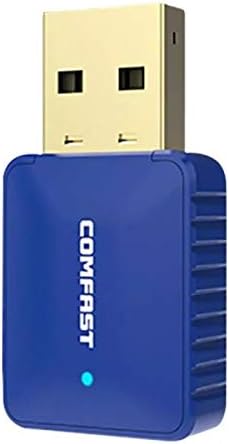
Figi 2: Side view of the COMFAST CF-726B adapter. This image highlights the compact profile of the device, making it suitable for various USB ports.
5. Antretyen
The COMFAST CF-726B adapter is designed for durability. To ensure its longevity and optimal performance, consider the following maintenance tips:
- Kenbe pwòp: Periodically clean the USB connector with a dry, lint-free cloth to remove dust or debris.
- Evite domaj fizik: Do not bend, drop, or expose the adapter to excessive force. Avoid pulling the adapter out by its casing; always grasp the USB connector firmly.
- Pwoteje kont likid: Keep the adapter away from water and other liquids.
- Depo: Lè w pa ap itilize adaptè a, sere l nan yon kote ki fre epi sèk, lwen limyè solèy dirèk ak tanperati ekstrèm.

Figi 3: Devan ak bò view of the COMFAST CF-726B adapter. This perspective shows the overall dimensions and the blue LED indicator light.
NAN. Depanaj
If you encounter issues with your COMFAST CF-726B adapter, refer to the following common troubleshooting steps:
- Adaptè pa detekte:
- Eseye branche adaptè a nan yon lòt pò USB.
- Rekòmanse òdinatè w lan.
- Ensure drivers are correctly installed. Reinstall drivers if necessary.
- Pa gen koneksyon Wi-Fi:
- Verifye ke rezo Wi-Fi ou a aktif epi l ap difize.
- Tcheke si ou te antre kòrèk modpas Wi-Fi.
- Ensure the Wi-Fi function is enabled on your computer.
- Try restarting your router/modem.
- Bluetooth pa fonksyone:
- Asire w ke Bluetooth aktive nan paramèt òdinatè w la.
- Confirm your Bluetooth device is in pairing mode.
- Remember that the Bluetooth driver is pa compatible with Windows XP/Vista.
- Retire epi re-konekte aparèy Bluetooth la.
- Vitès Wi-Fi ki ba:
- Ensure you are connected to the optimal frequency band (5.8GHz generally offers faster speeds if your router supports it).
- Reduce interference by moving closer to your Wi-Fi router or away from other electronic devices.
- Check for updated drivers.

Figi 4: Eksploze view of the COMFAST CF-726B adapter. This image illustrates the internal chip (RTL8821CU) responsible for its dual Wi-Fi and Bluetooth functionalities.
7. Espesifikasyon
| Mak | KONFAST |
| Modèl | CF-726B |
| Eleman prensipal la | RTL8821CU |
| Estanda san fil | IEEE802.11a/b/g/n/ac |
| Bluetooth vèsyon | 4.2 |
| Entèfas | USB 2.0 |
| Bann Frekans | 2.4GHz / 5.8GHz (Dual Frequency) |
| Maksimòm to done | 650 Mbps |
| Sekirite Done | WPA-PSK/WPA2-PSK, WPA/WPA2, WEP |
| Dimansyon | 36mm x 19mm x 9mm |
| Koulè | Ble |
| Sipòte OS | Windows 7/8/8.1/10 (32/64-bit), MacOS 10.6~10.11, Linux Kernel 2.6.18~3.10 |
| Aparèy konpatib | Desktop òdinatè |
8. Garanti ak sipò
8.1 Enfòmasyon sou Garanti
The COMFAST CF-726B adapter comes with a 12-mwa garanti from the date of purchase. This warranty covers manufacturing defects and ensures the product functions as described under normal use. Please retain your proof of purchase for warranty claims.
8.2 Sipò pou Kliyan
For technical assistance, driver updates, or further inquiries, please refer to the official COMFAST website or contact their customer support channels. The product is supplied with additional documentation that may contain specific support contact details.


