1. Pwodwi souview
The ALLPOWERS S200 Portable Power Station and SP026 Foldable Solar Panel combine to form a versatile solar generator kit designed for various outdoor and emergency power needs. The S200 power station provides 200W of AC output and 154Wh capacity, while the SP026 solar panel offers 60W of solar charging capability. This manual provides essential information for the safe and efficient use of your product.
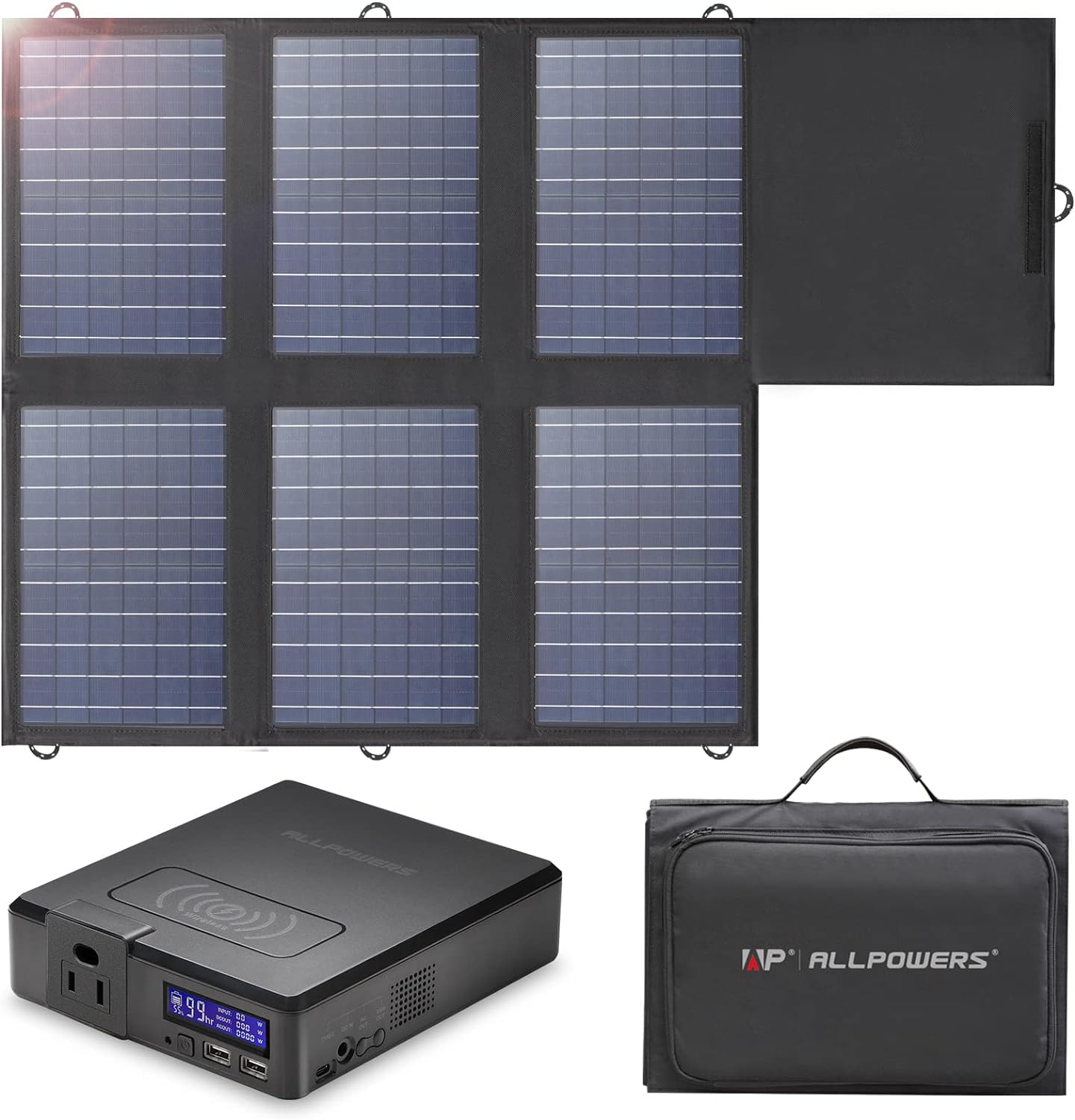
Image 1.1: The ALLPOWERS S200 Portable Power Station and SP026 Foldable Solar Panel. The power station is a compact black unit with various ports and a display, while the solar panel is a multi-panel foldable unit with a black fabric backing.
2. Enfòmasyon sou Sekirite
Tanpri li epi konprann tout enstriksyon sekirite yo anvan ou itilize pwodui sa a. Si ou pa swiv enstriksyon sa yo, sa ka lakòz chòk elektrik, dife oswa blesi grav.
- Pa demont, repare, oswa modifye inite a.
- Keep the product away from fire, water, and extreme temperatures.
- Evite jete oswa soumèt pwodwi a nan gwo enpak.
- Asire bon vantilasyon pandan w ap itilize pou anpeche surchof.
- Pa mete objè etranje nan pò yo.
- Kenbe soti nan atenn timoun yo.
- Jete pwodwi a dapre règleman lokal yo.
3. Pake kontni
Verifye ke tout atik yo enkli nan pakè ou a:
- 1x ALLPOWERS S200 Portable Power Station
- 1x ALLPOWERS SP026 Foldable Solar Panel 60W
- 1x AC adaptè
- 1x DC5.5x2.1mm to 5.5x2.1mm Cable
- 5x Laptop and Power Station Connectors
- 2x Buckles
- 1x Gid pou Itilizatè
- 1x kat garanti
Note: The S200 and SP026 may be delivered separately.
4. Konpozan ak Karakteristik Pwodwi
4.1 ALLPOWERS S200 Portable Power Station

Image 4.1: Labeled diagram of the ALLPOWERS S200 Portable Power Station, highlighting its various input and output ports.
The S200 features multiple output ports to power a wide range of devices:
- AC Output (110V 200W Max): Pou aparèy kay òdinè.
- 2x USB-A Output (5V/3A, 12W Max): For charging smartphones, tablets, and other USB-powered gadgets.
- USB-C Input/Output (60W Max): Supports fast charging for compatible devices and can also be used to recharge the power station.
- Wireless Charger (5V/1A, 5W Max): For wirelessly charging compatible smartphones.
- DC Input (99W Max): For charging the power station via the included AC adapter or solar panel.
- DC Output (60W Max): Pou aparèy espesifik ki mache ak kouran dirèk.
4.2 ALLPOWERS SP026 Foldable Solar Panel
The SP026 solar panel is designed for efficient and portable solar charging:
- Segondè efikasite: Converts up to 22% of sunlight into usable electricity.
- IP67 ki enpèmeyab: Surface treatment provides effective protection against water and dust.
- Dual USB-A Ports (5V/2.4A per port): For direct charging of 5V gadgets.
- 18V DC Sòti: For charging 12V car batteries and the S200 power station.
- PD60W USB-C Output: For faster charging of laptops and other USB-C devices.
- Pò paralèl: Allows connection of multiple foldable solar panels for increased power output.
- Konsepsyon pòtab: Compact (14.9"L x 10"W x 2.7"H folded) and lightweight (8.37lb total with S200 storage pocket).
5. Enstalasyon
5.1 Initial Charging of S200 Power Station
Before first use, fully charge the S200 power station.
- Via AC Wall Outlet: Connect the included AC adapter to the S200's DC input port and plug it into a wall outlet. The S200 can be fully charged in approximately 1.5 hours.
- Via USB-C Adapter: Connect a USB-C PD charger (not included) to the S200's USB-C port.
5.2 Solar Charging with SP026 Solar Panel
To charge the S200 using the SP026 solar panel:
- Unfold the SP026 solar panel and place it in direct sunlight. Ensure no shadows are cast on the panels for optimal performance.
- Connect the DC output cable from the SP026 solar panel to the DC input port of the S200 power station.
- The S200 display will indicate charging status. Full charge via SP026 takes approximately 3 hours under ideal sunlight conditions.

Image 5.1: Illustration of the three primary methods to recharge the ALLPOWERS S200: via AC wall outlet, USB-C adapter, and the SP026 solar panel.
6. Operasyon Enstriksyon
6.1 Limen/Etenyen
Press and hold the main power button on the S200 to turn the unit on or off. The display will illuminate when the unit is active.
6.2 Itilizasyon Pò Sòti yo
To use a specific output port (AC, USB, USB-C, Wireless), ensure the S200 is powered on. Connect your device to the appropriate port. For AC output, you may need to press a dedicated AC button to activate the AC inverter.
- AC Sòti: Plug your appliance into the 110V AC outlet. Ensure the appliance's power consumption does not exceed 200W.
- USB-A/USB-C Output: Connect your USB charging cable to the respective port and your device.
- Chaje san fil: Place your compatible device on the wireless charging pad on top of the S200.
The S200 supports charging while discharging, allowing you to power devices even when the unit itself is being recharged.
6.3 Optimal Solar Panel Placement
For maximum solar charging efficiency, position the SP026 solar panel directly facing the sun. Adjust its angle periodically as the sun moves. Avoid shaded areas.

Image 6.1: The ALLPOWERS S200 Power Station and SP026 Solar Panel actively charging various devices, including a laptop, drone, and tablet, in an outdoor setting.
7. Antretyen
Proper maintenance ensures the longevity and optimal performance of your ALLPOWERS products.
- Netwayaj: Use a soft, dry cloth to clean the exterior of both the power station and solar panel. Do not use abrasive cleaners or solvents. For the solar panel, gently wipe the surface to remove dust or debris that may reduce efficiency.
- Depo: When not in use for extended periods, store the S200 power station in a cool, dry place, away from direct sunlight and extreme temperatures. It is recommended to charge the power station to 50-80% every 3-6 months to maintain battery health.
- Swen batri: Avoid fully discharging the S200 frequently. Recharge it as soon as possible after significant use.
- Swen Panèl Solè: Fold the SP026 solar panel when not in use to protect the solar cells. Store it in its carrying case to prevent damage.
NAN. Depanaj
If you encounter issues with your ALLPOWERS S200 and SP026 kit, refer to the following common problems and solutions:
| Pwoblèm | Kòz posib | Solisyon |
|---|---|---|
| S200 not turning on | Pil fèb; Bouton pouvwa a pa byen peze. | Charge the S200 using AC or solar. Press and hold the power button for 3 seconds. |
| Pa gen pwodiksyon AC pouvwa | AC output not activated; Overload; Low battery. | Ensure AC button is pressed. Reduce connected load. Recharge the S200. |
| Solar panel not charging S200 | Insufficient sunlight; Incorrect connection; Damaged panel/cable. | Relocate panel to direct sunlight. Check all cable connections. Inspect panel and cable for damage. |
| Devices not charging from USB ports | S200 not powered on; Faulty cable; Device incompatibility. | Ensure S200 is on. Try a different USB cable. Verify device compatibility. |
If the problem persists after attempting these solutions, please contact ALLPOWERS customer support.
9. Espesifikasyon
Detailed technical specifications for the ALLPOWERS S200 Portable Power Station and SP026 Foldable Solar Panel:
| Karakteristik | Spesifikasyon |
|---|---|
| Modèl pwodwi | AP-SP-026+SS-002 |
| Mak | POUVWA |
| S200 Wattage (Sòti) | 200 Watt (AC) |
| S200 Capacity | 154Wh |
| S200 Voltage (AC Output) | 110 Vòlt (AC) |
| S200 USB-A Output | 2x 5V/3A (12W Maksimòm) |
| S200 USB-C Input/Output | 60W Max |
| S200 Wireless Charger | 5V/1A (5W Max) |
| S200 DC Input | 99W Max |
| S200 DC Output | 60W Max |
| SP026 Maximum Power | 60 Watts |
| SP026 Efficiency | Jiska 22% |
| SP026 USB-A Output | 2x 5V/2.4A |
| SP026 USB-C Output | PD60W |
| SP026 DC Output | 18V |
| Dimansyon pwodwi (pliye) | 10"L x 2.7"L x 14.9"H |
| Pwa total | Approx. 8.37 lbs (S200 + SP026) |
| Sous pouvwa | Mache ak pil, Mache ak enèji solè |
| Itilizasyon Rekòmande | Camping, Home Use, RV, Emergency |
10. Garanti ak sipò
ALLPOWERS provides a 2-ane garanti for the S200 Portable Power Station and SP026 Foldable Solar Panel kit, covering defects in materials and workmanship under normal use.
For warranty claims, technical support, or any questions regarding your product, please contact ALLPOWERS customer service through their official website or the retailer from whom you purchased the product. Please have your model number (AP-SP-026+SS-002) and proof of purchase ready when contacting support.


