Entwodiksyon
This manual provides comprehensive instructions for the assembly, operation, and maintenance of your Dystler Grey Nightstand with Charging Station. Please read this manual thoroughly before use to ensure proper functionality and safety. This nightstand is designed to enhance your bedroom or living space with its integrated charging capabilities, smart lighting, and convenient storage.
Enfòmasyon sou Sekirite
Enstriksyon enpòtan pou sekirite:
- Toujou swiv enstriksyon asanble yo ak anpil atansyon.
- Pa depase pwa maksimòm rekòmande a 20 liv for the table top to ensure stability and prevent accidents.
- Asire w tout koneksyon elektrik yo byen fèm epi konfòm ak kòd elektrik lokal yo.
- Keep liquids away from electrical components, including the charging station and LED lights.
- Do not attempt to modify or disassemble the electrical components. Contact qualified personnel for repairs.
- Kenbe ti pati ak materyèl anbalaj lwen timoun yo pou anpeche danje toufe.
- Place the nightstand on a flat, stable surface to prevent tipping.
Pwodwi souview
The Dystler Grey Nightstand is a multi-functional furniture piece featuring modern design and smart technology. It includes integrated LED lighting, a wireless charging pad, and USB charging ports, alongside ample depo.
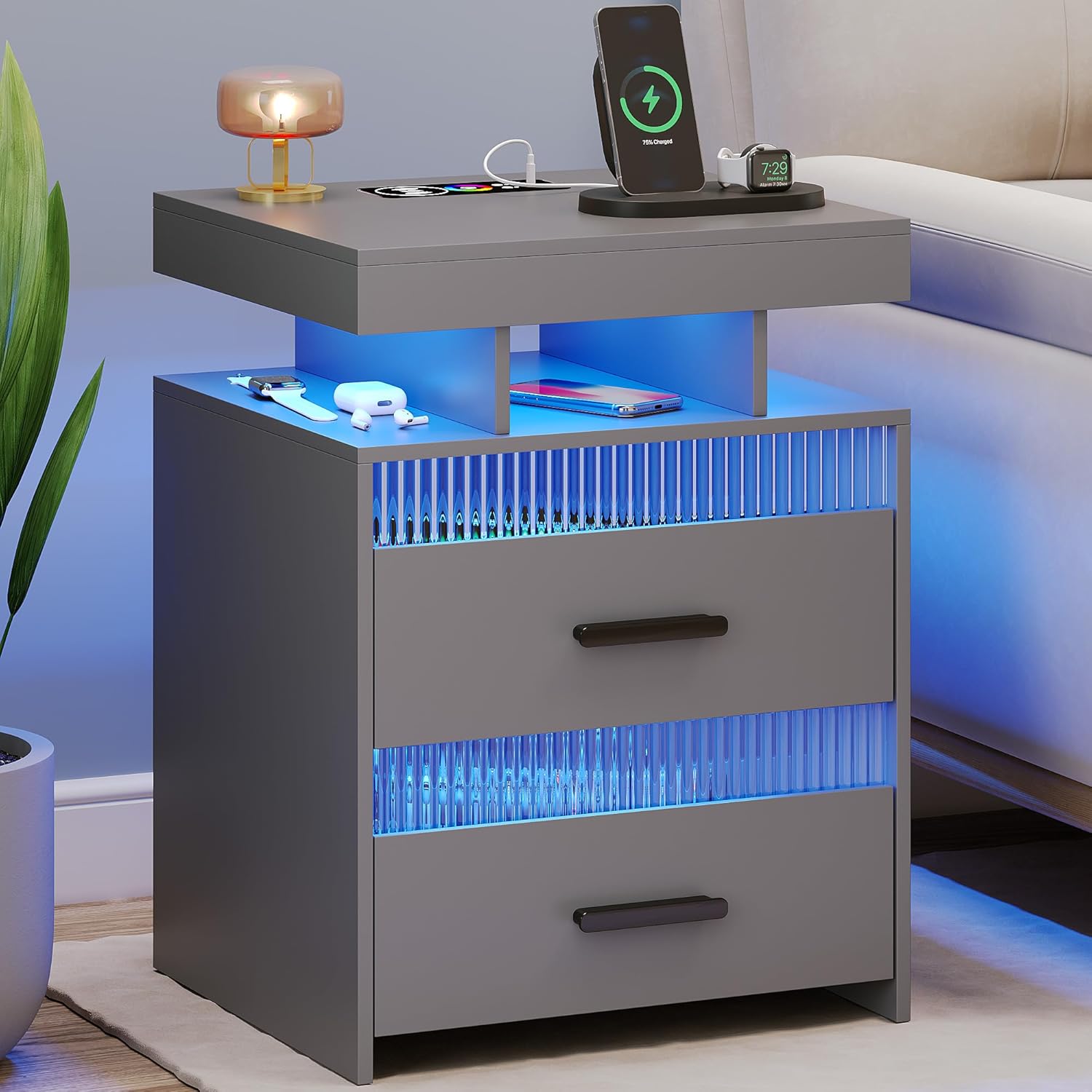
Figi 1: Devan view of the Dystler Grey Nightstand, showcasing its blue LED lighting, wireless charging pad, and overall design.
Karakteristik kle:
- Entegre ekleraj dirije: Offers 20 dimmable colors with adjustable brightness (10% to 100%).
- Human Sensor Design: Automatically illuminates when a person is detected within 2-3 meters, and turns off when they leave.
- Estasyon chaje san fil: Conveniently charge compatible devices by placing them on the designated area.
- USB chaje pò: Includes both standard USB and Type-C ports for wired charging.
- Ampdepo: Features two large storage drawers with quality sliding tracks and three open shelves.
- Konstriksyon dirab: Made from wood and engineered wood with stylish metal handles and transparent acrylic accents.
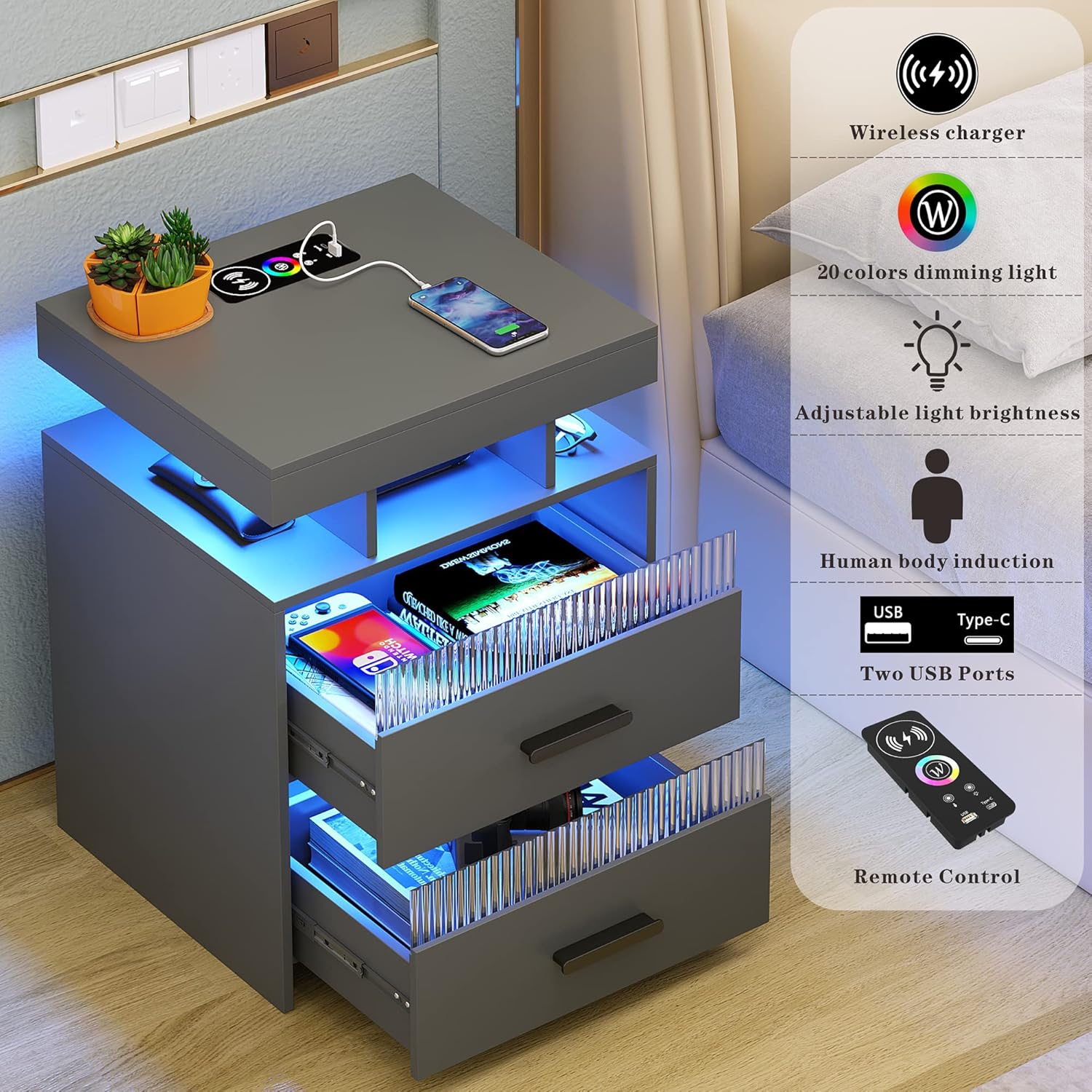
Figi 2: Plis paseview of the nightstand's smart features, including charging capabilities and lighting controls.

Figure 3: The nightstand demonstrating its wireless charging feature and the spacious storage drawers.
Enstalasyon ak Asanble
Your Dystler Nightstand requires assembly. Please ensure all parts are present before beginning. Refer to the included assembly guide for detailed, step-by-step instructions. It is recommended to assemble the unit on a soft, clean surface to prevent scratches.
Anvan ou kòmanse:
- Depake tout konpozan yo epi verifye yo avèk lis pyès ki nan gid asanblaj ou a.
- Gather necessary tools (typically a screwdriver and possibly a hammer, as specified in the assembly guide).
- Asire w ou gen ase espas pou asanblaj la.
Koneksyon elektrik:
Once assembled, connect the power cord from the nightstand to a standard electrical outlet. Ensure the outlet is easily accessible.
Enstriksyon Operasyon
Kontwòl ekleraj LED:
The LED lights can be controlled manually or automatically via the human sensor.
- Manyèl kontwòl: Use the included remote control to adjust light color (20 options) and brightness (10%-100%). Refer to the remote control diagram in your assembly guide for button functions.
- Mòd Capteur Imèn: The nightstand features a 360° human body induction sensor. When activated, the lights will automatically turn on when a person is detected within 2-3 meters and turn off when no presence is detected. This feature can be enabled/disabled via the remote control.

Figure 4: Demonstration of the human body induction feature, where the light activates upon detecting presence.

Figure 5: Visual representation of the 20 dimmable color options and brightness adjustment for the LED lighting.
Estasyon chaje:
- Chaje san fil: Place your Qi-compatible device directly on the designated wireless charging pad on the top surface of the nightstand. Ensure the device is centered for optimal charging. A charging indicator (if present on your device) will confirm charging status.
- Chaje USB: Connect your device's charging cable to either the standard USB port or the Type-C USB port located on the top surface.
Antretyen
Regular maintenance will help prolong the life and appearance of your Dystler Nightstand.
- Netwayaj: Siye sifas yo ak yon mou, damp cloth. Avoid abrasive cleaners or harsh chemicals that may damage the finish or electronic components.
- Époussetage: Regularly dust the nightstand, especially around the LED lights and charging ports, to prevent dust buildup.
- Antretyen tiwa: The drawers feature quality sliding tracks. If drawers become stiff, apply a small amount of silicone lubricant to the tracks.
- Eleman elektrik: Ensure all cables are free from kinks or damage. Do not attempt to clean electrical ports with liquids.
Depanaj
| Pwoblèm | Kòz posib | Solisyon |
|---|---|---|
| Limyè ki ap dirije pa limen. |
|
|
| Chaje san fil la pa fonksyone. |
|
|
| Pò USB yo pa chaje. |
|
|
| Human sensor not responding. |
|
|
Espesifikasyon
| Karakteristik | Detay |
|---|---|
| Mak | Dystler |
| Nimewo Modèl | 001 |
| Koulè | Gri |
| Dimansyon pwodwi (L x W x H) | 39.98 x 44.98 x 59.99 cm (15.74 x 17.71 x 23.62 pous) |
| Pwa atik | 15.42 kg (34 liv) |
| Materyèl | Wood, Engineered Wood (Top) |
| Karakteristik espesyal | Charging Station (Wireless, USB, Type-C), Storage, LED Light (20 colors, dimmable), Human Sensor |
| Maximum Weight Recommendation (Table Top) | 20 liv (9.07 kg) |
| Kantite tiwa | 2 |
| Kantite etajè | 3 |

Figure 6: Detailed dimensions of the Dystler Nightstand.

Figi 7: Detaye view of key components and features of the nightstand.
Garanti ak sipò
Dystler is committed to providing high-quality products. For warranty information, product support, or to report any issues, please contact Dystler customer service through the retailer where the product was purchased or visit the official Dystler websit la. Tanpri kenbe nimewo modèl ou a (001) ak dat acha a pare lè w ap kontakte sipò a.
For the most up-to-date contact information, please refer to the packaging or the retailer's websit.


