1. Entwodiksyon
Mèsi pou acha aasing the Audizio Adria DAB/Internet Radio Tuner. This device offers a versatile audio experience, combining Internet Radio, DAB+, FM radio, Bluetooth connectivity, and Spotify Connect. This manual provides essential information for setting up, operating, and maintaining your tuner to ensure optimal performance and longevity.
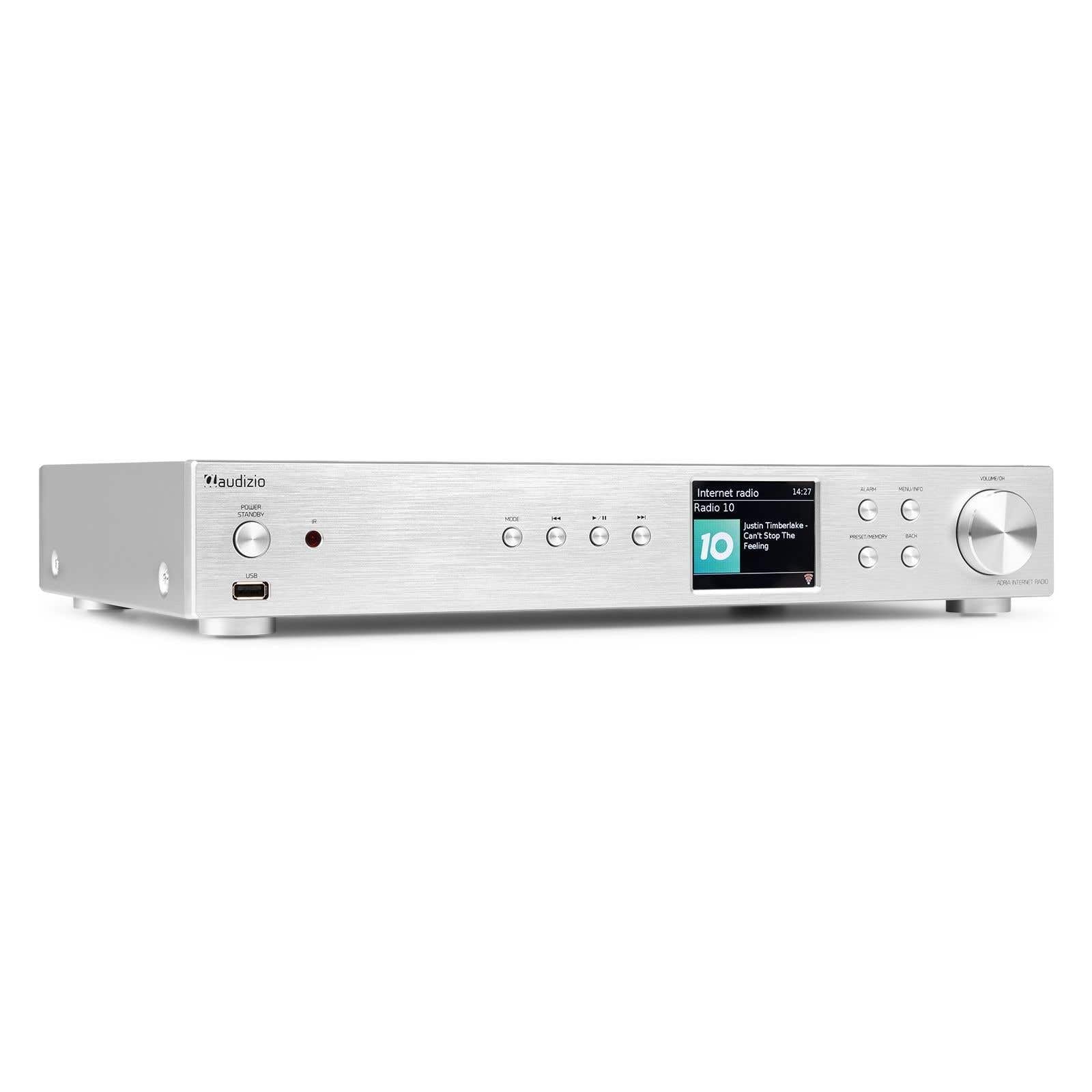
Figure 1.1: Audizio Adria DAB/Internet Radio Tuner with included remote control and antenna.
2. Enfòmasyon sou Sekirite
- Li tout enstriksyon ak anpil atansyon anvan ou itilize.
- Keep the unit away from water, moisture, and direct heat sources.
- Pa bloke ouvèti vantilasyon yo. Asire w ke gen ase espas ozalantou aparèy la pou yon bon sikilasyon lè.
- Sèvi ak adaptè pouvwa a sèlman ak inite a.
- Pa eseye repare oswa modifye aparèy la tèt ou. Konfye tout antretyen bay pèsonèl kalifye.
- Dispose of batteries responsibly. The remote control uses 1 AAA battery.
3. Pake kontni
Verifye ke tout atik yo prezan nan pakè a:
- Audizio Adria DAB/Internet Radio Tuner Unit
- Remote Control (requires 1x AAA battery, included)
- Adaptè pouvwa
- DAB/FM antèn
- Manyèl itilizatè
4. Pwodwi souview
4.1 Panèl devan

Figure 4.1: Front Panel Controls and Display
- Power / Standby Button: Limen oswa etenn inite a.
- Pò USB: Pou lekti medya soti nan aparèy depo USB.
- bouton mòd: Switches between Internet Radio, DAB+, FM, Bluetooth, and Media Player modes.
- Bouton jwe/poz: Kontwole lekti nan mòd medya yo.
- Bouton Sote/Sintonize: Navigates tracks or tunes radio frequencies.
- Ekspozisyon ekran: Shows station information, menus, and settings.
- Bouton Alam: Aksè nan paramèt alam yo.
- Menu/Info Button: Enters menu or displays information.
- Preset/Memory Button: Saves or recalls favorite stations.
- Bouton tounen: Retounen nan meni oswa ekran anvan an.
- Volume / OK Knob: Rotates to adjust volume or navigate menus; presses to confirm selections.
4.2 Panèl dèyè

Figi 4.2: Koneksyon Panèl Dèyè a
- Antre pouvwa: Konekte adaptè pouvwa a la a.
- Antre Antèn DAB/FM: Connect the included DAB/FM antenna.
- Sòti Analòg (RCA): Konekte ak yon amplifier or active speakers using RCA cables.
- Antre AUX: Konekte sous odyo ekstèn yo atravè yon jack 3.5mm.
- Port chaj USB: Pou chaje aparèy ekstèn yo.
- Sòti dijital optik: Konekte ak yon amplifier or DAC with an optical cable.
- Sòti dijital koaksyal: Konekte ak yon amplifier or DAC with a coaxial cable.
5. Enstalasyon
5.1 Connecting Power and Antennas
- Connect the supplied DAB/FM antenna to the DAB/FM Antenna Input on the rear panel. Extend the antenna fully for best reception.
- Connect the power adapter to the Power Input on the rear panel, then plug it into a wall outlet.
5.2 Konekte ak yon Sistèm Odyo
Choose one of the following methods to connect the Adria tuner to your amporatè aktif oswa moun k ap pale:
- Sòti Analòg (RCA): Use RCA cables to connect the Analog Output ports on the Adria to the corresponding input on your amplifier.
- Sòti dijital optik: Use an optical cable to connect the Optical Digital Output to an optical input on your amplifier oswa DAC.
- Sòti dijital koaksyal: Use a coaxial cable to connect the Coaxial Digital Output to a coaxial input on your amplifier oswa DAC.
5.3 Premye Limen ak Konfigirasyon Rezo a
- Press the Power/Standby button on the front panel or remote control to turn on the unit.
- The display will show the Audizio logo, then guide you through the initial setup wizard.
- Follow the on-screen prompts to select your language, time zone, and connect to your Wi-Fi network. You will need your Wi-Fi network name (SSID) and password.
- Use the Volume/OK knob to navigate menus and confirm selections.
6. Operasyon Enstriksyon
6.1 Seleksyon mòd
Peze a Mode button on the front panel or remote control to cycle through available modes: Internet Radio, DAB+, FM, Bluetooth, and Media Player (USB).
6.2 Radyo Entènèt
Figure 6.1: Internet Radio Mode Display
- Chwazi mòd Radyo Entènèt la.
- Use the Volume/OK knob to browse stations by location, genre, or search.
- Press the Volume/OK knob to select a station.
- Pou sove yon estasyon kòm yon predefinisyon, peze epi kenbe bouton an Prereglaj/Memwa button. Select a preset number and confirm.
- Pou raple yon predefinisyon, peze bouton an Prereglaj/Memwa button briefly, then select the desired preset.
6.3 DAB/DAB + Radyo

Figure 6.2: DAB Radio Mode Display
- Select DAB+ mode. The unit will automatically scan for available stations on first use.
- Use the Volume/OK knob to scroll through the list of stations.
- Press the Volume/OK knob to select a station.
- Saving and recalling presets works the same as for Internet Radio.
6.4 FM Radyo
In FM mode, use the Skip/Tune buttons to manually tune frequencies or press and hold to auto-scan. Saving and recalling presets works the same as for Internet Radio.
6.5 Koneksyon Bluetooth
- Select Bluetooth mode. The unit will enter pairing mode automatically.
- On your smartphone, tablet, or other Bluetooth device, search for available devices and select "Audizio Adria".
- Once paired, you can stream audio from your device to the tuner.
6.6 Spotify Connect
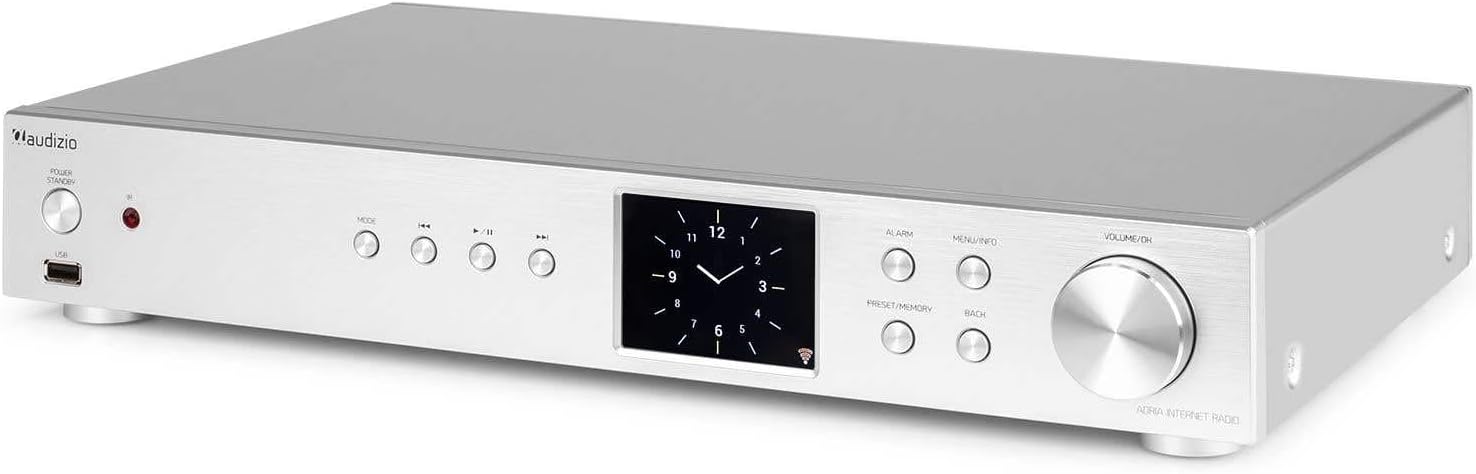
Figure 6.3: Spotify Connect Display
To use Spotify Connect:
- Ensure your Audizio Adria is connected to the same Wi-Fi network as your smartphone or tablet running the Spotify app.
- Open the Spotify app on your device and play a song.
- Tap the "Devices Available" icon (usually a speaker or computer icon) at the bottom of the screen.
- Select "Audizio Adria" from the list of available devices. The music will now play through your tuner.
6.7 Fonksyon alam

Figure 6.4: Clock and Alarm Display
Peze a Alam button to access and set up alarms. You can configure alarm time, source (buzzer, Internet Radio, DAB, FM), and frequency (daily, once, weekends, weekdays).
7. Kontwòl Remote

Figi 7.1: Aranjman kontwòl remote la
The remote control provides full functionality for operating your Audizio Adria tuner. Ensure the included AAA battery is correctly inserted. Point the remote control directly at the unit's front panel for optimal response.
- SNOOZE: Temporarily silences the alarm.
- Bouton pouvwa: Limen oswa etenn inite a.
- Bouton Navigasyon (Anlè, Anba, Agoch, Adwat, OK): Pou navigasyon ak seleksyon meni.
- VOL +/-: Ajiste volim.
- MOD: Chanje nan mòd antre yo.
- MENI: Aksè meni prensipal la.
- Tounen: Retounen nan ekran anvan an.
- ENFO: Displays detailed information about the current station or track.
- ESKANYE: Li kòmanse yon rechèch pou estasyon radyo.
- EQ: Aksè nan paramèt egalizatè yo.
- Klavye nimerik (0-9): For direct input or selecting presets.
- PRESET: Saves or recalls favorite stations.
8. Antretyen
To ensure the longevity and optimal performance of your Audizio Adria tuner, follow these maintenance guidelines:
- Netwayaj: Sèvi ak yon twal mou epi sèk pou netwaye deyò aparèy la. Pa sèvi ak pwodui netwayaj abrazif, sir, oswa solvan.
- Vantilasyon: Ensure that the ventilation openings are not blocked. Dust accumulation can be removed with a soft brush or vacuum cleaner.
- Depo: Si w ap sere aparèy la pou yon bon bout tan, dekonekte l nan ekipman pou kouran an epi sere l nan yon kote ki fre epi sèk.
- Swen antèn: Handle the antenna gently to avoid damage.
NAN. Depanaj
If you encounter issues with your Audizio Adria tuner, consult the following table for common problems and solutions:
| Pwoblèm | Kòz posib | Solisyon |
|---|---|---|
| Pa gen pouvwa | Kab kouran an pa konekte; priz kouran an gen pwoblèm. | Tcheke koneksyon kab kouran an; eseye yon lòt priz kouran. |
| Pa gen son | Volim twò ba; yo chwazi yon move sòti odyo; ampAnplifikatè/oratè yo etenn oswa dekonekte. | Increase volume; check audio cable connections; ensure amplifier/speakers are on and set to correct input. |
| Pa ka konekte ak Wi-Fi | Modpas ki pa kòrèk; siyal fèb; pwoblèm routeur. | Verify Wi-Fi password; move unit closer to router; restart router. |
| Resepsyon DAB/FM ki pòv | Antèn pa pwolonje; zòn siyal la fèb. | Fully extend and reposition the antenna; consider an external antenna if available. |
| Aparèy Bluetooth echwe | Device not in pairing mode; device too far; interference. | Ensure both devices are in pairing mode; move devices closer; turn off other Bluetooth devices. |
10. Espesifikasyon
| Karakteristik | Spesifikasyon |
|---|---|
| Mak | Odisyon |
| Nimewo Modèl | Adria |
| Koulè | Ajan |
| Gwosè ekspozisyon | 3.2 pous |
| Koneksyon Teknoloji | Optical, Coaxial, Bluetooth |
| Karakteristik espesyal | Bluetooth, Internet Radio, DAB+, FM, Spotify Connect |
| Gwoup Radyo Sipòte yo | DAB, DAB+, FM |
| Sous pouvwa | Fil elektrik |
| Dimansyon pwodwi (L x W x H) | 43.4 x 7.5 x 31 cm |
| Pwa atik | 3.2 Kilogram |
| Konpozan ki enkli | Kontwòl Remote |
| Aparèy konpatib | Telefòn entelijan, Tablèt, Laptop |
11. Enfòmasyon sou Garanti
This product is covered by a manufacturer's warranty. Please refer to the warranty card included in your package or contact your retailer for specific terms and conditions. Keep your proof of purchase for warranty claims.
12. Sipò
For technical assistance, troubleshooting beyond this manual, or service inquiries, please contact Audizio customer support or your local dealer. Contact information can typically be found on the manufacturer's websit la oswa dokiman acha ou a.


