Entwodiksyon
Thank you for choosing the Singer C7225 Computerized Sewing Machine. This manual provides comprehensive instructions for the safe operation, setup, maintenance, and troubleshooting of your new sewing machine. Please read this manual thoroughly before using the machine to ensure proper function and to maximize your sewing experience.
The Singer C7225 is designed for a wide range of sewing projects, offering advanced features and ease of use for both beginners and experienced sewers.
Enstriksyon Sekirite Enpòtan
Lè w ap itilize yon aparèy elektrik, yo ta dwe toujou swiv prekosyon sekirite debaz yo, tankou sa ki annapre yo:
- Always unplug the sewing machine from the electrical outlet immediately after using and before cleaning, removing covers, or making any user servicing adjustments.
- Pa pèmèt yo itilize kòm yon jwèt. Li nesesè anpil atansyon lè yo itilize aparèy sa a oswa tou pre timoun yo.
- Sèvi ak aparèy sa a sèlman pou itilizasyon li gen entansyon dekri nan manyèl sa a. Sèvi ak sèlman atachman manifakti a rekòmande jan sa a nan manyèl sa a.
- Pa janm opere aparèy sa a si li gen yon kòd oswa ploge domaje, si li pa fonksyone byen, si li te tonbe oswa domaje, oswa si li tonbe nan dlo.
- Never operate the appliance with any air openings blocked. Keep ventilation openings of the sewing machine and foot controller free from the accumulation of lint, dust, and loose cloth.
- Kenbe dwèt lwen tout pati k ap deplase. Swen espesyal yo mande alantou zegwi a machin a koud.
- Toujou sèvi ak plak zegwi apwopriye a. Plak la mal ka lakòz zegwi a kraze.
- Pa rale oswa pouse twal la pandan w ap koud. Sa ka devye zegwi a, sa ka fè l kase.
- Etenn machin koud la lè w ap fè nenpòt ajisteman nan zòn zegwi a, tankou pase anfile zegwi a, chanje zegwi a, pase anfile bobin nan, oswa chanje pye près la.
- Always unplug the sewing machine from the electrical outlet when removing the covers, lubricating, or when making any other user servicing adjustments mentioned in the instruction manual.
Pwodwi souview
Familiarize yourself with the main components of your Singer C7225 sewing machine.

Figi 1: Devan view of the Singer C7225 sewing machine, showcasing the main body, needle area, and control panel with various stitch patterns.

Figi 2: Side view of the Singer C7225, highlighting the handwheel and the power input port at the rear.
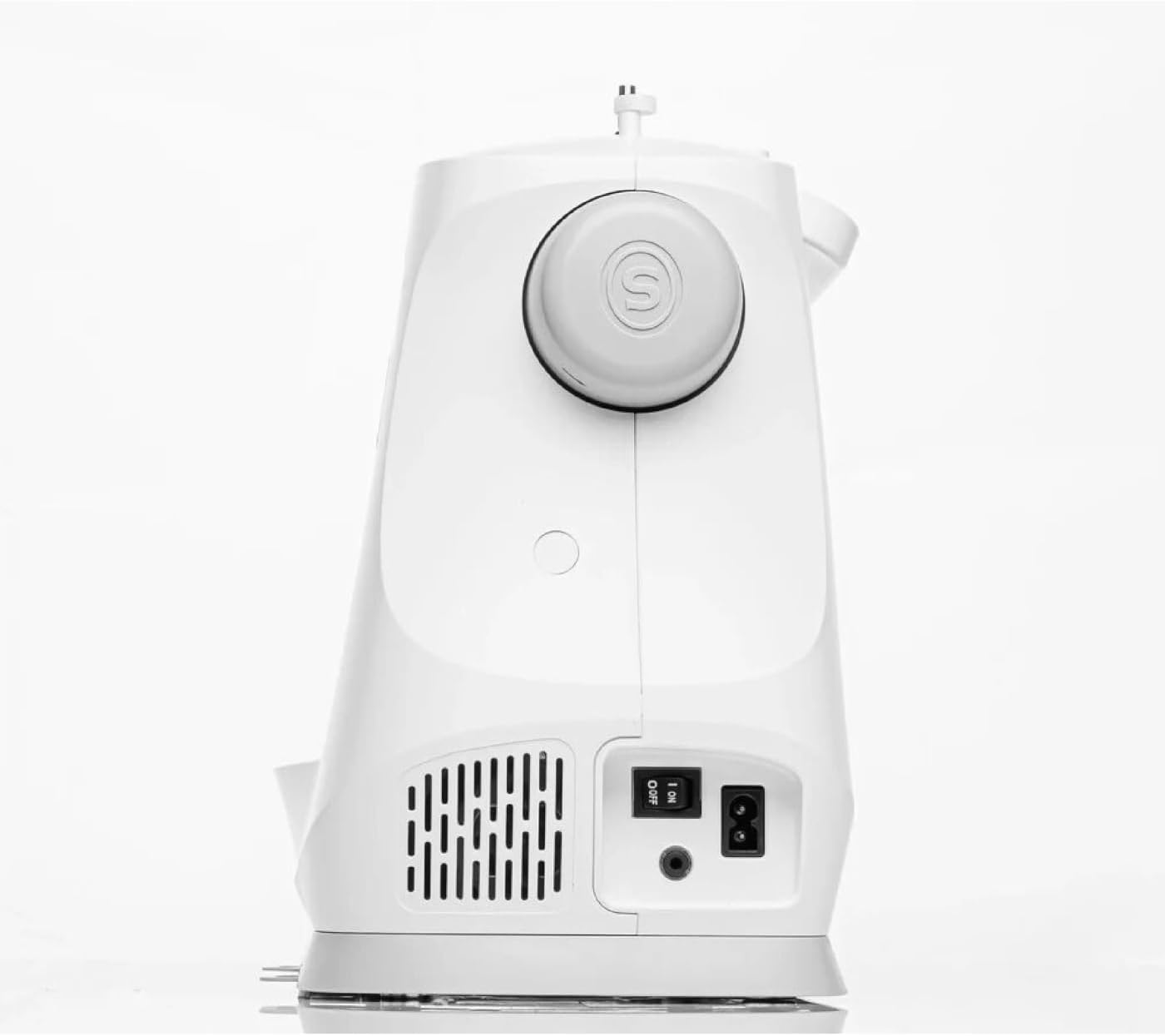
Figi 3: Dèyè view of the Singer C7225, showing the power switch and power cord connection point.

Figi 4: Devan pre view of the Singer C7225, focusing on the needle, presser foot, and bobbin area.
Konpozan kle:
- Plak zegwi: The metal plate under the needle, often with seam allowance guides.
- Pye pou peze: Holds the fabric firmly against the feed dogs while sewing.
- Feed Dogs: Teeth-like mechanisms that move the fabric under the presser foot.
- Bobbin Case: Holds the bobbin, which supplies the lower thread.
- Gid fil: Paths for the upper thread to follow from the spool to the needle.
- Dial tansyon: Ajiste tansyon fil anwo a.
- Volan: Leve epi desann zegwi a manyèlman.
- Panèl kontwòl/ekran LCD: For selecting stitches, adjusting settings, and viewenfòmasyon.
- Pò Kontwolè Pye: Where the foot pedal is connected.
- Pouvwa switch: Limen ak etenn machin nan.
Enstalasyon
1. Debalaj ak plasman:
- Carefully remove the machine from its packaging. Retain all packaging materials for future storage or transport.
- Place the machine on a stable, flat surface with adequate lighting. Ensure there is enough space around the machine for fabric handling.
2. Koneksyon pouvwa:
- Locate the power cord and foot controller.
- Insert the foot controller plug into the foot controller port on the machine.
- Insert the power cord plug into the power input port on the machine.
- Branche lòt bout kòd kouran an nan yon priz elektrik ki apwopriye.
- Turn on the power switch, usually located on the side or rear of the machine. The LCD screen should illuminate.
3. Winding the Bobbin:
- Mete yon bobin fil sou pin bobin la.
- Follow the bobbin winding path indicated by the arrows on the machine.
- Place an empty bobbin onto the bobbin winding spindle.
- Push the bobbin winding spindle to the right.
- Press the foot controller or start/stop button to begin winding. Stop when the bobbin is full.
- Koupe fil la epi retire bobin la.
4. Inserting the Bobbin:
- Louvri plak kouvèti bobin lan.
- Mete bobin ki vlope a nan bwat bobin lan, epi asire w ke fil la dewoule nan bon direksyon an (anjeneral nan sans kontrè ak zegwi mont lan).
- Gide fil la nan resò tansyon an epi nan fant gid fil la.
- Ranplase plak kouvèti bobin la.
5. Threading the Upper Thread:
- Leve pye pye a.
- Mete yon bobin fil sou pin bobin la.
- Follow the numbered threading path indicated on the machine, ensuring the thread passes through all guides and the take-up lever.
- Thread the needle from front to back using the automatic needle threader if available, or manually.
- Pull about 6 inches of thread through the needle eye.
6. Bringing Up the Bobbin Thread:
- Hold the upper thread lightly.
- Turn the handwheel towards you to lower the needle into the needle plate and then raise it again.
- The upper thread will catch the bobbin thread, forming a loop. Pull the loop up through the needle plate opening.
- Rale fil anwo a ak fil bobin nan anba pye près la epi nan direksyon dèyè machin nan.
Enstriksyon Operasyon
1. Selecting a Stitch:
- Limen machin nan.
- Use the stitch selection buttons or dial on the control panel to choose your desired stitch. The selected stitch will be displayed on the LCD screen.
- The C7225 offers a wide variety of utility, decorative, and alphanumeric stitches.
2. Adjusting Stitch Settings:
- Longè Stitch: Adjust the length of each stitch using the dedicated buttons. Longer stitches are for basting or thicker fabrics, shorter for fine details.
- Lajè Stitch: Adjust the width for zigzag or decorative stitches.
- Tansyon fil: The machine typically sets tension automatically, but manual adjustment may be needed for specific fabrics or threads. Refer to the tension dial.
- Pozisyon zegwi a: Adjust the needle position (left, center, right) for certain techniques like topstitching or zipper insertion.
3. Starting to Sew:
- Place the fabric under the presser foot, aligning the edge with a seam guide on the needle plate.
- Bese pye presser la.
- Press the foot controller gently or press the Start/Stop button to begin sewing.
- Guide the fabric gently with both hands, but do not push or pull it. Allow the feed dogs to move the fabric.
- To reverse stitch (for securing seams), press and hold the reverse button.
- When finished, press the Start/Stop button or release the foot controller.
- Leve zegwi a nan pozisyon ki pi wo a avèk volan an.
- Leve pye presser la.
- Pull the fabric towards the back and cut the threads using the thread cutter on the machine.
4. Changing Needles and Presser Feet:
- Changing Needles: Always turn off the machine before changing the needle. Loosen the needle clamp screw, remove the old needle, insert the new needle with the flat side facing the back, and tighten the screw. Use the correct needle type and size for your fabric.
- Changing Presser Feet: Raise the presser foot lifter. Press the release button on the back of the presser foot holder to detach the current foot. Position the new presser foot under the holder and lower the presser foot lifter until it snaps into place.
Antretyen
Antretyen regilye asire lonjevite ak pèfòmans optimal machin koud ou a.
1. Netwayaj:
- Apre chak itilizasyon: Use a small brush to remove lint and dust from the bobbin area and under the needle plate.
- Regilyèman: Remove the needle plate and clean the feed dogs and bobbin case area thoroughly. A small vacuum attachment can be helpful.
- Eksteryè: Siye eksteryè machin nan ak yon mou, damp twal. Pa sèvi ak pwodwi chimik piman bouk.
2. Oiling:
The Singer C7225 is largely self-lubricating. Refer to the full instruction manual for specific oiling points if necessary. Over-oiling can cause issues.
3. Depo:
When not in use, cover the machine with a dust cover to protect it from dust and debris. Store in a dry, cool place.
Depanaj
Seksyon sa a adrese pwoblèm komen ou ka rankontre. Pou pwoblèm ki pi konplèks, kontakte sèvis kliyan.
| Pwoblèm | Kòz posib | Solisyon |
|---|---|---|
| Machine not sewing / No power | Power cord not plugged in; Power switch off; Foot controller not connected. | Check all power connections; Turn on power switch; Ensure foot controller is securely plugged in. |
| Sote pwen | Incorrect needle; Needle bent or dull; Machine not threaded correctly; Incorrect tension. | Change needle to correct type/size; Replace bent/dull needle; Re-thread machine completely; Adjust tension. |
| Kase fil | Improper threading; Thread tension too tight; Needle bent or wrong size; Poor quality thread. | Re-thread machine; Loosen upper tension; Replace needle; Use good quality thread. |
| Twal la pa ap antre | Presser foot not lowered; Feed dogs lowered; Lint under needle plate. | Lower presser foot; Raise feed dogs; Clean under needle plate. |
| Bobbin thread tangling | Bobbin incorrectly inserted; Bobbin case dirty; Upper tension too loose. | Re-insert bobbin correctly; Clean bobbin case; Tighten upper tension. |
Espesifikasyon
| Karakteristik | Detay |
|---|---|
| Mak | Chantè |
| Modèl | C7225 |
| Koulè | Blan |
| Materyèl | Fè |
| Pwa | 8 Kilogram |
| Dimansyon (L x W x H) | 20P x 28l x 22H centimeters (Approximate) |
| Sous pouvwa | Kab elektrik |
| Kalite | Odinatè machin koud |
| Disponibilite pyès rezèv (Inyon Ewopeyen) | 2 Ane |
Garanti ak sipò
Enfòmasyon sou garanti: The Singer C7225 sewing machine comes with a manufacturer's warranty. Please refer to the warranty card included with your purchase for specific terms, conditions, and duration. Keep your proof of purchase for warranty claims.
Sipò Kliyan: For technical assistance, spare parts, or service, please contact Singer customer support. Contact details can typically be found on the Singer official websit la oubyen sou kat garanti a.
Resous sou entènèt: Visit the official Singer website for additional resources, including FAQs, video tutorials, and updated information about your C7225 model.


