Entwodiksyon
Thank you for choosing the Faber 34L Double Glazed 1600W Oven Toaster Grill (OTG). This manual provides essential information for the safe and efficient operation, maintenance, and troubleshooting of your appliance. Please read these instructions thoroughly before first use and retain them for future reference.

Imaj: Devan view of the Faber 34L OTG with its control panel and glass door.
Enstriksyon Sekirite Enpòtan
Toujou swiv prekosyon sekirite debaz yo lè w ap itilize aparèy elektrik pou diminye risk dife, chòk elektrik, ak blesi pou moun.
- Read all instructions before operating the OTG.
- Do not touch hot surfaces. Use handles or knobs. Always use oven mitts or gloves when handling hot materials.
- To protect against electrical shock, do not immerse cord, plug, or any non-removable parts of the oven in water or other liquid.
- Sipèvizyon sere se nesesè lè nenpòt aparèy itilize pa oswa toupre timoun yo.
- Debranche soti nan priz lè yo pa itilize ak anvan netwaye. Kite refwadi anvan ou mete oswa retire pati yo.
- Pa opere nenpòt aparèy ki gen yon kòd oswa ploge ki domaje, oswa apre aparèy la fonksyone mal oswa li te domaje nan nenpòt fason.
- Pa sèvi ak deyò.
- Pa kite kòd pandye sou kwen tab oswa kontwa, oswa manyen sifas cho.
- Pa mete sou oswa toupre yon gaz cho oswa recho elektrik, oswa nan yon fou chofe.
- Ou dwe pran anpil prekosyon lè w ap deplase yon aparèy ki gen lwil cho oswa lòt likid cho.
- Pa sèvi ak aparèy la pou lòt itilizasyon ki gen entansyon.
- Manje ki twò gwo oswa istansil metal pa dwe mete nan yon fou griye paske yo ka kreye yon dife oswa risk pou chòk elektrik.
- Yon dife ka rive si fou a kouvri oswa manyen materyèl ki ka pran dife, ki gen ladan rido, rido, mi, ak lòt bagay, lè nan fonksyone.
- Pa mete okenn nan materyèl sa yo nan fou a: papye, katon, plastik, oswa materyèl menm jan an.
- Pa sere okenn materyèl, apa de akseswa rekòmande pa manifakti a, nan fou sa a lè w pa ap itilize li.
- Always wear protective, heat-resistant gloves when inserting or removing items from the hot oven.
- Asire bon vantilasyon alantou aparèy la pandan operasyon an.
Pwodwi konpozan ak Pwodwi pou Telefòn
Your Faber OTG comes with the following components and accessories:
- Faber 34L OTG Unit
- Enamelled Bake Tray
- Grill Plato
- Plato ti kal pen
- Pizza Plate (9-inch)
- Rotisserie Rod
- Rotisserie Handle (Tongs)
- SS Wire Tray
- Silicon Heat Guard Glove

Image: All included accessories for the Faber 34L OTG, laid out for clear identification.
Enstalasyon ak Premye Itilizasyon
Debake
- Carefully remove the OTG and all accessories from the packaging.
- Remove any protective films, stickers, or packaging materials from the appliance and accessories.
- Enspekte aparèy la pou wè si li gen nenpòt domaj. Pa sèvi avè l si li domaje.
Plasman
- Place the OTG on a stable, flat, heat-resistant surface.
- Ensure there is adequate space (at least 10-15 cm) around all sides of the oven for proper ventilation. Do not place it directly against a wall or under cabinets.
- Keep the appliance away from flammable materials like curtains, tablecloths, and paper.
Netwayaj inisyal
- Anvan premye itilizasyon an, siye anndan ak deyò fou a ak yon pwodui netwayaj.amp twal.
- Wash all accessories (bake tray, grill tray, rotisserie rod, etc.) in warm, soapy water, rinse thoroughly, and dry completely.
- Mete plato miyèt moso a nan pati anba fou a.
First Use Burn-in
It is recommended to run the oven empty for about 15 minutes on its highest temperature setting (250°C) with the Function Selector set to 'Top + Bottom Heating' to burn off any manufacturing residues. A slight odor or smoke may be present during this process; this is normal. Ensure the area is well-ventilated.
Enstriksyon Operasyon
The Faber OTG features intuitive controls for various cooking functions.

Imaj: Gwo plan view of the control knobs on the Faber 34L OTG, indicating their respective functions.
Kontwòl Panel Plis paseview
- Bouton fonksyon: Selects the cooking function (Off, Rotisserie, Convection, Rotisserie + Convection).
- Bouton Tanperati: Ajiste tanperati pou kwit manje a soti nan 100°C rive nan 250°C.
- Bouton Seleksyon: Chooses the heating mode (Defrost, Top Heating, Bottom Heating, Top + Bottom Heating).
- Bouton revèy: Sets the cooking time up to 60 minutes. Includes an auto-cutoff feature.
Cooking Functions and Modes
Your OTG supports 6 cooking functions and various heating modes:

Image: Visual representation of the various cooking modes available with the Faber 34L OTG, including baking, roasting, and grilling.
- Kwit: Ideal for cakes, cookies, and bread. Use Top + Bottom Heating with or without Convection.
- Griye: Perfect for meats and vegetables. Use Top + Bottom Heating, often with Convection.
- Griye: For browning and crisping. Use Top Heating.
- pen griye: For bread and similar items. Use Top Heating.
- Degivrage: Thaws frozen foods. Use the Defrost setting on the Selector Knob.
- Rechofaj: Warms up cooked food. Use Top + Bottom Heating at a lower temperature.
Fonksyon Rotisserie
The auto motorized rotisserie allows for even grilling of whole chickens or large cuts of meat.
- Skewer the food onto the rotisserie rod, securing it with the forks.
- Place the rotisserie rod into the designated slots inside the oven.
- Set the Function Knob to 'Rotisserie' or 'Rotisserie + Convection'.
- Adjust Temperature and Timer as required for your recipe.
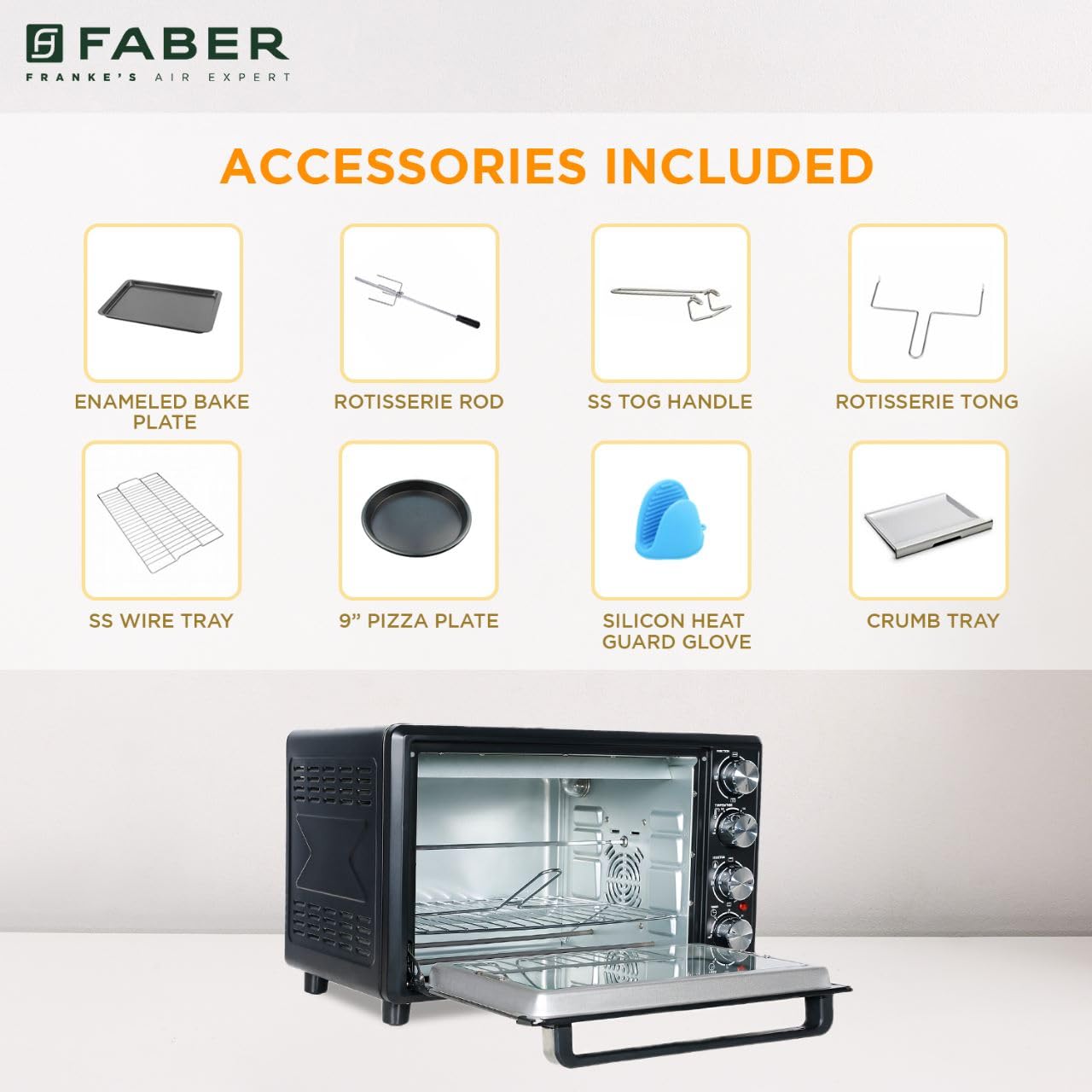
Image: The auto motorized rotisserie feature of the OTG, demonstrating two chickens being evenly grilled.
360° Convection Technology
The 360° Convection Technology ensures uniform cooking by circulating hot air throughout the oven chamber. This results in optimum browning, better crispiness, and higher nutrient retention.
- To activate convection, turn the Function Knob to 'Convection' or 'Rotisserie + Convection'.
- Convection cooking often requires slightly lower temperatures and shorter cooking times compared to conventional baking.

Image: Diagram illustrating the 360° convection technology, showing hot air circulating inside the oven for even cooking.
Timer with Auto Cut-off
The mechanical timer can be set for up to 60 minutes. Once the set time elapses, the oven will automatically switch off, indicated by a bell sound.
- Turn the Timer Knob clockwise to set the desired cooking duration.
- For shorter times (less than 10 minutes), turn the knob past 10 minutes and then back to the desired time for better accuracy.
Antretyen ak netwayaj
Regular cleaning and maintenance will ensure the longevity and optimal performance of your OTG.
Netwayaj jeneral
- Toujou debranche fou a nan priz kouran an epi kite l refwadi nèt anvan ou netwaye li.
- Siye sifas eksteryè yo ak yon mou, damp twal. Pa sèvi ak pwodui netwayaj abrazif oswa kousinen.
- Clean the interior walls, floor, and ceiling with a damp cloth and mild detergent. For stubborn stains, a non-abrasive oven cleaner designed for OTGs can be used, following the product instructions carefully.
- The double glazed glass door can be cleaned with a glass cleaner. The double glazing helps retain heat and prevents burns from touching the outer glass.
- Remove and empty the crumb tray regularly. Wash it in warm, soapy water, rinse, and dry thoroughly.
Netwayaj akseswar
- All removable accessories (bake tray, grill tray, wire rack, rotisserie rod, pizza plate, tongs, silicon glove) can be washed in warm, soapy water. Rinse well and dry completely before storing or reusing.
- Do not use metal scouring pads or abrasive cleaners on non-stick surfaces (if applicable) to avoid damage.

Imaj: Enteryè view of the Faber 34L OTG with the chamber light on, highlighting the clean racks and crumb tray, ready for use or after cleaning.
Depanaj
If you encounter any issues with your Faber OTG, refer to the following table for common problems and solutions.
| Pwoblèm | Kòz posib | Solisyon |
|---|---|---|
| Fou a pa limen. | Pa branche; kouran koupetage; priz ki gen pwoblèm; revèy la pa fikse. | Ensure the power cord is securely plugged into a working outlet. Check your household's circuit breaker. Set the timer knob to the desired cooking duration. |
| Manje a pa kwit egalman. | Incorrect temperature/mode; overcrowding; improper rack position; convection fan issue. | Verify temperature and heating mode settings. Avoid overcrowding the oven. Use the appropriate rack position. Ensure the convection fan is not obstructed (if using convection). |
| Twòp lafimen pandan operasyon. | Food spills; grease buildup; initial burn-off. | Clean the oven interior and accessories thoroughly. Ensure the crumb tray is clean. If it's the first use, some smoke is normal. |
| Rotisri a pa vire. | Rotisserie rod not properly seated; Function Knob not set to Rotisserie. | Ensure the rotisserie rod is correctly inserted into the drive socket and support. Set the Function Knob to 'Rotisserie' or 'Rotisserie + Convection'. |
| Timer pa travay. | Knob not turned past 10 minutes for short times; mechanical issue. | For times under 10 minutes, turn the knob past 10 and then back to the desired time. If the issue persists, contact customer support. |
If the problem persists after attempting these solutions, please contact Faber customer support.
Espesifikasyon
Detailed technical specifications for the Faber 34L OTG:
- Mak: Faber
- Nimewo Modèl: 131.0676.817
- Kapasite: 34 lit
- Wattage: 1600 Watts
- Koulè: Nwa
- Karakteristik espesyal: Temperature Control, 360° Convection, Rotisserie, Double Glazed Glass
- Kalite kontwòl: Bouton
- Style pòt: Dropdown Pòt
- Kalite Materyèl Pòt: Tanpered Glass
- Sous pouvwa: Fil elektrik
- Pwa atik: 10 kg 900 g
- Dimansyon atik (LxWxH): 51 x 39 x 32 santimèt
- Peyi orijin: Lachin

Image: Diagram showing the physical dimensions (Length, Width, Height) of the Faber 34L OTG.
Garanti ak sipò
Enfòmasyon sou Garanti
Your Faber OTG is covered by a manufacturer's warranty. Please refer to the warranty card included with your product for specific terms, conditions, and duration of the warranty. Keep your purchase receipt as proof of purchase for warranty claims.
Sipò pou Kliyan
For any service, repair, or technical assistance, please contact Faber customer support. You can find contact details on the warranty card or the official Faber websit.
- Sipò sou entènèt: Visit the official Faber websit pou FAQ ak resous sipò.
- Sant Sèvis: Locate authorized service centers in your region.


